SRS Registration - ita-social-projects/what-front GitHub Wiki
Registration feature
Process
- Every user who wants to enter the system, first of all, should register by entering First name, Last name, Email address, Password and Confirm password.
- The system checks if the user with such email already exists.
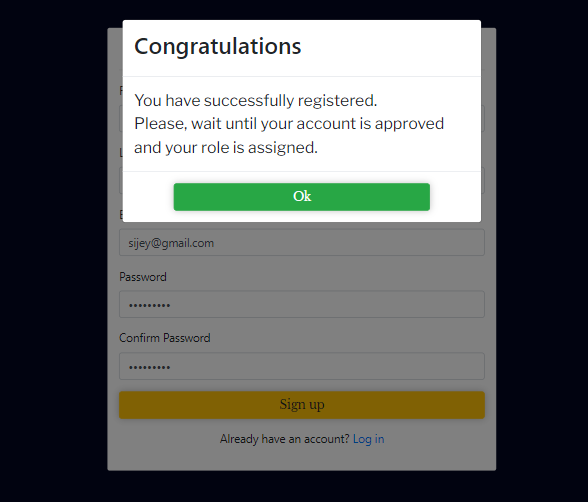
- If all fields are filled with valid data, the user will register and get pop-up message with information about his account. By clicking on 'Back' button, the system will redirect user to 'Login' page.
- Successful registered the user will be added to the list of unAssigned users (users without role).
Requirements
-
‘First Name’ and ‘Last Name’ fields are empty by default and accept 2-50 alphabetic symbols. It allowed Latin and Cyrillic letters in uppercase, in lowercase, including hyphen and apostrophe. Numbers are not allowed to enter.
-
'Email address' field is empty by default. Input only allowed in the email address format [email protected]. Acceptable email prefix formats: Latin letters (a-z), numbers, underscores, periods, and dashes. An underscore, period, or dash must be followed by one or more letters or numbers.
-
If 'Email address' field is filled email that already exists in the system and user click 'Sign up' button, 'Account already exists!' error message red color is displayed under 'Sign up' button.
-
'Password' field is empty by default and shall contain 8-16 symbols including at least one uppercase, one lowercase, one number, and one special symbol (!@#$%^&*()_+-=). All characters entered in the field must be converted to asterisks.
-
'Confirm password' field is empty by default. All characters entered in the field must be matched with the password above.
-
'Sign un' button is enabled.
-
'Log in' link is enabled and routes to the 'Login' page.
-
All the fields of the 'Registration' page contain corresponding placeholders.
-
If the user fills all the required fields with valid data, the pop-up message about successful registration is displayed.
-
If the required field (s) is left empty, this field (s) is highlighted with red border. 'This field is required' error message red color is displayed under each empty field of the 'Registration' page.
-
Loader is rendered while a request is sent to the server
Errors
| Description | Result |
|---|---|
| If the user fills in any field for the first time and this value is not valid | Error will be shown only after the onBlur event |
| If the user fills in this field, not the first time | Error will be shown every time when the value is not valid |
| 'First Name' field | |
| The 'First Name' field is empty and the user pressed 'Sign up' button or in case after the first event onBlur | The field is highlighted with red border and 'This field is required' error message red color is displayed under field. |
| The 'First Name' field contains one letter | 'Too short' error message red color is displayed under field. |
| The 'First Name' field contains more than fifty letters | 'Too long' error message red color is displayed under field. |
| The 'First Name' starts or finished with whitespace or hyphen | 'Invalid first name' error message red color is displayed under field. |
| The 'First Name' field contains at least one symbol or number | 'Invalid first name' error message red color is displayed under field. |
| 'Last Name' field | |
| The 'Last Name' field is empty and the user pressed 'Sign Up' button or in case after the first event onBlur | The field is highlighted with red border and 'This field is required' error message red color is displayed under field. |
| The 'Last Name' field contains one letter | 'Too short' error message red color is displayed under field. |
| The 'Last Name' field contains more than fifty letters | 'Too long' error message red color is displayed under field. |
| The 'Last Name' starts or finished with whitespace or hyphen | 'Invalid last name' error message red color is displayed under field. |
| The 'Last Name' field contains at least one symbol or number | 'Invalid last name' error message red color is displayed under field. |
| 'Email address' field | |
| The 'Email address' field is empty and the user pressed the 'Sign up' button or in case after the first event onBlur | The field is highlighted with red border and 'This field is required' error message red color is displayed under field. |
| The 'Email address' field is filled by non-existent email | 'Invalid email address' error message red color is displayed under field. |
| 'Password' field | |
| The 'Password' field is empty and the user pressed 'Sign up' button or in case after the first event onBlur | The field is highlighted with red border and 'This field is required' error message red color is displayed under field. |
| The 'Password' field length smaller than 8 characters | 'Password must contain at least 8 characters' error message red color is displayed under field. |
| The 'Password' field length larger than 16 characters | 'Password must contain 16 characters maximum' error message red color is displayed under field. |
| The 'Password' field is filled in with inappropriate data | 'Password must contain at least one uppercase, one lowercase, one number and one special symbol (!@#$%^&*()_+-=)' error message red color is displayed under field. |
| The 'Confirm password' field | |
| The 'Confirm password' field is empty and the user pressed 'Sign up' button or in case after the first event onBlur | The field is highlighted with red border and 'This field is required' error message red color is displayed under field. |
| The 'Confirm password' field is different than the password field above | 'You should confirm your password' error message red color is displayed under field. |
Back to content