SRS Edit Course details - ita-social-projects/what-front GitHub Wiki
Edit Course details
Process
- Admin and Secretary have access to this component from List of Courses
- This component allows us to edit details of a specific course, which we get by course ID
- After clicking on icon edit details - system will redirect the user to Courses Tabs component with active Tab (tab color: yellow) Edit course details and relevant content
- The system sends a request to the server and if the request is successfully loaded, it will show us Courses Tabs
- Not Found component will be rendered if course with current ID doesn't exist
Requirements
- User logged in as Admin or Secretary
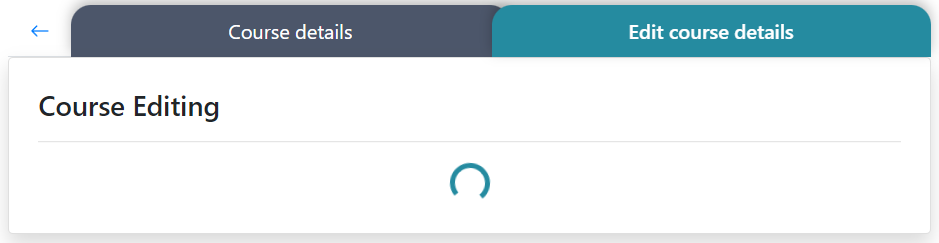
- Until the courses are downloaded, inside "Edit course details" component the loader is being shown
- The Button arrow, to the left of the first tab, is enabled and redirects us to the previous component (List of Courses)
- After clicking on "Save" button, we send a request and during this time this button is disabled. If request is successful, system will redirect the user to the List of Courses. "The course has been successfully edited" message is displayed. If request is failed the user keeps staying in this component and the button becomes enabled. Error message is displayed under "Course name" field. "Course name" field is highlighted in red.
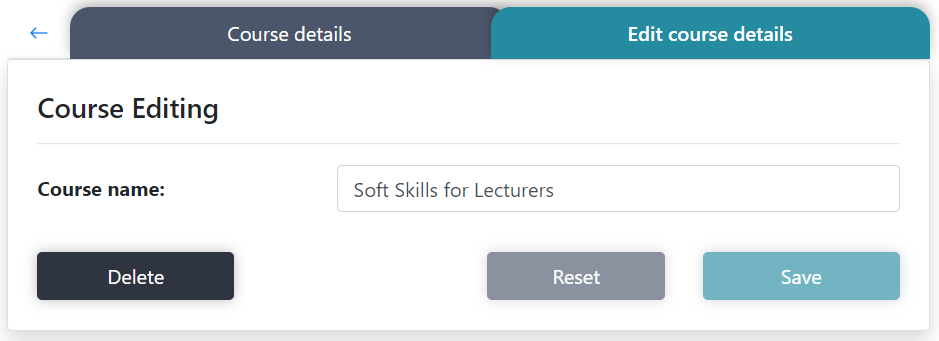
- "Reset button" is disabled by default. By clicking on "Reset" button we return all inputs values to their initial state
- Clicking on Сourse details Tab - this tab becomes active and shows us relevant content
- If user is on Course details Tab and refreshes page, system will make __Edit course details__Tab an active tab
- "Course name" field contains course name with current ID
- Course name field allows to change and update the course's name. This field requires to put in whether Latin letters, Cyrillic letters in upper or lower case, spaces between words, numbers or all of them
- "Clear" button is enabled by default. When user makes changes in any field "Clear" button becomes disabled
- "Save" button is disabled if no changes have been made to the form. When the user makes changes in any field and the form is valid, "Save" button becomes active
Errors
| Description | Result |
|---|---|
| Writing the wrong id in the URL address | redirect to Not Found component |
| The course name field | |
| The course name field is empty | This field is required |
| The course name field contains one letter | Too short |
| The course name field contains more than fifty letters | Too long |
Back to content