Header with dropdown menu - ita-social-projects/what-front GitHub Wiki
[WIP]
Header component
Process
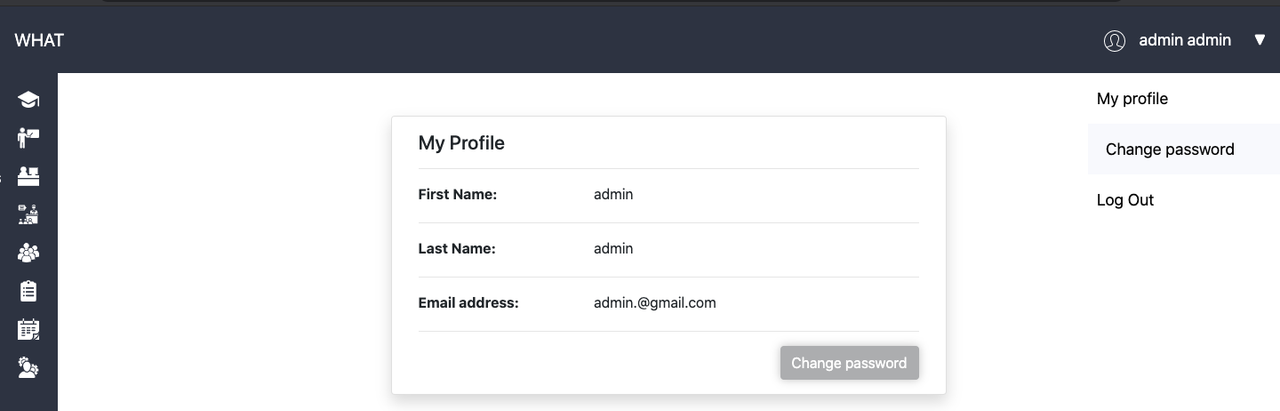
- any user has access to this component from any page. Header is always located on the top of any page.
- On the left side we can see the logo ('WHAT') of the project.
[EDIT]
[Must be specified whether logo is clickable and it can redirect the user to the main page]
- On the right side of header we can see:
- User logo . By clicking on this logo user will be redirected to 'My profile' page
- User name. By clicking on this name , the dropdown menu will be opened.
- Triangle icon. By clicking on this icon, user also can open dropdown menu.
[EDIT]
[Must be specified whether 'Triangle' icon changes its direction while the dropdown menu is opened]
- When dropdown menu is opened, we can see 3 menu-items:
- 'My profile' - by clicking here user will be redirected to 'My profile page'.
- 'Change password' - by clicking here user will be redirected to 'Change password page'
- 'Log Out' - after clicking there , user will be logged out and redirected to 'sign-in' page.
Requirements
- User must be logged in
Header

Header with menu
Errors
| Description | Result |
|---|---|
| null | null |
Back to content