LoRaWAN - hurricane-island/pen-bay-marine-data GitHub Wiki
Hardware Overview
This document collects information about deploying LoRaWAN-to-Cloud data pipelines using Raspberry Pi, Rak Wireless Transceivers, The Things Network, and InfluxDB. The Wiki is editable by project members, and version controlled with git.
Gateways
We have two methods to setup Raspberry Pi computers as a LoRaWAN gateways.
Either with an interface board connected directly to the computer, or through the USB interface using a Rak WisGate development base. Both versions use the same RAK2287 mPCIe LoRa concentrator. We also have an equivalent board made by Seeed. These are all based on the SX1302/3 chip from SemTech. 1302 and 1303 are form and pin compatible. The SX1302 over SPI configuration is known as Corecell.
The default Packet Forwarder program described in quick start materials should not be used. It is not meant for production use, and has security and performance issues. Instead we use the LoRaWAN Basic Station software. Basic Station does not rely on having a real-time clock like the packet forwarder, and is actively maintained by SemTech, Rak, and community members.
We use Raspberry Pi 3 and 3B+ because we have many available already. The 3B+ and later have pins for Power over Ethernet, which makes integrating them into networks easier. To support the receiver and demultiplexer hardware, the RPi must have power supply rated for >2.5A.
We run a containerized Basic Station version across all the devices using Balena Cloud. There is Rak article about doing just that you can find here. This built off the earlier work which is discussed in the TTN forums and was later published on the Balena blog.
Because the gateway software runs in a container, it is designed to accept most configuration as environment variables. These can either be baked into the Docker container, or managed across fleets and devices in Balena Cloud. Currently we are opting to do the later.
Devices
| Device | Semtech Board | GPS | Qty |
|---|---|---|---|
| Rak2287 SPI | SX1302 | Y | 2 |
| Rak2287 USB | SX1302 | N | 1 |
| Seed WM1302 SPI | SX1302 | Y | 1 |
Environment
| Variable | Fleet | Override |
|---|---|---|
DEVICE |
AUTO |
n/a |
GATEWAY_EUI_SOURCE |
wlan0 |
n/a |
HAS_GPS |
0 |
1 |
INTERFACE |
USB |
SPI |
MODEL |
SX1302 |
n/a |
TC_KEY |
n/a | device specific |
TLS_SNI |
true |
n/a |
TTS_REGION |
nam1 |
n/a |
TTS_TENANT |
neracoos |
n/a |
Transceivers & Relays
We chose transceiver boards that support LoRaWAN Relay. This is a relatively new standard, but as a LoRa Alliance member, Rak is an early adopter.
We are developing on the RAK3272-SIP board, and using a field tester to evaluate connectivity.
Other transceivers we have available include the Dragino LA66 and SX1262 based boards from Waveshare.
Rak also has SX1262 based boards, but we got a 126x-like embedded radio instead.
Devices
| Device | Board | LoRaWAN Version | Qty |
|---|---|---|---|
| Dragino | LA66 | 1.0.3 | 2 |
| Waveshare DIN | SX1262 USB | ? | 2 |
| Waveshare Pi | SX1262 GPIO | ? | 2 |
| Rak 3272-SiP | STM32WLE5JC UART2 | 1.0.4 | 4 |
Programming
The Rak breakout boards can be programmed with Rak Unified Interface RUI3. This is Arduino-like, and there is support for development through Arduino IDE or VSCode plugins. The devices can be managed with Rak's WisToolBox application. This is a cross platform app available on desktop and mobile, but the 3272 boards can only be flashed from desktop. That requires a USB to UART converter, so now I understand why integrated bluetooth is so popular.
The boards can also be controlled through a serial interface by sending RUI3 compatible AT commands on the UART2 interface. This is the preferred approach for the variety of systems we might wan to incorporate.
This is a descendent of the Hayes AT command modem developed in the 1980s.
We plan to use the boards and AT commands to send into the network from non-radio-enabled devices. This can be scripted from Python or C program running on a connected computer.
3272 Breakout Board
The product details for the 3272 transceiver are a good place to start. The quick start guide provides an example of connecting this exact device to TTN using the AT command.
These can broadcast to gateways, or can operate in P2P mode and talk to each other. Using the WisToolBox software, you can control the device, and update TTN connection info. Going through the OTAA process sets up the board as a standalone end device. There is a console interface to try AT commands without having to run a secondary controller.
While in Tx mode the embedded radio nominally uses 22mA, and only about 5mA in Rx mode. It operates on 3.3V supply.
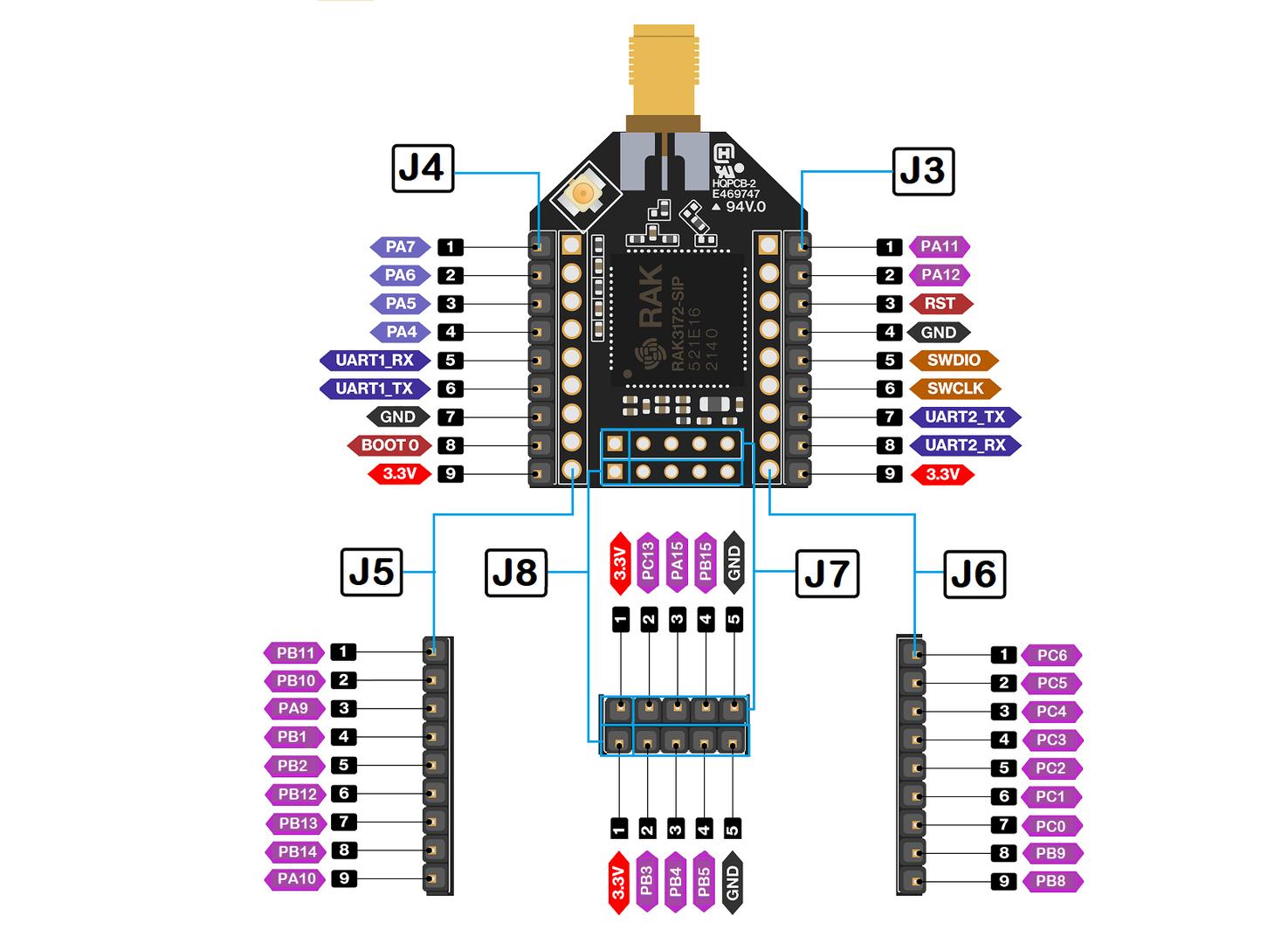
The pinout of the breakout board we are using is embedded below:
RTOS on Raspberry Pi
Basic Station does not require a real-time clock, but other pieces of software do, especially controllers for LoRa transceivers. There is some information out there about forcing RPi into acting like an RTOS. One method is dedicating a core to a system service like this display controller. There is some heated discussion on the topic of whether you should bother from RPi community and from The Things Network.
Software Integration
Cloud
Our gateways are registered under the NERACOOS tenant on a commercial instance of The Things Network. The Things Network API is described here.
Geolocation
With 3 or more gateways deployed, The Things Stack can triangulate geolocation to within about 50m. This is available as a LoRa Cloud integration.
Message Sinks
Messages can be stored for 30 days or longer on the cloud platform using a storage integration. TTN can also send message data to external services, either individual webhooks with HTTP, or MQTT to broadcast.
TTN has a built in MQTT broker (3.1.1, QoS=0), but InfluxDB no longer supports it directly. The preferred method of data collection is to subscribe an Influx instance to the TTN broker and collect data in the cloud. The message broker in this case is the "source of truth", allowing a Unified Name Space approach used sometimes in industrial applications.
The new recommended way to do this is described an integration guide on getting TTN connected to Influx here. This requires Influx's Telegraf agent. Since this MUST be hosted somewhere, the most direct approach is to write HTTP directly to the Influx API with a TTN Webhook integration.
HTTP Integration
The Influx v2 HTTP API will only accept messages formatted according to the Line Protocol.
Each line is a data point, and each data point corresponds to a single measurement. The line consists of the measurement, then optional tags, then required fields, then an optional timestamp.
Multiple points can be sent, for example:
curl \
  --request POST \
  --header "Authorization: Token $INFLUX_SERVICE_USER" \
  --header "Content-Encoding: identity" \
  --data-binary $'temperature value=0\nhumidity value=40' \
  "https://$INFLUX_HOST/api/v2/write?org=Research&bucket=weather&precision=ms"
However, the TTN webhook integration can only send JSON, and doesn't have the ability to transform the event data. Which leaves us with still needing to have some service in the middle connecting TTN and Influx, if using both as managed services.
References
Examples, Help, & Prior Art
- Paper on LoRaWAN soil sensor development
- Arribada animal tracking program
- Signal triangulation paper
- C# Rak node on RPi
- Hacking a Davis station
- Walker Reynolds IIOT online courses
- More Davis Console breakdowns
- ProData Weather wireless reception monitoring guide for Davis hardware
- Influx Slack
- list of MQTT software libraries
- MQTT collection with Influx
- OpenTelemetry with Influx
- Embedded Linux with Influx
- Influx University
- Influx Digital Twins