JavaScritp achieve online calculator tool toolfk online Programmer toolbox - hubs/toolfk GitHub Wiki
This paper to recommend [ToolFk] is a programmers often use a free online test kit, ToolFk feature is focused on everyday programmer development tools, without having to install any software, as long as the content execution affixed by a button, able to obtain the contents of the desired results.ToolFk also supports BarCode Barcode generated online , QueryList collector , PHP code is run online , PHP confusion, encryption, decryption , Python code is run online , JavaScript online operation ,YAML formatting tools , HTTP simulation query tool , HTML online toolbox , JavaScript online Toolbox ,CSS online toolbox , JSON online toolbox , unixtime timestamp conversion , Base64 / the URL of / native2ascii conversion , CSV conversion kit , XML online toolbox , the WebSocket online tools , Markdown online toolbox , Htaccess2nginx conversion, Hex conversion online , online encryption toolkit ,online pseudo-original tools , online APK decompile , online web screenshot tool , online random password generation , online generate two-dimensional code qrcode , online Crontab Expression Builder ,the online short URL Generator , Online calculator tool . And more than 20 daily programmer development tools, can be considered a very comprehensive website programmer's toolbox.
Site name: ToolFk
website links: https://www.toolfk.com/
Tools link: https://www.toolfk.com/tool-game-calculator
? Teaching Code
This tool [online scientific calculator tool]?-Dependent code base is https://github.com/seaswalker/js\_calculator
STEP 1
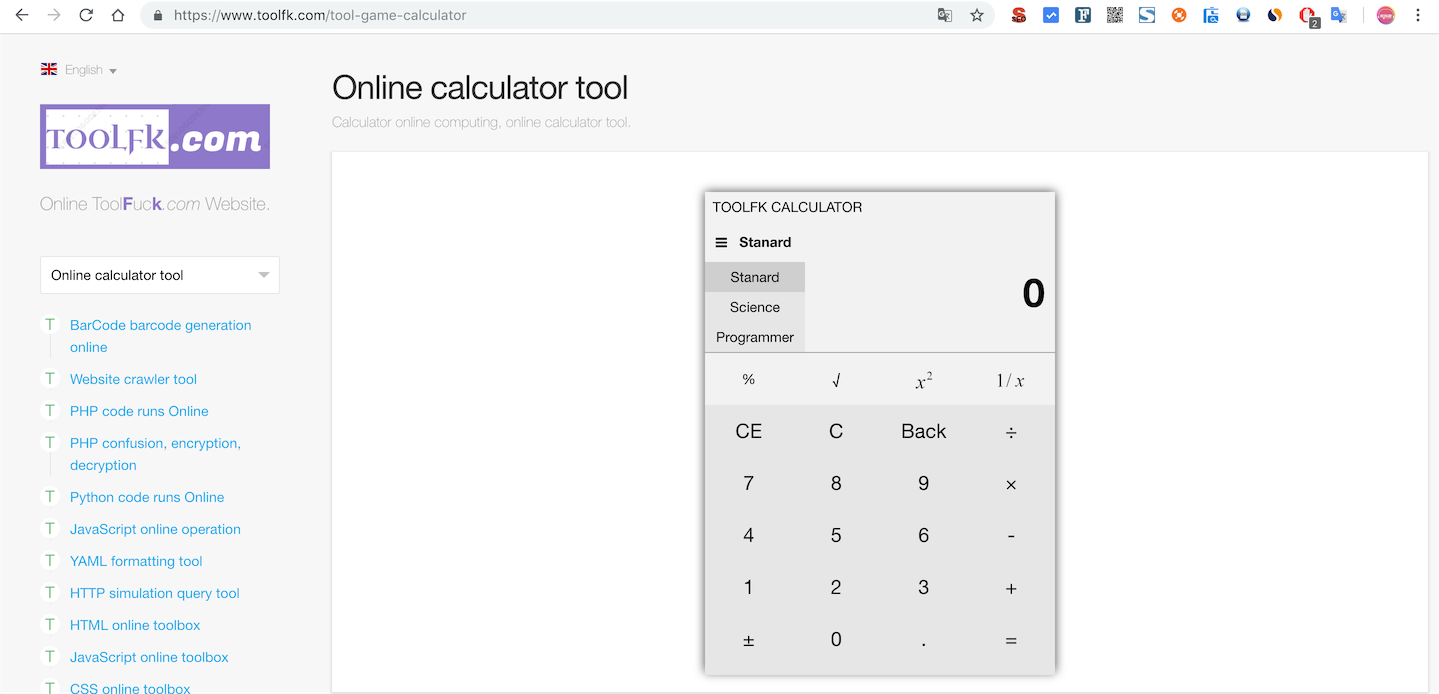
STEP 2
? THE CORE CODE IS AS FOLLOWS
// Global calculator objects
var Calculator = (function () {
var cal = {
Calculator keys // coding
keyCodes: {
0: '0',
1: '1',
twenty two',
3: '3',
4: '4',
5: '5',
6: '6',
7: '7',
8: '8',
9: '9',
10:, '.'
11: '±',
12: '=',
13: '+'
14: '-',
15: '*',
16: '/',
17: '%',
18: '√',
19: 'x2',
20: '1 / x',
twenty one: '(',
twenty two: ')',
23: 'yroot',
24: 'n!',
25: 'Exp',
26: '^',
27: 'sin',
28: 'cos',
29: 'tan',
30: 'powten',
31: 'log',
32: 'sinh',
33: 'cosh',
34: 'tanh',
35: 'π',
36: '↑',
37: 'CE',
38: 'C',
39: 'Back',
// The following is a programmer-type-specific keys
40: 'A',
41: 'B',
42: 'C',
43: 'D',
44: 'E',
45: 'F',
46: '&',
47: '|',
48: '~'
},
// for displaying map operators, such as * when calculation, while x showed better
operatorFacade: {
13: '+'
14: '-',
15: '×',
16: '÷',
17: '%',
23: 'yroot',
26: '^',
46: '&',
47: '|'
},
// current calculator type 1 -> Standard 2 -> science-based, 3 -> programmer type, the default standard
type: 1,
// calculator type prefix, used to obtain elements from the page
typePrefix: {
1: "std-",
2: "sci-",
3: "pro-"
},
// record whether each type of calculator event listener is already bound, key: typpe value, value: The default standard is true (Loaded)
hasInited: {
1: true,
2: false,
3: false
},
//constant
constants: {
// color when the mouse hovers
mouseHoverColor: "#CFCFCF",
// color calculator below the first row and the other row is different, this is the background color of the first row
firstMouseOutColor: "# F2F2F2",
// remaining background color of each row
mouseOutColor: "# E6E6E6"
},
cache: {
// display the contents of the input element
showInput: null,
// Previous calculations show area
preStep: null,
// display span four kinds of binary values, only valid in the programmer type
scaleSpans: null
},
/ **
* Get the content cache.showInput
* @Return String
* /
getShowInput: function () {
return cal.cache.showInput.innerHTML;
},
/ **
* Set showInput value
* @Param value
* /
setShowInput: function (value) {
cal.cache.showInput.innerHTML = value;
},
/ **
* Get the content cache.preStep
* @Return String
* /
getPreStep: function () {
return cal.cache.preStep.innerHTML;
},
setPreStep: function (value) {
cal.cache.preStep.innerHTML = value;
},
// operand stack
operandStack: [],
// operator stack
operatorStack: [],
// once the input is a binary operator, if it is a binary operator and enter again, this input is ignored
isPreInputBinaryOperator: false,
// if the last key pressed a meta-operation
isPreInputUnaryOperator: false,
// equal sign can not double-click
isPreInputEquals: false,
// If true, then the next digital input on the need to cover showInput, rather than appending
// the last calculated result (=)
preResult: 0,
// band currently used (only valid for programmers), the default decimal (DEC)
currentScale: 10,
isOverride: false,
// int check
intPattern:? / ^ - \ d + $ /,
// decimal check
floatPattern: /^-?\d+\.\d+$/,
// scientific notation check
scientificPattern: /^\d+\.\d+e(\+|-)\d+$/,
// check digit hexadecimal
hexPattern: / ^ [0-9A-F] + $ /,
// Auxiliary operator priority determination
operatorPriority: {
")": 0,
"|": 1,
"&": 2,
"+": 3,
"-": 3,
"*": 4,
"%": 4,
"/": 4,
"^": 5,
"Yroot": 5,
"(": 6
},
/ **
* Initialize the cache object (cal.cache)
* /
initCache: function () {
var prefix = cal.typePrefix [cal.type];
cal.cache.showInput = document.getElementById (prefix + "show-input");
cal.cache.preStep = document.getElementById (prefix + "pre-step");
if (cal.type == 3) {
cal.cache.scaleSpans = document.getElementById ( "pro-scales") getElementsByTagName ( "span").;
}
},
// various event listener function
listeners: {
/ **
* Hover color effect of the keys
* /
mouseHoverListener: function (e) {
var event = e || window.event;
event.currentTarget.style.backgroundColor = cal.constants.mouseHoverColor;
},
/ **
* Mouse removed from the row of symbols color effect
* /
firstMouseOutListener: function (e) {
var event = e || window.event;
event.currentTarget.style.backgroundColor = cal.constants.firstMouseOutColor;
},
/ **
* Mouse out from the lower row of numbers, symbols color effect
* /
mouseOutListener: function (e) {
var event = e || window.event;
event.currentTarget.style.backgroundColor = cal.constants.mouseOutColor;
},
/ **
* Press the button event listener
* /
keyPressListener: function (e) {
var event = e || window.event;
cal.handleKey (event.currentTarget.value);
},
/ **
* Show / Hide calculator type selection bar
* /
toggleTypeBarListener: function () {
var bar = document.getElementById (cal.typePrefix [cal.type] + "type-bar");
if (bar.style.display === "block") {
bar.style.display = "none";
} Else {
bar.style.display = "block";
}
},
/ **
* Switch the calculator type Listener
* /
switchTypeListener: function (e) {
var event = e || window.event;
cal.switchType (parseInt (event.currentTarget.value));
},
/ **
* Hexadecimal switch (special programmer)
* /
switchScaleListener: function (e) {
var event = e || window.event;
var scales = document.getElementById ( "pro-scales"). getElementsByTagName ( "div"),
Returns the child elements of the case // here you should use the currentTarget property because the target attribute element binding events are sub-elements
scale = parseInt (event.currentTarget.getAttribute ( "scale")),
oldScale = cal.currentScale;
// switch the selected style
for (var i = 0, l = scales.length; i <l; ++ i) {
scales [i] .removeAttribute ( "class");
}
event.currentTarget.setAttribute ( "class", "scale-active");
var lis, btns;
if (scale === 16) {
Row 6 // hexadecimal numbers on processing
cal.listeners._initFirstRowListeners ();
if (oldScale <10) {
cal.listeners._initSecondRowListeners ();
}
} Else if (scale === 10) {
if (oldScale === 16) {
. Lis = document.getElementById ( "pro-top-symbol") getElementsByTagName ( "li");
cal.disableButtons (lis, cal.listeners.firstMouseOutListener);
} Else {
cal.listeners._initSecondRowListeners ();
}
} Else if (scale === 8) {
if (oldScale> 8) {
. Lis = document.getElementById ( "pro-top-symbol") getElementsByTagName ( "li");
cal.disableButtons (lis, cal.listeners.firstMouseOutListener);
// Disable 8 and 9
btns = cal.getElementsByAttribute ( "li", "oct-disable", document.getElementById ( "pro-num-symbol"));
cal.disableButtons (btns, cal.listeners.mouseOutListener);
} Else {
cal.listeners._initSecondRowListeners ();
}
} Else if (scale === 2) {
if (oldScale === 16) {
. Lis = document.getElementById ( "pro-top-symbol") getElementsByTagName ( "li");
cal.disableButtons (lis, cal.listeners.firstMouseOutListener);
}
// Disable 2-9
btns = cal.getElementsByAttribute ( "li", "bin-disable", document.getElementById ( "pro-num-symbol"));
cal.disableButtons (btns, cal.listeners.mouseOutListener);
}
cal.currentScale = scale;
},
/ **
* Initialize first discharge event listener operator operator
* @Private
* /
_initFirstRowListeners: function () {
. Var lis = document.getElementById (cal.typePrefix [cal.type] + "top-symbol") getElementsByTagName ( "li");
cal.rebuildButtons (lis, cal.listeners.firstMouseOutListener);
},
/ **
* Initialize the second row operator event listeners
* @Private
* /
_initSecondRowListeners: function () {
var lis = document.getElementById (cal.typePrefix [cal.type] + "num-symbol") getElementsByTagName ( "li").;
cal.rebuildButtons (lis, cal.listeners.mouseOutListener);
if (cal.type === 3) {
// programmer type decimal point is disabled
cal.disableButtons ([document.getElementById ( "pro-point")], cal.listeners.mouseOutListener);
}
}
},
// Initialize event listener
initListeners: function () {
var prefix = cal.typePrefix [cal.type];
// set the row operator event listener, if a programmer type, because the default is 10 decimal, and hexadecimal numbers on the row, there is no need to set an event listener
if (cal.type <3) {
cal.listeners._initFirstRowListeners ();
}
// set below a column of figures, four arithmetic event listeners
cal.listeners._initSecondRowListeners ();
// Show / Hide sidebar calculator type selection
cal.addEvent (document.getElementById (prefix + "show-bar"), "click", cal.listeners.toggleTypeBarListener);
// switch the type of event is bound to the sidebar li
var bar = document.getElementById (prefix + "type-bar");
lis = bar.getElementsByTagName ( "li");
var li;
for (var i = 0, l = lis.length; i <l; ++ i) {
li = lis [i];
// Non-current type is only necessary to bind events
if (li.className! == "active") {
cal.addEvent (li, "click", cal.listeners.switchTypeListener);
}
}
// Load programmer type-specific
if (cal.type === 3) {
var scales = document.getElementById ( "pro-scales") getElementsByTagName ( "div"), scale.;
for (i = 0, l = scales.length; i <l; ++ i) {
scale = scales [i];
cal.addEvent (scale, "click", cal.listeners.switchScaleListener);
}
}
},
/ **
* Corresponding button-down event
* @Param value value value keys (i.e. its the keyCode)
* /
handleKey: function (value) {
console.log (value);
var keyCode = parseInt (value);
// If it is a numeric or decimal point, displayed directly
if (keyCode <11 || (keyCode> 39 && keyCode <46)) {
cal.showInput (cal.keyCodes [keyCode]);
if (cal.type === 3) {
// If a programmer type, you need to synchronize the display in hexadecimal value 4
cal.showScales (cal.getShowInput ());
}
} Else {
switch (keyCode) {
// sign
case 11:
cal.unaryOperate (function (oldValue) {
oldValue + = "";
if (oldValue === "0") {
return [oldValue];
}
if (oldValue.charAt (0) === '-') {
return [oldValue.substring (1)];
} Else {
return [ "-" + oldValue];
}
});
break;
// open the root
case 18:
cal.unaryOperate (function (si) {
return [Math.sqrt (si), "sqrt"];
});
break;
//square
case 19:
cal.unaryOperate (function (si) {
return [Math.pow (si, 2), "sqr"];
});
break;
// take reciprocal
case 20:
cal.unaryOperate (function (si) {
return [si === 0 ZERO_ERR: 1 / si, "1 /"?];
});
break;
//factorial
case 24:
cal.unaryOperate (function (si) {
if (si <0) {
si = (0 - si);
}
if (cal.isFloat (si + "")) {
si = Math.floor (si);
}
return [cal.fact (si), "fact"];
});
break;
// Exp into scientific notation
case 25:
cal.unaryOperate (function (si) {
return [si.toExponential (7)];
});
break;
// sin
case 27:
cal.unaryOperate (function (si) {
return [Math.sin (si), "sin"];
});
break;
// cos
case 28:
cal.unaryOperate (function (si) {
return [Math.cos (si), "cos"];
});
break;
// tan
case 29:
cal.unaryOperate (function (si) {
return [Math.tan (si), "tan"];
});
break;
x power // 10
case 30:
cal.unaryOperate (function (si) {
return [Math.pow (10, si), "powten"];
});
break;
// log
case 31:
cal.unaryOperate (function (si) {
// js Math.log is the number e, the Windows Calculator is the number 10, where reference Windows
return [Math.log10 (si), "log"];
});
break;
// sinh (hyperbolic sine function)
case 32:
cal.unaryOperate (function (si) {
return [Math.sinh (si), "sinh"];
});
break;
// cosh (hyperbolic cosine function)
case 33:
cal.unaryOperate (function (si) {
return [Math.cosh (si), "cosh"];
});
break;
// tanh (hyperbolic cotangent function)
case 34:
cal.unaryOperate (function (si) {
return [Math.tanh (si), "tanh"];
});
break;
// π
case 35:
cal.unaryOperate (function (si) {
return [Math.PI];
});
& Nb
This link: http://www.hihubs.com/article/385