Inpatient Final Bill Versions - hmislk/hmis GitHub Wiki
Inpatient — Final Bill Versions (Numbering, Retire, Email)
Page: Admission Profile → Billing panel → Manage Final Bills
XHTML: /inward/inward_final_bill_list.xhtml (versions list), /inward/inward_final_bill_approve.xhtml (read-only approval review), /inward/inward_reprint_bill_final.xhtml (view/print + Sent Emails history), /inward/inward_final_bill_email.xhtml (email review page)
Controller: InwardSearch (approve, retire, email), BhtSummeryController (create new version, numbering, credit company allocation)
Privileges: InwardSettleFinalBill (view page), InwardFinalBillApprove, InwardFinalBillCreateVersion, InwardFinalBillSetConfirmed, InwardFinalBillRetire, InwardFinalBillEmail
Why Multiple Versions Exist
A discharged admission's final bill isn't always right the first time — a missed charge, a late professional fee, or a correction after the patient has already left. Instead of editing the settled bill in place, the system creates a new version of the final bill. Every version stays in the admission's history; exactly one is marked Confirmed at any time, and the Confirmed version is the one used for reporting and collections.
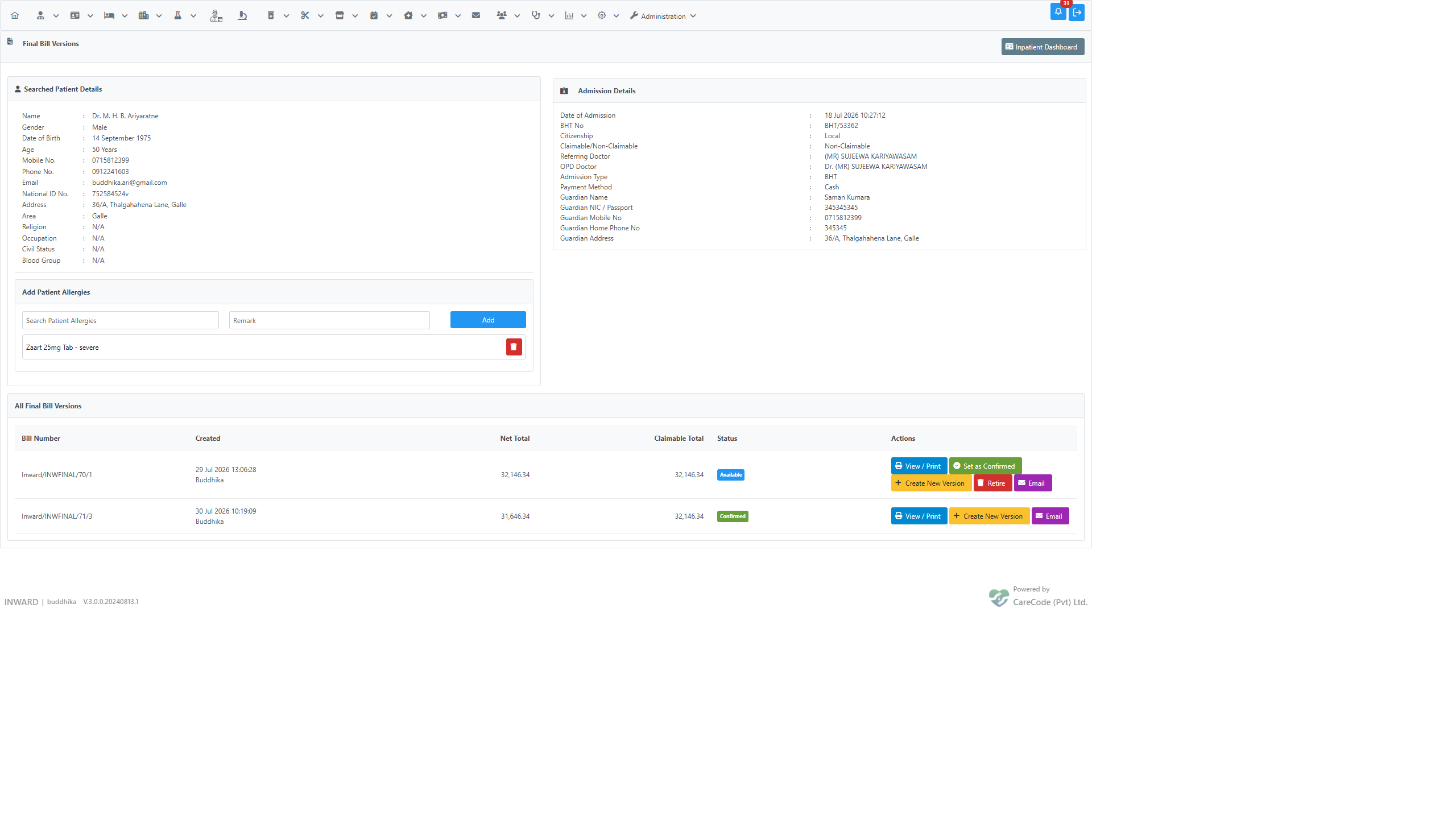
The Final Bill Versions List
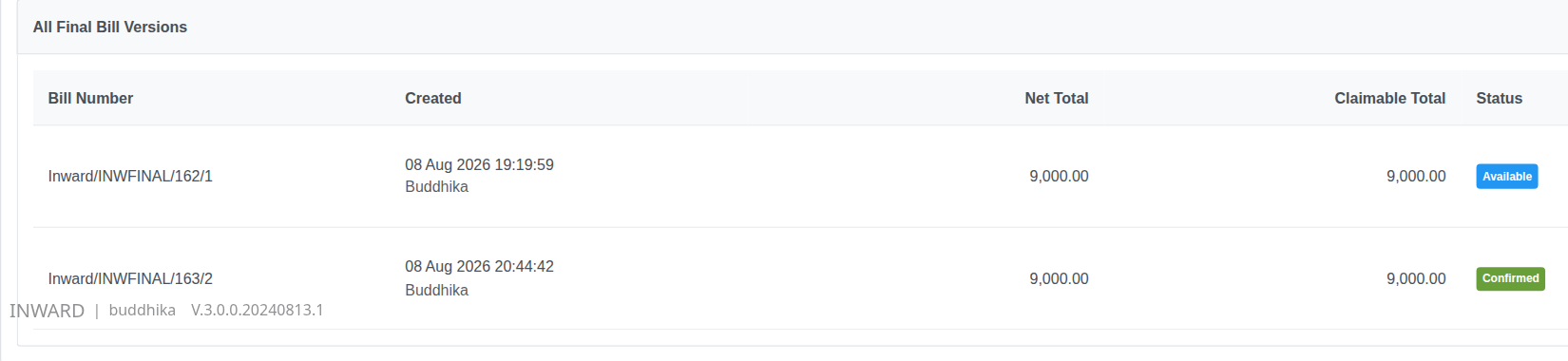
Open Manage Final Bills from the Admission Profile to see every version created for the admission:
| Column | Meaning |
|---|---|
| Bill Number | The version's bill number — see Numbering below |
| Created | When the version was created, and by whom |
| Net Total / Claimable Total | The version's totals |
| Status | Pending Approval, Available, Confirmed, or Cancelled |
| Actions | Approve (unapproved only), View / Print, Set as Confirmed, Create New Version, Retire, Email |
Approving a Version
Every new final bill version — whether it's the first one created for the admission or a later correction — starts out Pending Approval and locked down: it cannot be viewed, printed, emailed, or set as Confirmed until a privileged user approves it. This stops an in-progress or not-yet-reviewed bill from being handed to a patient or a credit company by mistake.
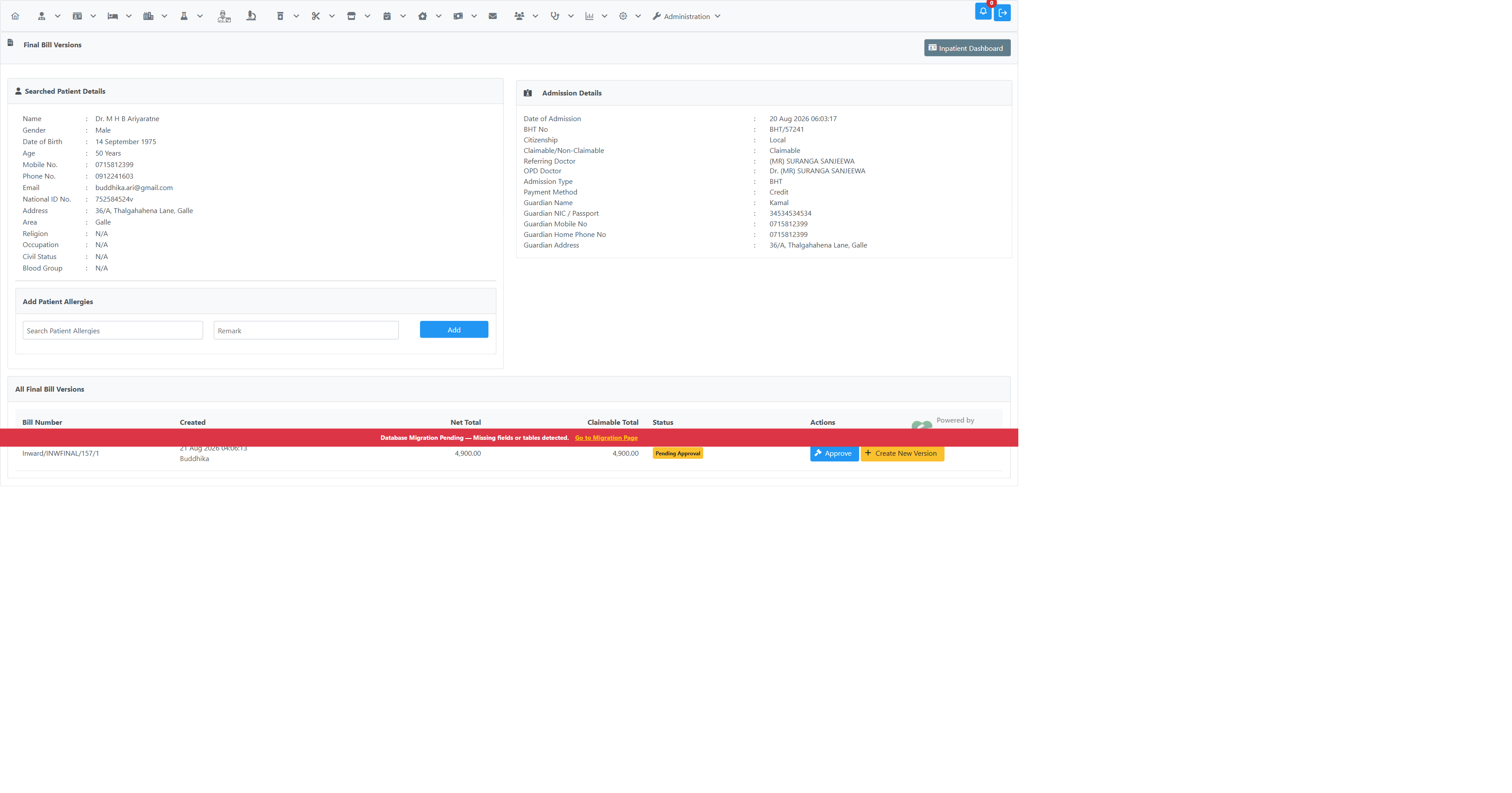
While a version is unapproved, its row shows only Approve (if the logged-in user holds the InwardFinalBillApprove privilege) and Create New Version — View / Print, Set as Confirmed, and Email are hidden until approval, and a user without the privilege sees no way to unlock the bill from this page.
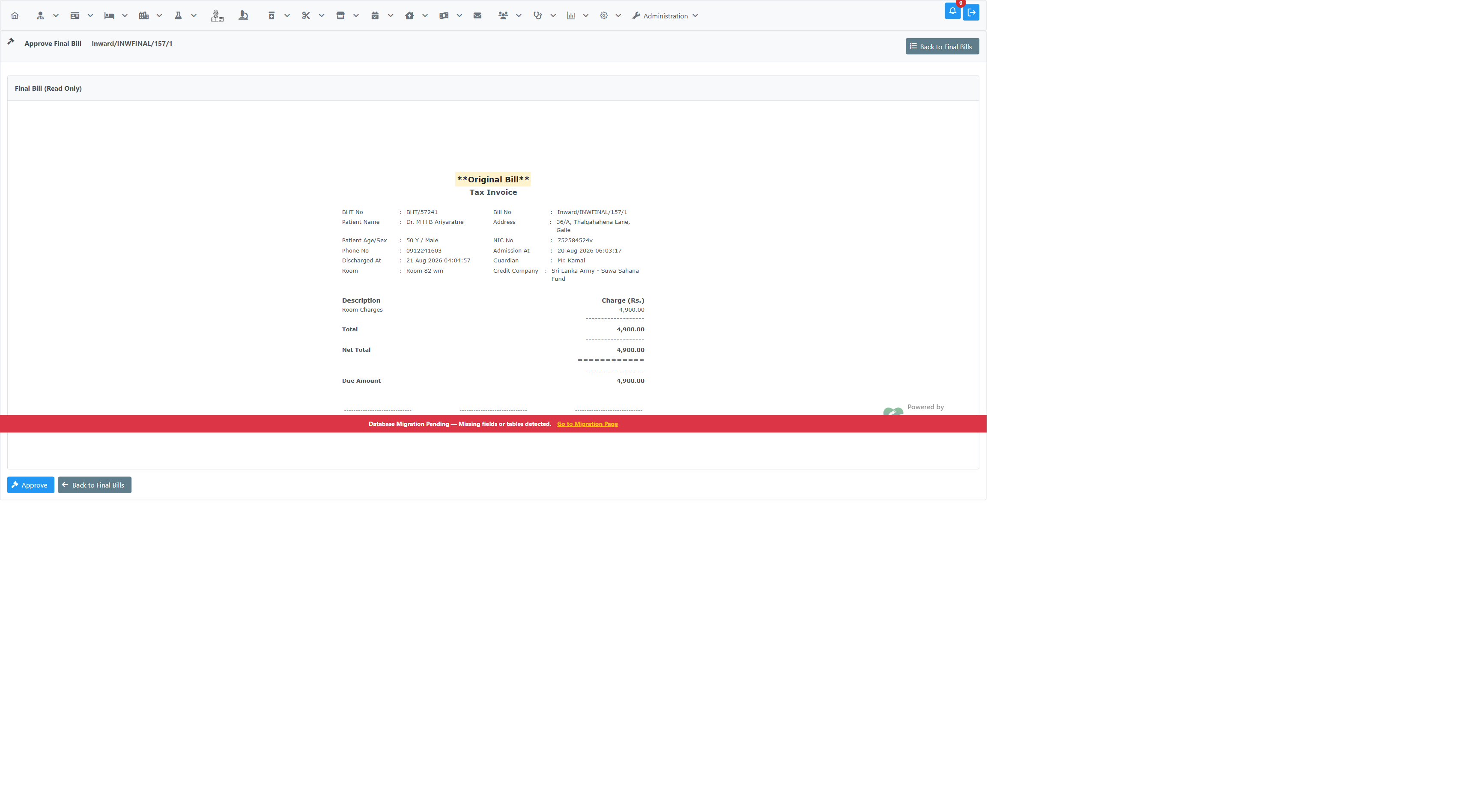
Click Approve to open a read-only review of the full bill — the same content that will later print, but with no print/email/edit controls:
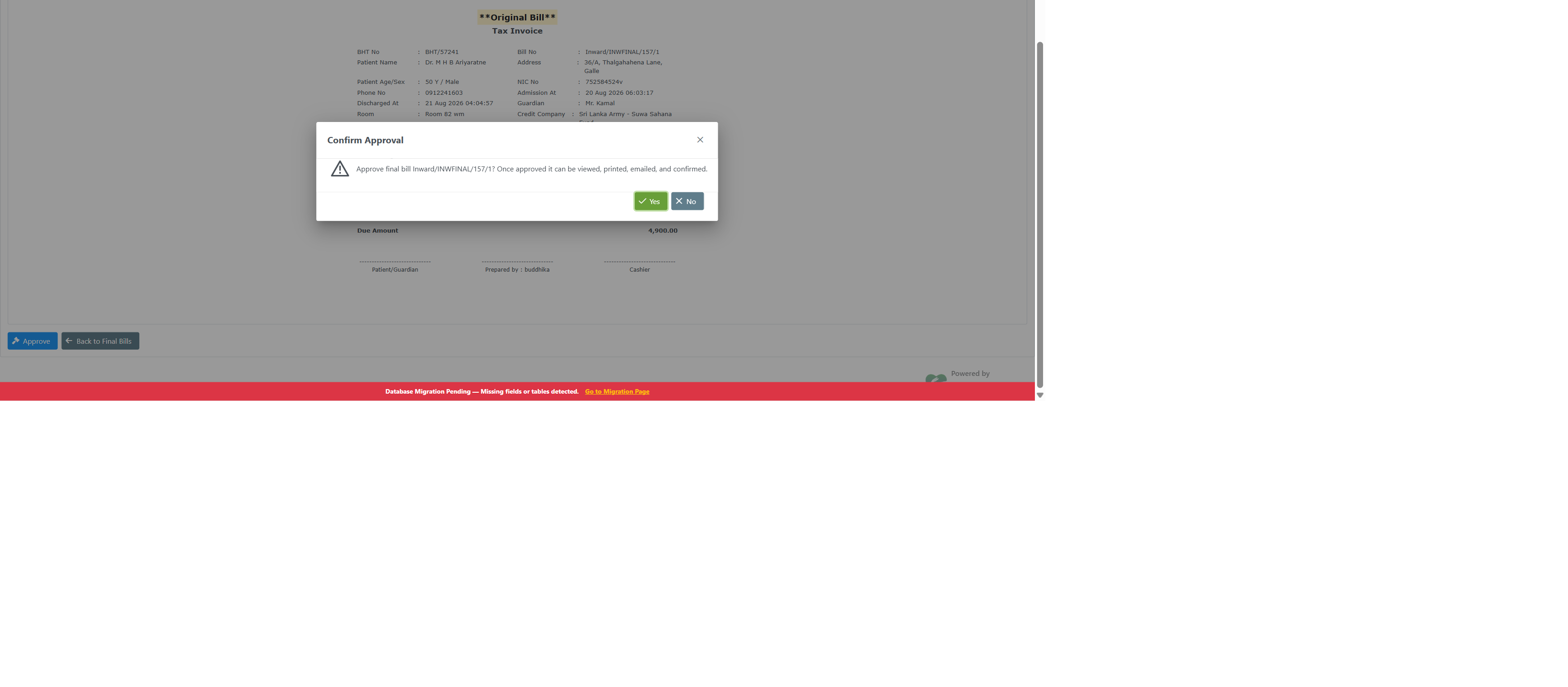
Click Approve on that page and confirm:
Once approved, the version's status updates (Available or Confirmed, per the usual rules below) and View / Print, Set as Confirmed, and Email all become available:
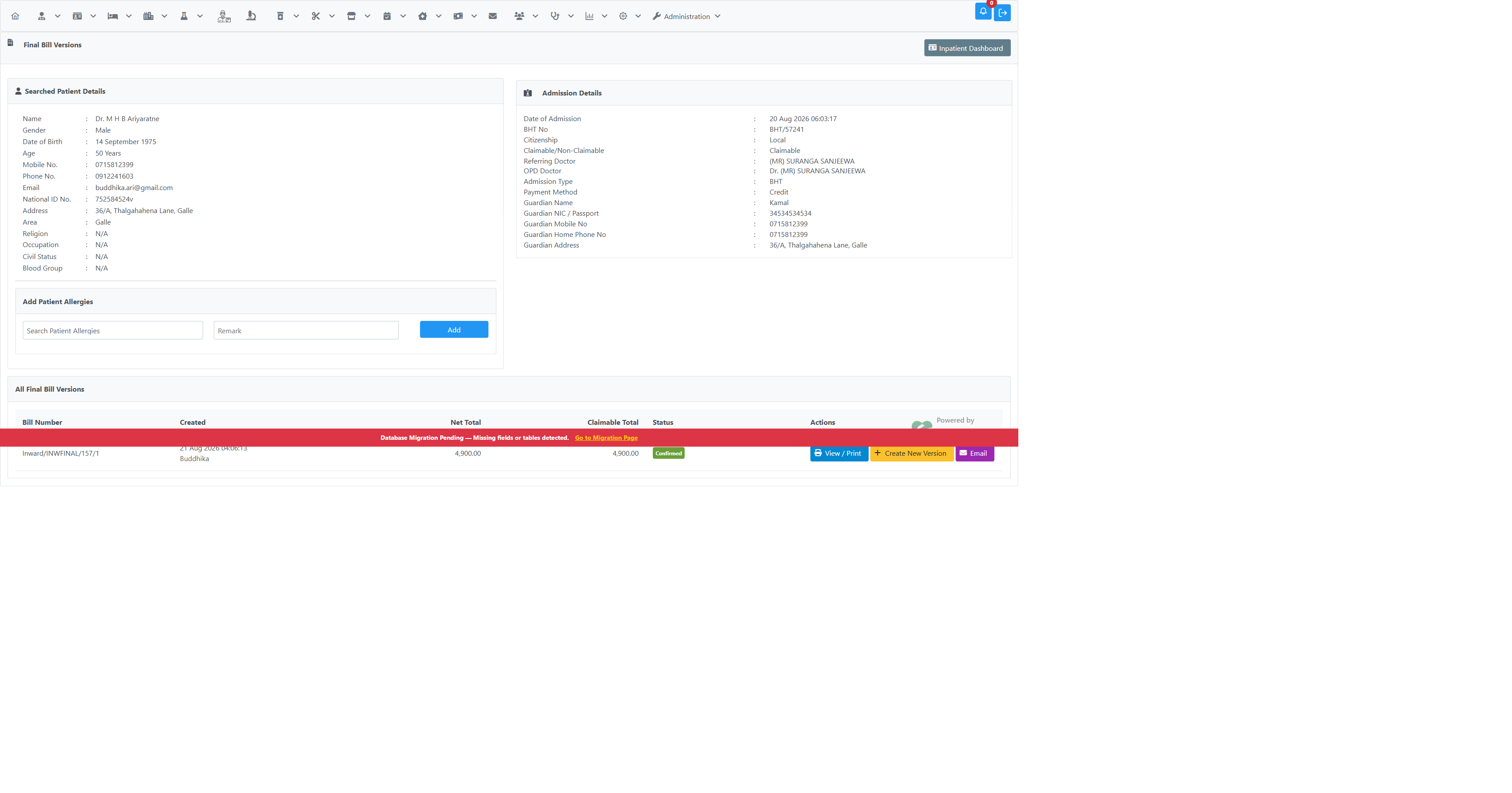
Approval is permanent and per-version — once approved, a version stays approved even if it's later cancelled or retired. It never carries over: creating a new version (via Create New Version) always produces a fresh version that starts Pending Approval again, exactly like the first one did.
Viewing / Printing a Version
View / Print opens the version on /inward/inward_reprint_bill_final.xhtml, with the bill laid out under several format tabs — Final Bill, Hospital Bill, Professional Bill, Final Bill Summary, Credit Company Letter, and Custom Bills. Each preview has a With Professional Fee toggle in its header: ticked, the printed Net Total is the version's full net total (hospital charges + professional fees − discount); unticked, the preview switches to a hospital-only figure for a copy that omits professional fees.
The toggle now defaults to ticked on every route into this page, so the Net Total shown in the Final Bill and Custom Bill tabs matches the version's stored Net Total — the same figure as the Net Total column in the versions list and the Bill Details summary card — as soon as the page opens.
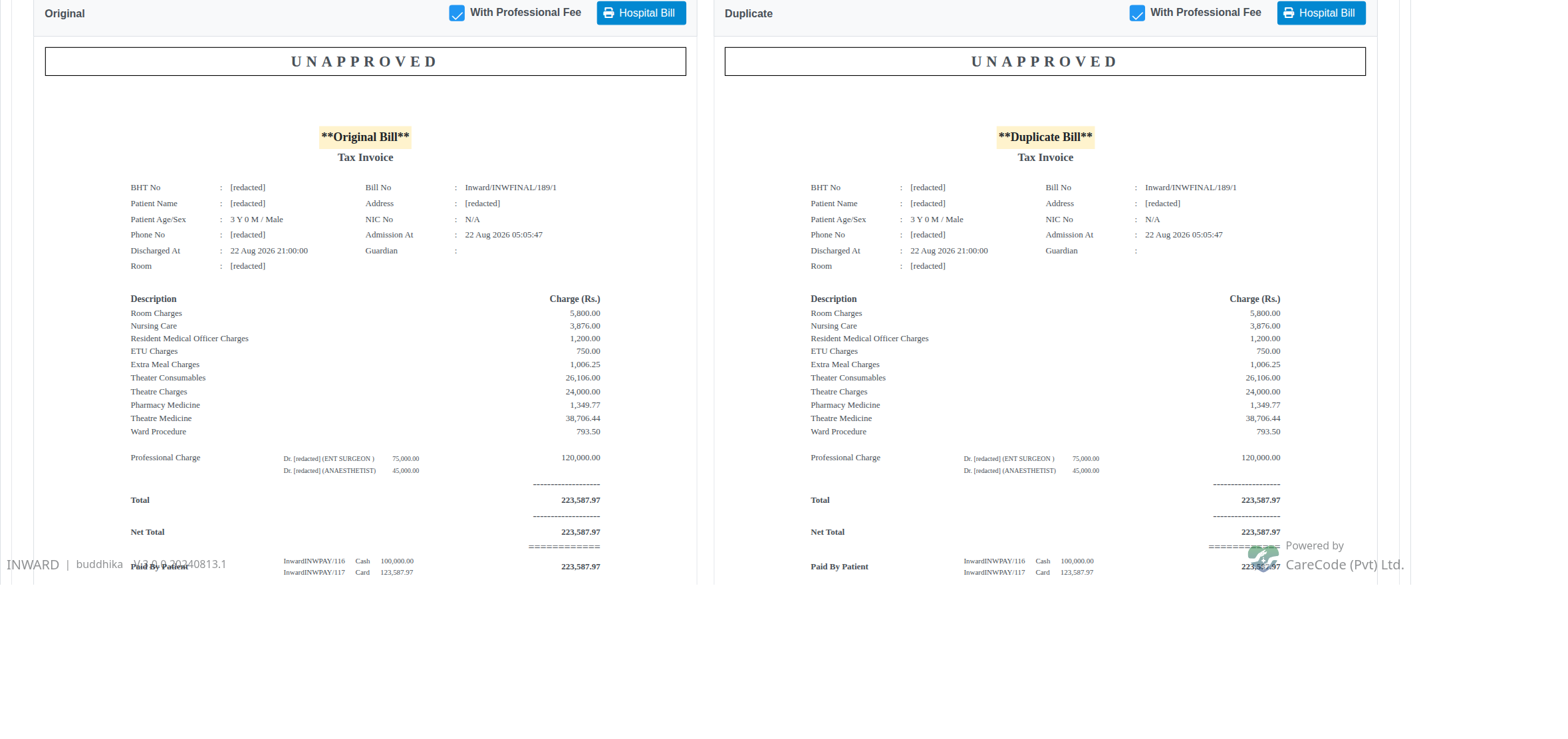
Final Bill tab on open: "With Professional Fee" is ticked and the Net Total (223,587.97) matches the versions list and the Bill Details card.
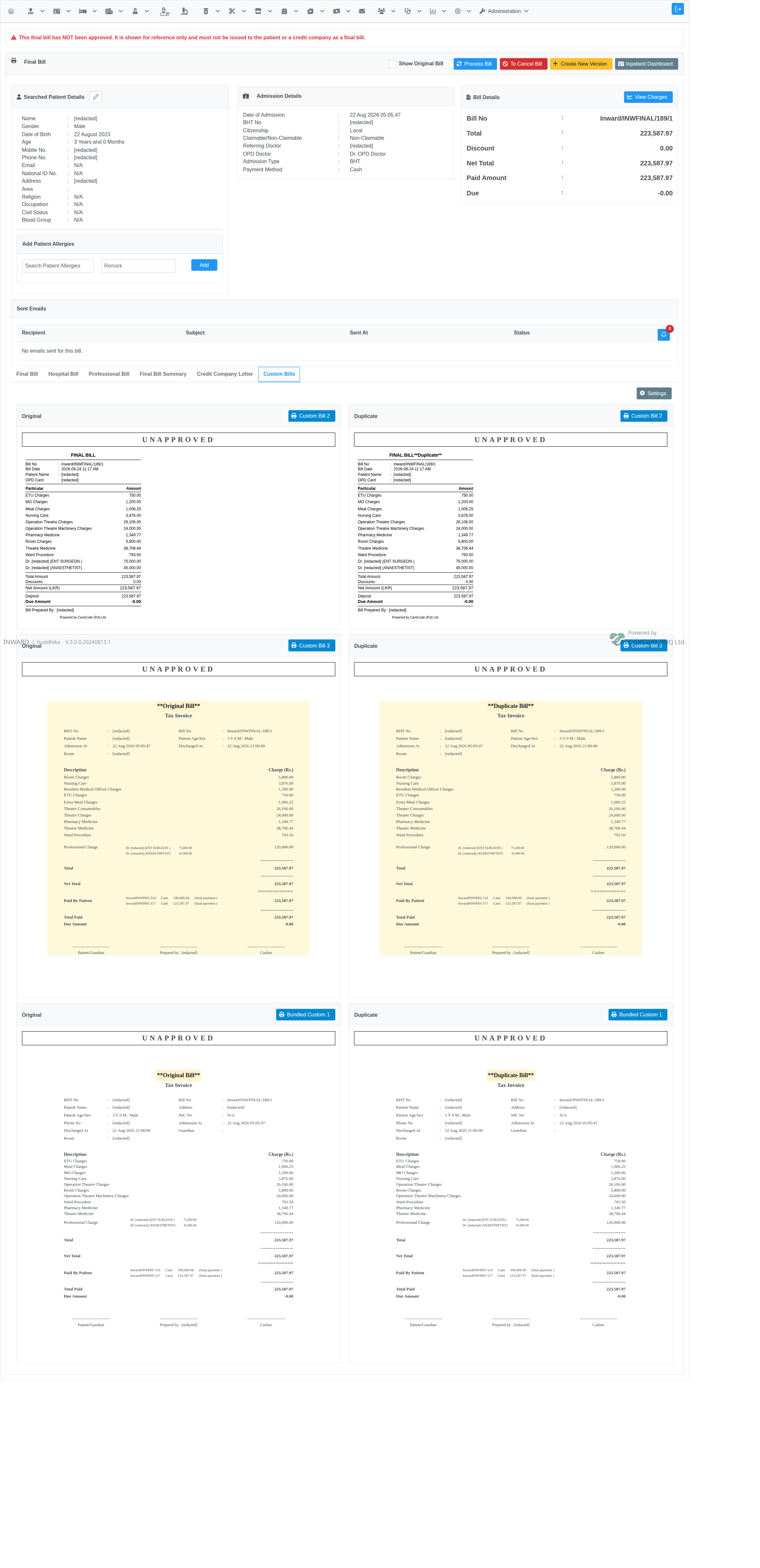
Custom Bills tab: every custom format prints the same Net Total as the Final Bill tab.
Earlier releases left this toggle unticked when a version was opened from Manage Final Bills → View / Print (and from the Admission Profile Final Bill button when only one version existed), so those tabs first rendered a lower, hospital-only Net Total until the toggle was ticked by hand — while the same version opened from Final Bill Search looked correct. See issue #23652.
Numbering
All versions of one admission's final bill share the same base bill number — the institution/department prefix and sequence number are fixed at whatever version 1 used — with a plain incrementing suffix for the version:
Inward/INWFINAL/70/1
Inward/INWFINAL/70/2
Inward/INWFINAL/70/3
This holds regardless of which department the user creating a later version is currently working in. Earlier releases had a bug where the number was generated from the acting user's session department instead of the admission's own — see issue #22541 for the before/after. If you see a version whose prefix doesn't match version 1 (e.g. MP/INWFINAL/1/2 on an admission whose other versions are all Inward/...), it predates the fix and should be retired.
Creating a New Version
Click Create New Version on any non-cancelled row. This opens the final bill editing screen pre-populated from the source version, where charges can be corrected before saving. Saving creates a new version and — if it's the first save — sets it as Confirmed.
Credit Company Allocation Carries Forward
For a Credit admission, the new version's Credit Company Allocation panel is seeded from the source version's split — including every credit company still on the admission, even one that was allocated 0.00 last time. This matters when, for example, the first insurer only agrees to pay part of the bill: the second (or third) credit company on file is still there as an editable row ready to take the rest, instead of having to be re-added by hand.

See Insurance Allocation on the Final Bill for how the allocation itself is calculated and overridden.
Setting a Version as Confirmed
Click Set as Confirmed on any approved, Available, non-cancelled version to make it the one used for reporting and collections. The previously Confirmed version (if any) is demoted to Available. A cancelled bill cannot be confirmed, and neither can an unapproved one.
Retiring a Version
Click Retire on any non-Confirmed, non-retired version to soft-delete it from the list — for example, a version created with the numbering bug, or a duplicate created by mistake.
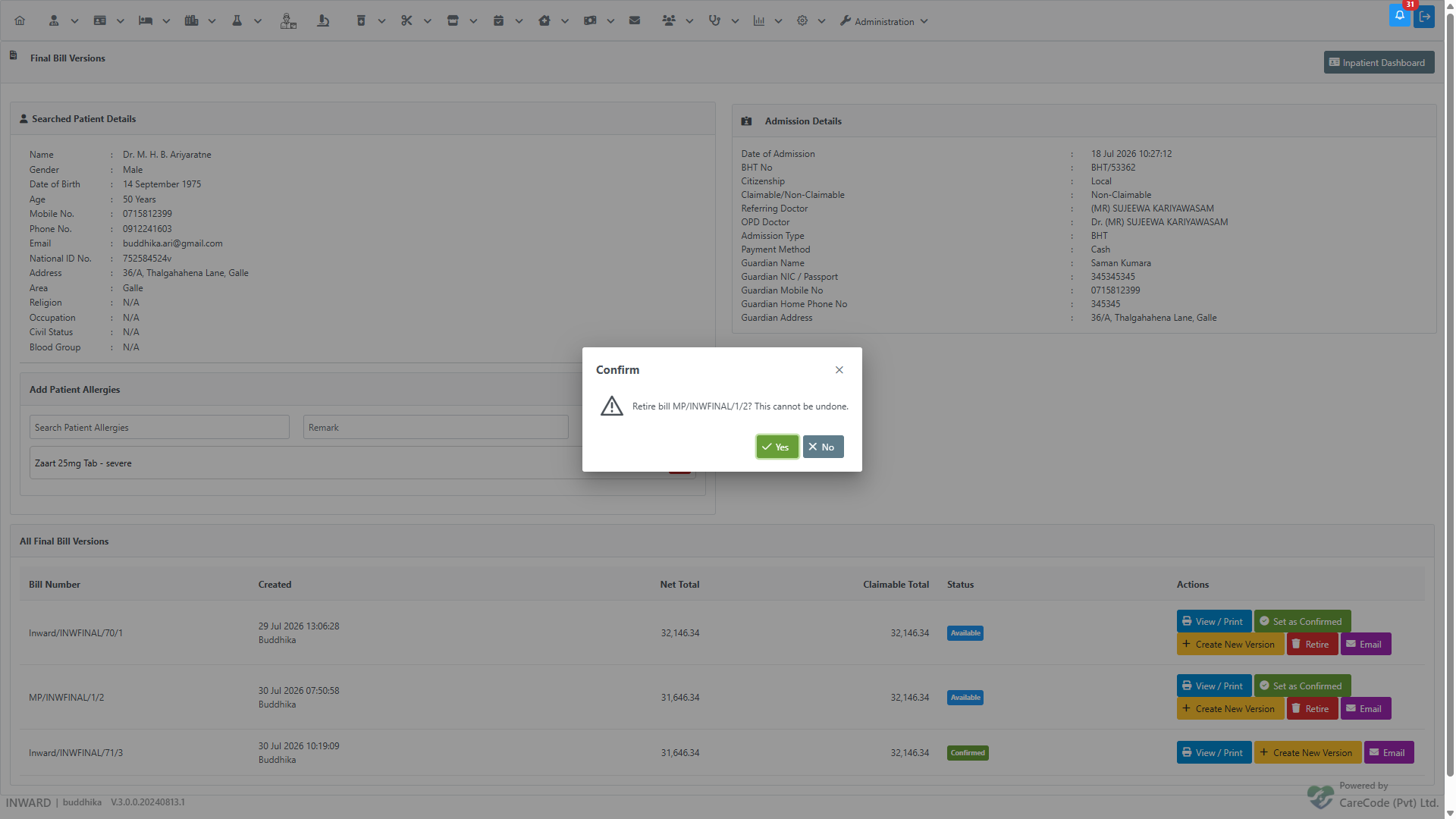
Retiring is permanent — there is no undo. The button is only available when:
- the version is not already retired,
- it is not the currently Confirmed version (confirm a different version first if you need to retire this one), and
- it is not the only remaining version for the admission.
Emailing a Version
Click Email on any approved version to open a dedicated Email Final Bill review page — the send is no longer immediate. The recipient defaults to the patient's own email if one is on file; the subject and message body are pre-filled but fully editable before sending.
Page: /inward/inward_final_bill_email.xhtml Controller: InwardSearch
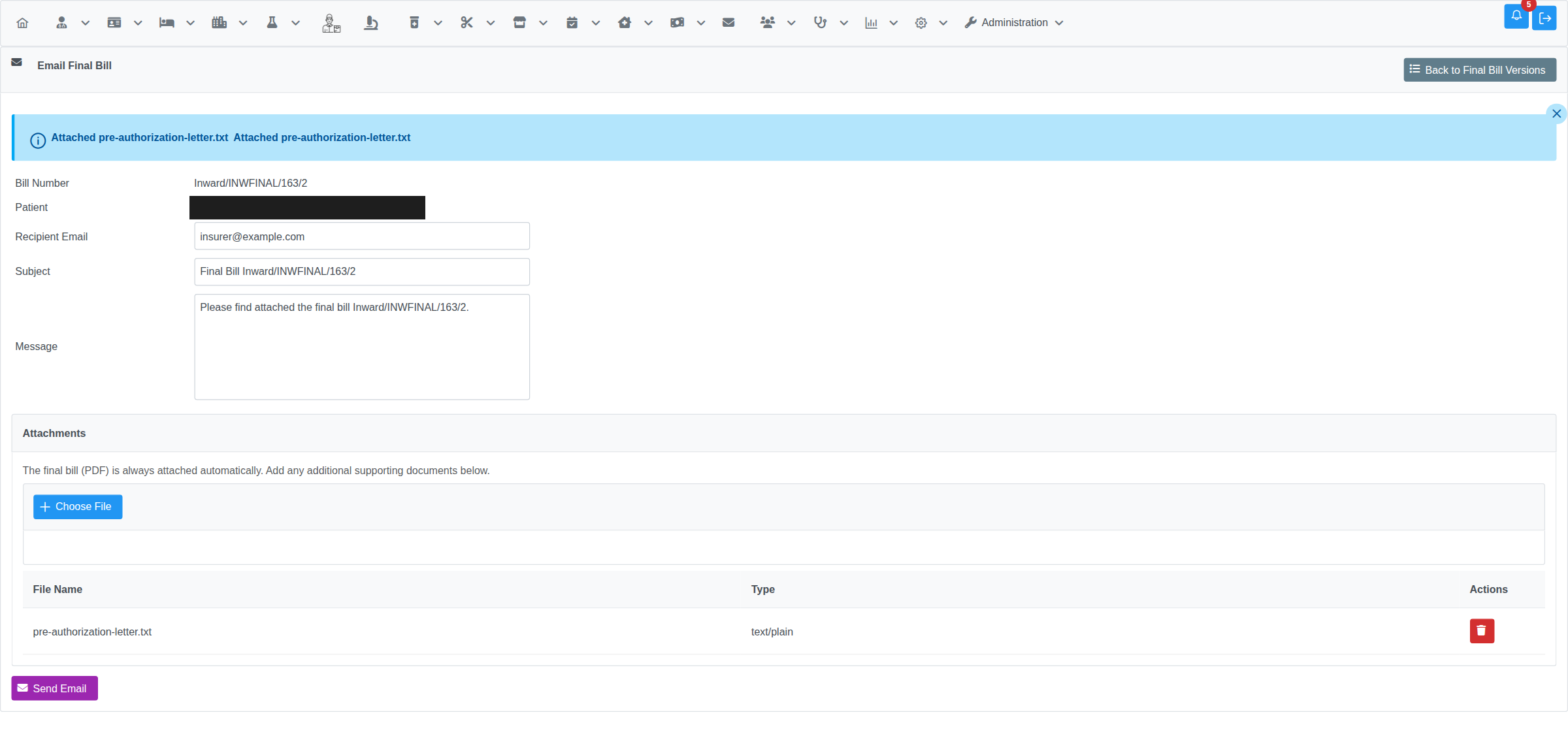
A one-page PDF summary of the bill (bill number, patient, admission, and totals — not a full itemized reprint) is always attached automatically. Additional supporting documents (e.g. a pre-authorization letter requested by the credit company) can be attached from the same page before sending:
- Up to 5 attachments, each up to 10 MB, 20 MB combined.
- Click the trash icon on any row to remove it before sending.
Only once Send Email is clicked does the message actually go out. Every attempt — successful or not — is logged. Open View / Print on the version to see its send history under Sent Emails, with status Sent, Pending, or Failed.
Only a genuine, non-cancelled, approved Final Bill can be emailed this way — the page checks the bill type, the underlying atomic bill type, and approval status before allowing a send, so a cancellation record or an unapproved draft can't be sent out mislabeled as a reviewed final bill.
Related Articles
- Inpatient — Final Bill Generation — generating the first version of the final bill
- Inpatient — Final Bill Payment — collecting payment against the Confirmed version
- Finance — Inpatient Final Bill — overview of the final billing workflow