Finance Shift Handover - hmislk/hmis GitHub Wiki
Shift Handover
Introduction
A shift handover is the formal process by which a cashier transfers their shift's collections to the next cashier or supervisor at the end of their shift. The handover creates a documented record of everything transferred. The receiving party can accept it, but the sending cashier does not have to wait for that — see After You Hand Over.
Navigation
Main Menu → Financial Transaction Manager → Handover tab
Creating a Handover
- In the Shift tab, click Handover Current Shift.
- The handover page opens showing your current shift details: your name, Shift Start date and bill number, Total Collected Value, and Total Handed over Value.
- Your shift's money is grouped by Payment Method with three columns — To Handover, Handing Over, and Difference.
- Review each row and verify the totals.
- Enter the denomination breakdown for cash in the quantity boxes on the right. Negative quantities are not allowed.
- Review the float transactions for the shift. Each float you sent or received during the shift is listed with its From User, To User, and amount.
- In the Hand over to field, search for and select the cashier who will receive the shift.
- Click Handover.
- Confirm the dialog "Are you sure you want to handover this shift?". The handover summary print opens.
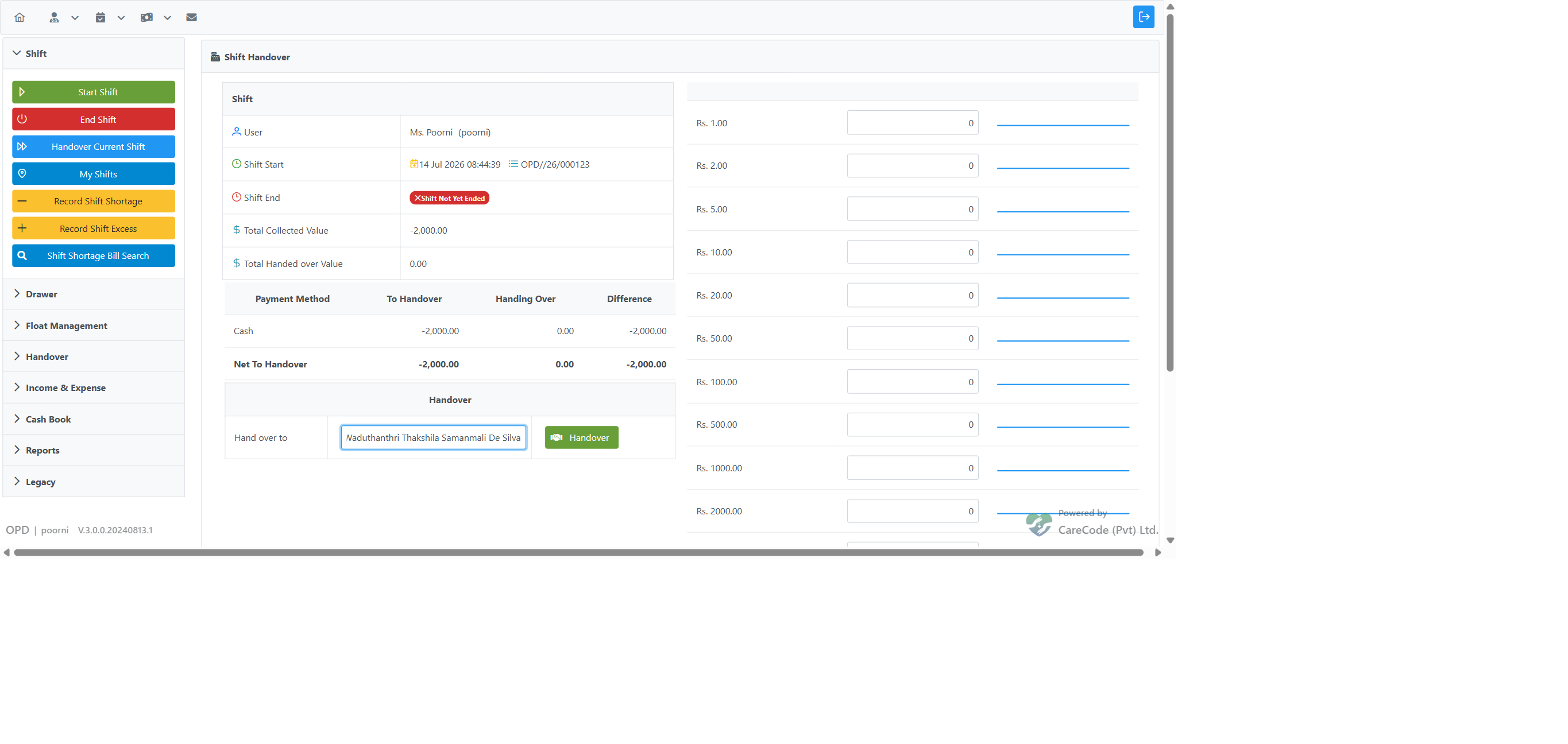
Note: You cannot hand over a shift to yourself. If you select your own name and click Handover, the system rejects it with "Cannot handover to yourself. Please select a different user." and no handover is created.
Floats and Shift Shortage Rows
Rows with the type Floats are cash movements in or out of your drawer that are not collections, for example a Deposit to Safe/Bank, a withdrawal, or a float increase or decrease. They show the institution name like any other row, and a deposit shows as a negative cash amount.
A shift shortage you recorded with Record Shift Shortage gets its own row. Its Institution column shows Shortage Bill in red (Shift Shortage on the receipts and on the receiving cashier's accept page). It is never combined with a bank deposit made on the same day.

A Rs 300 bank deposit (institution shown) and a separate Rs 50 shift shortage (Shortage Bill) on the Handover Current Shift page.
On the handover receipt, the Shortage Transactions section lists only shift shortage bills, not deposits or other float movements.

The handover receipt lists the deposit with its institution; only the shortage appears under Shortage Transactions.
Print Options
From the handover summary print, click View Details to open the detailed receipt.
| Purpose | |
|---|---|
| Handover Summary Print | One-line-per-payment-method summary |
| Handover Details Print (View Details) | Full detailed receipt, including the Float Transactions table |
The Handover Details Print lists every float transaction for the shift under Float Transactions, showing the Direction (Float Sent / Float Received), From User, To User, and Amount. Each Float Sent and Float Received row shows the correct recipient name in the To User column, so you can confirm exactly who each float went to or came from.

After You Hand Over
Once you click Handover, everything in that handover leaves your Handover Current Shift page — whether or not the receiving cashier has accepted it yet. Open Handover Current Shift again and the handed-over values are no longer there.
This includes the Net Float (Cash) row. That row brings forward every float you received and have not yet handed over, including floats received in an earlier shift. When you hand over, all of those floats go with the handover and do not come back on a later shift.

Handover Current Shift reopened straight after a handover that has not been accepted yet — nothing is left to hand over.
- The receiving cashier can still accept the handover later from Shift Handovers to Accept.
- If you Recall the handover (from My Handovers), or the receiving cashier Rejects it, the values — including any floats it carried — return to your Handover Current Shift page so you can hand them over again.
- To end your shift without waiting for the receiving cashier to accept, the administrator must enable the configuration option Allow Shift End Without Handover Acceptance. When it is off, End Shift waits until your handovers are accepted.
Accepting a Handover
- In the Handover tab, click Shift Handovers to Accept.
- A list of handovers waiting for you appears, showing the handover Number, sender Username and Staff Name, Created At, and Value.
- For the handover you want to process, click To Accept to review and accept it, or Reject to return it to the sender for correction.
- On accepting, review the totals, float detail, and denomination breakdown, then confirm. Your drawer is credited with the handed-over amount.
- Print the acceptance receipt when prompted.
Important: A handover made up only of float transfers (for example, when the sending cashier's whole shift was sending or receiving floats, with no billed cash collection) currently cannot be accepted — clicking To Accept has no effect. In that situation the sending cashier should ensure the shift includes a normal collection, or contact an administrator. This limitation is being tracked for improvement.
Viewing My Handovers
In the Handover tab, click My Handovers to open the list of handovers you have created. Click any handover to view details (cashier/handover_view.xhtml), print summary or details, or reprint from cashier/handover_reprint.xhtml.
Settling Missing Proof
If a handover has a missing payment proof (e.g. a card slip not yet received), navigate to Settle Handover Proof Missing:
- Page:
cashier/settle_handover_proof_missing.xhtml - Print:
cashier/settle_handover_proof_missing_print.xhtml
Legacy Handover
When "Legacy Handover is enabled" is true, additional options appear:
- Handover (OLD) —
navigateToHandoverCreateBill() - Handover By Period (if "Period Handover is enabled") —
navigateToHandoverCreateBillForSelectedPeriod()
Technical Reference
| Item | Detail |
|---|---|
| Controller | FinancialTransactionController |
| Create current shift | navigateToHandoverCreateBillForCurrentShift() |
| Receive list | navigateToReceiveHandoverBillsForMe() |
| Accept | navigateToReceiveNewHandoverBill() |
| Reject | navigateToRejectNewHandoverBill() |
| My handovers | navigateToMyHandovers() |
| Reprint | navigateToHandoverReprint() |
| Config keys | "Current Shift Handover is enabled", "Legacy Handover is enabled", "Period Handover is enabled", "Allow Shift End Without Handover Acceptance" |
| PR references | #20808, #20798, #20797, #20813, #20815 |