Direct Issue to BHTs from Pharmacy - hmislk/hmis GitHub Wiki
Path:
Pharmacy > Inpatient Medication Management > Direct Issue to BHTs
1. Enter Patient Name, BHT, PHN, or MRN

Scanning a barcode: PHN and MRN are printed as barcodes on patient wristbands and other documents. Scan the barcode straight into the search box — if it matches exactly one admission, the bill screen opens automatically, no click needed.

If the same patient has more than one matching admission (or you search by partial name), all matches are listed for you to pick manually.

2. Search and select items needed to be issued
3. Enter the quantity of each item that should be added
4. Press the "Add" button
If an item needs to be removed use the "Remove" button. If you want to change the quantity of each item press the "Edit" button.
If the requested item is out of stock, select a substitute
Each bill line has a "Select a Substitute" button (🔄 icon) next to the item name.
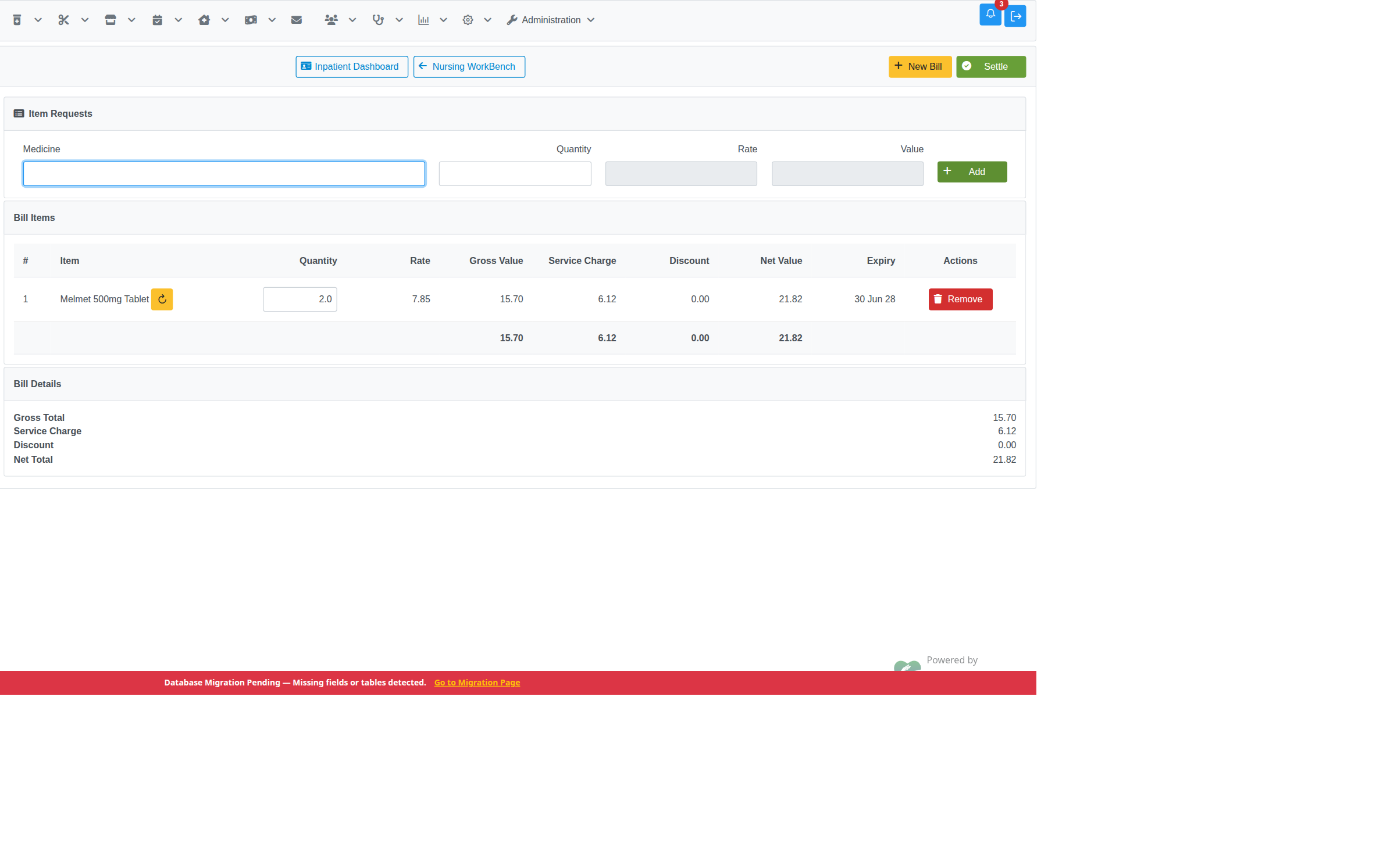
Pressing it opens an Alternatives dialog listing every in-stock, non-expired sibling brand of the same medicine (same generic/VMP), ordered by earliest expiry first, with rate, stock, and expiry shown for each. Press "Replace" on the alternative you want to issue instead.

The bill line updates immediately — item name, rate, service charge, and net value are all recalculated for the new item.

A line priced from an inpatient package shows a lock icon instead of the substitute button — package-priced items can't be substituted, since the package quota was reserved for that specific item.
5. Select "Settle" to finalize the bill
If you want to start over press "New Bill"
6. Print the bill
Rate, Service Charge, and Discount visibility on the printed bill: these figures are gated by two separate privileges, so a user can be allowed to see one without the other.
- Rate / Gross / Net — require the
Nursing IP Billing View Ratesprivilege (plus theNursing IP Billing - Show Rate and Valuesetting being enabled). - Service Charge / Discount — additionally require the
IP Billing View Discountprivilege. Without it, the Rate/Gross/Net columns and totals still print, but the Service Charge and Discount columns/rows are hidden rather than shown as zero.
With both privileges granted, every column and total prints correctly, matching what was actually charged:

"ISSUE BILL" native print format: if the Pharmacy Inward Direct Issue Bill is PosHeaderPaper print-format option is enabled, this page instead prints a separate 72mm "ISSUE BILL" header format. Its RATE/VALUE columns and Net Total row are controlled by the Pharmacy Bill Sent to Ward - Show Rate and Value application config (default: on, combined with the Nursing IP Billing View Rates privilege) — the same config used by the Inward BHT Issue Against Request page's print, so both ward-issue printouts stay consistent.
Default (config on): RATE, VALUE, and Net Total print:

Config switched off: only ITEM and QTY print, no RATE/VALUE columns or Net Total:

Direct Issue vs Issue Discharge Medicines
These two pages look similar but charge differently:
| Direct Issue to BHTs (this page) | Issue Discharge Medicines | |
|---|---|---|
| Used for | Medicines given during the ward stay | Take-home medicines at discharge |
| Charge | Retail rate plus the inward price-matrix service charge (margin) | Retail rate only — no service charge |
| Privilege | Direct Issue to BHT | Pharmacy Discharge Medicine Issue |
Both draw stock from your logged-in pharmacy and both appear in the inward/pharmacy reports and the interim bill. See Issue Discharge Medicines for the discharge workflow.
Related Features
- Direct Issue Return to Pharmacy — returning unused items from a direct issue bill back to the pharmacy
- Search Inpatient Direct Issue Returns — search/audit direct issue return bills