Admin Audit Trail on Practitioner Records - hmislk/hmis GitHub Wiki
Admin — Audit Trail on Practitioner Records
Every practitioner record in HMIS captures who created it and who retired it, with timestamps. This article describes the fields, where they are surfaced in the UI, and how to use them for audit.
The audit fields on a Staff record
All Staff records (and therefore Doctor and Consultant records too) carry the following audit fields:
| Field | Type | When set |
|---|---|---|
creater |
WebUser |
Set once when the record is first saved. Captures the user who created the record. |
createdAt |
Timestamp | Set once at creation. |
retirer |
WebUser |
Set when the record is soft-deleted via any of the Delete actions. |
retiredAt |
Timestamp | Set at soft-delete time. |
retireComments |
String | Free-text comment field that can hold a reason for retirement. Not exposed on every delete dialog. |
dateRetired |
Date | A second, date-only retirement field used by some HR retirements. Distinct from retiredAt. |
Note that
createris spelt with one t in the schema (legacy naming). Do not "fix" it; controller code references the same column name.
Where audit fields appear in the UI
Consultant edit screen — Edit tab
In admin_doctor_consultant.xhtml, the consultant edit panel has an Edit tab next to Basic Details. It shows:
| Label | Value source |
|---|---|
| ID | current.id |
| Creator | current.creater.webUserPerson.nameWithTitle |
| Created At | current.createdAt (Asia/Colombo, long date-time pattern) |
This is the cleanest in-app place to read the creator stamp on a consultant.
Staff Bulk Delete grid
In staff_bulk_delete.xhtml, the Created By column shows the creator name — useful for spotting batches uploaded by a particular user when you need to mass-retire them.
Staff List / Doctor lists
The standard list grids do not show creator or retirement fields by default — these screens prioritise operational data (name, code, EPF). To audit by creator, use the database directly or use the Bulk Delete screen filter on Created By.
Retired records
Retired records are excluded from active lists, so their retirement timestamp and retirer are not visible in the UI without database access. The data is intact and queryable; an administrator can produce a report on demand.
Sample audit queries
When the in-app surfaces are not enough, use these JPQL or SQL queries:
-- All retired doctors retired in the last 90 days, with who retired them and when
SELECT s.id, p.name, w.web_user_person_id AS retirer_user, s.retired_at
FROM staff s
LEFT JOIN person p ON p.id = s.person_id
LEFT JOIN web_user w ON w.id = s.retirer_id
WHERE s.retired = TRUE
  AND s.retired_at >= NOW() - INTERVAL 90 DAY
  AND s.dtype IN ('Doctor', 'Consultant')
ORDER BY s.retired_at DESC;

-- Staff created by a specific user
SELECT s.id, p.name, s.created_at
FROM staff s
LEFT JOIN person p ON p.id = s.person_id
WHERE s.creater_id = :userId
ORDER BY s.created_at DESC;
(Column names may differ in your installation; verify against the schema.)
Person edit audit trail (name / date of birth / demographics)
In addition to the creation and retirement stamps described above, HMIS now records a full before-and-after audit event every time a practitioner's underlying Person record is edited through the Staff, Doctor, or Consultant screens. This closes the long-standing gap where a name or date-of-birth change left no trace.
Because a Person record is shared across Staff, Doctor, Consultant, and Patient roles, an unauthorised change to a name, NIC, or date of birth could previously alter multiple parts of the system with no record of who did it. The Person edit audit trail exists specifically to make those changes traceable for fraud investigation and data-integrity review.
What is captured
When you edit and save a practitioner on any of these screens, an audit event is written with before and after values for the person's key demographic fields:
| Field | Tracked |
|---|---|
| Name | Yes |
| Full Name | Yes |
| Name with Initials | Yes |
| Surname / Last Name | Yes |
| Title | Yes |
| NIC / Passport No | Yes |
| Date of Birth | Yes |
| Gender | Yes |
| Address | Yes |
| Mobile / Phone / Email / Fax | Yes |
Each event also records who made the change (the logged-in user), when (timestamp), the IP address of the device, and the Person ID it applied to. A first-time save of a brand-new person is recorded as a create event (no "before" values); every later edit is recorded as an update event showing both sides of the change.
Which screens raise these events
| Screen | Action that raises the event |
|---|---|
| HR Staff (without doctors) — admin | Selecting a staff member, editing demographic fields, and clicking Save |
| Doctors (including / excluding consultants) | Selecting a doctor, editing details, and clicking Save |
| Doctors & Consultants (admin) | Selecting a consultant, editing details, and clicking Save |
| Staff List → full staff edit form | Editing a staff member's Personal Details tab (including Date of Birth) and clicking Save |
| Any of the above | Adding a brand-new record instead of editing an existing one raises a create event rather than an update event |
Selecting a different person in the list snapshots the current values so the "before" side of the next edit is accurate. Saving with no actual field changes still raises an update event — the before and after values will simply be identical.
Where to read these events
Person edit events appear in the All Audit Events viewer:
Administration → Manage Metadata → Audit → Audit Event History. Set the date range and click Search. Look for events with the action updatePerson (edits) or createPerson (new records) and entity type Person. The Differences column shows each changed field as Before: … , After: ….
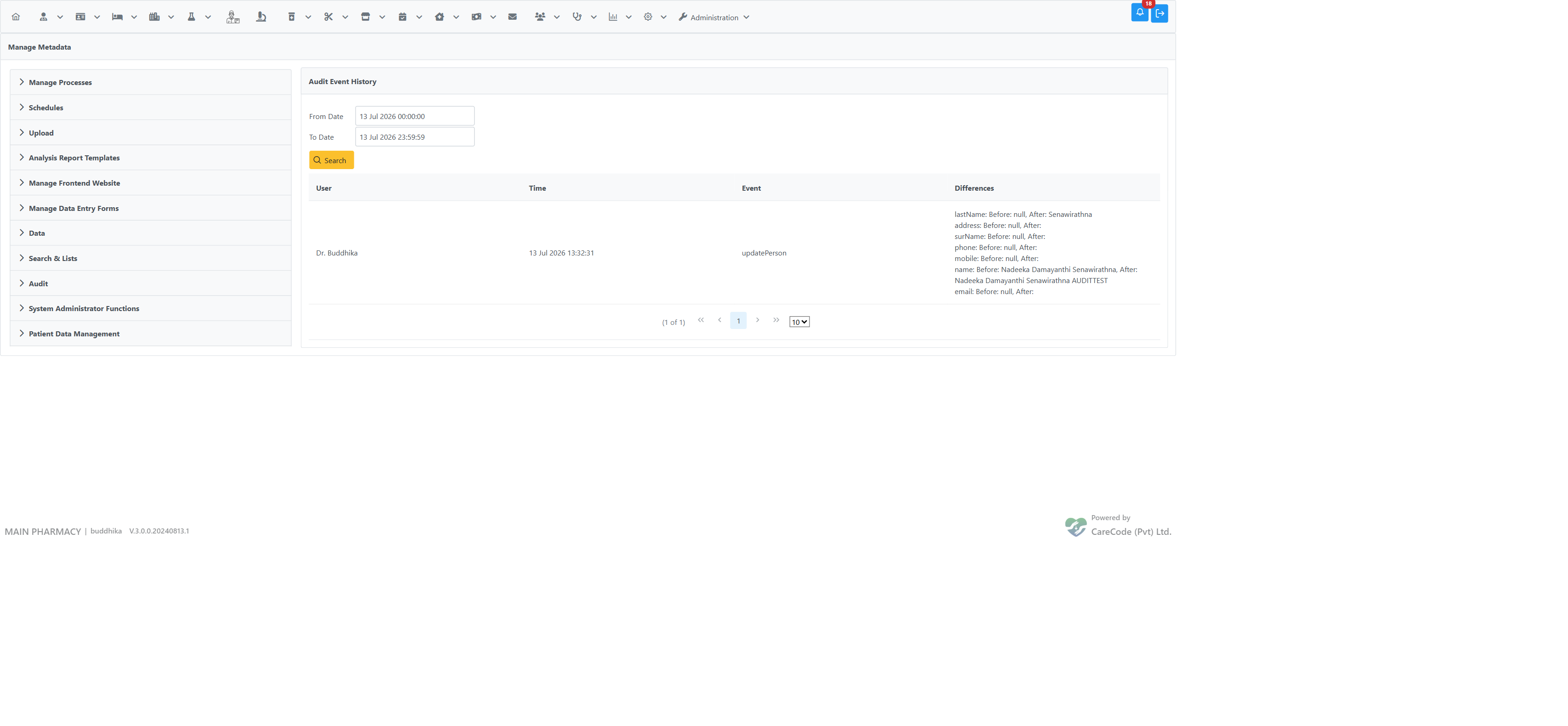
Example: a name change from "Nadeeka Damayanthi Senawirathna" to "…AUDITTEST" and a last name added, both captured with before/after values, attributed to the editing user and timestamp.
Tip: The viewer is not filterable by person — search the date range that covers the change, then use your browser's find-in-page (Ctrl+F) on the practitioner's name to locate their events.
Note for administrators. These Person edit events are stored in the audit database, which is a separate store from the operational database. Treat the audit event as a record that an edit was submitted by that user at that time — always confirm the operational record itself when investigating, rather than assuming the value shown in the "after" column is the record's current live value.
Create events
For newly created doctors, consultants, and staff, the Differences column lists the values that were saved under "Created with:", and the event is linked to the record it created (its ID is stored on the event and appears as personId in the created values).
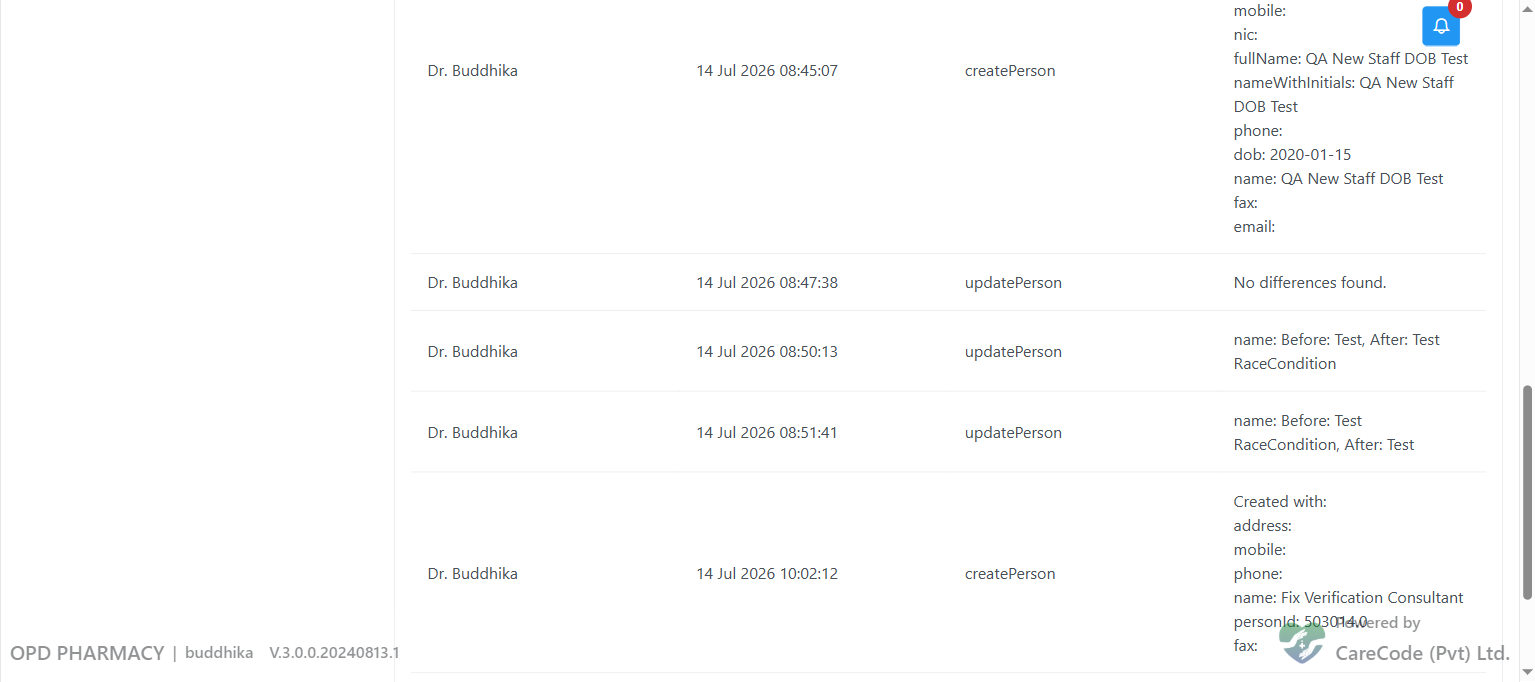
Example: an updatePerson event (top) rendering its diff normally, next to a createPerson event (bottom) listing the fields that were set on the new record.
What audit fields do NOT capture
The on-record creation/retirement stamps and the Person edit audit trail together cover most demographic change tracking. They still do not capture:
| Event | Captured? |
|---|---|
| Field-level edits to name / DOB / demographics | Yes — see Person edit audit trail above |
| Signature upload / removal | No (only the current image is stored) |
| Linked-user change | No |
Re-instatement (clearing retired) |
No — only the most recent retirement is recorded |
| Edits made directly in the database (bypassing the UI) | No — audit events are only raised by the application screens |
If you need change history for the events still marked "No", you must rely on database transaction logs or an external audit layer.
Practical audit workflows
| Question | How to answer |
|---|---|
| Who added this consultant? | Open the Consultant editor, switch to the Edit tab, read Creator and Created At. |
| Who retired this doctor last week? | Run the SQL above filtered to the previous week. |
| Was this batch of staff added by an upload? | Query for staff with created_at within the upload's clock window and the same creater_id. Compare to the spreadsheet you ran. |
| Who keeps retiring my test doctor by accident? | Restore (clear retired), then look at retirer_id if it happens again. |
| Has anyone been tampering with one specific record? | The schema only shows the most recent creation/retirement events. Use database transaction logs for richer history. |
Limitations and design notes
- Audit data lives on the same row as the record. There is no separate audit-log table.
- There is no editor for the audit fields in the UI; they are read-only by design.
retireCommentsis rarely populated because the Delete confirmation dialog does not collect a comment. To make use of it, scripts or a custom screen are required.dateRetired(date-only) andretiredAt(timestamp) can fall out of sync if data has been edited directly. TreatretiredAtas authoritative.
Recommended administrator hygiene
- Periodically run the retired in the last 90 days query to confirm only authorised users have retired staff.
- Match the creator IDs on records created during bulk uploads to the user who ran the upload — flag mismatches.
- After any direct database operation that bypasses the UI, document it externally; the schema does not record manual interventions.