Systems Design Knowledge - herougo/SoftwareEngineerKnowledgeRepository GitHub Wiki
Cracking the Coding Interview 6th edition
Source: Google it!
Key points:
- communicate
- broad first
- assumptions
- estimate when necessary
- dream (i.e. one massive machine) first, then get real later
Procedure (SAWKR)
- scope (features)
- assumptions (e.g. <= 1M user requests / day)
- Whiteboard diagram
- Key issues (e.g. spiking of URL use)
- Redesign
Possible questions
- responsiveness (of data updates)
- is the data source growing?
- is a particular query repeated over time (vs generic solution)?
Main Questions (UDIRU)
- Use cases?
- How much data must it handle?
- What are the inputs and outputs?
- Requests/s expectations
- Who are the users? Who will use it?
Considerations
- failures
- availability/reliability
- read-heavy vs write-heavy
- security
- queuing
Scaling
- vertical (i.e. better hardware)
- horizontal (i.e. more machines)
load balancer: Suppose we have multiple machines for receiving requests. How do we assign an incoming request to a machine in a way that balances the load among machines? That is what a load balancer is for.
Database Denormalization and NoSQL
- Joins can get slow as the system grows bigger. One solution is denormalization.
- Denormalization: adding redundant info in your table to avoid the need for doing a join.
- NoSQL has no joins and is designed to scale better.
Database partitioning (Sharding)
- Sharding: splitting the data across multiple machines while making sure you have a way of determining which piece of data is on which machine.
- Types of sharding:
- Vertical: partitioning by feature (e.g. one machine for messages, another for profiles, etc).
- con: what if the tables get very large (need a new partitioning scheme)
- Key-Based or Hash-Based: based on an ID or something (e.g. hash value of ID modulo N)
- con: (problem mentioned in consistent hash section)
- Directory-Based: Maintain a lookup table to find the data.
- cons:
- single point of failure
- constantly accessing this table impacts performance
- cons:
- Vertical: partitioning by feature (e.g. one machine for messages, another for profiles, etc).
Other
- Caching is good for performance
- Asynchronous processes and queues
Networking metrics
- Bandwidth: max amount of data transferred / time
- Throughput: actual amount of data transferred / time
- Latency how long it takes to go from one end to the other
Various Sources
Consistent Hashing
Source:
Suppose you are implementing a short URL service and you need a way to lookup an actual URL given a short URL. To do this, you want to implement a load balancer and distribute calls to N servers. The traditional way is to use a hashing function on the short URL and take the remainder of the hash modulo N. These URL key-value pairs are sharded over the machines so once you find the right machine, you can look it up on that machine. However, what happens when you add or remove a server (N changes)? The hash modulo N changes in almost all cases, so you would need to migrate almost all key-value pairs to different servers.
Initial Idea: Consider a circular array of size M (where M is always larger than the number of servers). Compute the hash of each server id to map the servers onto the circular array. When an incoming call comes, compute the hash and find the remainder modulo M. Find the nearest server in a clockwise fashion and pass the call to that server.
Problem with this approach: This may lead to unbalanced server loads.
Solution (Consistent Hashing): Use k (k known as the weight) hashing functions, which are used on the keys of each server. We have kN entries on our circular array. Note that when we add or remove a server, we only need to remap a small portion of the key-value pairs and the rest remain unchanged. Furthermore, with more hashing functions, it is expected that the load is more balanced.
Note: in the case of collisions (e.g. hash function 3 Modulo M for server 1 matches hash function 4 modulo M for server 2), we can instead map hashes to an angle floats on a circle and use a BST to organize them. We can query the BST to find the "next clockwise server".
Following the System Design Primer
Source:
System design topics: start here
Sources:
- (optional) https://www.youtube.com/watch?v=-W9F__D3oY4
- (optional) http://www.lecloud.net/tagged/scalability/chrono
Harvard Lecture video
- Web host: ???
- VPS: ???
- (mentions vertical and horizontal scaling)
- 1 method of load balancing: round robin
- whenever a new request comes in, assign it to machine i, which gets incremented modulo N for each request
- N is the number of servers
- problems:
- 1 server may experience heavy load (why?)
- DNS caching doesn't work if we're constantly re-assigning the machine
- since we change machines frequently, session data is not kept (e.g. logging in, adding products to cart)
- whenever a new request comes in, assign it to machine i, which gets incremented modulo N for each request
- RAID adds redundancy to disk storage
- suppose we store the server in cookies to make sure we maintain a session with the server
- problem: security since you're revealing internal information
- solution: store a random number in the cookie and have the load balancer look up the machine from that random number
- Master-slave concept for MySQL data replication
- Have a master and multiple slaves with the same data on all of them
- Writes get sent to the master, which sends them to the slaves
- Reads get load balanced to the slaves
- Helps with read-heavy applications
- problem: single point of failure (master)
- solution: multiple masters (e.g. 2) with a load balancer on top
- Partitioning load balancers
- It's a good idea to have multiple load balancers in case of failure
- Suppose you are running Facebook
- You can partition load balancers (choose which load balancer you go to) based on Facebook name
- (end of the lecture has a good walkthrough of the thought process behind creating a system design for a web service)
Articles
- Clones
- First golden rule for scalability: every server contains exactly the same codebase and does not store any user-related data, like sessions or profile pictures, on local disc or memory.
- Sessions need to be stored in a centralized data store which is accessible to all your application servers.
- Databases
- (no new info?)
- Caching
- 2 types of caching
- by SQL query (hard to maintain accuracy of data in the cache)
- by object (easy to maintain accuracy)
- example objects to cache
- user sessions (never use the DB)
- fully rendered blog articles
- user-friend relationships
- 2 types of caching
- Asynchronism
- paradigms it can be done
-
- Cronjob pre-rendered, static content for fast responses (e.g. blog pages)
-
- Send message to user once a job is done (e.g. new FB message)
-
- paradigms it can be done
Latency vs throughput
Source: (optional) https://community.cadence.com/cadence_blogs_8/b/sd/archive/2010/09/13/understanding-latency-vs-throughput
- Latency is the time to perform some action or to produce some result.
- Throughput is the number of such actions or results per unit of time.
- Generally, you should aim for maximal throughput with acceptable latency.
Availability vs Consistency
Sources
- (optional) http://robertgreiner.com/2014/08/cap-theorem-revisited/
- (optional?) https://github.com/henryr/cap-faq
Network partition - When a network failure divides the network into 2 groups with no way of communicating between the 2 groups.
The CAP Theorem states that in a distributed computer system, you can only support two of the following guarantees:
- Consistency - Every read receives the most recent write or an error (i.e. timeout error)
- Availability - Every request receives a response, without guarantee that it contains the most recent version of the information
- Partition Tolerance - The system continues to operate despite arbitrary partitioning due to network failures
Networks aren't reliable, so you'll need to support partition tolerance. You'll need to make a software tradeoff between consistency and availability.
When to use consistency:
- when atomic reads and writes are needed
When to use availability
- business needs allow for eventual consistency
- system needs to keep working despite external errors
Atomic, or linearizable, consistency is a guarantee about what values it's ok to return when a client performs get() operations. The idea is that the register appears to all clients as though it ran on just one machine, and responded to operations in the order they arrive.
An asynchronous network is one in which there is no bound on how long messages may take to be delivered by the network or processed by a machine. The important consequence of this property is that there's no way to distinguish between a machine that has failed, and one whose messages are getting delayed.
Why is the CAP Theorem true? The basic idea is that if a client writes to one side of a partition, any reads that go to the other side of that partition can't possibly know about the most recent write. Now you're faced with a choice: do you respond to the reads with potentially stale information, or do you wait (potentially forever) to hear from the other side of the partition and compromise availability?
Consistency Patterns
Further reading/watching
We have a trade-off between consistency and availability, which doesn't necessarily mean a binary choice.
Weak Consistency
- Definition: After a write, reads may or may not see it. A best effort approach is taken.
- Examples: video chat, real-time multiplayer games
Eventual Consistency
- Definition: After a write, reads will eventually see it (typically within milliseconds). Data is replicated asynchronously.
- Examples: email, DNS
- Works well in highly available systems
Strong Consistency
- After a write, reads will see it. Data is replicated synchronously.
- Examples: file systems, RDBMSes
- Works well in systems that need transactions
Availability Patterns
There are two complementary patterns to support high availability: fail-over and replication.
Fail-over
Active-passive
- With active-passive fail-over, heartbeats are sent between the active and the passive server on standby. If the heartbeat is interrupted, the passive server takes over the active's IP address and resumes service.
- The length of downtime is determined by whether the passive server is already running in 'hot' standby or whether it needs to start up from 'cold' standby. Only the active server handles traffic.
- Active-passive failover can also be referred to as master-slave failover.
Active-active
- In active-active, both servers are managing traffic, spreading the load between them.
- If the servers are public-facing, the DNS would need to know about the public IPs of both servers. If the servers are internal-facing, application logic would need to know about both servers.
- Active-active failover can also be referred to as master-master failover.
Failover is usually used for load balancers because they are stateless.
Disadvantage(s): failover
- Fail-over adds more hardware and additional complexity.
- There is a potential for loss of data if the active system fails before any newly written data can be replicated to the passive. (Why???)
Replication
Master-slave and master-master (explained more in the database section)
- Master-slave replication
- Master-master replication
Availability in Numbers
Availability is often quantified by uptime (or downtime) as a percentage of time the service is available. Availability is generally measured in number of 9s--a service with 99.99% availability is described as having four 9s.
If a service consists of multiple components prone to failure, the service's overall availability depends on whether the components are in sequence or in parallel.
In sequence
- Overall availability decreases when two components with availability < 100% are in sequence:
Availability (Total) = Availability (Foo) * Availability (Bar)- If both Foo and Bar each had 99.9% availability, their total availability in sequence would be 99.8%.
In parallel
- Overall availability increases when two components with availability < 100% are in parallel:
Availability (Total) = 1 - (1 - Availability (Foo)) * (1 - Availability (Bar))- My question: Where does this come from? I assume the components of copies of each other. Then the system is down only when both components are down.
- If both Foo and Bar each had 99.9% availability, their total availability in parallel would be 99.9999%.
Domain Name System
sources and further reading: skipped
A Domain Name System (DNS) translates a domain name such as www.example.com to an IP address.
DNS is hierarchical, with a few authoritative servers at the top level. Your router or ISP provides information about which DNS server(s) to contact when doing a lookup. Lower level DNS servers cache mappings, which could become stale due to DNS propagation delays. DNS results can also be cached by your browser or OS for a certain period of time, determined by the time to live (TTL).
- NS record (name server) - Specifies the DNS servers for your domain/subdomain.
- MX record (mail exchange) - Specifies the mail servers for accepting messages.
- A record (address) - Points a name to an IP address.
- CNAME (canonical) - Points a name to another name or CNAME (example.com to www.example.com) or to an A record.
Services such as CloudFlare and Route 53 provide managed DNS services. Some DNS services can route traffic through various methods:
- Weighted round robin
- Prevent traffic from going to servers under maintenance
- Balance between varying cluster sizes
- A/B testing
- Latency-based
- route to the region with the lowest latency
- Geolocation-based
- route to based on user location
Disadvantage(s): DNS
- Accessing a DNS server introduces a slight delay, although mitigated by caching described above.
- DNS server management could be complex and is generally managed by governments, ISPs, and large companies.
- DNS services have recently come under DDoS attack, preventing users from accessing websites such as Twitter without knowing Twitter's IP address(es).
Content Delivery Network
sources and further reading: skipped
Proxy server a server that acts as a mediator between the user and a server.
- this server can be on the user's device or somewhere else
- reasons to use one
- moderate content your organization/children access
- allow for configuring your proxy server for improved security
- get access to blocked resources
- proxy server is different from a VPN
A content delivery network (CDN) is a globally distributed network of proxy servers, serving content from locations closer to the user. Generally, static files such as HTML/CSS/JS, photos, and videos are served from CDN, although some CDNs such as Amazon's CloudFront support dynamic content. The site's DNS resolution will tell clients which server to contact.
Serving content from CDNs can significantly improve performance in two ways:
- Users receive content from data centers close to them
- Your servers do not have to serve requests that the CDN fulfills
Push CDNs
Push CDNs receive new content whenever changes occur on your server. You take full responsibility for providing content, uploading directly to the CDN and rewriting URLs to point to the CDN. You can configure when content expires and when it is updated. Content is uploaded only when it is new or changed, minimizing traffic, but maximizing storage.
Sites with a small amount of traffic or sites with content that isn't often updated work well with push CDNs. Content is placed on the CDNs once, instead of being re-pulled at regular intervals.
Pull CDNs
Pull CDNs grab new content from your server when the first user requests the content. You leave the content on your server and rewrite URLs to point to the CDN. This results in a slower request until the content is cached on the CDN.
A time-to-live (TTL) determines how long content is kept in a computer system.
A TTL determines how long content is kept in a cache for the CDN. Pull CDNs minimize storage space on the CDN, but can create redundant traffic if files expire and are pulled before they have actually changed.
Sites with heavy traffic work well with pull CDNs, as traffic is spread out more evenly with only recently-requested content remaining on the CDN.
Disadvantage(s): CDN (what do these mean???)
- CDN costs could be significant depending on traffic, although this should be weighed with additional costs you would incur not using a CDN.
- Content might be stale if it is updated before the TTL expires it.
- CDNs require changing URLs for static content to point to the CDN.
Push vs Pull CDN
Push CDN advantages
- flexible (can specify which content will be pushed to the CDN server, when it expires, and when it has to be updated
- keeps traffic on origin server low
Pull CDN advantages
- easy to set up
- saves server space (only updates cache when request is sent)
Pull CDN disadvantages
- slower user experience (spend time going to origin server)
When to use push CDN
- prioritize latency over server space
- large downloads over small downloads
- want flexibility
- minimal changes
Examples:
- image host -> pull
- software repository -> push
Sources:
- https://www.belugacdn.com/push-cdn/
- https://medium.com/@ajin.sunny/push-cdn-vs-pull-cdn-a13145df5e13
- https://www.travelblogadvice.com/technical/the-differences-between-push-and-pull-cdns/
Load Balancer
sources and further reading:
- https://www.youtube.com/watch?v=iqOTT7_7qXY
- others (skipped)
Load balancers distribute incoming client requests to computing resources such as application servers and databases. In each case, the load balancer returns the response from the computing resource to the appropriate client. Load balancers are effective at:
- Preventing requests from going to unhealthy servers
- Preventing overloading resources
- Helping to eliminate a single point of failure
Load balancers can be implemented with hardware (expensive) or with software such as HAProxy.
Additional benefits include:
- SSL termination - Decrypt incoming requests and encrypt server responses so backend servers do not have to perform these potentially expensive operations
- Removes the need to install X.509 certificates on each server
- Session persistence - Issue cookies and route a specific client's requests to same instance if the web apps do not keep track of sessions
To protect against failures, it's common to set up multiple load balancers, either in active-passive or active-active mode.
Load balancers can route traffic based on various metrics, including:
- Random
- Least loaded
- Session/cookies
- Round robin or weighted round robin
- Layer 4
- Layer 7
- Least Connections
Round Robin
The load balancer keeps a counter i (modulo the number of servers you have) and each request gets sent to server i, then the counter is incremented.
This is very popular and used when the machines have identical specs.
Weighted Round Robin
Assign weights to each server (typically integer I believe). Consider the following python code.
# N servers 0 to N-1
weights = ...  # array of size N
routing_arr = []  # maps
for i, weight in enumerate(weights):
    routing_arr.extend([i] * weight)
counter = 0

def handle_load_balancer_request(request):
    global counter
    servers[routing_arr[counter]].handle_request(request)
    counter = (counter + 1) % N
This can handle a group of machines with different specs. For example, a machine with weight 2 can handle 2x as many requests as a machine with weight 1.
Layer 4 load balancing
Layer 4 load balancers look at info at the transport layer to decide how to distribute requests. Generally, this involves the source, destination IP addresses, and ports in the header, but not the contents of the packet. Layer 4 load balancers forward network packets to and from the upstream server, performing Network Address Translation (NAT).
Layer 7 load balancing
Layer 7 load balancers look at the application layer to decide how to distribute requests. This can involve contents of the header, message, and cookies. Layer 7 load balancers terminate network traffic, reads the message, makes a load-balancing decision, then opens a connection to the selected server. For example, a layer 7 load balancer can direct video traffic to servers that host videos while directing more sensitive user billing traffic to security-hardened servers.
At the cost of flexibility, layer 4 load balancing requires less time and computing resources than Layer 7, although the performance impact can be minimal on modern commodity hardware.
Horizontal scaling
Load balancers can also help with horizontal scaling, improving performance and availability. Scaling out using commodity machines is more cost efficient and results in higher availability than scaling up a single server on more expensive hardware, called Vertical Scaling. It is also easier to hire for talent working on commodity hardware than it is for specialized enterprise systems.
Disadvantage(s): horizontal scaling
- Scaling horizontally introduces complexity and involves cloning servers
- Downstream servers such as caches and databases need to handle more simultaneous connections as upstream servers scale out
Disadvantage(s): load balancer
- The load balancer can become a performance bottleneck if it does not have enough resources or if it is not configured properly.
- Introducing a load balancer to help eliminate a single point of failure results in increased complexity.
- A single load balancer is a single point of failure, configuring multiple load balancers further increases complexity.
Reverse Proxy (Web Server)
sources and further reading: skipped
A reverse proxy is a web server that centralizes internal services and provides unified interfaces to the public. Requests from clients are forwarded to a server that can fulfill it before the reverse proxy returns the server's response to the client.
Additional benefits include:
- Increased security - Hide information about backend servers, blacklist IPs, limit number of connections per client
- Increased scalability and flexibility - Clients only see the reverse proxy's IP, allowing you to scale servers or change their configuration
- SSL termination - Decrypt incoming requests and encrypt server responses so backend servers do not have to perform these potentially expensive operations
- Removes the need to install X.509 certificates on each server
- Compression - Compress server responses
- Caching - Return the response for cached requests
- Static content - Serve static content directly
- HTML/CSS/JS
- Photos
- Videos
- Etc
Load balancer vs reverse proxy
- Deploying a load balancer is useful when you have multiple servers. Often, load balancers route traffic to a set of servers serving the same function.
- Reverse proxies can be useful even with just one web server or application server, opening up the benefits described in the previous section.
- Solutions such as NGINX and HAProxy can support both layer 7 reverse proxying and load balancing.
Disadvantage(s): reverse proxy
- Introducing a reverse proxy results in increased complexity.
- A single reverse proxy is a single point of failure, configuring multiple reverse proxies (ie a failover) further increases complexity.
What is the difference between a load balancer and a reverse proxy?
- they are often the same thing, but not always
- reverse proxy has extra benefits (e.g. security) whereas the load balancer simply distributes load
Application Layer and Microservices
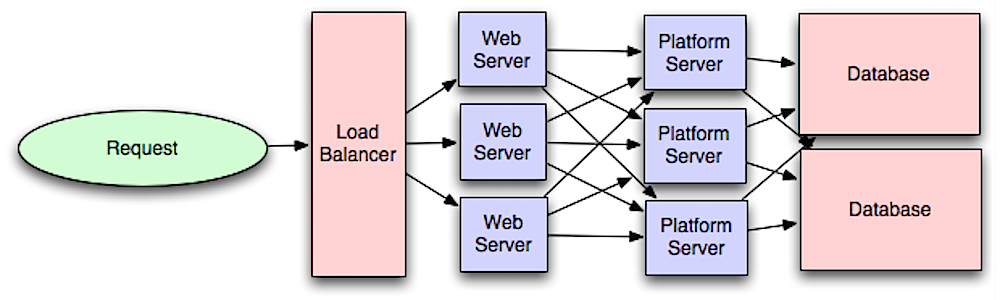
Database
(repeat)
Federation (or functional partitioning) splits up databases by function. For example, instead of a single, monolithic database, you could have three databases: forums, users, and products.
Denormalization - Redundant copies of the data are written in multiple tables to avoid expensive joins. This attempts to improve read performance at the expense of some write performance.
Disadvantage(s): denormalization
- Data is duplicated.
- Constraints can help redundant copies of information stay in sync, which increases complexity of the database design.
- A denormalized database under heavy write load might perform worse than its normalized counterpart.
SQL Tuning: process of improving SQL statement performance in a measurable way. See https://github.com/donnemartin/system-design-primer#sql-tuning for examples.
NoSQL
NoSQL is a collection of data items represented in a key-value store, document store, wide column store, or a graph database.
- Key-value store: (Abstraction: hash table)
- Document store: (Abstraction: key-value store with documents stored as values)
- Wide column store: (nested map ColumnFamily<RowKey, Columns<ColKey, Value, Timestamp>>)
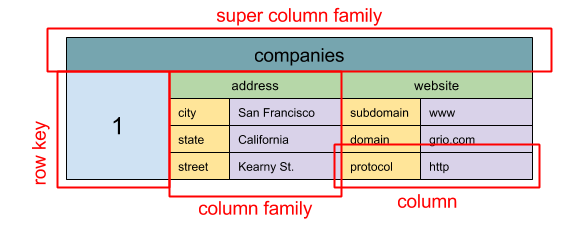
- Graph database (Abstraction: graph)
Caching
Kinds of cache
- Client (e.g. OS, browser)
- Content Delivery Network (CDN)
- Database caching
- row level
- query level
- Application caching
- Fully-formed serializable objects
- Fully-rendered HTML
Asynchronism
Message queues receive, hold, and deliver messages. If an operation is too slow to perform inline, you can use a message queue with the following workflow:
An application publishes a job to the queue, then notifies the user of job status A worker picks up the job from the queue, processes it, then signals the job is complete
Task queue: Tasks queues receive tasks and their related data, runs them, then delivers their results.
Back pressure: clients get a server busy or HTTP 503 status code to try again later (used when queue fills up memory)
Communication
(OSI 7-layer model image)
(HTTP verbs such as GET, POST, PUT, DELETE, PATCH, etc)
(TCP) (UDP - for video calls, real-time video games, etc) (Remote procedure call) (REST)
Polling vs Streaming
- Polling: send request every X seconds (typically 30-60) and get response
- Streaming: Get data from a server continuously