React Redux - herougo/SoftwareEngineerKnowledgeRepository GitHub Wiki
Source:
- https://www.youtube.com/playlist?list=PLC3y8-rFHvwheJHvseC3I0HuYI2f46oAK
- https://react-redux.js.org/tutorials/quick-start
Redux - a predictable state container for JavaScript apps
- not tied to React
- can be used with React, angular, vue, or even vanilla JavaScript
- a problem it solves: accessing data between components requires a LOT of prop drilling
React-Redux - official Redux UI binding library for react
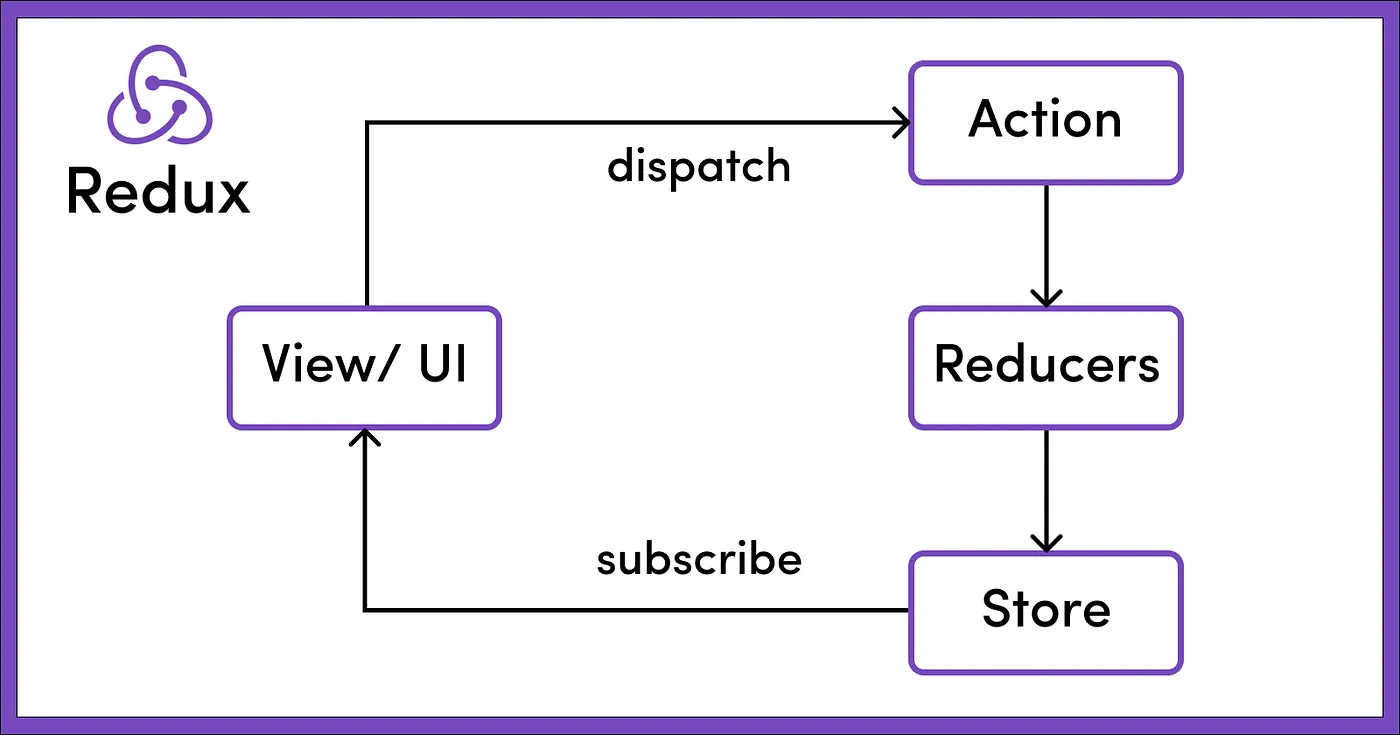
Core concepts for redux
- store: where data is stored
- actions: are dispatched to the store to apply the corresponding state change
- reducer: take the current state and a dispatched action and return the new state
- We have 2 sections of the state space (ice cream and cake).
const redux = require('redux')

const CAKE_ORDERED = 'CAKE_ORDERED'
const ICECREAM_ORDERED = 'ICECREAM_ORDERED'

function orderCake(qty = 1) {
  return {
    type: CAKE_ORDERED,
    payload: qty
  }
}

function orderIceCream(qty = 1) {
  return {
    type: ICECREAM_ORDERED,
    payload: qty
  }
}

const initialCakeState = {
  numOfCakes: 10
}

const initialIceCreamState = {
  numOfIceCreams: 20
}

const cakeReducer = (state = initialCakeState, action) => {
  switch (action.type) {
    case CAKE_ORDERED:
      return {
        ...state,
        numOfCakes: state.numOfCakes - 1
      }
    default:
      return state
  }
}

const iceCreamReducer = (state = initialIceCreamState, action) => {
  switch (action.type) {
    case ICECREAM_ORDERED:
      return {
        ...state,
        numOfIceCreams: state.numOfIceCreams - action.payload
      }
    case CAKE_ORDERED:
      return {
        ...state,
        numOfIceCreams: state.numOfIceCreams - action.payload
      }
    default:
      return state
  }
}

const rootReducer = redux.combineReducers({
  cake: cakeReducer,
  iceCream: iceCreamReducer
})

const store = redux.createStore(rootReducer)

console.log('Initial State ', store.getState())
const unsubscribe = store.subscribe(() => {
  console.log('Updated State ', store.getState())
})
store.dispatch(orderCake())
store.dispatch(orderIceCream())
unsubscribe()The word "thunk" is a programming term that means "a piece of code that does some delayed work". Rather than execute some logic now, we can write a function body or code that can be used to perform the work later.
Thunk Use Cases
- Moving complex logic out of components
- Making async requests or other async logic
- Writing logic that needs to dispatch multiple actions in a row or over time
- Writing logic that needs access to getState to make decisions or include other state values in an action
The Redux Toolkit configureStore API automatically adds the thunk middleware during store creation, so it should typically be available with no extra configuration needed.
const redux = require('redux')
const thunkMiddleware = require('redux-thunk').default
const axios = require('axios')
const createStore = redux.createStore
const applyMiddleware = redux.applyMiddleware

const initialState = {
  loading: false,
  users: [],
  error: ''
}

const FETCH_USERS_REQUESTED = 'FETCH_USERS_REQUESTED'
const FETCH_USERS_SUCCEEDED = 'FETCH_USERS_SUCCEEDED'
const FETCH_USERS_FAILED = 'FETCH_USERS_FAILED'

const fetchUsersRequest = () => {
  return {
    type: FETCH_USERS_REQUESTED
  }
}

const fetchUsersSuccess = users => {
  return {
    type: FETCH_USERS_SUCCEEDED,
    payload: users
  }
}

const fetchUsersFailure = error => {
  return {
    type: FETCH_USERS_FAILED,
    payload: error
  }
}

const fetchUsers = () => {
  return function (dispatch) {
    dispatch(fetchUsersRequest())
    axios
      .get('https://jsonplaceholder.typicode.com/users')
      .then(response => {
        // response.data is the users
        const users = response.data.map(user => user.id)
        dispatch(fetchUsersSuccess(users))
      })
      .catch(error => {
        // error.message is the error message
        dispatch(fetchUsersFailure(error.message))
      })
  }
}

const reducer = (state = initialState, action) => {
  console.log(action.type)
  switch (action.type) {
    case FETCH_USERS_REQUESTED:
      return {
        ...state,
        loading: true
      }
    case FETCH_USERS_SUCCEEDED:
      return {
        loading: false,
        users: action.payload,
        error: ''
      }
    case FETCH_USERS_FAILED:
      return {
        loading: false,
        users: [],
        error: action.payload
      }
  }
}

const store = createStore(reducer, applyMiddleware(thunkMiddleware))
store.subscribe(() => {
  console.log(store.getState())
})
store.dispatch(fetchUsers())
React Toolkit reduces boilerplate code (i.e. action creator functions).
// index.js
import React from 'react'
import ReactDOM from 'react-dom/client'
import './index.css'
import App from './App'
import store from './app/store'
import { Provider } from 'react-redux'

// As of React 18
const root = ReactDOM.createRoot(document.getElementById('root'))

root.render(
  <Provider store={store}>
    <App />
  </Provider>,
)
// features/counter/counterSlice.js
import { createSlice } from '@reduxjs/toolkit'
export const counterSlice = createSlice({
name: 'counter',
initialState: {
value: 0,
},
reducers: {
increment: (state) => {
// Redux Toolkit allows us to write "mutating" logic in reducers. It
// doesn't actually mutate the state because it uses the Immer library,
// which detects changes to a "draft state" and produces a brand new
// immutable state based off those changes.
// Also, no return statement is required from these functions.
state.value += 1
},
decrement: (state) => {
state.value -= 1
},
incrementByAmount: (state, action) => {
state.value += action.payload
},
},
})
// Action creators are generated for each case reducer function
export const { increment, decrement, incrementByAmount } = counterSlice.actions
export default counterSlice.reducer// app/store.js
import { configureStore } from '@reduxjs/toolkit'
import counterReducer from '../features/counter/counterSlice'
export default configureStore({
reducer: {
counter: counterReducer,
},
})// features/counter/Counter.js
import React from 'react'
import { useSelector, useDispatch } from 'react-redux'
import { decrement, increment } from './counterSlice'
import styles from './Counter.module.css'
export function Counter() {
const count = useSelector((state) => state.counter.value)
const dispatch = useDispatch()
return (
<div>
<div>
<button
aria-label="Increment value"
onClick={() => dispatch(increment())}
>
Increment
</button>
<span>{count}</span>
<button
aria-label="Decrement value"
onClick={() => dispatch(decrement())}
>
Decrement
</button>
</div>
</div>
)
}