create project - hantsy/angularjs-zf2-sample GitHub Wiki
#Create a restful application with AngularJS and Zend 2 framework
This example application uses AngularJS/Bootstrap as frontend and Zend2 Framework as REST API producer.
##The backend code
This backend code reuses the database scheme and codes of the official Zend Tutorial, and REST API support is also from the Zend community.
Zend2 provides a AbstractRestfulController for RESR API producing.
class AlbumController extends AbstractRestfulController {

    public function getList() {
        $results = $this->getAlbumTable()->fetchAll();
        $data = array();
        foreach ($results as $result) {
            $data[] = $result;
        }

        return new JsonModel(array(
            'data' => $data)
        );
    }

    public function get($id) {
        $album = $this->getAlbumTable()->getAlbum($id);
        return new JsonModel(array("data" => $album));
    }

    public function create($data) {

        $data['id']=0;
        $form = new AlbumForm();
        $album = new Album();
        $form->setInputFilter($album->getInputFilter());
        $form->setData($data);

        $id=0;
        if ($form->isValid()) {
            $album->exchangeArray($form->getData());
            $id = $this->getAlbumTable()->saveAlbum($album);
        }else {
          print_r(  $form->getMessages());
        }

        return new JsonModel(array(
            'data' => $id,
        ));
    }

    public function update($id, $data) {
        $data['id'] = $id;
        $album = $this->getAlbumTable()->getAlbum($id);
        $form = new AlbumForm();
        $form->bind($album);
        $form->setInputFilter($album->getInputFilter());
        $form->setData($data);

        if ($form->isValid()) {
            $id = $this->getAlbumTable()->saveAlbum($form->getData());
        }

        return new JsonModel(array(
            'data' => $id,
        ));
    }

    public function delete($id) {
        $this->getAlbumTable()->deleteAlbum($id);

        return new JsonModel(array(
            'data' => 'deleted',
        ));
    }

    protected $albumTable;

    public function getAlbumTable() {
        if (!$this->albumTable) {
            $sm = $this->getServiceLocator();
            $this->albumTable = $sm->get('Album\Model\AlbumTable');
        }
        return $this->albumTable;
    }

}
The naming convention of the methods for REST API is listed in the following table.
| URL | HTTP Method | Controller Method | Description |
| /albums | GET | getList | Get the list of Albums |
| /albums | POST | create | Create a new Album |
| /albums/:id | GET | get | Get the details of a Album |
| /albums/:id | PUT | udpate | Update a Album by id |
| /albums/:id | DELETE | delete | Delete a Album by id |
Besides the naming convention, you have to set the routing rule to make it work.
Change the content of module/Album/config/module.config.php to the following.
<?php

return array(
    'controllers' => array(
        'invokables' => array(
            'Album\Controller\Album' => 'Album\Controller\AlbumController',
        ),
    ),
    // The following section is new and should be added to your file
    'router' => array(
        'routes' => array(
            'album' => array(
                'type' => 'segment',
                'options' => array(
                    'route' => '/albums[/:id]',
                    'constraints' => array(
                        'id' => '[0-9]+',
                    ),
                    'defaults' => array(
                        'controller' => 'Album\Controller\Album'
                    ),
                ),
            ),
        ),
    ),
    'view_manager' => array(
        'strategies' => array(
            'ViewJsonStrategy',
        ),
    ),
);
For producing REST API, it needs render a JSON view instead of the HTML view.
It is very similar with the before AngularJS CakePHP application and AngularJS Grails application.
I do not want to duplicate the codes in this post, please checkout the codes github.com.
https://github.com/hantsy/angularjs-zf2-sample
Clone the source from github.com.
git clone https://github.com/hantsy/angularjs-zf2-sample
Run php composer.phar install to install the depencies automaticially. This applicalication also used Composer to manage the dependencies.
Create a vhost setting in Apache for this application, set the value of the DocumentRoot is <your application path>/public.
<VirtualHost *:80>
    ServerName zf2-tutorial.localhost
    DocumentRoot E:/MyWorks/hantsy-labs/angularjs-zf2-sample/public

    SetEnv APPLICATION_ENV "development"
    <Directory E:/MyWorks/hantsy-labs/angularjs-zf2-sample/public>
        DirectoryIndex index.php
        AllowOverride All
        Order allow,deny
        Allow from all
    </Directory>
</VirtualHost>
Change the database setting(username and password) in the config/autoload/local.php.
return array(
     'db' => array(
         'username' => 'root',
         'password' => '',
     ),
 );
Start apache server.
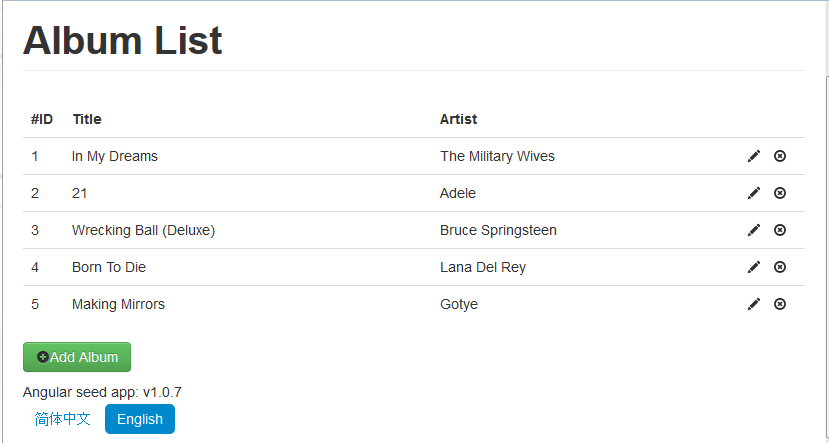
Open browser, navigate to http://zf2-tutorial.localhost/app/index.html#/albums.
##Sample codes
Clone the sources from my github.com.
git clone https://github.com/hantsy/angularjs-zf2-sample
And switch to stage1 branch.
git checkout stage1