10 File Io - grymmjack/DRAW GitHub Wiki
What you'll learn: Every way to get artwork in and out of DRAW — the native
.drawformat, nine raster export formats, the famous QB64 source-code export, color-cycling formats (QB64 program, GrafX2 GIF, animated GIF, DeluxePaint LBM), and the Extract Images sprite-decomposition tools.
🎯 Goal: Understand all file format options.
| Format | Shortcut / menu |
|---|---|
| Image (PNG / BMP / JPG / GIF) | Ctrl+O |
Project (.draw) |
Alt+O |
Aseprite (.ase / .aseprite) |
File → Open Aseprite |
Photoshop (.psd) |
File → Open Photoshop |
DeluxePaint (.lbm / .iff, ILBM or PBM) with cycle ranges |
Ctrl+O, or File → Color Cycling → Open DeluxePaint / GrafX2 File |
| GrafX2 GIF with cycle ranges |
Ctrl+O (the ranges come along automatically) |
| Import Image (oversized, interactive placement) | File → Import Image |
| Drag-and-drop file onto window | Windows |
| Command-line argument | DRAW path/to/file.draw |
| Command | Shortcut | Notes |
|---|---|---|
| Save | Ctrl+S |
Silent resave to current path. |
| Save As… | Ctrl+Shift+S |
Prompt for new name and format. |
| Export Selection | Ctrl+Alt+Shift+S |
Save just the selected region. |
| Export Layer as PNG | Layer menu | One-click per-layer PNG. |
| Export Brush as PNG | F12 |
Current custom brush. |
The Recent Files list holds up to 10 entries with quick-jump shortcuts Alt+1 … Alt+0.
File → New from Template… reads from ASSETS/TEMPLATES/ and gives you a starter canvas with appropriate dimensions, palette, and grid for common targets (NES sprite, Game Boy tile, Lospec sheet, etc.).
🎯 Goal: Understand the native DRAW project format.
A .draw file is a valid PNG file with a custom drAw chunk embedded inside. Every image viewer on the planet can render the flattened preview. Only DRAW can read the rich data inside the chunk and reconstruct the editable project.
What .draw preserves:
- All layers, blend modes, opacities, names, groups, symbol parents/children.
- Active palette state and the auto-generated
[DOCUMENT]palette. - Tool states, grid settings, snap, crosshair config.
- Reference image configuration and overlay opacity.
- Text layer data (re-editable!).
- Extract Images settings.
- Character Mode state.
The format is versioned for forward compatibility — newer DRAW builds still read older .draw files, and they extend the chunk safely when new features arrive.
🎯 Goal: Export artwork in various formats.
| Format | Use case |
|---|---|
PNG (native .draw) |
Embeds the full project in a PNG; viewable anywhere, re-editable in DRAW. |
| PNG (plain) | Standard PNG, no metadata. |
| GIF | Static, palette-aware. |
| JPEG | Lossy compression for previews. |
| TGA | Truevision; popular in game dev. |
| BMP | Windows Bitmap — for retro tooling. |
| HDR | High Dynamic Range. |
| ICO | Windows Icon (multi-resolution). |
| QOI | Modern lossless Quite OK Image format. |
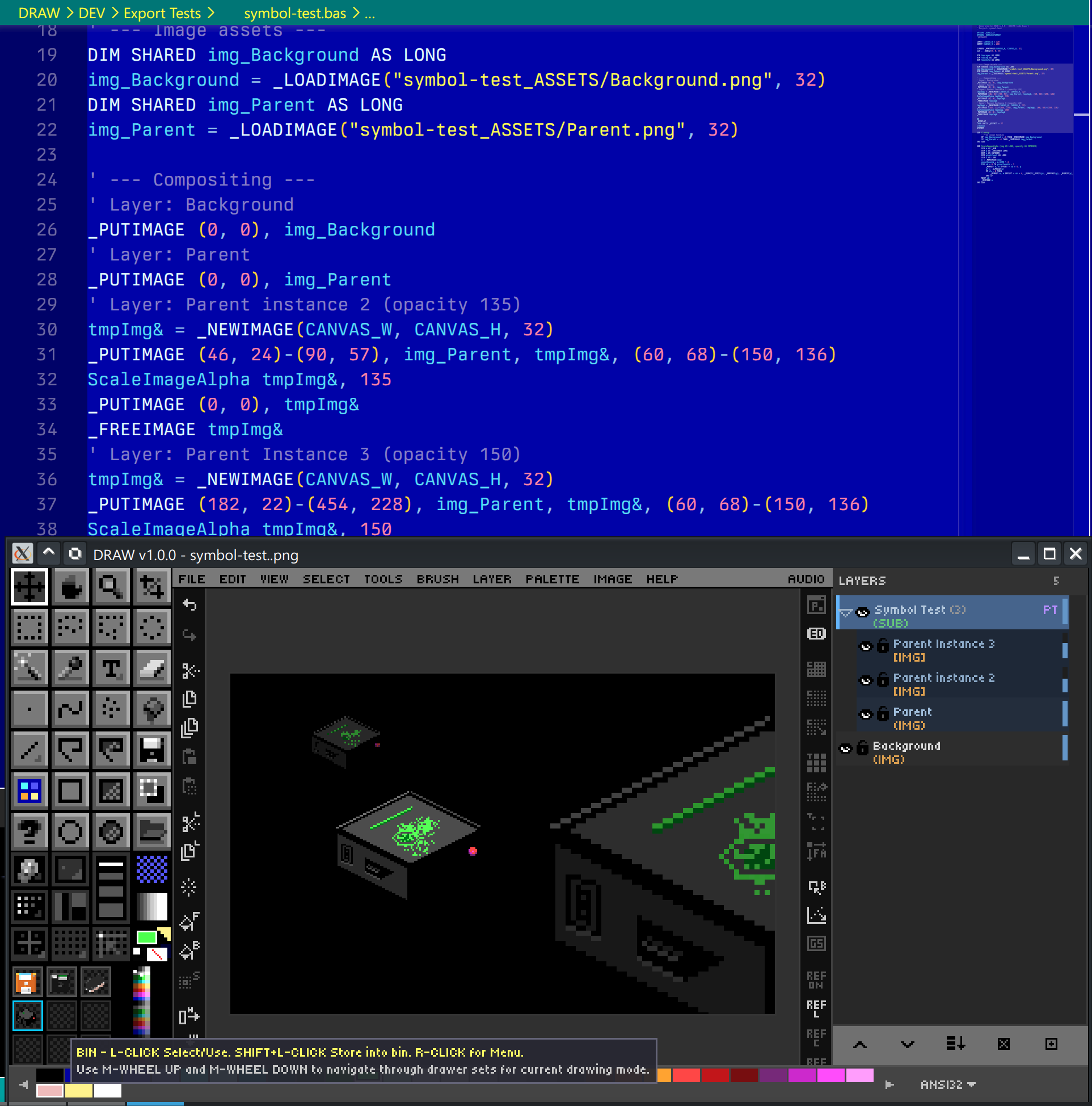
The signature feature: export your artwork as a self-contained .bas program. The file declares a screen, sets pixels in order, and runs as a standalone QB64-PE compile. Open it, hit compile, and your sprite paints itself onto the screen. This is wonderful for:
- BASIC tutorials.
- Embedding small graphics in QB64-PE programs without shipping image files.
- Showing how a piece of pixel art was constructed pixel by pixel.
🎯 Goal: Get color-cycling art out of DRAW in a form other people and programs can play, and bring cycling art in from DeluxePaint and GrafX2.
Cycle ranges (Chapter 3) are saved in every .draw file. To take them anywhere else, use File → Color Cycling:
| Command | Writes | Plays in |
|---|---|---|
| Export Cycling QB64 Program (.bas)… | One self-contained .bas file |
QB64-PE: qb64pe -x art.bas
|
| Export GIF + Cycle Ranges (GrafX2)… | A still .gif with GrafX2 CRNG ranges |
GrafX2, and DRAW (ranges load back); other viewers show the still image |
| Export Animated GIF of the Cycle… | An animated .gif of one full loop |
Any browser, chat app or image viewer |
| Export DeluxePaint ILBM (.lbm)… | IFF ILBM (planar) with CRNG chunks |
DeluxePaint (Amiga), GrafX2, PyDPainter, Pro Motion, and DRAW |
| Export DeluxePaint PBM (.lbm, PC)… | IFF PBM (chunky), as saved by DeluxePaint II Enhanced on the PC | DeluxePaint for DOS, GrafX2, and DRAW |
| Open DeluxePaint / GrafX2 File… | — | Opens .lbm / .iff / .gif with the file's palette and ranges |
The exported .bas needs no image files. A single DATA block, deflated and base64-encoded, holds the palette, the ranges, your art as a 32-bit image, and an 8-bit overlay containing only the cycling pixels. The program draws the art, then rotates the overlay's palette with _PALETTECOLOR. Each range runs on its own clock, in the same speed units and directions DRAW uses. It opens at the largest whole-number zoom that fits your screen. Space pauses, + / - change the speed, R restarts and Esc quits. The comments at the top list every range and explain the technique, so it also works as a lesson in palette animation.
-
Speeds use DeluxePaint's
CRNGunit (16384 = 60 steps per second), so ranges move from DRAW to.lbmand GIF and back without drifting. -
Ping-pong and paused ranges are DRAW extras that
CRNGcan't express. DRAW writes ping-pong as forward and a paused range as inactive, then adds a small private block (DRAWCYCLin GIFs,DRCYin LBMs) that other programs skip and DRAW reads back exactly. - Transparency becomes the GIF transparent color, or the LBM transparent color when the palette has a free slot.
- Off-palette pixels are mapped to the nearest palette color that is not in a cycle range, so they never start cycling by accident. The log reports how many there were.
- Importing a DeluxePaint or GrafX2 file creates a new document with the file's exact palette and pixel indices. A swatch must own its pixels, so when the file repeats a color that matters, DRAW nudges the later copy by one or two levels. Inactive ranges and ranges with speed 0 import as paused. Old 4-bit Amiga palettes are rescaled. Extra-Halfbrite images become 64 colors. HAM images aren't supported.
-
Saving an opened
.lbmor.gifwithCtrl+Swrites a companion.drawnext to it. The original file is never overwritten.
Frame 1 is the whole picture. Each later frame holds only the box around the cycling pixels plus that step's colors, so the files stay small. The loop is the exact least common multiple of your ranges' periods. Speeds whose periods divide evenly loop in a few seconds; very mismatched speeds are cut at 60 seconds or 1000 frames, with a note in the log. Times are rounded to GIF's 1/50-second steps.
Every format above is also available without opening a window:
DRAW art.png --palette art.gpl --cycle 16-31:8 --cycle 40-47:12:ping --export art.draw
DRAW art.draw --export art.bas           # .bas  .gif  .lbm (ILBM)  .bbm or .pbm.lbm (PBM)
DRAW art.draw --export-anim art-anim.gif
DRAW old.lbm  --export old.draw          # DeluxePaint -> DRAW, ranges included
--cycle LO-HI[:STEPS_PER_SECOND[:fwd|rev|ping]] adds a range and can be repeated. DRAW exits after the work is done, with status 0 on success. DEV/tools/make-cycle-examples.sh builds the scenes in SAMPLES/COLOR CYCLING/ this way.
🎯 Goal: Bring classic ANSI/BBS art into DRAW as pixels, and turn your pixel art into shareable ANSI.
DRAW reads and writes the ANSI-art family of formats, so you can drop lo-fi mockups into DRAW, refine them as pixels, and hand them back out as .ans.
Supported inputs:
| Kind | Extensions | Notes |
|---|---|---|
| Text ANSI |
.ans .asc .nfo .diz
|
SGR escape sequences — 16-color, iCE, 256-color (38;5;n), and 24-bit truecolor (38;2;r;g;b). UTF-8 block/box art is auto-detected and mapped to CP437. |
| BIN | .bin |
Raw character+attribute pairs; width from SAUCE (BinaryText). |
| XBIN |
.xb .xbin
|
Full XBIN: custom 16-color palette, embedded font, and RLE compression. |
| TundraDraw | .tnd |
24-bit truecolor binary stream. |
The Import ANSI dialog previews the art and its detected format, and lets you choose how it rasterises onto the canvas:
-
WIDTH —
8 PX(square) or9 PX(authentic VGA 9-dot; box-drawing characters join across cells). -
ASPECT —
SQUAREorDOS 1.2(the classic non-square CRT stretch). -
SCALE —
1×–8×nearest-neighbor. -
Cell height follows the SAUCE font:
IBM VGA→ 8×16,VGA50/EGA43→ 8×8.
If an XBIN carries an embedded font or a custom palette, the dialog offers to install them into your libraries:
-
Import font writes the font to
FONTS/ANSI Imports/so it appears as a bitmap font for the Text tool. -
Import palette writes a
.GPLinto your user palettes and refreshes the picker.
You can also open ANSI art straight from the command line: ./DRAW.run artwork.xb.
Export converts the canvas to half-block ANSI (each character cell shows two stacked pixels via ▀). The dialog gives a live source-vs-render preview plus:
| Control | Choices |
|---|---|
| FROM |
DOCUMENT (flattened) · LAYER (current) · SELECTION (marquee region) — auto-selects Selection when one is active |
| COLOR |
16 · iCE · 256 · RGB (24-bit) — auto-detected from the art |
| CELLS |
PER-PIXEL (one canvas pixel per cell — maximum detail) · 1:1 8PX (one 8-px cell — round-trips terminal art at native size) |
| FONT |
VGA 8x16 · VGA50 8x8 (written to the SAUCE record) |
| SIZE | Column count (auto, or stepped) |
A byte-exact SAUCE record (dimensions + font) is appended. Use Selection as the source to mock a scene in pixels and export just one section to ANSI.
💡 Round-trip tip:
PER-PIXELkeeps every pixel but renders ~8× larger in a terminal/viewer;1:1 8PXmaps 8×16-pixel blocks to one cell, so exported terminal art re-imports at its original size.
🎯 Goal: Extract sprites from sheets or compositions.
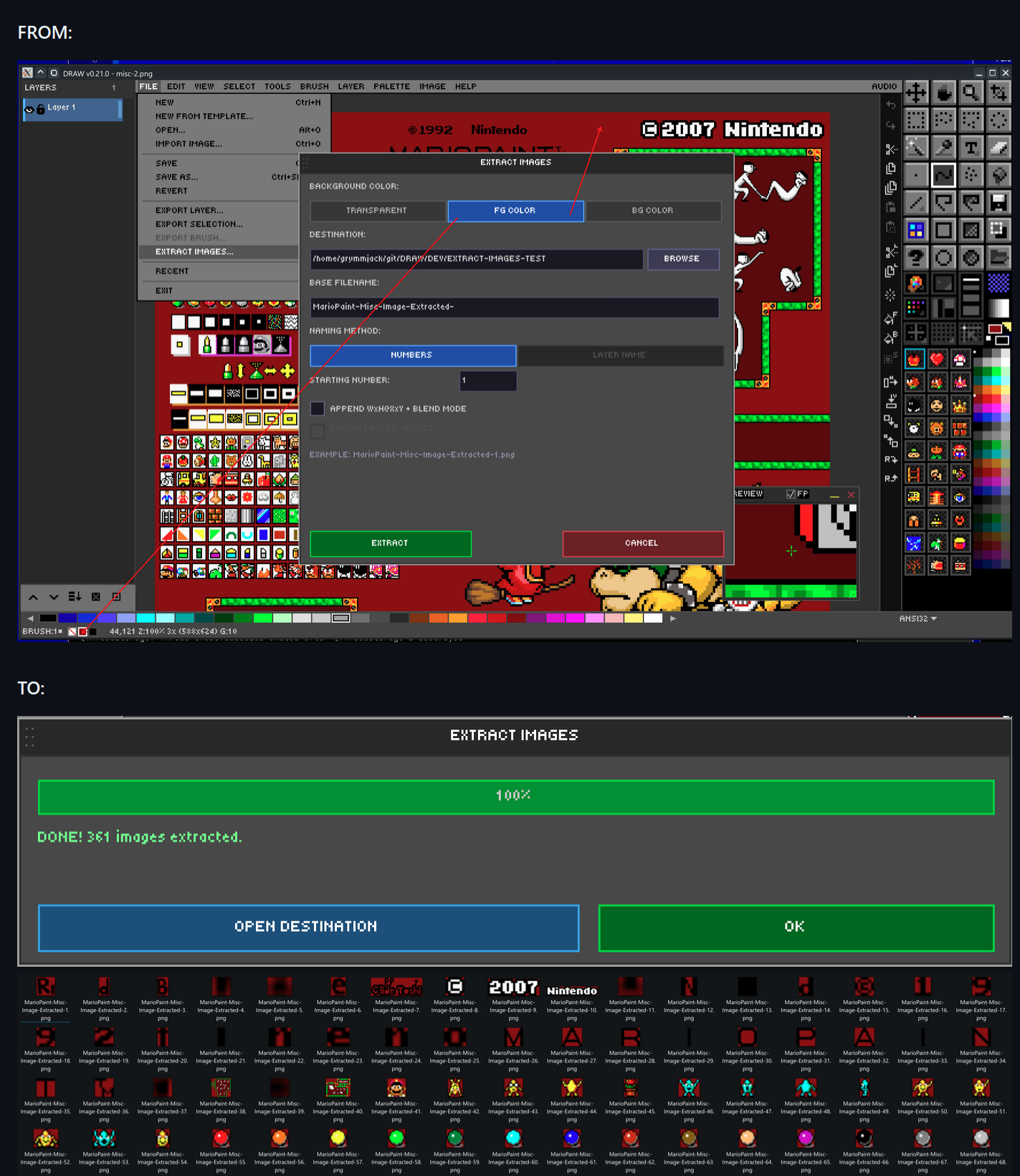
DRAW can decompose a finished image into individual sprite PNGs. Three extraction methods are available:
- Flood-fill connected regions — auto-detect distinct sprites by transparent gutters. Best for unsorted sprite sheets.
- Per-layer extraction — each layer becomes one PNG. Best when your sheet was built layer-by-layer.
- Merged extraction — flatten visible layers and extract regions from the result.
Background options for each output sprite: Transparent, FG color, or BG color. Output is a folder of separate PNG files; the settings you pick are persisted in the .draw file so you can re-export later with one click.
There is a related command, Extract From Grid…, which slices a regular grid (e.g., 16×16 cells) into named PNGs — perfect for tilesets — and Extract To Layers From Grid…, which slices a grid into named layers in a new project.
➡️ Next: Chapter 11 — Canvas & View Controls