High Level Analysis - gcivil-nyu-org/NYU-Marketplace GitHub Wiki
High-Level Context Diagram
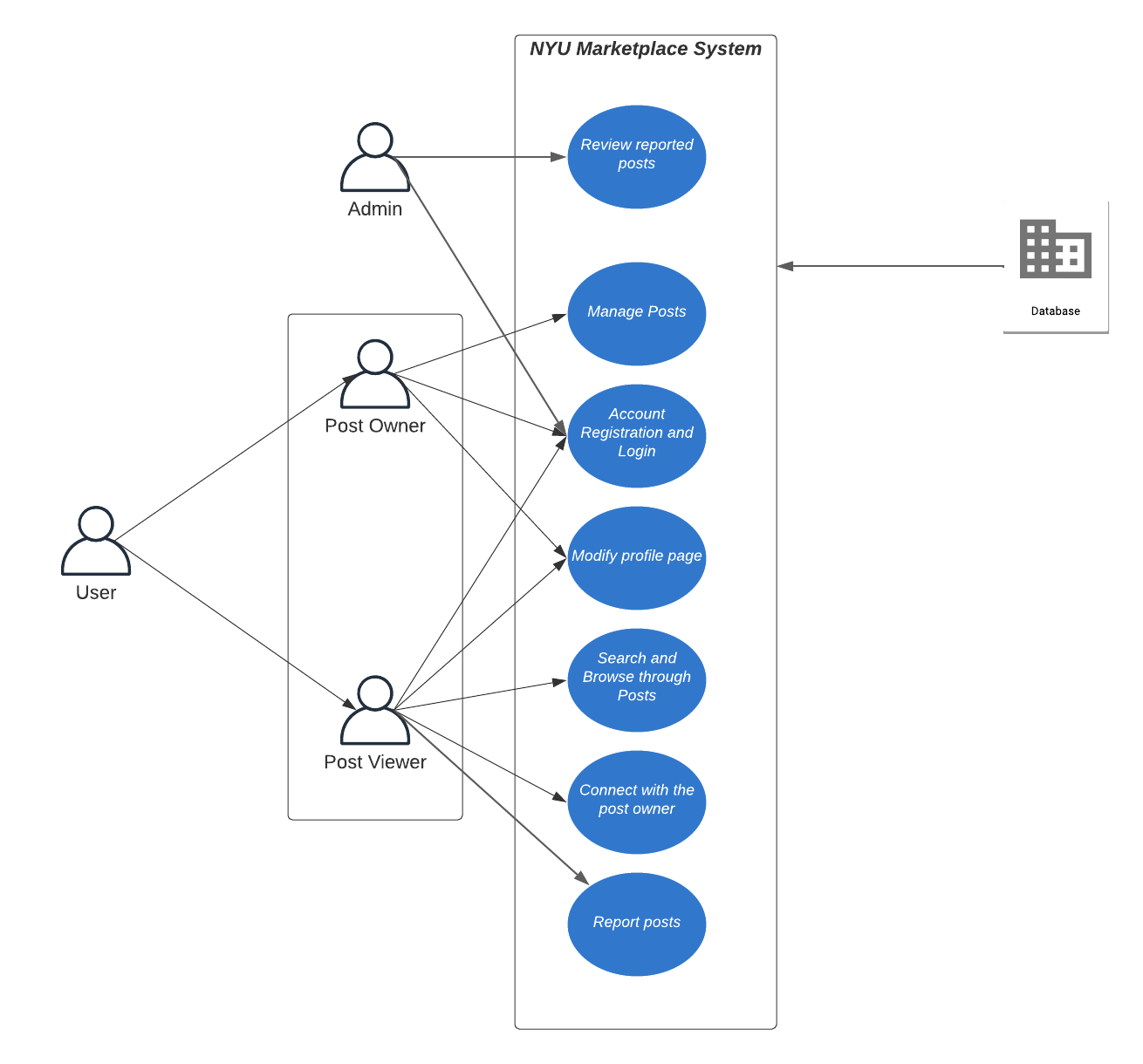
User Personas
User
User is a student from the NYU community who is looking to buy, sell, rent or exchange an item of interest. User can register an account and create own profile. Then user can decide to be post viewer or post owner.
Post Owner
Post owner can sell, rent out or exchange item of interest by creating a post on NYU marketplace. Post owner will get notified when other users show interest in their post. And post owner can view the messages from the post manage page and decide on whom to contact.
Post Viewer
Post viewer can browse through NYU marketplace and look for items they might have interest in. Post viewer can connect with post owner by clicking the "Interested" button and leaving a customized message and contact information.
Admin
Admin can review the reported posts and verify if these reports are valid and then proceed accordingly. Admin can delete the posts that violate the policies set forth and ban the account owner who violated the website's code of conduct.
Epics
Account registration and login
Users can register and login to our website either using 'Continue with google' or by providing their email id and password. The user's email will be checked to ensure it ends with nyu.edu. In the case of the user providing their email and password, a verification link will be sent to their email to verify ownership. Users will have the ability to recover their accounts using the forgot password option. Users will be able to stay logged in for an extended period of time using the Remember Me checkmark.
Admins can also login to our website using the same login interface as normal users.
-
As a user, I want to be able to create an account using 'Continue with Google' so that I can access NYU marketplace using my Google account.
-
As a user, I want to be able to create an account using my email id and password so that I can access NYU marketplace using my email id and password.
-
As a user, I want to be able to login to my account using 'Continue with Google' so that I can access NYU marketplace using my Google account.
-
As a user, I want to be able to login to my account using my email id and password so that I can access NYU marketplace using my email id and password.
-
As a user, I want to be able to reset my account using the forgot password button so that I can recover my account if I forget my password.
-
As a user, I want to be able to stay signed in to the website using the Remember Me checkmark so that I don't have to login each time I visit NYU marketplace.
-
As a user, I want to be able to signup/login only using my NYU email address, and not any other email address so that I can be sure that only members of the NYU community can access NYU marketplace.
-
As an admin, I want to be able to login using my username and password so that I can moderate the website.
Search and Browse through Posts
Users can find different types of items by selecting tags "Buy", "Exchange", and "Rent". Users can use the filter to choose the category and sort items. For example, they can find textbooks which are sold in the category “Books”. Users can search items by typing the name of items. Then users can browse the information of items. It displays some basic information including item name, item price, post date, and post user.
- As a post viewer, I want to be able to search items quickly and easily by inputting the name so that I could find the specific items I want.
- As a post viewer, I want to be able to select types of items easily by choosing tags “Buy”, “Exchange” and “Rent” so that I could filter the types of items.
- As a post viewer, I want to be able to sort items easily so that I could find what I want quickly.
- As a post viewer, I want to be able to filter items by category so that I could find the items of a specific type.
- As a post viewer, I want to be able to browse the information of items so that I could have a glance at the information of the item.
Manage Posts
Users can sell, rent out, or exchange items they no longer require by creating posts about them. Users can also edit a post to update details like the cost of the item, location, etc. Users will be able to view and delete all the notifications for their posts. Once the connection with a user is made the user can delete the post from the account.
- As a post owner, I want to be able to create a post by adding details like item name, item cost, location, and contact information.
- As a post owner, I want to be able to edit the posts I have made previously.
- As a post owner, I want to be able to delete the post that was made previously.
- As a post owner, I want to be able to view all the notifications made by other interested members.
- As a post owner, I want to be able to view the contact information of the person who has shown interest.
- As a post owner, I want to be able to delete any notification that may not be relevant.
Connect with the post owner
Post viewers can connect with post owners by using “Interested” button and leaving a customized message by using the comment function. On the other hand, the post owner will get notified by the notification system when post viewers click “Interested”.
- As a post viewer, I want to be able to show interest in the post by clicking the “Interested” button so that I can have the opportunity to contact with post owner.
- As a post viewer, I want to be able to leave my customized message to the post owner so that I can let post owner see my message and start to contact me.
- As a post viewer, I want to be able to share with the post owner my contact information which may include email or phone number so that I can have post owner contact me if they want to contact me.
Modify profile page
Users can find their personal profiles by viewing the profile page. It displays some basic information of users including their account name, account photo, the school within NYU, phone number, preferred email, and so on. Some of the information is not required.
- As a user, I want to be able to create my profile.
- As a user, I want to be able to edit my profile details such as profile photo, contact information or address.
- As a user, I want to be able to change my account password.
- As a user, I want to be able to choose which personal information I want to show or want to hide so that my personal data is safe.
- As a user, I want to be able to update my personal contact information so that I could get contacted.
- As a user, I want to be able to delete my profile if I choose to.
Report Posts
Users will have the ability to report a post that they believe is spam, illegal or dangerous.
- As a post viewer, I want to be able to report posts that are spam, illegal or dangerous so that I can keep NYU marketplace free of unwanted posts.
Review reported Posts
Admin will have the ability to review a reported post and then identify if the post is reported for valid reasons.
- As an admin, I want to be able to view reported posts so I can validate if the post is a spam or not.
- As an admin, I want to be able to delete a post that is abusive or illegal so the application is safe for other users.
- As an admin, I want to be able to keep posts that were spammed for wrong reasons so all users get a fair chance to use the application.