Git (intro) - ftc8380/coding-guide GitHub Wiki
Git
Way back in the Android Studio page of this guide, I had you install Git so you could get the team code from VCS. Now it's time for us to elaborate on that a bit and talk about what you installed.
A bunch of fellow users and employees of GitHub, Inc. have written a guide to Git so that's there to help you. (I know, I keep linking you to other resources, but there's no use reinventing the wheel).
Local and remote repositories
In short, Git can turn any folder or directory into a Git repository (repo for short), allowing it to be used in that folder. Every project on the team GitHub is a Git repository. Yes, even this guide!
Git allows the creation of both local and remote Git repositories:
- Local repositories exist on computers like yours or the team laptop
- Remote repositories are usually hosted on a website like GitHub
Commits
Every Git repository records pieces of info called commits. GitHub's guide says:
Commits are the building blocks of "save points" within Git's version control. By using commits, you're able to craft history intentionally and safely.
You can keep making commits to continue your progress or revert to a previous one if something goes wrong, just like you would with a video game checkpoint, my favorite analogy for Git commits.
Each commit follows a previous commit, so they link together into a chain of sorts.
Push and pull
Let's introduce some more operations of Git: pushing and pulling.
- Pushing takes commits from the local repository and PUSHES them to the remote repo.
- Pulling takes commits from the remote repo and PULLS them into your local repo.
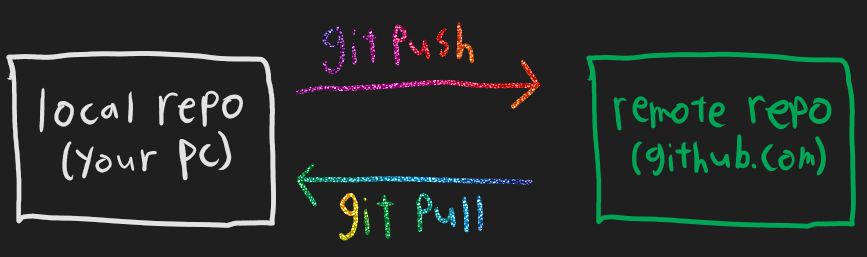
Git is a smart cookie so it only pushes the commits that the remote repo doesn't have, and it only pulls the ones that your local repo doesn't have. Just FYI.
Remember that there could be multiple people working on code, so the remote repo is where changes will be shared. It's on you to update (read: pull) periodically so that your local repo stays up to date. As a matter of fact, Git will often straight up deny your pushes if you haven't been caught up.
Git and Android Studio
GitHub's guide lists a bunch of commands. So long as you have Git installed properly, those commands are valid - you can run them from Android Studio by finding the Terminal button somewhere in the lower left. But it turns out that Android Studio has its own interface, to save you a few keystrokes. In the next few page(s) you'll learn how to use said interface.