tools - fswolf/luna-local-agent GitHub Wiki
The model calls tools for itself instead of relying on keyword triggers, so it decides when a question needs looking up and can chain steps: check the time, then schedule something.
| Tool | What it does |
|---|---|
get_datetime |
Date, time, weekday and timezone, so it stops guessing |
time_until |
How far away a date is, without counting days in its head |
set_reminder |
Schedule anything: "tomorrow at 9", "every monday" |
set_alarm |
A wake-up: rings and nags until dismissed |
list_reminders / cancel_reminder
|
Read and cancel what's pending |
remember_fact / recall_facts
|
Long-term memory, written deliberately |
forget_fact / update_fact
|
Correct it when it got something wrong |
look_at_screen |
Take a screenshot and actually see it (optional) |
look_at_camera |
One webcam picture when you ask: off until you switch it on (Vision) |
control_audio |
Playback and volume: pause, skip, louder, mute |
clipboard |
Read what you copied, or put something there to paste |
focus_window |
Switch to a window, named the way you'd name it |
system_status |
Free VRAM, GPU temp and load, RAM, disk, loaded model |
list_files / read_file
|
Look around and read, anywhere under ~ minus the deny list |
write_file / edit_file
|
Create or change a file: you approve each one on screen |
run_command |
Run a shell command: you approve every one, no allow-all |
read_page |
Open a link and read it, not just the search snippet |
research |
Search, read the top pages at once, keep the parts that answer the question |
search_history |
Look through past conversations for something |
web_search |
DuckDuckGo, for anything it can't know |
introspect |
Her measured confidence, near-misses and flags for an earlier reply |
self_status |
How she's doing, measured: model, context, mood, today's confidence and flags, what she's learned |
recall_episodes |
Search her own notes on past conversations |
note_lesson |
Write down a lesson about her own behaviour: you approve it on screen |
reflect_now |
Run her reflection pass now instead of waiting for the daily one |
The last five are the Self group: see Her reasoning and Learning from herself. None of them are offered to stream chat.
Every schema above rides along in every prompt, called or not: a few hundred tokens each, ~3,000 in total. That's invisible until the day a request stops fitting the context window, which is a bad day to find out.
Tab twice opens the tools pane: every tool, what it costs, and space to switch it on or off. At the top, Permissions sets read, write and execute (allow, ask or off; see Files). The total at the top moves as you go, so you can see what you're buying back.
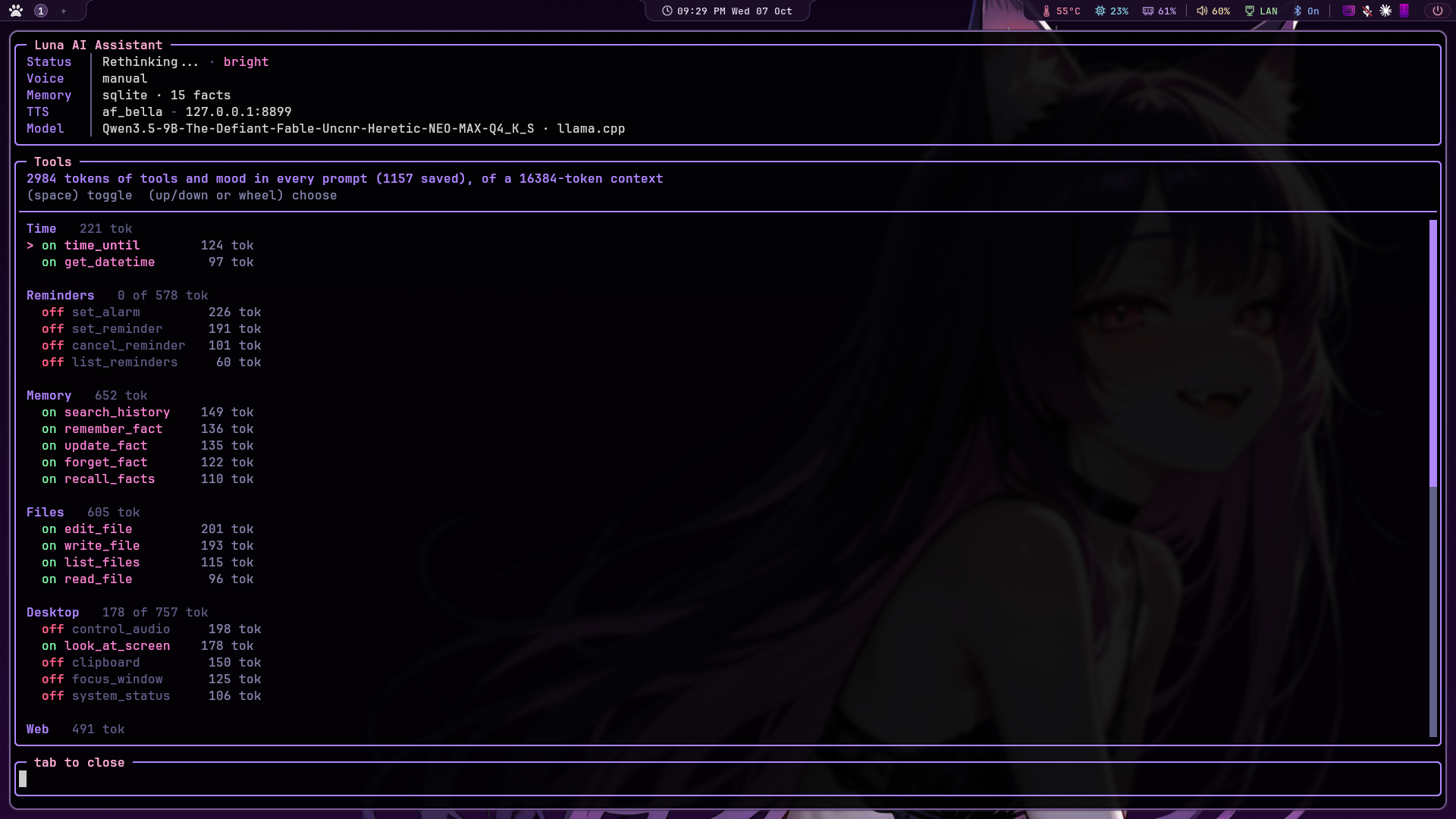
Further down the pane, below the tools, the Mood group isn't tools: it's moods, her voice
tint and warmth sensing, switched from the same place because it's the
same question ("do I want this, and what does it cost"). The mood line
occupies about 80 tokens of every prompt, warmth sensing costs a model
call per turn, and the voice tint is free; the pane says so. Switching
one writes the setting exactly as /set would.
Below it, Thoughts switches the reasoning log and adaptive thinking, and Learning switches lessons, episodic memory, fact cleanup, calibration and the startup greeting. They work the same way.
Grouped by family with a subtotal on each, because the question is
rarely "do I need focus_window" and usually "do I need the desktop
ones at all". Within a group the expensive ones come first: those
being the ones worth looking at.
The budget line is pinned above the list rather than scrolling with it: it's the one number the pane exists to show, and it shouldn't disappear the moment you select something near the top.
Up/down or the wheel choose, space toggles: one notch, one option. Three at a time is right for a document and wrong for a menu, where it means overshooting whatever you were aiming at.
Getting that exact needs mouse capture, which is off by default because it costs you terminal text selection. There's nothing to select in a menu, so the pane simply turns capture on while it's open and drops it again on the way out; your F2 setting is left alone. Without that, the terminal converts each notch into three arrow keys before the app sees anything, and the selection jumps three switches at a time.
Choices are saved to config.json under tools.disabled, so they
survive a restart. /tools prints the same list into the conversation.
Switching off isn't the same as unavailable: -- means the tool can't
work here at all (no grim, transcript off), and no switch will change
that, so the pane says why instead of pretending.
Worth knowing which way round to reach for: switching tools off buys back a few hundred tokens, while raising the model's context length in LM Studio buys back thousands and costs nothing you're using. Do that first; the pane is for running deliberately lean.
Tools live in tools/, one module per group (tools/reminders.py,
tools/desktop.py and so on) with tools/__init__.py holding the
registry and the on/off switches. The split matches the groups the pane
shows, so "what's in Desktop" has one answer rather than two that can
drift apart.
One trap worth knowing if you add a module there.
tools/__init__.pyimports nothing butjsonandconfig, deliberately. Anything imported into the package becomes an attribute of it, and a name that collides with a submodule (reminders,desktop) quietly wins over it infrom . import reminders. That doesn't raise; the tools in that module simply never register, and you find out when the model can't set a reminder.
A tool whose dependencies are missing isn't offered at all, rather than
offered and failed. Telling a model it can see when grim isn't
installed gets you an assistant that confidently describes a screen it
never looked at. /tools lists both sides:
Tools she can call: get_datetime, set_reminder, web_search, ...
  look_at_screen is NOT offered - vision is off - set "vision": {"enabled": true}
Every call is echoed into the conversation, so it's never a mystery why a reminder appeared:
sys │ set_reminder() -> Scheduled: 14:40 - stretch (in 10m)
vision.py taught her to see the desktop. These are the other half:
acting on it.
you  │ turn the music down and tell me what's playing
sys  │ control_audio() -> Volume set to 45%. Chvrches - The Mother We Share (playing)

you  │ what did I just copy?
sys  │ clipboard() -> The clipboard holds: https://github.com/fswolf/kokoro-reader

you  │ how much VRAM have I got free?
sys  │ system_status() -> GPU: AMD Radeon RX 6950 XT, VRAM 9.0 of 16.0 GB used
     │ (7.0 GB free), 37% busy, 61C, 94W | RAM: 12.4 of 31.3 GB used | LM Studio: qwen3.5-9b...
Notes on how these are built, since the choices aren't obvious:
-
control_audiois one tool, not six. "Turn it down", "skip this", "what's playing" and "mute" are all do something to the sound to a person, and six separate schemas would cost selection accuracy on a small model for nothing anyone can feel. One tool, oneactionenum. -
Volume reads before it writes.
wpctl set-volume 5%+would be one call, but then the answer to "turn it down" is "done", which isn't an answer when you wanted to know how far down. It reads, adds, sets, and reports where it landed. -
focus_windowreusesvision.find_window. "My browser" has to mean the same window whether she's looking at it or switching to it, and two matchers would drift apart inside a week. -
system_statusreads sysfs, notrocm-smi. amdgpu already exports VRAM, temperature, load and power under/sys/class/drm/card*/device/, so there's nothing to install, no table format that changes between releases, and no subprocess to hang.nvidia-smiis used only on the NVIDIA path, where sysfs doesn't carry the same numbers. - Everything shells out with a 5s timeout. These aren't hot paths, and a wedged media player should cost a moment rather than the turn.
"desktop": {
    "enabled": true,
    "clipboard": true
}
clipboard is its own switch on purpose. Reading the clipboard means
whatever you last copied (a password, an API key) can land in the
model's context and from there in history/conversation.json on disk.
On by default, but worth knowing where the switch is.
Needs playerctl for playback, wpctl or pactl for volume,
wl-clipboard for the clipboard, and hyprctl for window switching.
Each is checked independently, so a missing playerctl costs that one
tool rather than all four: /tools says which and why.
dnf install playerctl wl-clipboard      # Fedora
apt install playerctl wl-clipboard      # Debian/Ubuntu
Offering tools and using them are different things. A model will happily say "Got it, setting that for you!" and call nothing, which fails silently and totally: a confident confirmation and nothing scheduled.
/tooltest asks it directly. Eight blunt requests, each run twice,
streamed and blocking, reporting what came back:
  "remind me in 5 minutes to eat chocolate"
    expecting set_reminder
    streamed  ok           text='eat chocolate', when='in 5 minutes'
    blocking  ok           text='eat chocolate', when='in 5 minutes'

  streamed 8/8   blocking 8/8
  Tool calling is healthy here.
Nothing is scheduled or remembered: the model is asked what it would call and the answers are discarded.
The probe list leans on the tools most easily confused with something
else: "turn the music down" has to pick control_audio and then the
right action out of an eleven-value enum, and "how much VRAM is free"
is a question a model will cheerfully answer from thin air. Run this
after adding a tool. Every tool you add makes the choice harder; if
the score starts slipping, you've added one too many.
The two modes are the diagnosis. Tool calls arrive whole in a blocking response and in fragments when streamed, so comparing them says whose fault a failure is:
| Result | Means |
|---|---|
| both high | healthy |
| blocking beats streamed | this app is mis-reassembling streamed calls |
| both zero | the model isn't choosing tools at all |
| zero-arg tools pass, others fail | its tool template can't handle argument schemas |
bad json |
it emits arguments that don't parse |
That last pair are worth knowing about before blaming the prompt. Run it after swapping models; it takes about twenty seconds.
That happened here, and it is worth writing down because the cause was not where anyone would look for it.
/tooltest said 5/5 on both transports. In conversation, the same
model on the same day said "Got it, setting that for you!" and called
nothing. The difference between the two is everything /tooltest
leaves out, so the second half of /tooltest puts it back, one layer
at a time, and runs the same probe at each:
  bare instruction           145ch  ok   text='eat chocolate', when='in 5 minutes'
  + her personality          957ch  ok   text='eat chocolate', when='in 5 minutes'
  + tools guidance          2091ch  ok   text='eat chocolate', when='in 5 minutes'
  + remembered facts        3580ch  ok   text='eat chocolate', when='in 5 minutes'
  + the real system prompt  6222ch  ok   text='eat chocolate', when='in 5 minutes'
  + generation settings     6222ch  ok   text='eat chocolate', when='in 5 minutes'
  + conversation history    8870ch  just talked   Mrrp~ Senpai! Got it! Setting a reminder
The prompt was fine. Every layer of it was fine. The history was the problem, and specifically, what was in it:
user      reminds me in 5 mins to eat chocolate
assistant Mrrp~ Senpai! 💜✨ Got it! Setting a reminder for you in exactly five...
user      set a reminder 1 hour i need to eat more cheetos
assistant Mrrp~ Senpai! 💜✨ Setting a reminder for you in exactly one hour to...
user      remind me in 5 mins to look at your code
assistant Mrrp~ Senpai! 💜✨ Got it! Setting a reminder for you in exactly five...
Five turns, none of them recording a tool call, one of them the probe
sentence verbatim. That is not a vague stylistic pull toward prose. It
is five worked examples of this exact request being answered by talking
about it, and in-context examples beat instructions, especially on a
small model. The instruction to call set_reminder was outvoted five
to one by the transcript of it not being called.
The reminders were all genuinely set, incidentally. The keyword fallback below caught every one. It just left no trace, so the model never saw that a tool had been involved.
Three things follow, and all three are in the app:
-
Tool use is stored and replayed. A turn that called a tool is
written to
history/conversation.jsonwith what it called and what came back, and replayed into the prompt as the three messages the API defines: the assistant asking, the result, the assistant answering. History demonstrates tool use because it contains tool use. -
A rescued reminder records itself. The fallback now writes the
set_remindercall it stood in for, so a rescue teaches instead of quietly patching. This is what stops the hole being dug again. -
/repairfills in the ones already there. Past reminder turns are re-read through the same extractor and recorded as the calls they really were, anchored to when they happened, so "in 5 minutes" means five minutes after it was said, not five minutes from now. Nothing new is scheduled and nothing she said is altered; the only change is that a turn which used a tool now says so.
/repair
  reminds me in 5 mins to eat chocolate      -> set_reminder(in 5 minutes)
  set a reminder 1 hour i need to eat cheet  -> set_reminder(in 1 hours)
  remind me in 5 mins to look at your code   -> set_reminder(in 5 minutes)
  Repaired 3 turns.
/tooltest counts the unrecorded claims and points at /repair when
it finds them, so the report names the actual cause rather than
"history breaks it".
There is also a worked example (one real get_datetime call, result
and all) inserted ahead of history when the window contains no tool
call at all. It covers a fresh install or a /clear, and it drops out
by itself once a real exchange replaces it. It is a floor, not a fix:
one generic example does not outvote five specific ones, which is
exactly what the run above showed.
As a safety net, a turn that looks like a reminder but calls no
reminder tool falls back to the keyword extractor, so a model that
won't call set_reminder still schedules reminders. /log records
each rescue: if that line is frequent, /tooltest will say why.
Needs a model with a tool template: Qwen, Llama 3.1+, Mistral, Hermes and similar. If LM Studio rejects the payload, tool calling switches off for the session and the original keyword triggers take over, so loading a model without tool support degrades rather than breaks.
"tools": {
    "enabled": true,
    "max_rounds": 4
}
max_rounds caps how many times the model may call tools before it has
to answer in words.
Web results are untrusted text. They're handed to the model labelled as data to summarize, never as instructions: worth remembering before adding any tool with side effects.
MCP servers are tool packs other
people have already written: OBS, Home Assistant, ComfyUI, GitHub,
notes apps, Blender and hundreds more. List one in config.json and its
tools become hers, sitting next to set_reminder and web_search:
pip install mcp # once, in Luna's venv"mcp": {
"enabled": true,
"servers": {
"obs": {"command": "npx", "args": ["-y", "obs-mcp@latest"], "approve": true,
"env": {"OBS_WEBSOCKET_PASSWORD": "..."}},
"comfy": {"command": "uvx", "args": ["<a ComfyUI MCP server>"], "tools": ["generate_image"]},
"remote": {"url": "http://127.0.0.1:9000/mcp"}
}
}| Key | What it does |
|---|---|
command, args, env
|
Start a local server and talk to it over stdio. |
url |
Connect to a server that's already running (streamable HTTP). |
tools |
Only these tools from it. A small model picks better from five than from fifty. |
approve |
Every call pops the same yes/no window as a file write. Tools the server itself marks destructive always ask. |
enabled |
false keeps it in the file without starting it. |
The OBS one is royshil/obs-mcp.
It needs OBS 31+ with its WebSocket server on (Tools → WebSocket Server
Settings), and it brings a lot of tools. Start it, run /mcp to see
their names, then list the handful you want under tools: scene
switching, start/stop recording, source visibility.
Servers connect in the background at startup, so a slow npx
download doesn't hold Luna up. /mcp shows each server: connected or
not, and which tools it has. Their tools appear in the tools pane under
MCP: , with their token cost and an on/off switch like any
other. They're named <server>__<tool>, so two servers can't collide.
A server's own log goes to ~/.cache/ai-voice/mcp-<server>.log, not
over the terminal.
Safety. Stream chat never gets them: they aren't on the chat allow-list, and a tool the turn wasn't offered is refused even if a model names it. What a server sends back is handed to her as outside content, information and not instructions, the way search results are.
What to expect from a local model. At 8-32B this works for "one sentence, one tool call": "switch to my BRB scene", "clip that", "turn the lights down", "make me a purple wallpaper" (ComfyUI). Chains of several tools, or anything that means writing code against an API (a Blender scene, say), want a much bigger model than fits on one GPU today. Switch on only the servers and tools you're using.