controls - fswolf/luna-local-agent GitHub Wiki
| Key | Action |
|---|---|
| Home | Push to talk: depends on the voice mode below |
| Home (while she's thinking or talking) | Cancel the turn |
| Enter | Send typed message |
| Tab | Open / close the help panel |
| PgUp / PgDn | Scroll the conversation, or the help when it's open |
| Tab | Cycle conversation → help → tools; the input bar names the next stop |
| F2 | Toggle mouse capture: see below |
| End | Jump back to the newest message |
| Esc | Quit |
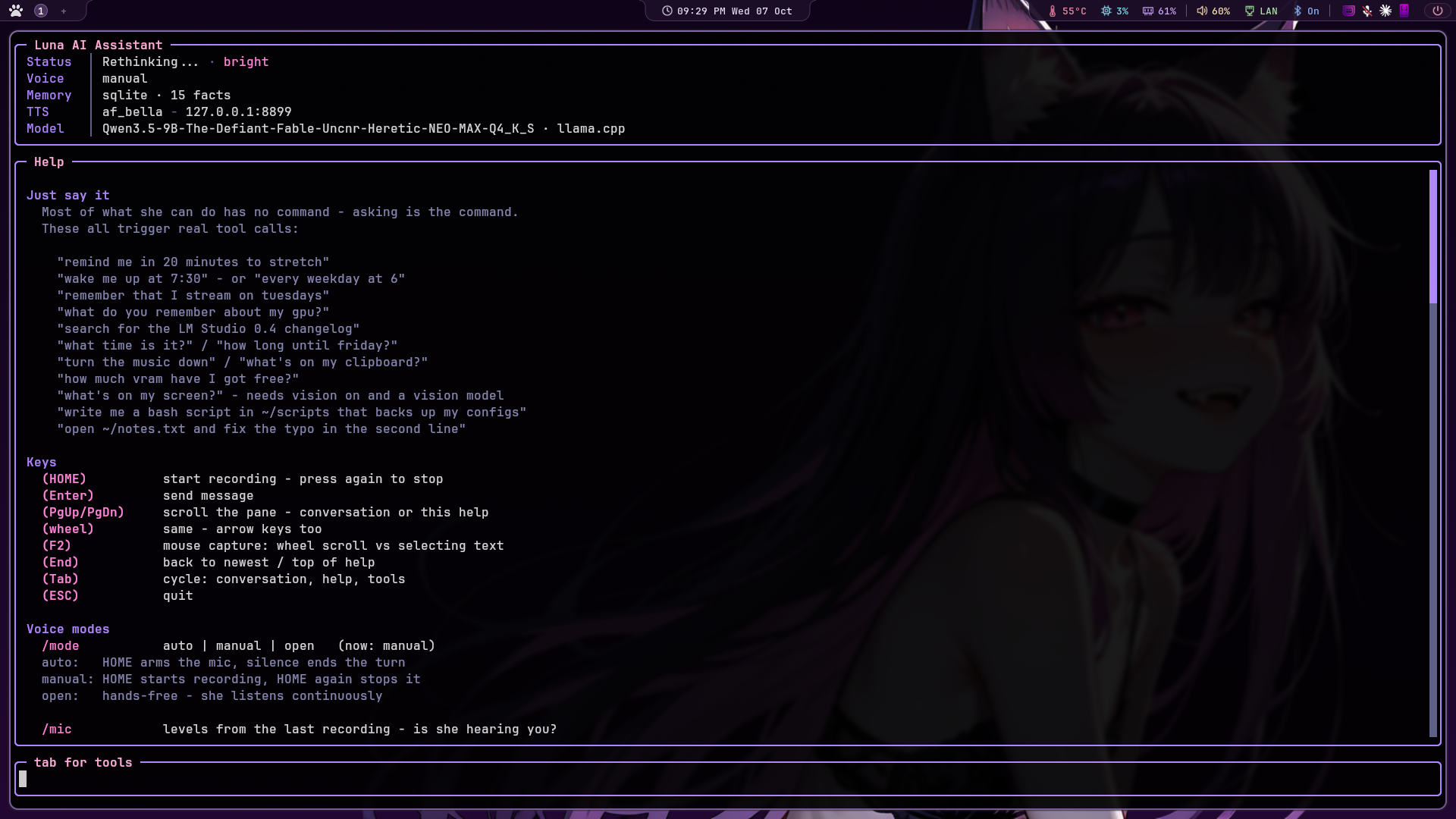
Mouse capture is off by default, so you can select and copy from the conversation the way you would anywhere else.
The two are mutually exclusive, not a bug: turning on mouse support enables terminal mouse reporting, which means the terminal hands drags to the application instead of making a selection. You get wheel scrolling and lose copy-paste. In a window full of log lines and error messages that's the wrong trade, and PgUp/PgDn/End already scroll.
F2 swaps between them live, and /mouse does the same while also
remembering the choice:
"ui": { "mouse": false }Most terminals also let you hold Shift while dragging to bypass mouse reporting, so you can select even with capture on.
Slash commands:
| Command | Action |
|---|---|
/mode |
auto, manual or open: switch without restarting |
/mic |
What the voice detector measured on the last recording |
/barge |
Whether talking over her will work, and the levels |
/wake |
Wake word status and live scores |
/reminders |
List what's scheduled, with countdowns |
/cancel N |
Cancel reminder N |
/when ... |
Test how a time phrase is read, without scheduling it |
/alarm ... |
Set a wake-up: /alarm 7:30am, /alarm every weekday at 6
|
/alarms |
List them, numbered for /cancel
|
/snooze [n] |
Ring again in n minutes |
/alarm off |
Stop one that's ringing; /alarm test hears the tone |
/look |
List windows, or test a screenshot |
/camera |
Webcam: /camera on, off, list, test
|
/log |
Tail the debug log without leaving the app |
/mood |
How she's feeling, and what moved it: /mood reset to clear |
/facts |
What she remembers: /facts all, /facts retired
|
/skills |
Recipes she's saved: /skills show, forget, restore <n>
|
/projects |
Ongoing work: /projects show, done, pause, resume, drop <n>
|
/situation |
The live lines she sees each turn (window, music, load, plugins, next reminder) |
/voice |
List voices, or switch: blends too |
/context |
What every turn sends, in tokens, against the model's context length |
/mouse |
Wheel scrolling vs. being able to select text |
/scroll |
Why the wheel isn't scrolling: pane sizes and what the terminal sent |
/set |
List every setting, or change one: saved to config.json
|
/tools |
Which tools the model can call, what each costs: Tab twice to change, and to set read/write/execute permissions |
/tooltest |
Whether this model actually calls them |
/repair |
Record past reminders as the tool calls they really were |
/plugins |
What's installed, then /<name> on, off, or status |
/allow |
Whether file changes are asking; /allow off ends a session allow-all |
/minecraft ... |
on, off, goal <what>, pause, resume: see Games
|
/zork ... |
on, off, play, pause: she plays Zork I, see Games
|
/vibecity ... |
on, off, play, pause, goal <what>: she plays mayor in your open Vibe City window, see Games
|
/home ... |
on, off, refresh: your smart home through Home Assistant, see Home automation
|
/discord approval ... |
auto, discord or desk: who approves Discord's commands and file changes |
/cron |
Scheduled jobs, and when each last ran |
/mcp |
MCP servers: connected or not, and their tools |
/portrait |
Her animated portrait; /portrait obs for an OBS source |
/thoughts, /memory, /monitor
|
The browser pages: her reasoning, her memory, the live view |
/help |
Points at Tab, and says which mode you're in |
/keys |
Hotkey + socket diagnostics |
/clear |
Wipe the conversation and saved history |
/quit |
Exit |
"theme": {
    "accent": "#ff87d7",
    "border": "#b48cff",
    "user":   "#5fd7ff",
    "agent":  "#ff87d7"
}
Keys: accent, border, title, label, text, value, agent,
user, system, ok, warn, footer, dim, prompt, link.
Terminals without truecolor fall back to the nearest 256-colour match.
How HOME behaves. Set stt.mode in config.json or switch live with
/mode <name>.
| Mode | HOME | Recording ends when |
|---|---|---|
auto |
starts listening | you stop talking (default) |
manual |
starts recording immediately | you press HOME again |
open |
arms the mic and leaves it armed | you stop talking, then it re-arms |
auto   - the quick question. Waits for you to speak, stops on silence.

manual - records the moment you press and ignores silence entirely, so
         you can think, trail off and come back. Press again to stop.

open   - hands free. Speech starts a turn, silence ends it, Luna
         answers, and the mic re-arms. HOME toggles the whole loop.
HOME means two different things depending on when you press it, and the difference is decided by whether the microphone is open:
| idle | while recording | while thinking or talking | |
|---|---|---|---|
auto |
start a turn | cancel it | cancel it |
manual |
start recording | finish, and answer | cancel it |
In manual mode the second press is a request for an answer, not a change of mind, so it ends the recording and leaves the turn alone. If you do want to abandon one, press again once she's thinking. A cancel during recording throws the audio away rather than transcribing it and then refusing to answer.
Pressing HOME to talk also quiets anything she's saying at the time (a reminder, a stream-chat reply), so the mic hears you and not her. And a HOME pressed right after you hit Enter, while she's still finishing the last reply, cancels the message you just sent too.
Open mode only records between turns, never while Luna is speaking,
and waits settle_seconds after she finishes before re-arming:
otherwise her own voice out of the speakers retriggers the mic and she
talks to herself. Headphones make it moot.
Barge-in is the exception to that rule, and it has its own section below. With a wake word loaded, open mode waits for her name instead of starting on any speech at all.
Speech is detected with Silero VAD,
a small speech/not-speech model, rather than by measuring loudness. A
level meter can't tell your voice from a fan, so the bar has to sit high
enough to ignore the room, which makes it late to trigger and prone
to cutting off quiet syllables. Silero knows the difference, and only
ends a turn below threshold - 0.15, so trailing off doesn't end the
recording.
Without silero-vad installed it falls back to an RMS detector that
calibrates against your noise floor. /mic says which is running:
vad=silero | speech above 0.40, ends below 0.25 | last peak=0.0210 |
triggered=True | captured=3.4s | mode=auto
Cutting off or slow to start? Lower vad_threshold to 0.25-0.3.
Triggering on background noise? Raise it to 0.5-0.6.
"stt": {
    "mode": "auto",
    "vad": "auto",
    "vad_threshold": 0.4,
    "model": "small",
    "language": "en",
    "sensitivity": 1.0,
    "silence_seconds": 1.2,
    "max_seconds": 60,
    "manual_max_seconds": 300,
    "no_speech_timeout": 8,
    "settle_seconds": 0.6
}| Key | Default | Purpose |
|---|---|---|
mode |
auto |
auto, manual or open
|
vad |
auto |
silero, energy, or auto
|
vad_threshold |
0.4 |
Silero speech probability. Lower picks up sooner |
model |
small |
Whisper size: tiny, base, small, medium
|
language |
en |
null to auto-detect (unreliable on short clips) |
sensitivity |
1.0 |
Energy fallback only. >1 triggers more easily |
silence_seconds |
1.2 |
Quiet time before it stops and transcribes |
max_seconds |
60 |
Cap on one recording in auto/open |
manual_max_seconds |
300 |
Backstop in manual |
no_speech_timeout |
8 |
Give up if you never start talking (auto only) |
settle_seconds |
0.6 |
Pause before re-arming in open mode |
Start talking while she's speaking and she stops.
The problem is that your microphone hears her too, and Silero is quite right to call that speech. There's no acoustic echo cancellation here, so the only honest discriminator left is loudness: her voice reaches the mic attenuated by the room, yours doesn't.
So the first half-second of playback measures how loud she is at your
microphone, and after that it takes both a confident speech
classification and a level well above that baseline, held for
barge_in_seconds, to count as an interruption. On headphones the
baseline is near silence and this is trivially reliable. On speakers it
depends on your volume.
/barge shows you the numbers:
barge-in on | her level at your mic=0.0061 | you need 0.0153 to cut in |
loudest you hit=0.0402 | best speech score=0.91
Interrupting herself? Raise barge_in_margin. Won't trigger no matter
how loud you are? Lower it, or wear headphones.
"stt": {
    "barge_in": true,
    "barge_in_seconds": 0.35,
    "barge_in_margin": 2.5,
    "barge_in_boost": 0.25
}| Key | Default | Purpose |
|---|---|---|
barge_in |
true |
Needs Silero: the energy detector can't do this |
barge_in_seconds |
0.35 |
How long you must keep talking. Lower and a cough cuts her off |
barge_in_margin |
2.5 |
How much louder than her own bleed you have to be |
barge_in_boost |
0.25 |
Added to the VAD threshold while she's talking |
In open mode a barge-in skips the settle pause, because you're already mid-sentence and waiting would eat the start of it.
A barge-in stops the audio only: the reply keeps generating and stays on screen. Without echo cancellation to lean on this will misfire occasionally, and when it does it should cost you the sound, never the answer. Pressing HOME is the one that stops both.
Optional. Replaces HOME in open mode: say her name and she listens.
openWakeWord runs a small ONNX classifier over 80ms frames, cheap enough to leave running all day without Whisper or the language model ever waking up.
There is no pretrained "hey Luna", and there won't be unless you make one. Two options:
-
Use a stock phrase.
hey_jarvis,alexa,hey_mycroftandhey_rhasspyship with the package and work immediately. -
Train her name. openWakeWord's training notebook turns synthetic
samples into an
.onnxyou pointmodelat. It takes about an hour and is the only way to get "hey Luna".
"wake_word": {
    "enabled": true,
    "model": "hey_jarvis",
    "threshold": 0.5,
    "follow_up_seconds": 12,
    "cooldown_seconds": 1.0
}| Key | Default | Purpose |
|---|---|---|
enabled |
false |
Off unless you ask for it |
model |
hey_jarvis |
A built-in name, or a path to one you trained |
threshold |
0.5 |
Raise if it fires at the television, lower if it ignores you |
follow_up_seconds |
12 |
How long she keeps listening afterwards, so a follow-up doesn't need her name again |
cooldown_seconds |
1.0 |
Deaf period after a detection, so the tail of the phrase isn't heard as a second one |
/wake shows live scores for tuning the threshold. If the package or the
model file is missing it says so and open mode falls back to starting on
any speech.
HOME works while the assistant's window is focused, everywhere, with no permissions and nothing to configure. That covers normal use and is all most setups need.
If you want to start a turn without focusing it (mid-game, or with
the browser in front) there's a control socket at
$XDG_RUNTIME_DIR/ai-voice.sock. Bind a key to poke it:
# hyprland.conf
bind = SUPER, HOME, exec, python3 ~/ai-voice/ai-voice-ctl.py ptt
-- hyprland.lua
hl.bind("SUPER + HOME", hl.dsp.exec_cmd("python3 ~/ai-voice/ai-voice-ctl.py ptt"))ai-voice-ctl.py is stdlib-only and needs no virtualenv, which matters
because exec runs outside it. It takes ptt, stop or quit, so any
script or panel button can drive the assistant. stop never starts a
turn: it stops whatever she's doing, a reminder or a chat reply as well
as your own turn.
Keep a modifier. A bare
HOMEbind is swallowed compositor-wide, soHomestops working in your terminal, editor and browser, including the assistant's own prompt.
This is also the better way to use vision: focus the window you care about, hit the bind, and talk. The assistant never takes focus, so the screenshot is of what you were actually looking at rather than of her own terminal. See Vision.
The same socket works on Sway, KDE or GNOME; only the bind syntax changes.
Windows. Python there has no unix sockets, so Luna listens on a
random localhost port instead, and writes the port and a random key to
%LOCALAPPDATA%\ai-voice\control.json. ai-voice-ctl.py reads that
file, so the commands are the same. A command without the key is
ignored, which keeps a web page that finds the port from driving her.
Bind it with AutoHotkey (v2):
#Home::Run 'pythonw ai-voice-ctl.py ptt', 'C:\Users\you\ai-voice'pythonw runs it without a console window flashing up.
macOS has unix sockets, so it works as on Linux: point a
Shortcuts, Hammerspoon or skhd bind at python3 ai-voice-ctl.py ptt.