Import Export Settings and Calibration - fredzo/UA3REO-DDC-Transceiver GitHub Wiki
Import/Export Settings and Calibration
Wolf transceiver configuration and calibration data are stored in the device's internal flash memory.
Each time a parameter is changed or a calibration is made, the information is updated in the flash memory.
This information, especially calibration information, are crucial for you Wolf to operate properly.
It's a very important to create a copy of this data before you make any unusual configuration change, when you update your calibration, or when you update the firmware.
Wolf Import/Export principles
Your Wolf can import settings from and export settings to an SD card inserted in the SD card slot using Menu/SD Card options.
Make sure you use a FAT32 formatted SD card of 32 Gb or less.
To allow you to have several versions of your settings and calibration file, your Wolf can handle 3 different slots for importing and exporting data.
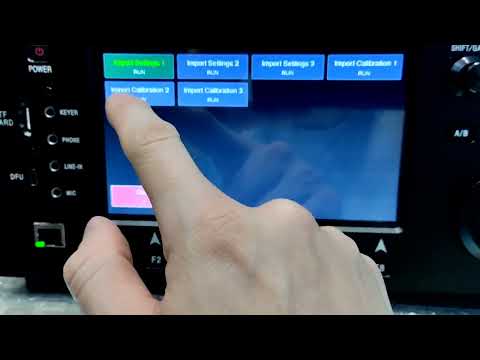
For that reason, in both Import and Export you will see options for Settings 1, 2 and 3 and Calibration 1, 2 and 3:
When you want to backup your settings or calibration data, simply chose one of the 3 slots and the data will be stored in the corresponding file on the SD Card:
wolf-settings.inifor Settings 1wolf-calibrations.inifor Calibration 1wolf-settings-2.inifor Settings 2wolf-calibrations-2.inifor Calibration 2wolf-settings-3.inifor Settings 3wolf-calibrations-3.inifor Calibration 3
Same goes for importing:
- Choose
Import Settings 1to restore data fromwolf-settings.ini - Choose
Import Calibration 1to restore data fromwolf-calibrations.ini - Choose
Import Settings 2to restore data fromwolf-settings-2.ini - Choose
Import Calibration 2to restore data fromwolf-calibrations-2.ini - Choose
Import Settings 3to restore data fromwolf-settings-3.ini - Choose
Import Calibration 3to restore data fromwolf-calibrations-3.ini
Export Settings and Calibration
To import your current settings and calibration, go to Menu/SD Card/Export Settings to SD and chose :
- Choose
Export Settings 1to save settings to slot 1 (wolf-settings.inifile) - Choose
Export Calibration 1to save calibration to slot 1 (wolf-calibrations.inifile) - Choose
Export Settings 2to save settings to slot 1 (wolf-settings-2.inifile) - Choose
Export Calibration 2to save calibration to slot 1 (wolf-calibrations-2.inifile) - Choose
Export Settings 3to save settings to slot 1 (wolf-settings-3.inifile) - Choose
Export Calibration 3to save calibration to slot 1 (wolf-calibrations-3.inifile)
Import Settings and Calibration
To restore your settings and calibration from the SD card, go to Menu/SD Card/Import Settings from SD and chose :
- Choose
Import Settings 1to restore data fromwolf-settings.ini - Choose
Import Calibration 1to restore data fromwolf-calibrations.ini - Choose
Import Settings 2to restore data fromwolf-settings-2.ini - Choose
Import Calibration 2to restore data fromwolf-calibrations-2.ini - Choose
Import Settings 3to restore data fromwolf-settings-3.ini - Choose
Import Calibration 3to restore data fromwolf-calibrations-3.ini
Here is a demonstration video for settings and calibration file import:
Default settings and calibration files
Default settings and calibration files for Zastone ZT7500 Wolf version are available for download here.
File Manager
TODO
Record CQ Message
TODO
USB Card Reader
TODO
Format SD card
TODO