Troubleshooting - foonerd/glass GitHub Wiki
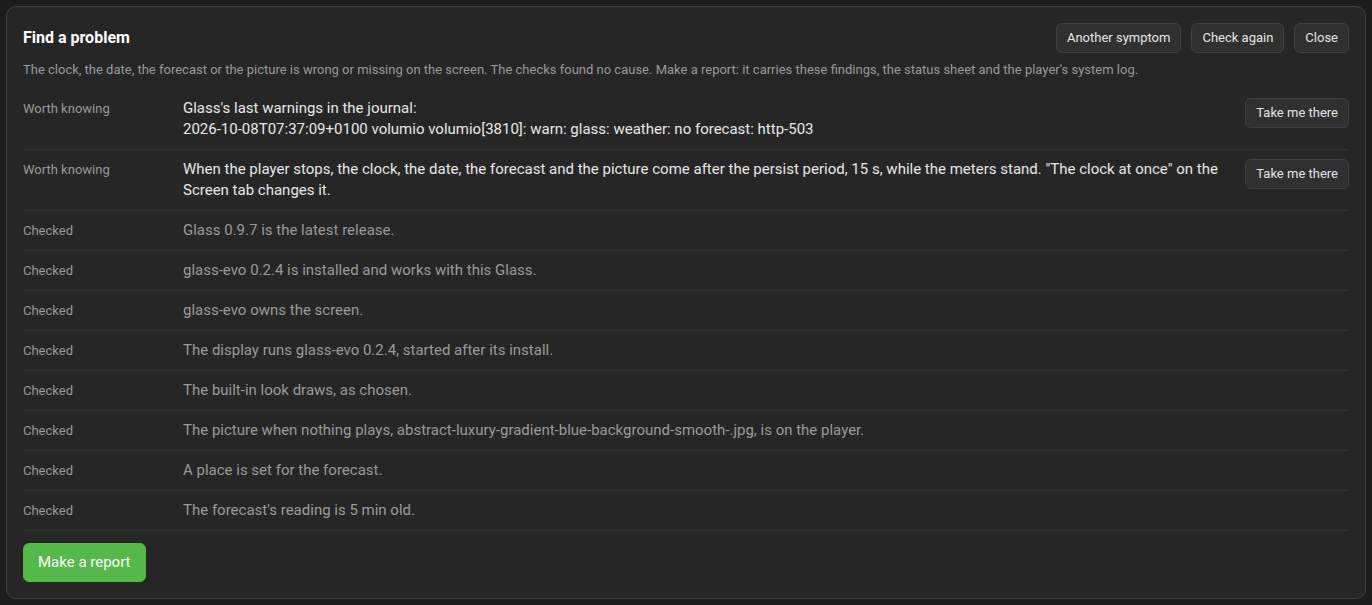
Start at the Manager's Status tab. Find a problem there asks what is wrong and runs the checks the Manager can run itself: is the player playing, is the display on the screen and did it die, does the audio tap head the sound path and is what plays measured, are the controls on and is there a panel to touch, whose is the screen and is it turned as the panel suggests, are remote displays served and receiving, did the display lower its frame rate, and glass-evo's own: is it installed and does it work with this Glass, does it hold the screen with a display started after its install and with its own binary, which module do the views and the look panel draw with, are the look and the picture chosen there, is a place set and its reading fresh, when does the clock come after a stop, does the look show the buttons, what does the player offer to browse, and did the last install go through or was it refused for the pair. It lists the likely causes first, then what is worth knowing, then what it checked and found right, each with a button to the tab where it is set; most of this page is those checks in words. When that does not settle it, Make a report under the findings captures the problem and builds the report to post; Reporting a problem has the steps.
The sheet below it says whether the display is up, which theme is on show, whether what plays is measured, which displays and remotes are connected, and the last problems Glass wrote to the journal. The System tab's Logging panel shows the last three hundred lines Glass wrote and downloads a thousand as a file for a report; set the level to Info or Verbose there first, reproduce, then download. Most questions end there. The Logging page has the levels and what each line means.
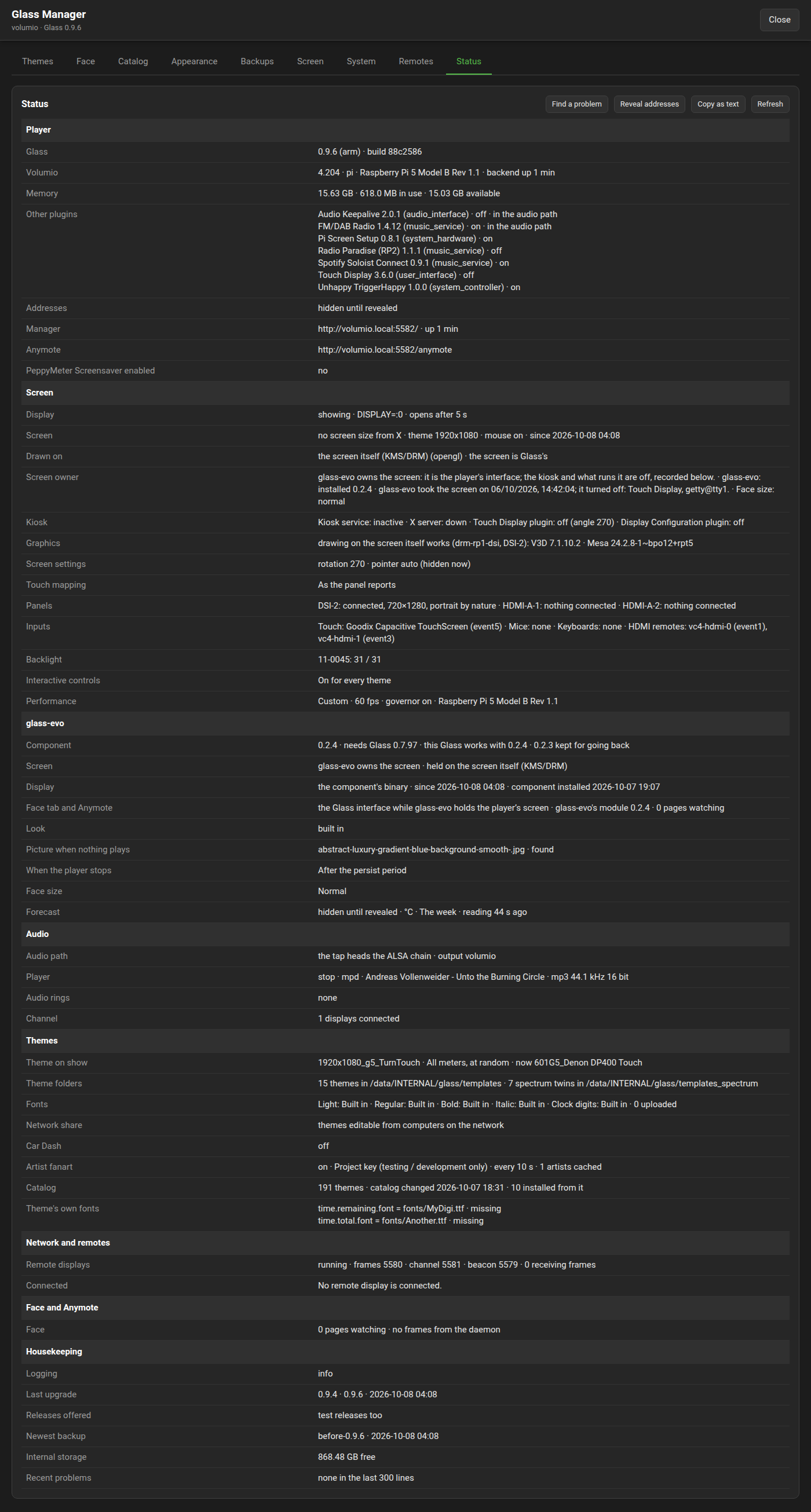
When asking for help, make a report there. For a quick question the sheet alone will do: "Copy as text" puts the whole sheet on the clipboard, with the findings of a diagnosis when one was run, or take a screenshot of the tab. The player's addresses stay hidden unless "Reveal addresses" is pressed first; a question about reaching the player from a phone is the one case that needs them.
| Symptom | What to do |
|---|---|
volumio plugin install ends with mv: target '/tmp/plugins/glass.zip': No such file or directory
|
The downloaded zip sits inside the folder being installed. The command compresses the folder into a zip and moves every zip it finds; remove the downloaded one from the folder, or unpack it from the parent directory as the Quick-Start shows. |
| The installer says PeppyMeter Screensaver is enabled | Disable that plugin first, then install Glass; Glass takes its themes and settings over, the themes copied into its own folder, that plugin's folder left as it was. |
| Glass is installed but stays disabled | The same: PeppyMeter Screensaver is still enabled. The settings page offers to disable it. |
| After the one-line install Glass is listed but off, and its manager does not answer | The installer waits for the player's record of Glass as enabled before it restarts the player; an installer fetched earlier restarted first, which a fast player (x86) lost. Turn Glass on under Settings, Plugins, Installed Plugins. |
They are for the player's own screen: how big the theme is drawn on it and where. The Face is a browser window looking at the same theme, and a browser window has no fixed size, so the Face always shows the whole theme sized to the window; there is nothing for an offset to act on. Expect the settings to work on the player and the Face to fill itself.
The settings page's Display section sends the "Fit to screen" switch when saved, so the switch turns the fit on as well as off. A release whose Display section did not send it read every save as off: the switch could turn the fit off but never on, and the toast said there was nothing to change; upgrade. The Manager's Display panel sets the fit on any release.
The install copies PeppyMeter Screensaver's themes and the four bundled ones into Glass's folder once, when Glass's theme folder is first made, so a theme removed from Glass's folder stays removed at the next upgrade; an install that copied them at every upgrade, without overwriting, brought a removed theme back while the old plugin's folder still held it. If the old plugin's folder still holds themes, the Manager's System tab says so and can wipe them.
| Check | What to do |
|---|---|
| Is Glass enabled? | Settings, Plugins, Installed Plugins. Glass stays disabled while PeppyMeter Screensaver is enabled; the settings page says so and offers to disable it. |
| Is music playing? | The meters appear while the player plays, after the screensaver timeout. |
| The timeout | The Display section of the Settings page. Set the Touch Display plugin's own screensaver longer than Glass's, or off. |
| The display output | Display :0 for the player's own screen. "No screen of its own" opens no window on purpose. |
| The Status tab | The Display row says "showing" or "not showing" and after how long the display opens. The Recent problems row has the last warnings and errors Glass wrote, a display that died among them; Find a problem, "The display dies at once or keeps restarting", reads them for you. |
The Status tab's Player line says "measured" or "not measured". Not measured means the source plays below the audio tap, so it is heard but not seen. This happens when a source's own player was started before the tap joined the sound path, or picked its device while the player's ALSA file was half written at boot.
| Source | What to do |
|---|---|
| Soloist Connect, Spotify Connect, AirPlay | Restart that plugin, or the player. Glass nudges Soloist itself after every rewrite of the ALSA file, so this should not recur. |
| Local files, web radio, streaming services through the player | These pass the tap; check the Audio rings line for a live ring while playing. None means the tap is not in the sound path: restart the player once, which rebuilds it. |
| A DSP plugin in the chain | The tap sits at the head of the chain and measures before the DSP; FusionDSP and the like are fine. |
The needles' response is the Meter section's: Smooth needle for inertia, Meter sensitivity for quiet material.
The display moves on only to a meter that is not the one on show and stays put when the rotation holds no other: a theme with one meter, or one meter chosen from the Meter section's list, with a change interval set, is not loaded again at every interval. On a release that loads it again, a visible reload, upgrade, or choose two meters or the longest interval.
The log names the reason, prefixed glass: or glass-launcher::
| Line | Meaning |
|---|---|
the shipped binary for this machine is missing or is the wrong CPU |
The binary for this player's processor did not start: it is missing from the plugin, or a library it needs is. Install Glass again from the releases page (one zip holds every processor); the installer brings SDL2, EGL and OpenGL where they are missing, and says so when it could not. |
Authorization required, but no authorization protocol specified and x11 not available
|
On a player whose image runs its own kiosk (x86, and the products with a built-in screen) the X server runs as root and admits only root. Glass's install admits the player's own user without waiting for the kiosk to start again; an install that waited for it showed nothing until then. Upgrade from the System tab, or restart the player once. |
no screen to draw on: no X server, no Wayland and no KMS/DRM device |
The player has nothing the display can open: no kiosk's X server is up and the kernel drives no screen (a graphics card with no kernel driver of its own, or no screen at all); the display says so rather than running and showing nothing. A player with no screen of its own is set so on the Settings page. |
SDL error: EGL not initialized, at every start, on a player without the Touch Display plugin |
The installer brings the two libraries the display needs to draw on a screen of its own, EGL and OpenGL; a player with a kiosk has them through its X server, and one installed by an installer that did not bring them lacks them. Upgrade Glass from the Manager's System tab (the upgrade installs them), or run sudo apt-get install -y libegl1 libgl1 on the player; the display comes up at its next start. |
the display died N s after launch, K times in a row; next attempt in M s |
The display died as it started; the line before it says why. Each such death in a row doubles the wait before the next start, a minute at most. |
| Symptom | Look at |
|---|---|
| Album art missing | The theme's albumart.pos and albumart.dimension; whether the player's own interface shows art for the track. |
| The cover blinks at every pause or change of volume, playing from a Lyrion server | The Squeezelite plugin gives the cover a new address with every state it pushes; the cover is kept while each is fetched. On a release that let it go dark meanwhile, upgrade Glass, and glass-evo where it holds the screen. |
| Album art missing when playing from a Lyrion (Squeezebox) server, while Volumio's own page shows it | The Squeezelite plugin hands the server's covers on without saying they are pictures; a cover is known by its content. On a release that took only what was called an image, where covers that came by a plain address, a radio station's for one, showed, upgrade Glass, and glass-evo where it holds the screen. |
| A folder picture missing | The file's name and case in the track's folder, and the theme's folderlayer.N.files. A stream has no folder. |
| The theme's own icon for web radio does not show | A theme's icon is read from format-icons/webradio.png as well as under the type's key, radio for web radio; a release that looked under the type's key only never read webradio.png. Upgrade, or name the file radio.png. |
| The clock shows no digits after choosing one of the player's fonts for them | A player font chosen for the clock digits on the Appearance tab is found; on a release that did not find it, upgrade. |
| No fanart | The Appearance tab's switch, and whether the theme has a fanart.pos; the Artwork page has where pictures come from. |
| The fanart starts again whenever the meter changes | The show carries on while the artist stays; on a release where every change of meter, by a timer or with the title, started the artist's pictures anew, upgrade Glass, and glass-evo where it holds the screen. |
| The display slow or the player short of memory with fanart | The Appearance tab's unlimited switch: leave it off, and clear the fanart cache. |
The previews on the Themes tab are rendered the theme alone; a release that rendered them with glass-evo's clock, date and bar of controls over the theme, on a player whose screen glass-evo held, left such previews behind. Upgrade Glass, then press Render missing previews on the Themes tab: the previews made by an earlier version are rendered again, the theme alone.
The Manager tells which pictures a preview render made whatever the log level; a release that could not with the log level below Info gave up with "the render produced no pictures", for every theme, whenever an upgrade made the previews stale. On it, set Logging to Info on the System tab and open the Themes tab again; the previews render.
Volumio names a track inside a cue sheet in its own way; the sheet's folder is the track's, on the player's screen and on remote displays alike, so back.jpg and the other pictures a theme reads from the album's folder show for CUE + FLAC and CUE + APE albums as for single files. A release that took such a track for a stream with no folder never showed them; upgrade.
A letter drawn as a grey block with a faint shape in it, the w of "The Show Must Go On" in a theme's bold title for one, is a fault of an earlier release's text rasteriser for a glyph standing at an exact quarter or half of a pixel; rare, and the same wherever the theme was drawn. Upgrade from the System tab.
| Symptom | Look at |
|---|---|
| Nothing turns |
albumart.rotation, albumart.rotation.speed, vinyl.center, reel.<side>.center in the theme; the Rotation section of the settings page. |
| Turning about the wrong point | The centres are screen coordinates, not points inside the picture. |
| The arm off the record |
tonearm.pivot.image and the three angles; 0 points right and negative angles turn clockwise. |
| Text cut and not scrolling |
playinfo.<field>.maxwidth; the Scrolling section's mode and speeds. |
| The sample rate stands left of where the theme puts it | The line is centred or right aligned as the theme's texts are, and playinfo.samplerate.align sets it by itself; a release that always drew it from the left of its box needs an upgrade. |
| The ticker missing |
playinfo.ticker = True and playinfo.ticker.pos. |
| The window off the screen | The Display section's Meter position, which may be negative to move a theme up or left past the screen's edge, or a theme drawn for a larger screen: "Fit to screen" scales it. |
The Meters-Reference has every key.
Glass repaints only what changed, so a still theme is nearly free. What costs is what moves: a large spectrum, records and reels, a fanart slideshow with fades.
| Lever | Where |
|---|---|
| Frame rate | The Frame rate section: 30 for needles, 20 on a Raspberry Pi 3 with a spectrum, 15 on a Zero 2 W. A record or a reel is turned at every frame, so the frame rate is its lever too. |
| The spectrum's size | The theme's spectrum.size; fewer or narrower bars in the spectrum theme. |
| The analyser's look | Fewer bins, plain bars rather than rounded or outlined ones, bgr.alpha = 1, and 30 frames a second; the Performance page has what each look costs. |
| The theme's size | An 800x480 theme on a small screen instead of a 1280x720 one scaled. |
GLASS_PROFILE in the display's environment prints where each frame's time goes; the Logging page has it.
| Symptom | Look at |
|---|---|
| The remote finds no player | Serving is off on the player's Remotes tab, or the remote is on another network, where the beacon does not reach: add the player by name or address on the remote's settings page. |
| The remote shows the theme but nothing moves | The Remotes tab lists the remote as connected but not receiving frames: UDP to the frames port (5580) is blocked between the two machines, or the player's port was moved and the remote was started before it asked the manager. |
| Needles flying about on the remote while the player is smooth | A remote or a player older than 0.7.4. Upgrade both. |
| The remote stops moving after a track change while the player goes on | A remote or a player older than 0.7.6: the daemon numbered its packets by the ring, which starts again with every stream. Upgrade either; both is best. |
| The remote does not follow a theme change | The remote is set to a theme of its own; or its channel is down, which the Remotes tab shows. A remote hears the configuration on every connection. |
| The remote's settings page does not open | It is served on port 5583 of the remote's machine, not the player's; the first screen names the address. |
| The page opens but every button says the remote did not answer | The remote has stopped (Q quits it) or its page moved: start it again and reload the page. Escape leaves full screen and keeps the remote running, so the page can be used on the same machine. |
| A bundle shows the theme alone, no clock and no controls | Its settings page's "The Glass interface" is at its first choice, "the Glass interface while glass-evo holds the player's screen", and the kiosk holds the player's screen, or the player's Glass is older than 0.8.20 and does not say whose its screen is. The page's Status says "Glass interface: shown" or "not shown", and the remote's log says why. "The Glass interface always" shows it whatever the player's screen does. |
| A bundle shows the clock and the date but no controls | "Controls on this remote" on its settings page is at hidden, or at "as the player's look says" while the player's look hides them, which the player's sheet says under glass-evo, "Buttons: hidden by the look". Shown is this remote's word over the look. |
| A touch on a bundle no longer plays or pauses | As it is meant where the Glass interface shows: a touch on the picture brings the bar of controls, and play or pause is a button on it, as on the player's own screen. The standalone remote, and a bundle set to the theme alone, play or pause on a touch. |
| Android will not install the other flavour | Android refuses an app built on an older Glass than the one installed. Install a flavour built on the same Glass or a newer one (the app's version names it), or uninstall Glass Remote first; its settings go with it. |
| The remote lists no themes from its own folder | The folder holds theme folders, or a templates folder with templates_spectrum beside it; a share must be mounted first, or named by its UNC path on Windows. "Read the folder" says what it found. |
| Symptom | Look at |
|---|---|
| A tap on a control does nothing | The Interactive controls setting on the settings page or the System tab: "as the theme says" needs interactive = True (or buttons) in the meter's section under config.extend = True; "on" acts for every theme that draws indicators. The display's start line in the log says whether the controls are on and why. |
| A fader has to be dragged sideways, though it moves up and down | A bar is dragged the way it is drawn; a release that read a touch on a bar by the shape of its box, left to right in a box wider than tall, whatever the bar's own direction, needs an upgrade. |
| A tap on a control closes the display | The tap missed the control and the touch settings closed the meters. Controls answer within 48 pixels of what is drawn; move the theme's controls apart, or lower touch.margin in the meter if two sit close. |
| The bar moves but the volume or the position does not | The command reached the player over the channel; the Player line on the Status tab must show the channel connected. At Verbose the log says what each tap asked for. |
| Car Dash did not switch | The Themes tab's Car Dash panel says which period it is and when the next switch comes; the player's clock and time zone (Volumio's System settings) decide. By the sun, a place must be known: the zone's, or a latitude and longitude typed there. |
| The Face tab draws the theme but nothing moves, and its line says "no frames" | The frames daemon is not running or its socket is not reachable: the Status tab's Remote displays row says whether it runs, and the journal has its start line (glass-serve:) and glass: face: lines. It runs whenever the plugin does; a backend restart brings it back. Nothing moves either while the player is paused or the source plays below the tap: the Player row says "measured" when it is. |
| The Face tab says the release has no browser module | The plugin was installed from a checkout without scripts/ship.sh, which builds face/glass-face.wasm into the plugin; a release zip has it. |
| The Face tab is slow on a phone | It draws at the theme's frame rate on one thread; a lower frame rate on the settings page, or a smaller theme, costs the phone less. The theme is fetched once and kept in the browser; a first visit brings the fonts, about 60 MB with the built-in set. |
- The Face or Anymote stood still after the player stopped. They show what the player's screen shows: the persist countdown after a stop or a pause, and then a banner saying the player is stopped or paused and the display has left the screen, until the player plays again; on a screen that is the display's own (glass-evo holding it, or a player with no kiosk), where the display stays on the screen, the banner says only that the player is stopped or paused. With glass-evo installed the pages show glass-evo's clock, date and controls themselves and there is no banner; if they show the theme alone, look at "The Face tab and Anymote show" on the Screen tab, and at the System tab for a glass-evo that needs updating.
- The Face showed a track as just begun after a reload. A page or a display that attaches mid-track starts at the player's position; a release that did not needs an upgrade.
-
A waterfall fills with green when the player stops or pauses. In a look laid out for two channels that names only
palette.leftandpalette.right, a release that took silence for a one-channel analyser wrote the silent rows across both sides in the one-channel palette's lowest colour, and one that took a mono recording the same way made its two sides one for as long as the track played. Upgrade Glass, and glass-evo for the player's own screen.
| Symptom | Look at |
|---|---|
| The Face tab or Anymote shows the theme, where Volumio's interface or Now Playing is on the player's screen | As it is meant. The pages are Glass's picture, the theme and its meters, not a copy of the player's screen: a kiosk's own pages never appear in them. "The Face tab and Anymote show" on the Screen tab only says whether glass-evo's clock and controls lie over the theme; the Screen page has each choice. |
| The Face tab and Anymote show no clock and no controls with glass-evo installed | "The Face tab and Anymote show" on the Screen tab is at "the theme alone", or at its first choice, "the Glass interface while glass-evo holds the player's screen", while the kiosk owns the screen: choose "the Glass interface, always", or hand the screen to glass-evo. The line under the choice says what the pages carry now. Where the row is not on the tab, glass-evo needs updating on the System tab. |
| The Face tab and Anymote show the clock and the date but no bar of controls | The look hides the buttons: "Show the buttons" is off in the look panel's Buttons section, for a screen no finger reaches, and the pages follow the player's look. The sheet's glass-evo section says "Buttons: hidden by the look", and Find a problem names it under "Touch or the controls do not act as they should". A remote has a word of its own. |
| The face shows the theme but no title, time, volume or play state until something is tapped or the track changes | A new page gets the state the plugin holds at once; on a release where the state the player holds reached a page only on a push from the player, upgrade. |
| Anymote does not open full screen by itself | No browser lets a page take the screen without a touch or a click. Keep it as an app on a phone or a tablet, launch a computer's browser in kiosk mode, or press the button; the Anymote page has the three. |
| Anymote goes dark on a phone after a while | The phone's screen timeout: a page over plain HTTP may not keep the screen awake. Set the timeout longer in the phone's display settings while Anymote is the display. |
| A tap on a control does nothing on the face | The player's Interactive controls setting, as for its own screen: "as the theme says" needs the meter's interactive = True or buttons; "on" acts for every theme that draws indicators. The tab's line at the bottom says which meter is on show. |
| The face is slow or drops frames on a phone | It paints at the theme's frame rate on one thread; a lower frame rate on the settings page or a smaller theme costs the phone less. |
Find a problem has a symptom for them, "Browsing, search or the queue shows nothing or will not play". Its checks: whether glass-evo is installed and works with this Glass, whether the look shows the buttons the More sheet opens from, whether the display is connected to the player so a tap reaches it, which module the pages draw with, and what the player offers to browse, counted and named. The glass-evo wiki's Home page has the queue, browsing and search as they work; what looks wrong but is as meant:
| Symptom | Look at |
|---|---|
| More, the queue, browse and search are nowhere on the face | The look hides the buttons, and the sheet with them: "Show the buttons" in the look panel's Buttons section. On a remote, "Controls on this remote" on its settings page. |
| Browse opens and lists nothing | The face lists what the player's own Browse page offers. Find a problem counts the sources and names them; none means the player's own settings: the music services and the library are set in Volumio's own settings, and a library not yet scanned, or services all off, show the same there. |
| A tap on a browsed track plays it with the rest of its list, and what was in the queue is gone | As meant: a tap on a row, and the play triangle at its right end, are clear and play, the player's own "Clear and play". The play in a circle adds and plays with the queue kept; the plus adds to the queue. |
| The browser can only be left with back, back, back | Every page below the first has a way out at the header's right end; the way back at the left goes up a page, and out at the first. A glass-evo with no way out below the first needs an update on the System tab. |
| A swipe on a queue row did nothing, or clear did nothing | A drag to the left on a row swipes it to its bin, and a tap on the bin takes the track out; a touch anywhere else lets the row back. Clear, at the header's right end, asks once: the header says how many tracks, a second press does it, a touch elsewhere withdraws it. |
| Covers come and go in the queue or a list on the Face tab and Anymote | The rows' covers have a cache of their own beside the album art's; a release that fetched both into one bounded cache had a page pushing one cover out to fetch another, round and round, while the player's screen and the remotes lost a cover instead. Upgrade Glass and glass-evo together. |
| A tap on a row or a verb does nothing on the player's screen | The display's connection to the player: the Channel row on the sheet, and Find a problem's channel check. The Face tab and Anymote send their taps through the Manager and need no channel. |
- The Screen tab shows no rotation, pointer or touch controls. The kiosk holds the screen, running or on its way: the Touch Display plugin or the Display Configuration plugin is running or starting, the kiosk unit is running or enabled at boot, or an X server of the kiosk's is up; or no panel is connected. That is as it should be: the kiosk is the player's interface, and Glass runs as a screensaver over it. The controls apply only on a player with no kiosk at all, and the tab says which it is.
- The picture is portrait and cropped. With no kiosk the display draws in the panel's own orientation, and many panels are portrait by nature; X turned them for you before. Set the rotation on the Manager's Screen tab to the angle the Touch Display plugin used, which the tab suggests, and touch turns with it.
- Save on the Screen tab answers "bad request". One release read the face size of an unset key wrongly and refused every save of rotation or pointer. Upgrade from the System tab.
- The theme is turned on its side under the kiosk. A rotation kept for a panel the display draws on itself applies only where the display draws on the screen itself, not under X, where the X server makes the turn; a release that applied the same turn under X too, on top of the X server's, needs an upgrade.
- The kiosk did not come back after turning its plugin on. The display steps aside within two seconds of the kiosk's X server trying to start and starts the kiosk again if it failed in between; a release that could hold the screen while the X server tried to start needs an upgrade.
- Touches land in the wrong place, or on the wrong side. The panel's touch frame is not the picture's. On the Screen tab, under Touch, try the swap and mirror switches first; if the touches are off in a way those do not fix, calibrate on the screen: five targets, one touch each, and the display keeps the map.
- The screen showed the console when the player stopped. With the display drawing through KMS/DRM the screen is Glass's alone, so the display stays on it, the theme standing still once the player has stopped, and comes back by itself if it is ever gone; a release that left the screen to the console needs an upgrade.
-
Nothing shows on a screen with no kiosk. The display logs "renderer ... on kmsdrm" when it opened the screen;
GLASS_GRAB=/tmp/shown.pngin the display's environment writes the picture as shown, after its first thirty frames, so it can be looked at from a terminal;GLASS_GRAB_AFTER=240waits that many frames instead.
- "Use glass-evo on the screen" is not offered, and the tab says the player cannot draw on its screen without the kiosk. The Manager asks before a take whether the player's graphics can draw on the screen itself, and where they cannot it says what it found and turns nothing off. The reason is the system's own: a graphics library that will not load is named with the loader's words. The graphics libraries are the system's, not Glass's; the three faults seen so far and their cures are under Known system issues below, and Find a problem tells them apart and names the cure itself. The status sheet's Graphics row and Make a report carry the same.
- The kiosk is back and glass-evo is gone from the screen. The screen went back by itself, and the Screen tab says why: glass-evo could not start (the reason follows in brackets), its component was gone, or Glass was turned off. Fix the cause, then hand the screen over again.
- glass-evo will not take the screen, or lost it after a restart of the player: "kmsdrm not available". On a Raspberry Pi whose panel is on DSI (or any player with a second graphics card that has nothing connected), the display is told the card and does not search for it. A release that searched depended on the order the system listed its graphics cards in, which changes from one boot to the next, so the same player worked after one start and not after another, and a display on a player with no kiosk died at every start the same way. Upgrade Glass, and glass-evo, which carries the same in itself.
- The screen went black for a minute or more after "Use glass-evo on the screen", then the kiosk came back. glass-evo could not start on this screen. The kiosk has the screen back in about ten seconds, and a second try straight after is as quick as the first; a release whose three tries stood the screensaver's delay apart kept the screen black for a minute or more.
-
The reason reads "SDL error: Can't load EGL/GL library on window creation". The display could not open the screen itself: a graphics library is not on the player, or the graphics driver refused the screen. The reason on the Screen tab goes on to say which: what Mesa reported, and a library the player lacks by name, with the line that installs it (
sudo apt-get install -y libegl1 libgl1). Where the reason adds nothing, look at the kiosk's own X log,grep -n -E "glamor|eglGetDisplay|swrast" /var/log/Xorg.0.log:glamor initializedis a player whose graphics work;eglGetDisplay() failedandswrastis one where the kiosk itself draws without the GPU, and glass-evo, which draws through the same libraries, cannot start until the system is repaired. Where the reason names alibgalliumthat will not load, see Known system issues below: the Mesa packages are out of step with one another, and the cure is there. Upgrade Glass, hand the screen over once more, and read the reason again; Make a report on the Status tab carries the log with it. - "This player has no screen glass-evo can draw on by itself." The player has neither a screen the kernel drives nor an X server installed. The kiosk stays the interface there.
- On x86 the theme is cut off or stands small under glass-evo, and "fit the theme to the screen" does nothing. One release brought up the X server for glass-evo with no window manager, so the window kept the theme's size. Upgrade, then give the screen back and hand it over again.
- The clock flashes and the bar comes up at every change of track. An out-of-date glass-evo takes the moment the player says "stop" between two tracks for the player standing still. Update glass-evo on the System tab.
- The clock cannot be made to fill the screen, or stops growing as its size goes up. A size you set is the size you get: the controls reach four times the look's own size, the clock fills the width at the size that takes, and past it runs over the screen's edges, which the likeness shows before you save. A glass-evo that keeps a margin and its glass's room about the clock whatever size is asked for, and never lets it be taller than half the picture, is out of date: update glass-evo and Glass on the System tab.
- glass-evo is "older than this Glass works with". Update it on the System tab; where no newer release is out yet, the tab says so.
- glass-evo will not be removed. It owns the screen: give the screen back to the kiosk first, on the Screen tab, then remove it on the System tab.
- glass-evo keeps dying and the screen went back. After three failed starts in a row the screen returns to the kiosk. Installing glass-evo again, or putting the kept version back, starts the count afresh; hand the screen over again after it.
- Find a problem says the kiosk service has failed, with glass-evo on the screen and nothing wrong. On a player whose image runs its own kiosk (x86), a release that left the kiosk's unit standing as failed on handing the screen to glass-evo had the diagnosis take that for the cause. Upgrade Glass; the finding goes at once, and the unit's state at the next take or restart.
Faults of the player's own system that Glass's checks bring to light. None is in Glass or glass-evo, and none is repaired by anything Glass does; Glass names them so they can be put right. They were found together on one player and are written up in the order they were cured there; a player may have one, or all three. Read the Screen tab's reason first: it says which.
What it looks like. glass-evo will not take the screen, or takes it and gives it back within seconds, the reason reading SDL error: Can't load EGL/GL library on window creation. The Screen tab's Graphics row and the status sheet say it in the loader's words:
EGL gave no display for /dev/dri/card0 (EGL_SUCCESS); the EGL vendor library libEGL_mesa.so.0
would not load: libgallium-24.2.8-1~bpo12+rpt4.so: cannot open shared object file: No such file or directory
and the kiosk's own X server draws in software (eglGetDisplay() failed in /var/log/Xorg.0.log). The kiosk still shows: it does not need the GPU. glass-evo draws through the same libraries and cannot start without them.
What it is. The system's Mesa packages are from two different builds. The EGL vendor library asks for a libgallium of the exact build it was packaged with (here rpt4), and the libgallium on the player is a later one (rpt5). Nothing above them reaches the GPU. Seen where the Touch Display plugin was installed on an earlier Volumio, bringing the Mesa packages of that day for its X server, and the player was then brought up through updates to an image whose libgallium had moved on. A fresh image does not have it.
See it for yourself, over SSH, and post the output as text when asking for help:
dpkg -l | grep -E "mesa|libgallium|libegl|libgbm" ; ls -l /usr/lib/*/libgallium*
Packages all at one build suffix and the file on disk at the same: fine. Packages at one and the file at another: this fault.
The cure. Bring the six Mesa packages up to the build the archive offers today, over SSH:
sudo apt-get update && sudo apt-get install --only-upgrade libegl-mesa0 libgbm1 libgl1-mesa-dri libglapi-mesa libglx-mesa0 mesa-libgallium
Read what apt says it will do before it does it: those six packages upgraded to one build, and nothing more. If it wants to remove anything, or install a long list of other packages, answer no and ask for help with its output as text. Then reboot, and Use glass-evo on the screen on the Screen tab. Run the check above afterwards: all at one build and glass-evo on the screen is the mark of a repair.
Two things that do not cure it, so you need not try them: uninstalling and reinstalling the Touch Display plugin leaves the Mesa packages as they are, since apt finds them installed already; and the factory reset works, but only because it replaces the whole system, which the one line above does without it. If apt itself refuses, see the Python entry below first.
No GPU on a Raspberry Pi 5 with a DSI panel: /dev/dri/card0 could not be opened: Permission denied, or no renderD128
What it looks like. glass-evo gives the screen back at once, the reason reading Permission denied (os error 13) on /dev/dri/card0, or Failed to get evdev touchscreen name; the kiosk draws in software. The user and the device permissions are all in order, and ls -l /dev/dri/ shows one card0 and no renderD128, where a working Pi 5 shows card0, card1, card2 and renderD128. lsmod | grep -E "v3d|vc4" shows vc4 with nobody using it and no v3d at all.
What it is. The one card0 is the DSI panel's own driver (drm-rp1-dsi), which the kernel brought up; the Pi 5's GPU driver, v3d, never loaded, so there is no render device and nothing above it reaches the GPU. Volumio's own boot file carries dtoverlay=vc4-kms-v3d under [pi5], but on this player, with the panel's overlay in userconfig.txt, that was not enough. Seen on a Pi 5 with the Raspberry Pi Touch Display 2 on DSI.
The cure. Keep a copy of the file, then add one line to /boot/userconfig.txt, directly above the panel's own dtoverlay= line, exactly as written:
sudo cp /boot/userconfig.txt /boot/userconfig.txt.bak
sudo nano /boot/userconfig.txt
dtoverlay=vc4-kms-v3d-pi5,cma-512
Change nothing else; a wrong line in a boot file and the player does not boot. Reboot, then ls -l /dev/dri/; lsmod | grep v3d: renderD128 in the list and a v3d line is the GPU up. The copy is the way back if the player does not return; on an NVMe system that means reaching the boot partition from another machine, so say so when asking for help before doing anything else.
The package manager refuses every plugin: libpython3.11-stdlib : Depends: libpython3.11-minimal (= …) but … is installed
What it looks like. Installing or reinstalling a plugin that brings system packages (the Touch Display plugin among them) fails at Installing necessary utilities with apt saying You might want to run 'apt --fix-broken install' and a list of Python packages depending on versions of one another that do not match. The plugin's own files were fine; the system would not take anything new, and the failed install's own cleanup then removes the kiosk's files and the user's graphics rights, which the next successful install puts back.
What it is. Python's own packages on the player are caught between two versions, half upgraded, and apt installs nothing until they agree. Seen on Volumio 4 where FusionDsp was installed first and a plugin needing Python was installed after it. Not Glass, not glass-evo, not the display.
The cure, over SSH, in this order:
sudo dpkg -i --force-overwrite /var/cache/apt/archives/libpython3.11-stdlib_3.11.2-6+deb12u8_armhf.deb
sudo apt install -f
The first line puts the stuck package in place from the copy apt already fetched; the second lets apt finish. If the first says the file does not exist, the version on your player differs from this example: ls /var/cache/apt/archives/libpython3.11* shows what is there, and the apt message names the version it wants. Then install the plugin that failed, and go back to the Mesa cure above if that is what brought you here.
Afterwards. With glass-evo on the screen the display's processor share drops from the kiosk's software drawing to a few percent; and a portrait panel shows the theme turned until the rotation is set on the Screen tab.
Find a problem has four symptoms of glass-evo's own: the clock, the date, the forecast or the picture wrong or missing on the screen; the look panel's likeness and the screen disagreeing; the forecast missing, stale or for the wrong place; browsing, search or the queue showing nothing or not playing. Their checks read the status sheet's glass-evo section and say, in words with a button to the tab:
| What the check finds | What it means |
|---|---|
| glass-evo is not installed | The clock, the date, the forecast and the picture are glass-evo's; without it the theme stands alone. Get it on the System tab. |
| glass-evo is older than this Glass works with, or has no binary for this player | Update it on the System tab; a release without a binary for the player's processor cannot run the face. |
| The kiosk owns the screen | The face shows only where glass-evo holds the screen. Hand it over on the Screen tab. |
| The display started before glass-evo was installed | The version before still runs on the screen until the display starts again: save any change on the Screen tab, or restart the plugin. The status sheet's glass-evo section carries both times. |
| The display runs Glass's own binary while glass-evo owns the screen | No face is drawn. Give the screen back and hand it over again; if that does not take, the component's binary for this player is missing. |
| glass-evo carries no module for a browser | The Face tab, Anymote and the likeness show the theme alone with "the Glass interface" chosen. Update glass-evo. |
| The views draw the theme alone | "The Face tab and Anymote show" on the Screen tab is at the theme, or at its first choice while the kiosk owns the screen; the likeness follows the same choice. |
| This page drew the likeness with an older module | The browser kept glass-evo's module from before an update. Reload the page. |
| The look chosen is not installed | The built-in look draws while the panel shows the name: choose a look, or put its folder back under faces. |
| The theme on show brings a look of its own | Its face.txt lies over the look chosen on the Screen tab: where the screen and the panel disagree, that is why; the panel says which keys the theme sets. |
| The picture when nothing plays is missing | The file is gone from the player's pictures and the theme shows instead: upload it again or choose another. |
Files under skies that are no sky's name |
Not drawn. The names a theme's skies may have are on the glass-evo wiki's Face themes page. |
| The theme on show names files it does not have | Every file the theme's text calls for is looked for where the display looks: a picture that is not there is a cause, the display draws without it and the theme has a hole; a file the display does without, a field's own font or a knob's picture, is a note, optional. The theme's Details on the Themes tab list every file, see Themes. (Checked under "The meters never appear", "The picture is turned, cropped or in the wrong place", "A remote display, the Face or Anymote", and "Something else".) |
| No place is set | No forecast shows. Set one in the Forecast section of the Screen tab. The place itself is never in a finding, as the addresses are not. |
| No reading, a stale reading, a request that failed | The player asks the weather service every hour over the network; no reading means no way to the internet or a service that refuses, with the last request's error in the finding. A reading older than three hours is stale. |
| When the player stops, the clock comes after the persist period | As set on the Screen tab: the meters stand for the persist period from the settings page, then the clock, the date, the forecast and the picture come. With a persist period of 0 s the clock comes at once whatever the choice. |
| The skies move on a small board | A note under "It is slow": the forecast's moving skies cost on a board where frost over a moving theme does not suit either. The switch is in the Forecast section. |
| The look hides the buttons | "Show the buttons" is off in the look panel's Buttons section: no bar, no sheet and no touch on the face, so no browse, no search and no queue, on the screen, the Face tab and Anymote alike; a remote shows them by its own word. The cause under "Touch or the controls do not act as they should" and under the browse symptom, worth knowing under the face, the look and the remotes. The sheet's glass-evo section has a Buttons row. |
| The player offers nothing to browse | Under the browse symptom: the sources of the player's own Browse page, counted and named when there are any; none is the player's own, set in Volumio's settings. |
| The last install was refused for the pair, or failed | Under every symptom. Refused: one zip of the two was given alone, and the way out is both zips in the one box on the System tab; failed otherwise, the install's own words, with the player running what it ran before. The sheet's Housekeeping has a Last install row with the same, kept until the next install or a restart of the backend. |
The System tab upgrades Glass to the latest release and goes back to the kept version. The backend restarts a few seconds after the job says so; the page waits for the new version and reloads. A backup named before-<version> is written first and is on the Backups tab. If the player's backend does not come back within a minute, restart it from the command line:
sudo systemctl restart volumio| Symptom | Look at |
|---|---|
| Something went wrong after a test release, or a setting nobody remembers changing |
Back to the stable release on the System tab puts the latest stable release of Glass and glass-evo in place and the settings back to its defaults, after asking what to keep; a backup named before-stable holds the settings as they were. Where the Manager itself does not come up, get-glass.sh --stable does the same from a shell. The Manager page has both. |
| A release is marked "test release" | Offer test releases is on, on the System tab: the player is then offered Glass and glass-evo as soon as they are published, while they are still being tried on the project's own players. Turn it off to be offered only what is released to everyone; going back to the kept version works as ever. |
| The download fails | A download whose connection breaks is tried again after 2, 4 and 8 seconds before the job fails. Check that the player reaches GitHub, then Check now and upgrade again. |
| The upgrade is refused, or installs glass-evo first | Glass and glass-evo each name the least of the other they work with. An upgrade of Glass that needs a later glass-evo installs that first; a glass-evo that needs a later Glass is not installed until Glass is upgraded. |
| An install by file is refused: Glass "needs a newer glass-evo", or glass-evo "needs a later Glass" | One zip of the two was given alone, and alone it cannot keep to what the two name of each other. On the System tab, choose both zips in the one box, Glass and glass-evo, and install the files together: the glass-evo zip goes in first, held to the Glass that will run, then Glass. The sheet's Last install row keeps the refusal, and Find a problem names it under every symptom with the way out. |
Restore a backup from the Backups tab, or remove the plugin and install it again. The themes and the backups are under /data/INTERNAL/glass/. The settings backups stay through an uninstall always; the themes stay when "Do not delete themes" is on and are removed when it is off.
Make a report on the Status tab, under Find a problem's findings, builds the report for you, whatever the checks said:
- Start. Glass logs in full from here, and the display starts again so its own lines are full too. The log level goes back by itself: when the report is made, on Cancel, after ten minutes, and after a restart of the player in between, which is a fair way to reproduce a problem that shows at start.
- Reproduce. Do what goes wrong. When it has happened, say in a line what you did and what you saw, and press the button.
- The system log. The player's system log is sent to Volumio's log server through Volumio's own submitter, the one the player's dev page uses: the kernel's and the player's journal, with Glass's lines of those minutes in it, the configuration and the network details, passwords left out. Its link joins the report.
- The report. Your words, the minutes it was reproduced in by the player's clock and the log level Glass wrote at in them, the log's link, what the checks found, and the status sheet as it stands, its glass-evo section with it; the addresses and the forecast's place stay hidden in it unless revealed.

Hand it over one of three ways. Open a GitHub issue at foonerd/glass for a defect: the issue opens with the report in it, and the report is on the clipboard too. Copy for the forum for a question or anything else, and paste it into a post on the community forum; a report longer than a post takes is cut at a line with a word that the file has the whole. Download the report saves the whole as a text file named by the player and the minute, for an attachment or a mail.
On a player with no way out to the internet the log cannot be sent: the report says so, and Download the system log gives the file to attach. The addresses in the status sheet stay hidden unless "Reveal addresses" is pressed; the system log itself carries the player's network details, as every Volumio log does.