Rig - foldynl/QLog GitHub Wiki
The Rig Widget is a very simple Rig Controller. It can change Band, Mode and Rig Profile.
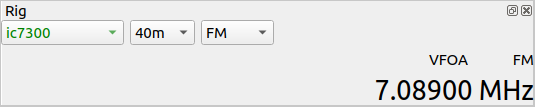
QLog remembers the last used frequency for each band. When you switch between bands, QLog automatically tunes to the previously used frequency for that band.
Scroll the mouse wheel over a digit in the frequency display to adjust the frequency by that digit's place value (for example, 1 kHz or 10 Hz per scroll step). When the pointer is over the frequency display but outside the digits, the default step is 10 Hz.
The Rig widget can also show small frequency labels next to the mode information:
- Bandmap Guide label - when Bandmap Guide is enabled and the current frequency is inside a guide range with a label, QLog shows that label. If the frequency is outside all valid guide ranges, QLog shows
OUT. - IBP - shown when the current frequency is on an International Beacon Project frequency.
- SOS - shown when the current frequency is on an emergency frequency.
Move the mouse over a label to see the frequency or range details.