matrix - ff6347/extendscript GitHub Wiki
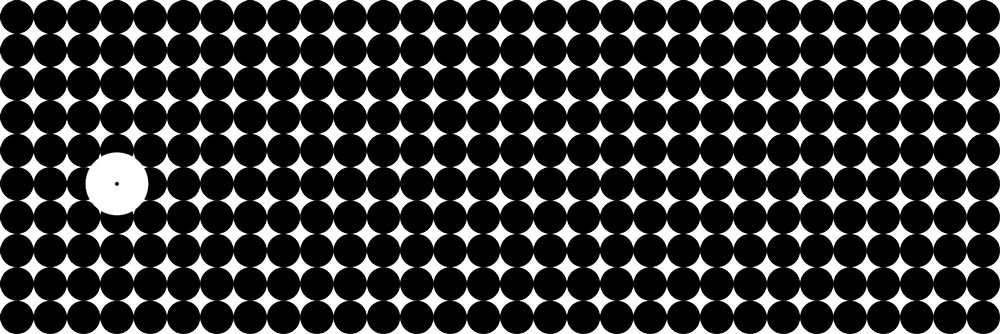
    /*
    This script creates a 2 dimensional array to create a matrix
    you can access object by the number of the column or the row


            X----0----1----2----3----4----5----6----7
            *--------------------------------------->
    C       Y    0    0    0    0    0    0    0    0
            |    |    |    |    |    |    |    |    |
    O       |    1    1    1    1    1    1    1    1
            |    |    |    |    |    |    |    |    |
    O       |    2    2    2    2    2    2    2    2
            |    |    |    |    |    |    |    |    |
    R       |    3    3    3    3    3    3    3    3
            |    |    |    |    |    |    |    |    |
    D       |    4    4    4    4    4    4    4    4
            |    |    |    |    |    |    |    |    |
    I       |    5    5    5    5    5    5    5    5
            |    |    |    |    |    |    |    |    |
    N       |    6    6    6    6    6    6    6    6
            |    |    |    |    |    |    |    |    |
    A       |    7    7    7    7    7    7    7    7
            |    |    |    |    |    |    |    |    |
    T       |    8    8    8    8    8    8    8    8
            |    |    |    |    |    |    |    |    |
    E       |    9    9    9    9    9    9    9    9
            |    |    |    |    |    |    |    |    |
    S       V    10   10   10    10  10   10   10   10

    So you can access the object in the upper left corner
    via:
    matrix[ 0][ 0] // upper left
    matrix[ 7][10] // is the lower right corner

    */

    var ph = 100; // page height for better handling
    var pw = 300; // page width for better handling


    var doc = app.documents.add({
            /*Creae a doc with some settings*/
            facingPages:false,

            documentPreferences:{
                pageHeight: ph,
                pageWidth: pw
                }
            });

    var page = doc.pages[0]; // get the first page

    var diam = 10;// the diameter of the the ovals


    var matrix = new Array(); // his will hold all arrays this is X columns

    /*
    Now make a loop in a loop and create some circles
    it calcs the position of the ovals and creates the 2 dim Array
    */
    for(var x1 = 0; x1 < pw;x1 = x1 + diam){
        rows = new Array();
        /*

        we need a counter to create the matrix like this rows[count] = oval;
        if we would use rows.push(oval) we would not need this counter
        */
        var count = 0;
        for(var y1 = 0; y1 < ph;y1 = y1 +diam){
            var y2 = y1 + diam;// now we have the y1 coord we need to create y2
            var x2 = x1 + diam;// now we have the x1 coord we need to create x2

            // create a oval
            var oval = page.ovals.add({
                geometricBounds:[y1,x1,y2,x2],
                strokeWeight:0,
                fillColor:doc.swatches[3] /* This is black on creation */
            });
            // now add the oval to the row
            rows[count] = oval;
            count++;// increase count
            }

            matrix.push(rows); // and add another row to the matrix
        }


    var X = 3; // this is how we now can select the objects
    var Y = 5; // this is how we now can select the objects
    alert("HI there I am the object of the type: " + matrix[X][Y].constructor.name+"\n"+
     "at matrix coordinate:"+" X: " + X + "|| Y: " + Y);// set some properties

    matrix[X][Y].strokeWeight = 25;
    matrix[X][Y].strokeColor = doc.swatches[2];
    matrix[X][Y].bringToFront();