Effects - ff6347/extendscript GitHub Wiki
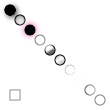
This script is a mixture of basil.js and raw indesign API calls. We apply all the effects that are possible to some ellipses.
#includepath "~/Documents/;%USERPROFILE%Documents";
#include "basiljs/bundle/basil.js";
function draw() {
  // code goes here -----------
  var doc = b.doc();
  b.clear(doc);
  doc.documentPreferences.properties = {
    pageWidth: 110,
    pageHeight: 110
  };
  var ellipseWithShadow = b.ellipse(10, 10, 10, 10);
  // for the settings of the shadow take a look at
  // http://yearbook.github.io/esdocs/#/InDesign/DropShadowSetting
  ellipseWithShadow.transparencySettings.dropShadowSettings.properties = {
    mode: ShadowMode.DROP,
    noise: 0.5,
    xOffset: 2,
    yOffset: 2
  };
  b.fill(255);
  // for the inner shadow settings see
  // http://yearbook.github.io/esdocs/#/InDesign/InnerShadowSetting
  var ellipseWithInnerShadow = b.ellipse(20, 20, 10, 10);
  ellipseWithInnerShadow.transparencySettings.innerShadowSettings.properties = {
    applied: true,
    distance: 2
  };
  b.fill(0);
  // http://yearbook.github.io/esdocs/#/InDesign/TransparencySetting/outerGlowSettings
  var ellipseWithOuterGlow = b.ellipse(30, 30, 10, 10);
  ellipseWithOuterGlow.transparencySettings.outerGlowSettings.properties = {
    applied: true,
    effectColor: doc.swatches[5]
  };
  b.fill(255);
  // see http://yearbook.github.io/esdocs/#/InDesign/InnerGlowSetting
  var ellipseWithInnerGlow = b.ellipse(40, 40, 10, 10);
  ellipseWithInnerGlow.transparencySettings.innerGlowSettings.properties = {
    applied: true,
    effectColor: doc.swatches[5]
  };
  // http://yearbook.github.io/esdocs/#/InDesign/BevelAndEmbossSetting
  var ellipseWithBevelAndEmboss = b.ellipse(50, 50, 10, 10);
  ellipseWithBevelAndEmboss.transparencySettings.bevelAndEmbossSettings.properties = {
    applied: true,
    highlightColor: doc.swatches[5]
  };
  // see http://yearbook.github.io/esdocs/#/InDesign/SatinSetting
  var ellipseWithSatin = b.ellipse(60, 60, 10, 10);
  ellipseWithSatin.transparencySettings.satinSettings.properties = {
    applied: true,
    invert: true
  };
  // see http://yearbook.github.io/esdocs/#/InDesign/FeatherSetting
  var ellipseWithFeather = b.ellipse(70, 70, 10, 10);
  ellipseWithFeather.transparencySettings.featherSettings.properties = {
    mode: FeatherMode.STANDARD,
    noise: 10,
    width: 5
  };
  // see http://yearbook.github.io/esdocs/#/InDesign/DirectionalFeatherSetting
  var ellipseWithDirectionalFeather = b.ellipse(80, 80, 10, 10);
  ellipseWithDirectionalFeather.transparencySettings.directionalFeatherSettings.properties = {
    applied: true,
    angle: 99,
    leftWidth: 20,
    rightWidth: 10
  };
  // see http://yearbook.github.io/esdocs/#/InDesign/GradientFeatherSetting
  var ellipseWithGradiantFeather = b.ellipse(90, 90, 10, 10);
  ellipseWithGradiantFeather.transparencySettings.gradientFeatherSettings.properties = {
    applied: true,
    hiliteAngle: 80,
    hiliteLength: 10
  };
  // see http://yearbook.github.io/esdocs/#/InDesign/BlendingSetting
  var ellipseWithBlending = b.ellipse(100, 100, 10, 10);
  ellipseWithBlending.transparencySettings.blendingSettings.properties = {
    opacity: 50
  };
  // you also apply al these things above only to the stroke or the fill
  // http://yearbook.github.io/esdocs/#/InDesign/StrokeTransparencySetting
  // http://yearbook.github.io/esdocs/#/InDesign/FillTransparencySetting
  var rectWithBlendingOnlyOnStroke = b.rect(10, b.height - 20, 10, 10);
  rectWithBlendingOnlyOnStroke.strokeTransparencySettings.blendingSettings.properties = {
    opacity: 50
  };
  // code end ------------------
}
b.go();