Flutter HTTP GET Multiple data - fauziardha1/learn-flutter GitHub Wiki
HTTP GET in multiple data or list of data
status: SuccessContoh Data: 🔢
{
    "page": 1,
    "per_page": 6,
    "total": 12,
    "total_pages": 2,
    "data": [
        {
            "id": 1,
            "name": "cerulean",
            "year": 2000,
            "color": "#98B2D1",
            "pantone_value": "15-4020"
        },
        {
            "id": 2,
            "name": "fuchsia rose",
            "year": 2001,
            "color": "#C74375",
            "pantone_value": "17-2031"
        },
        {
            "id": 3,
            "name": "true red",
            "year": 2002,
            "color": "#BF1932",
            "pantone_value": "19-1664"
        },
        {
            "id": 4,
            "name": "aqua sky",
            "year": 2003,
            "color": "#7BC4C4",
            "pantone_value": "14-4811"
        },
        {
            "id": 5,
            "name": "tigerlily",
            "year": 2004,
            "color": "#E2583E",
            "pantone_value": "17-1456"
        },
        {
            "id": 6,
            "name": "blue turquoise",
            "year": 2005,
            "color": "#53B0AE",
            "pantone_value": "15-5217"
        }
    ],
    "ad": {
        "company": "StatusCode Weekly",
        "url": "http://statuscode.org/",
        "text": "A weekly newsletter focusing on software development, infrastructure, the server, performance, and the stack end of things."
    }
}- Siapkan tampilan yang terdiri dari ListViewBuilder dan RaisedButton ,
- Buat model untuk data yang akan di ambil, misal user :
class Resources {
  int id;
  String name;
  int year;
  String color;
  String pantonValue;

  Resources({this.id, this.name, this.year, this.color, this.pantonValue});

  factory Resources.createResouce(Map<String, dynamic> jsonObject) {
    return Resources(
      id: jsonObject["id"],
      name: jsonObject["name"],
      year: jsonObject["year"],
      color: jsonObject["color"],
      pantonValue: jsonObject["pantone_value"],
    );
  }

  static Future<List<Resources>> getFromAPI(int id) async {
    String url = "https://reqres.in/api/unknown";
    var apiResult = await http.get(url);
    var jsonData = json.decode(apiResult.body);

    List<Resources> resources = [];

    for (var item in jsonData["data"]) {
      resources.add(Resources.createResouce(item));
    }

    return resources;
  }
}
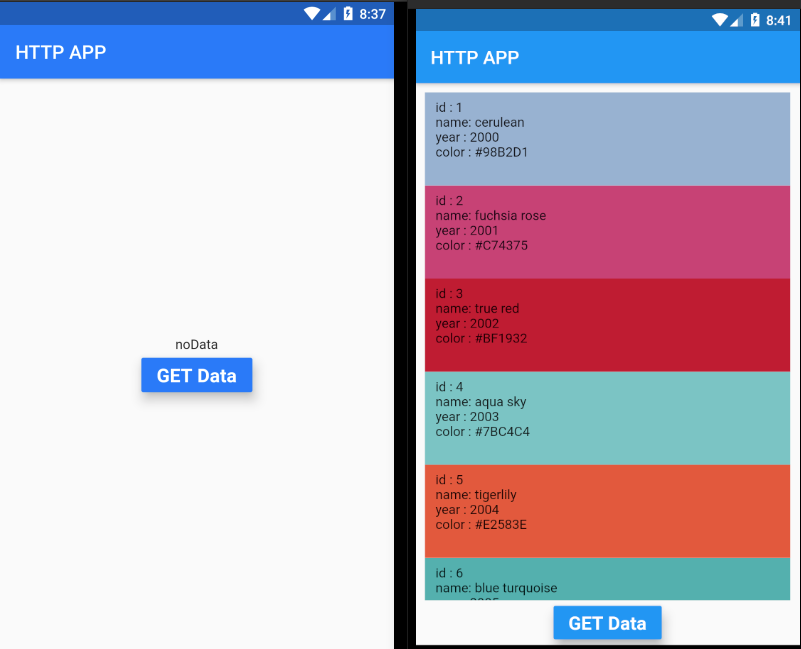
- kembali ke main.dart dan buat object resource dan tampilkan datanya. main.dart :
class GetAppMultipleData extends StatefulWidget {
  @override
  _GetAppMultipleDataState createState() => _GetAppMultipleDataState();
}

class _GetAppMultipleDataState extends State<GetAppMultipleData> {
  List<Resources> resources = [];
  List<SimpleResourcesView> resourcesView = [];

  void loadResourcesView(List<Resources> resources) {
    List<SimpleResourcesView> data = [];
    for (var resource in resources) {
      data.add(SimpleResourcesView(
        resources: resource,
      ));
    }
    setState(() {
      resourcesView = data;
    });
  }

  @override
  void initState() {
    loadResourcesView(resources);
    super.initState();
  }

  @override
  Widget build(BuildContext context) {
    return Scaffold(
      appBar: AppBar(title: Text("HTTP APP")),
      body: Center(
        child: Column(
          mainAxisAlignment: MainAxisAlignment.center,
          crossAxisAlignment: CrossAxisAlignment.center,
          children: [
            Flexible(
              flex: 2,
              child: resourcesView.length > 0
                  ? ListView.builder(
                      padding: EdgeInsets.all(10),
                      itemBuilder: (_, int index) => resourcesView[index],
                      itemCount: resources.length ?? 0,
                    )
                  : Text("noData"),
            ),
            RaisedButton(
                color: Colors.blue,
                elevation: 10,
                onPressed: () {
                  Resources.getFromAPI(3).then((value) {
                    resources = value;
                    loadResourcesView(resources);
                    setState(() {});
                  });
                },
                child: Text(
                  "GET Data",
                  style: TextStyle(
                    color: Colors.white,
                    fontSize: 20,
                    fontWeight: FontWeight.bold,
                  ),
                ))
          ],
        ),
      ),
    );
  }
}

class SimpleResourcesView extends StatelessWidget {
  final Resources resources;

  SimpleResourcesView({this.resources});

  @override
  Widget build(BuildContext context) {
    var hexColor = resources.color.replaceAll("#", "");
    hexColor = "0xFF" + hexColor;
    var color = Color(int.parse(hexColor));
    return Container(
      height: 100,
      color: color,
      child: Padding(
        padding: const EdgeInsets.all(8.0),
        child: Column(
          crossAxisAlignment: CrossAxisAlignment.start,
          children: [
            Text(
                " id : ${resources.id} \n name: ${resources.name} \n year : ${resources.year} \n color : ${resources.color}"),
          ],
        ),
      ),
    );
  }
}
hasil :