Using InterfaceBuilder - fan-ADN/nendSDK-iOS GitHub Wiki
Implementation procedure when using Interface Builder
It is possible to implement banner ads with Interface Builder
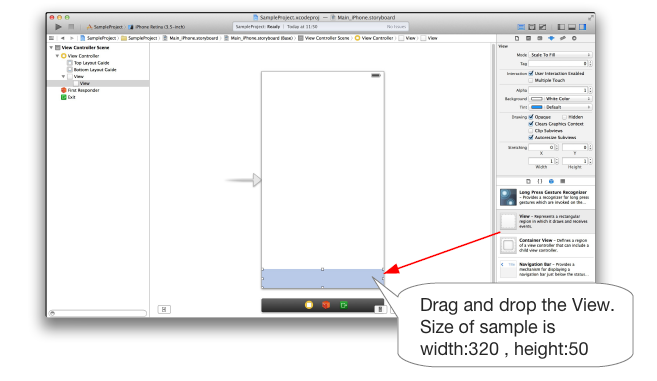
Adding View
Add View where the ad will be displayed in View. Adjust the View and ad size when configuring
Changing Class and Property Setting
You can change the Class and Property in the Identity Inspector from the Utility area.
- Set
NADViewin CustomClass - Add User Defined Runtime Attributes to the following value:
- Set the apiKey in
nendApiKeythat was issued in the dashboard - Set the spotID in
nendSpotIDthat was issued in the dashboard
Items possible to set User Defined Runtime Attributes
The items below can set User Defined Runtime Attributes within the initial value:
| Key Path | Type | Value | Required or Optional | Initial Value | Explanation |
|---|---|---|---|---|---|
| nendApiKey | String | Issued apiKey | Required | - | apiKey issued in the dashboard |
| nendSpotID | Number | Issued SpotID | Required | - | SpotID issued in the dashboard |
| isAdjustAdSize | Boolean | YES or NO | Optional | NO | Auto Scaling Ads possible/not possible |
The setting is now complete.
Regarding Auto Scaling Ad Sizes
Starting from SDK ver 2.6.0, banner sizes will be scaled automatically depending on the width of every smartphone device. By using auto scale, the ad will be scaled based on the width of the device.
Please refer to [Regarding Ad Formats and Sizes](About Ad Sizes#auto_scaling) for display examples
Setting User Defined Runtime Attributes
Add isAdjustAdSize in User Defined Runtime Attributes in the NADView that is configured, then set it to YES.

Determine the position to display ad by using Auto Layout
ex. To display at the bottom of the screen
Place NADView in the position that you want the ad displayed, then check the Horizontal Centre in Container panel in the Align setting.

Set the suitable value for the Width and Height in the Pin Setting panel. Then click the Constrain To Margins at the bottom of Spacing To Nearest Neighbor.

Example of the created constraint

Please refer to [here](About Ad Sizes#restrictions) for more information on auto scaling constraints.