Store data in SQLite - fakeivchenko/lwjwae GitHub Wiki
An application needs to remember things: notes, settings, a list of recent files. lwjwae gives it a database of SQLite in one file, with all of the SQL of SQLite, and no driver to add. Java and the page share it. In this guide, a page keeps notes in the store, and Java counts them in the same file.
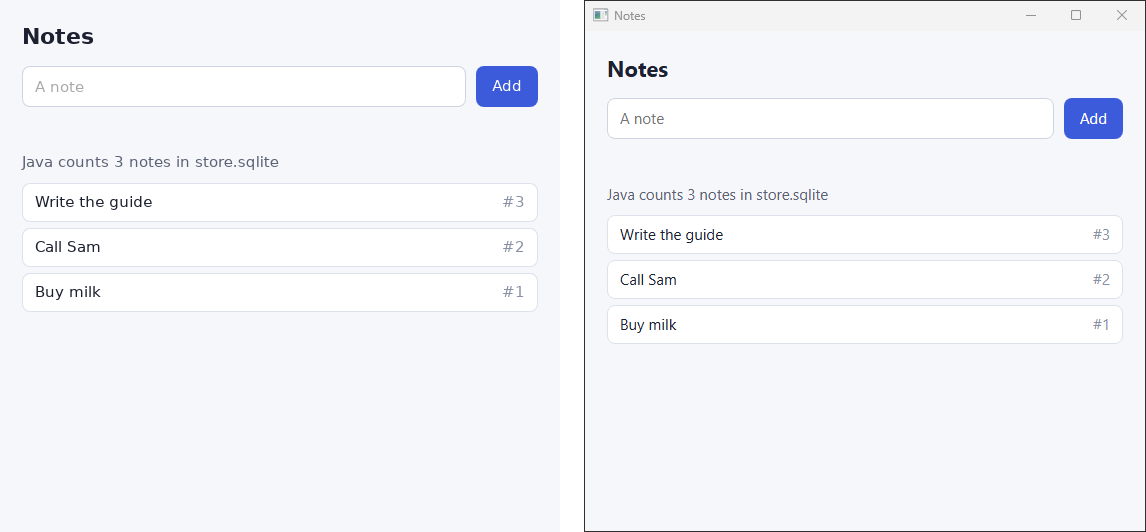
Give the application a name
The store lives in the data directory of the application, and the data directory comes from its
name. Without a name, the application has no data directory, and application.store() throws
IllegalStateException.
public class Notes {
  public static void main(String[] args) {
    // The name gives the application a data directory, and the store a place in it.
    ApplicationParameters parameters = ApplicationParameters.builder().name("Notes").build();
    try (Application application = Application.create(parameters)) {
      Store store = application.store();
      store.executeScript(
          """
          CREATE TABLE IF NOT EXISTS notes (
            id INTEGER PRIMARY KEY,
            title TEXT NOT NULL UNIQUE
          )
          """);
      Window window =
          application.show(
              WindowParameters.builder()
                  .title("Notes")
                  .size(new WindowSize(560, 500))
                  .resource("store/index.html")
                  .build());
      // Java reads the same file as the page.
      window.bind("noteCount", _ -> String.valueOf(Notes.count(store)));
      application.run();
    }
  }

  private static Object count(Store store) {
    return store.query("SELECT count(*) AS n FROM notes").getFirst().get("n");
  }
}
The store opens on the first call to application.store() and closes with the application. The
file is store.sqlite in the data directory:
| Platform | Data directory |
|---|---|
| Windows | %APPDATA%\NAME |
| macOS | ~/Library/Application Support/NAME |
| Linux | $XDG_CONFIG_HOME/NAME, or ~/.config/NAME |
To keep the data somewhere else, set dataDirectory in ApplicationParameters.
CREATE TABLE IF NOT EXISTS runs on every start and does nothing after the first. To change the
schema later, keep its version in PRAGMA user_version and run the steps that the file hasn't seen
yet.
Read and write from the page
The page reaches the store as lwjwae.store. It needs no binding and no setup.
const store = lwjwae.store;

async function refresh() {
  const rows = await store.query("SELECT id, title FROM notes ORDER BY id DESC");
  // ... draw the rows
  const count = await window.noteCount();
}

document.querySelector("#add").addEventListener("submit", async (event) => {
  event.preventDefault();
  const title = document.querySelector("#title");
  await store.execute("INSERT INTO notes (title) VALUES (:title)", { title: title.value });
  await refresh();
});
| Method | What it does |
|---|---|
query(sql, params) |
Runs one statement and resolves to its rows, each an object of column names and values |
execute(sql, params) |
Runs one statement and resolves to { changes, lastInsertRowId } |
executeScript(sql) |
Runs every statement of a script in order, such as a schema, and resolves to nothing |
transaction(statements) |
Runs a list of { sql, params } in one transaction and resolves to the rows of every statement |
params is an array for the parameters ? and ?NNN, or an object for :name, @name, and
$name, written in the object without their prefix. It is optional.
A row holds a number, a string, or null. JSON has no bytes, so a BLOB reaches the page as
Base64.
Read and write from Java
Store takes the same SQL with the same two ways to pass parameters. In Java, a row is a Map
from the name of a column to its value: a Long, a Double, a String, a byte[], or null,
by the type of the value in SQLite.
store.execute("INSERT INTO notes (title) VALUES (?)", "Groceries");
store.execute("INSERT INTO notes (title) VALUES (:title)", Map.of("title", "Call Sam"));
List<Map<String, Object>> found =
    store.query("SELECT * FROM notes WHERE title LIKE :prefix", Map.of("prefix", "Gro%"));
long id = store.lastInsertRowId();
Every method of Store is safe to call from any thread. One call runs at a time, and a transaction
keeps the others waiting until it ends. That makes the store simple to share between a binding, an
event handler, and the thread that started the application.
Change several rows or none
A transaction makes every statement of it happen, or none of them. In Java, pass the work to
transaction:
store.transaction(
    work -> {
      work.execute("INSERT INTO notes (title) VALUES (?)", "Pack");
      work.execute("INSERT INTO notes (title) VALUES (?)", "Leave");
    });
If the work throws, the store rolls the whole transaction back. A transaction inside another is a
savepoint of it, so the inner one can fail and the outer one can go on. inTransaction does the
same and returns the result of the work.
On the page, transaction takes the statements as a list:
const [inserted, count] = await store.transaction([
  { sql: "INSERT INTO notes (title) VALUES (:title) RETURNING id", params: { title: "Pack" } },
  { sql: "SELECT count(*) AS n FROM notes" },
]);
The answer has one entry for every statement, in order. A write has rows only when it says
RETURNING.
Handle a refused statement
A row that breaks a constraint, for example a second note with the same title, fails the call. On
the page, the rejection has a code:

try {
  await store.execute("INSERT INTO notes (title) VALUES (:title)", { title: title.value });
} catch (failure) {
  error.textContent = `${failure.code}: ${failure.message}`;
}
| Code | Java | When |
|---|---|---|
constraint |
ConstraintViolatedException |
A constraint refused a row: UNIQUE, NOT NULL, CHECK, or a foreign key |
sql-error |
StoreFailedException |
SQLite refused the statement, for example a table that doesn't exist |
malformed-command |
IllegalArgumentException |
The call isn't one: more than one statement, or a missing parameter |
message is the text of SQLite, with its result code. Foreign keys are on, so a row that points
at a missing row is a constraint too.
Good to know
- One statement per
queryandexecute. For a schema or a migration with many, useexecuteScript, which takes no parameters. - SQLite is the one of the system:
winsqlite3.dllon Windows,libsqlite3.dylibon macOS, andlibsqlite3.so.0on Linux, which WebKitGTK depends on. The application carries no database of its own,. - The store opens the file in write-ahead mode. A write is atomic and survives a crash, and a read doesn't wait for it.
- For tests,
Store.inMemory()gives a store that is gone when it closes. - The same data directory keeps the size and the place of the windows, so the store sits next to them. Delete the folder to reset the application.