Follow the theme of the desktop - fakeivchenko/lwjwae GitHub Wiki
Many users switch their desktop between light and dark, some of them at sunset. An application that ignores the switch looks out of place for half of its day. lwjwae tells Java and the page which theme the desktop has, and tells them again when it changes. In this guide, a page draws itself in the colors of the desktop, and Java prints every switch.
Read the theme in Java
application.theme() returns a SystemTheme, LIGHT or DARK. onThemeChange calls a listener
when the user switches:
public class Themes {
  public static void main(String[] args) {
    try (Application application = Application.create()) {
      application.bind("javaTheme", _ -> application.theme().pageName());
      application.onThemeChange(theme -> System.out.println("The desktop is now " + theme));
      application.show(
          WindowParameters.builder()
              .title("Theme")
              .size(new WindowSize(560, 300))
              .resource("theme/index.html")
              .build());
      application.run();
    }
  }
}
The listener runs on a virtual thread, in the order of the changes, and never with the theme that
the application already has: a switch to the theme that is on is no change. theme() answers
LIGHT where the desktop makes no choice.
Follow the theme on the page
The page reads the theme with lwjwae.theme.current() and hears a switch with
lwjwae.theme.listen. Both use the names "light" and "dark", the names of
prefers-color-scheme:
const apply = async (theme) => {
  document.documentElement.dataset.theme = theme;
  document.querySelector("#page").textContent = theme;
  document.querySelector("#java").textContent = await window.javaTheme();
};
lwjwae.theme.current().then(apply);
lwjwae.theme.listen(apply);
:root { --bg: #f6f7fb; --text: #1c2030; }
[data-theme="dark"] { --bg: #151823; --text: #e6e9f2; }
body { background: var(--bg); color: var(--text); }
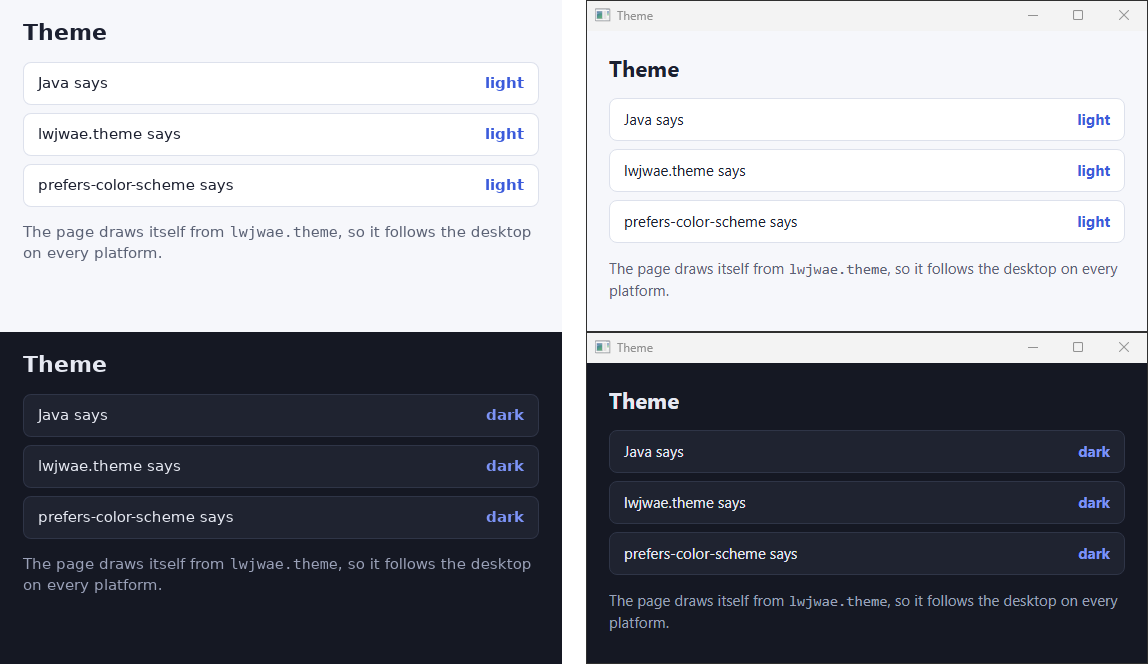
listen returns a promise of the function that stops the listener. In the picture, the first line
is what Java says, the second what the page reads from lwjwae.theme, and the third what the
engine says through prefers-color-scheme. All three agree after a switch.
Or leave it to CSS
The engines of Windows and macOS follow the desktop in prefers-color-scheme without any help, and
the GTK backends make WebKitGTK follow it too. A page that is only styled can skip lwjwae.theme:
@media (prefers-color-scheme: dark) {
  :root { --bg: #151823; --text: #e6e9f2; }
}
Use lwjwae.theme when the page needs the value in script, such as to switch the theme of a chart
library, or when it keeps its own setting that can override the desktop.
Where the choice comes from
| Platform | Source | Change |
|---|---|---|
| Windows | AppsUseLightTheme of the user in the registry, the "app mode" of the settings |
Read once a second, so a switch shows within a second |
| macOS | The appearance of the system, AppleInterfaceStyle |
The notification that the system posts |
| Linux, GTK 3 and GTK 4 | The color-scheme of the desktop portal |
The SettingChanged signal of the portal |
On Linux, the portal wins where it has a choice, and lwjwae writes it into the dark preference of
GTK. GTK 3 doesn't read the portal, and WebKitGTK takes prefers-color-scheme from that preference,
so without the write a page would stay light on a dark desktop. A session without a portal falls
back to the dark preference of GTK and to the name of its theme: a name with dark in it is dark.
Good to know
- Windows has two settings, "Choose your default Windows mode" and "Choose your default app mode". lwjwae follows the second one, the one that applications paint with.
- A tray application with no window still hears the switch: Windows polls the registry, and the other backends listen on the desktop.
- The theme is the choice of the user, not the color of your window. A window with a title bar of
its own, such as a frameless one, paints the title bar itself, so follow
theme()there too.