Frequently Asked Questions - ennobler/gem5-test-doc GitHub Wiki
- Take a look at the documentation, specifically the video on the Introduction page. Then the video on Running gem5 is helpful. If you have any questions, check this page and search this wiki before posting to the Mailing Lists. Additionally, we encourage you to take the gem5 101 course, which goes through a lot of gem5 basics.
- By creating a Etherdump object, setting it's file parameter, and setting the dump parameter on the EtherLink to it. This is easily accomplished with our fs.py example configuration by adding the command line option --etherdump=. The resulting file will be named and be in a standard pcap format.
- You probably have libpython in a non-standard path and need to set LD_LIBRARY_PATH
- This is done by passing the EXTRAS argument to scons when you build M5. See Extras for more information.
- This is done by specifying a different target in scons
scons -j 4 build/X86/libm5_debug.so CPU_MODELS=TimingSimpleCPU
- A disk image is just a raw data file...we use disk images to fake a
real hard disk. You can use the
util/mkblankimage.shscript in the m5 repository to create a blank image of arbitrary size.
- Using either sudo or the root account run
/bin/mount -o loop,offset=32256 /z/foo.img /mount/point. You can then copy the desired files to the image. (If you don't have root access on a real machine, you can always create a virtual machine using a tool like VirtualBox or QEMU and mount the image inside the VM.) Remember to unmount it before running the simulator with/bin/umount /mount/pointor you may get unexpected results. This is a hack-y method, what you should do to add new binaries to M5 is modify linux-dist and place it in that build structure. The offset parameter is required because our disk images contain both a partition table and the partition. The partition table occupies the first 32256 bytes of the image.
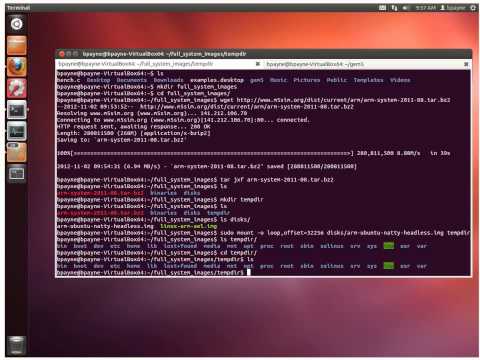
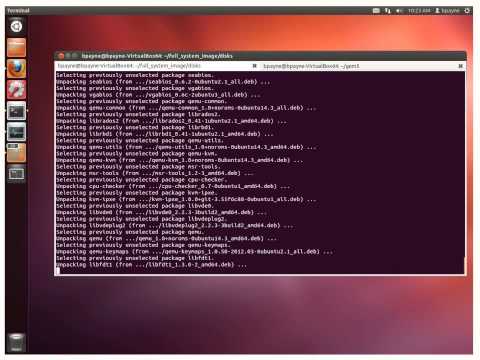
Note: The 2nd video uses an Ubuntu Natty image. Since Natty is now quite
old, you will need to update your /etc/apt/sources.list file, on the
mounted image. Use, e.g., sudo vi /etc/apt/sources.list, and replace
http://old-releases.ubuntu.com/ubuntu/ in place of
http://ports.ubuntu.com/. Also, for things to work as show in the
video, you will need to have have sshd running on the host machine.
- There are several ways to do this:
- You can get the blank image script from the m5/util directory, create a new blank image that is the desired size, and then mount both images and copy the contents of the 50MB one to your new one.
- You can use the 50MB image to boot the system but then mount a second disk image that has your benchmark on it by adding the image to FSConfig.py and then mounting it with an rcS script
- You can build an entirely new image of the desired size with PTX dist (available from the Download page).
- The MIPS SDE Lite package is a very good tool but unfortunately it will not work if you would like to cross-compile a MIPS/Linux binary and run it on M5. The MIPS SDE package contains some SDE-specific startup routines and glibc calls that M5 will not be able to support. The cross-compiler solution we found to work is crosstool. For MIPS, gcc 3.4.4 and glibc 2.3.5 seems to work.
- The smallest unit of time gem5 understands is 1 picosecond (since 1 picosecond = (1 second)/1000000000000).
- If M5 seems to initialize OK, but the CPU never fetches any instructions, it may be because your executable is dynamically linked. M5 does not support dynamic linking (shared libraries) in syscall emulation mode. You must recompile the executable and have it statically linked. With gcc, just add the "-static" flag to the command line.
- There is no inherent limit in M5 (other than simulation speed). In SE mode there are no obstacles to simulating as many CPUs as you want. However, in FS mode, the real-world Alpha platform we model (Tsunami) only supports up to 4 processors. To get around this limit, we defined and implemented a variant of the Tsunami platform (which we call BigTsunami) that can take up to 64 processors. Note that BigTsunami does not correspond to any real system. BigTsunami support is included in the standard M5 Alpha build, but booting with more than 4 CPUs requires modifications to the PAL code and kernel as well. Take a look at the Download page for our Linux patches and modified PAL code. Note that even with the BigTsunami changes, simulating 64 processors will be quite slow, and the Linux scheduler doesn't seem particularly good at scheduling a large number of processors.
Prebuilt kernel and PAL binaries can be found at: http://www.cs.utexas.edu/~cart/parsec_m5/
- Using the '-h' flag will show what options M5 can take in general.
Running
m5.debug foo.py -h(or any m5 binary variant) will list all options that are available based on M5's internal options and the options defined in the .py file.
- See the SPEC2000 benchmarks page.
- See the SPEC2006 benchmarks page.
- See the Splash benchmarks page.
- You have not installed the full-system files (disk images, kernels, and other binaries) or have not setup the path to them correctly. See Getting Additional Tools and Files.
- In SE mode, simply create a system with multiple CPUs and assign a different workload object to each CPU's workload parameter. If you're using the O3 model, you can also assign a vector of workload objects to one CPU, in which case the CPU will run all of the workloads concurrently in SMT mode. Note that SE mode has no thread scheduling; if you need a scheduler, run in FS mode and use the fine scheduler built into the Linux kernel.
- There are some very fundamental issues with whatever approach you choose. Here are your options:
- Terminate as soon as any thread reaches a particular maximum number of instructions. This option is equivalent to max_insts_any_thread. The potential problem here is that because of the inherent non-determinism of multithreaded programs, there is no way to ensure that all experiments do the same work. You might also not get the same amount of work done. For example, if you have two threads, one of them must reach the maximum. The other could either execute no instructions, or could execute max-1 instructions. The benefit of this approach is that all threads are running fully until the simulation terminates (provided that none of the threads terminate early due to some other condition.)
- Terminate once all threads have reached a maximum number of instructions. This option is equivalent to max_insts_all_threads. In this mode, we make sure all threads do at least a certain amount of work, but threads that reach the maximum continue executing. This has the same benefit as the previous example, but also suffers from the problem that non-determinism will cause you to potentially not do the same amount of total work.
- In this unimplemented mode, all threads would run for exactly a specified number of instructions with some threads terminating early. All threads will do the same amount of work thus avoiding the problem of the previous options. The downside of this option is that the threads may not all be running for the entire simulation. For example, one thread might finish its instructions almost right away, while the other thread has quite a bit left to do. When this happens, you're only running a multiprogram workload for a fraction of the total time.
- Another unimplemented option could be to specify how many instructions each thread has to complete before exiting. This is not implemented, but would allow a balance to be struck between options 1 and 2 if the user experimented to figure out what a good mix was.
If you want to implement either of the unimplemented options, or if you have other ideas, please let us know!
The sampler from the previous version of M5 has been replaced with functionality via Python. See the Sampling documentation for details.
- That means that one of the libraries that you are linking with uses
a syscall that is not emulated. You can do a
manon the syscall name to see what the syscall is supposed to do and then try to implement at least whatever functionality your application needs. Or you can try the quick & dirty approach, which is to change the function pointer for syscall in arch///.cc from unimplementedFunc to ignoreFunc, which will make it print a warning and keep going rather than terminate with an error. No guarantees that your program won't crash because of this though.
- Objects such as DynInsts are reference counted, making it slightly
harder to obtain the data inside. In gdb you must access them
through the pointer that is stored in the ref counted pointer, which
is called data. Thus given a ref counted pointer
ptr, in gdb you would say(gdb) ptr->datato get the pointer to the actual object.
- This is due to having a function that is declared but never defined. Either you forgot to define it, or are not compiling in the file that defines it. In the case of templated code, you may be including the wrong file or you may not have manually instantiated a templated class that needs to be manually instantiated.
When I'm running in SE mode I get warnings about unimplemented or ignored system calls or trapping modes.
- M5 does not support IEEE FP floating point traps (underflow, overflow, etc.) and as a result doesn't bother supporting the system calls that enable/disable these traps or set the corresponding trap handlers. It's pretty unlikely your application relies on them (we haven't seen one yet that does). As long as everything else seems to work you can ignore the warning.
Where are the classes for each ISA instruction? Where are the execute() methods for the StaticInst class?
- Both the classes and the execute() methods are generated through Python upon building any version of M5. For example, After building ALPHA, they will be located in the build/ALPHA/arch/alpha/ folder. The key files are decoder.hh, decoder.cc (which describe the ISA instructions), and *_exec.cc (which describe the execute() methods). The definitions for both exist in the .isa files found in src/arch/*/isa/, which are processed by src/arch/isa_parser.py to generate the previously mentioned .hh/.cc files.
- It is not currently supported. The SimpleCPU doesn't support SMT, so it doesn't support fast-forwarding in SMT mode. However it should be feasible given some hacking on the SimpleCPU or the Sampler.
- Add the file to the source list in the SConscript in the current directory or (if there is none) the closest parent directory.
- You need to both have a Python version of your object defined (see
the various py files in src/
/\* and C++ file need to have the Params::create() function difned for your particular object.
- This is not supported. Just create a Scalar<> statistic that does the same thing as your normal variable and use that in the formula instead.
- There is a lot of templated code used within M5, and these *_impl.hh are used to make it a little easier to organize things. Normally template functions must be entirely included in the header file in order to not require the programmer to manually instantiate the copies of the template functions. However, when you have an entire class that's templated, the header files quickly become bloated and too big, except for small helper classes. Thus we put the declarations in the header file as normal, the definitions in the *_impl.hh file, and the manual instantiations in the *.cc file. This makes it easier to sort out the instantiations from the definitions. Also if there are only a few templated functions inside a non-templated class, it may be possible to include the functions in the *_impl.hh file and not have to manually instantiate the functions. You just need to include the *_impl.hh file in any .cc files that use the templated function. See mem/packet{.hh|_impl.hh|.cc} for an example.
- Delete the scons.dblite file in the m5 directory.
configs/example/se.py is a sample configuration file for syscall
emulation. Similarly, configs/example/fs.py is a sample configuration
for full system simulations. Both these files include files in the
configs/common/
directory.
A good point of reference for this is the "argsInit" function in the src/sim/process.cc file. For Syscall Emulation, each process is given a "LiveProcess" object and that function initializes the arguments to that process and also sets up the initial stack for that process. You'll also notice that the architecture specific Process objects (e.g. AlphaLinuxLiveProcess found in arch/alpha/linux/process.hh) derive from the LiveProcess object too.
When creating a new HelloDevice class extending SimObject class (following the example in the ASPLOS tutorial slide 106-115), one might encounter loader errors like the following:
build/X86/params/params_wrap.do:
In function `_wrap_DeviceParams_create':
m5/build/X86/params/params_wrap.cc:19999:
undefined reference to `DeviceParams::create()'
collect2: ld returned 1 exit status
scons: *** [build/X86/m5.debug] Error 1
scons: building terminated because of errors.
This error is caused by NOT defining a HelloDeviceParams::create()
function in the device.cc. One should add the following in the device.cc
HelloDevice * HelloDeviceParams::create()
{
    return new HelloDevice(this);
}