BIRD‐Metadata‐Overview‐with‐examples‐and‐pictures - eclipse-efbt/efbt GitHub Wiki
BIRD Metadata Overview
This page describes the main BIRD metadata artefacts . It uses examples from the BIRD website and visualisations from the Eclipse Free BIRD Tools (EFBT) project
At a glance
BIRD metadata can be grouped into 11 artefact groups. Some are base artefacts maintained directly in the metadata. Others are derived by applying processes such as mappings or gap analysis to the base artefacts.
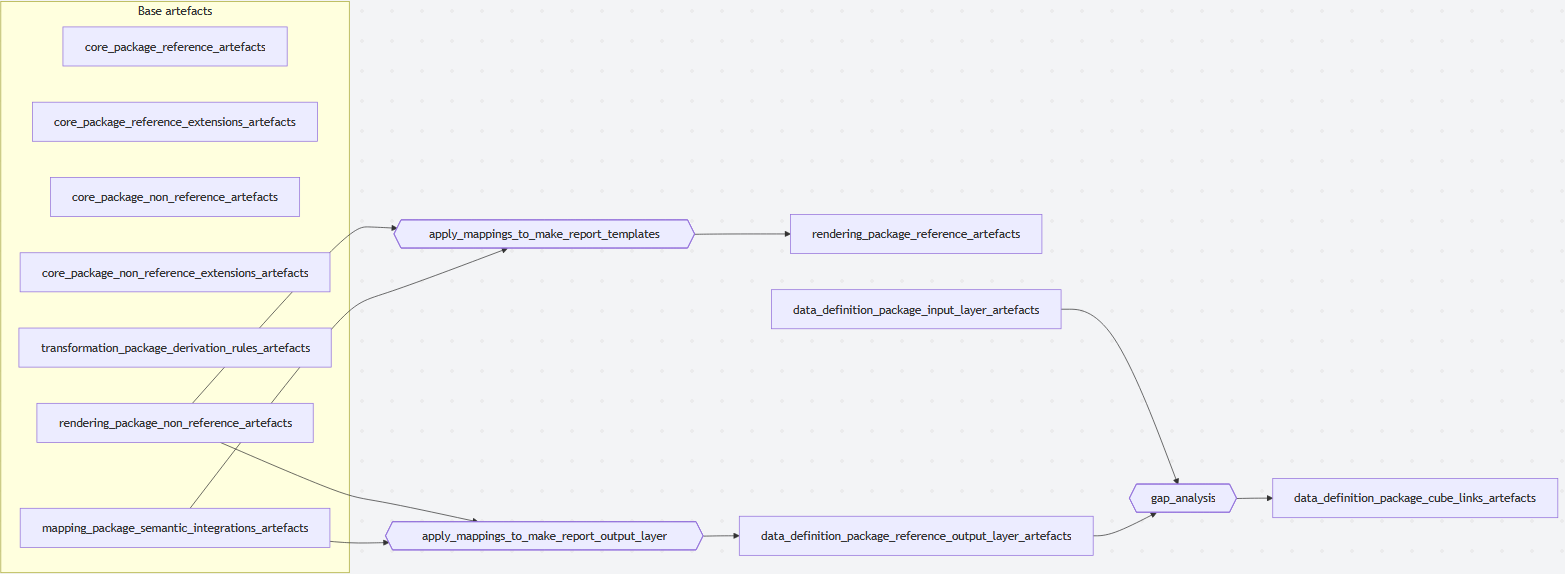
Figure: Overview of BIRD metadata artefact groups and derivation processes.
| Artefact group | Package or process | Main role |
|---|---|---|
| Core package - reference artefacts | SMCubes core package | SDD variables, domains, and members. |
| Core package - reference extension artefacts | SMCubes core package | SDD member hierarchies and subdomains. |
| Core package - non-reference artefacts | SMCubes core package | Non-reference variables, domains, and members, such as EBA dictionary content. |
| Core package - non-reference extension artefacts | SMCubes core package | Non-reference member hierarchies and subdomains. |
| Transformation package - derivation rules artefacts | SMCubes transformation package | Pseudocode rules for derived Enriched Input Layer fields. |
| Rendering package - non-reference artefacts | SMCubes rendering package | Non-reference annotated regulatory templates, such as EBA FINREP templates. |
| Mapping package - semantic integration artefacts | SMCubes mapping package | Mappings between non-reference dictionaries and the SDD reference dictionary. |
| Data definition package - input layer artefacts | SMCubes data definition package | Input Layer and Enriched Input Layer cubes and cube structure items. |
| Rendering package - reference artefacts | Derived by applying mappings to report templates | Reference annotated templates expressed in SDD terms. |
| Data definition package - reference output layer artefacts | Derived by applying mappings to report output layers | Reference Output Layer cubes, combinations, filters, and aggregations. |
| Data definition package - cube links artefacts | Derived by gap analysis | Links between input/enriched input cube structure items and Reference Output Layer cube structure items. |
Background
SMCubes
BIRD metadata is described using the SMCubes methodology. SMCubes organises metadata into packages, such as the core package, data definition package, rendering package, mapping package, and transformation package. Each package defines a set of metadata concepts and how those concepts relate to each other.
Reference and non-reference artefacts
BIRD separates metadata into reference and non-reference artefacts.
- Reference artefacts use the BIRD data dictionary, known as the SDD. The SDD is also used by the ECB for other purposes, including AnaCredit.
- Non-reference artefacts use other dictionaries, such as the EBA dictionary.
- Mappings connect non-reference artefacts to reference artefacts, allowing a non-reference regulatory template to be interpreted in SDD terms.
Key terminology
| Term | Meaning in this page |
|---|---|
| Variable | A business concept that can be used as a field, column, axis, or dimension. |
| Domain | The set of members that can be used as allowed values for a variable. |
| Member | One allowed value in a domain. |
| Member hierarchy | A parent-child structure between members in the same domain. |
| Subdomain | A subset of the members in a domain, often used to restrict allowed values in a specific cube or framework. |
| Cube | A structured dataset definition. It is similar to a table definition. |
| Cube structure item | A field or column in a cube. |
| Combination | A set of variable/member pairs, often used to represent the metadata behind a report datapoint. |
| Cube link | A link between cube structure items, usually from an input or enriched input cube to a Reference Output Layer cube. |
| Derivation rule | Pseudocode describing how an enriched input field is calculated from input fields. |
Core package artefacts
The SMCubes core package contains the basic dictionary building blocks: variables, domains, and members.
Non-reference variables, domains, and members
The example below shows a non-reference variable called Main Category from the EBA dictionary. Its domain is also called Main Category, and its allowed values include members such as Loans and advances (x469).
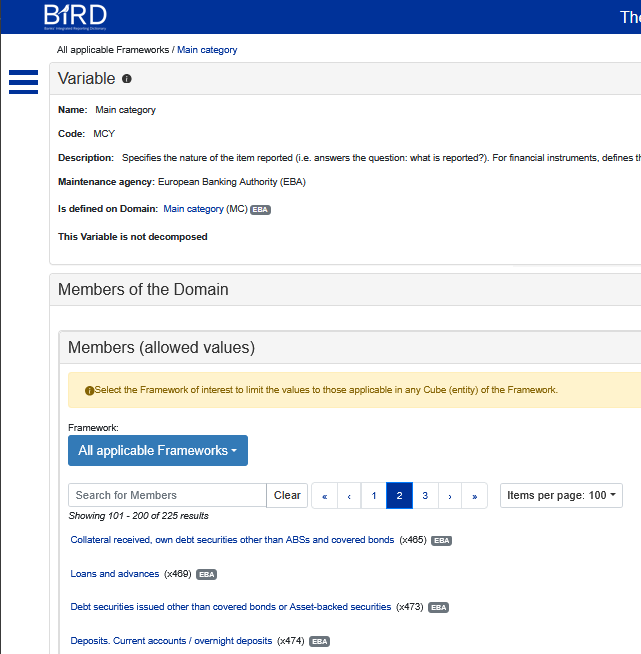
Figure: Non-reference variable, domain, and members for Main Category.
Reference variables, domains, and members
The example below shows a reference variable called TYP_INSTRMNT from the SDD dictionary. It has a domain called TYP_INSTRMNT, with members such as Term loans Other than Trade receivables, Credit card balance, Finance leases, Reverse repurchase agreements, on demand and short notice (114).
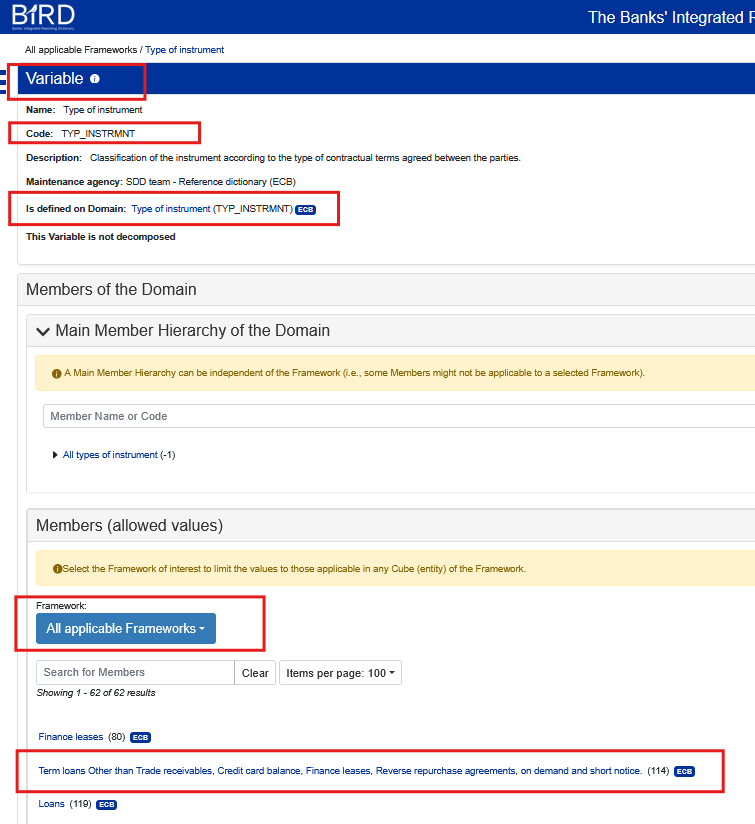
Figure: Reference variable, domain, and members for TYP_INSTRMNT in the SDD dictionary.
Extension artefacts: member hierarchies and subdomains
The core package also includes extension artefacts such as member hierarchies and subdomains.
Non-reference member hierarchy
The example below shows a member hierarchy for the non-reference Main Category domain. It shows where Loans and advances (x469) sits in the hierarchy. A domain may have multiple hierarchies.
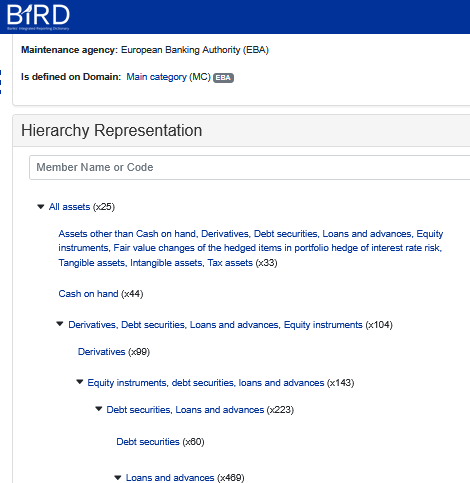
Figure: Non-reference member hierarchy for Main Category.
Reference member hierarchy
The example below shows a member hierarchy for the reference TYP_INSTRMNT domain. It shows that Term loans Other than Trade receivables, Credit card balance, Finance leases, Reverse repurchase agreements, on demand and short notice (114) has a more specific child member, Other loans (1022).
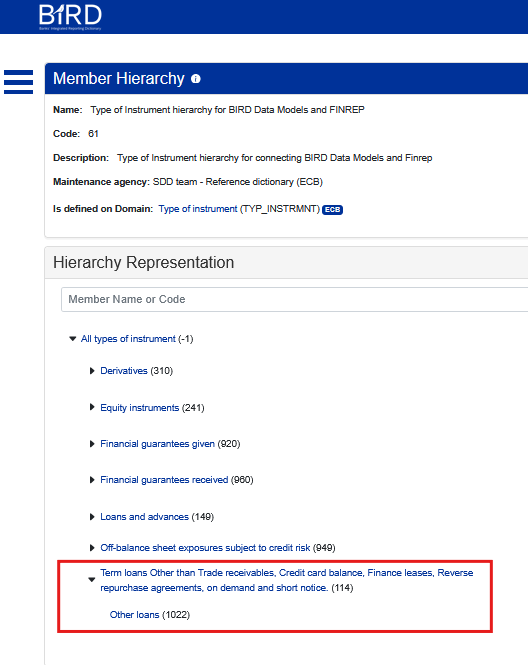
Figure: Reference member hierarchy for TYP_INSTRMNT.
Subdomains
A variable can also have a subdomain. A subdomain restricts a domain to the subset of members that are valid in a particular context.
For example, the Input Layer cube BIRD_EIL_INSTRMNT has a cube structure item called INSTRMNT_TYP_PRDCT. That cube structure item uses the TYP_INSTRMNT domain, but its subdomain contains only the members that are valid for that cube. It includes Other loans (1022), but not the broader member Term loans Other than Trade receivables, Credit card balance, Finance leases, Reverse repurchase agreements, on demand and short notice (114).
This is expected. Input Layer cubes usually use leaf-level members, because an implementation should classify a record as specifically as possible rather than using broad parent categories such as "loans and advances" or "all types of instrument".
The BIRD website includes a useful shortcut for showing only the allowed values used by cubes in a specific framework, such as FINREP, AnaCredit, or an input model.
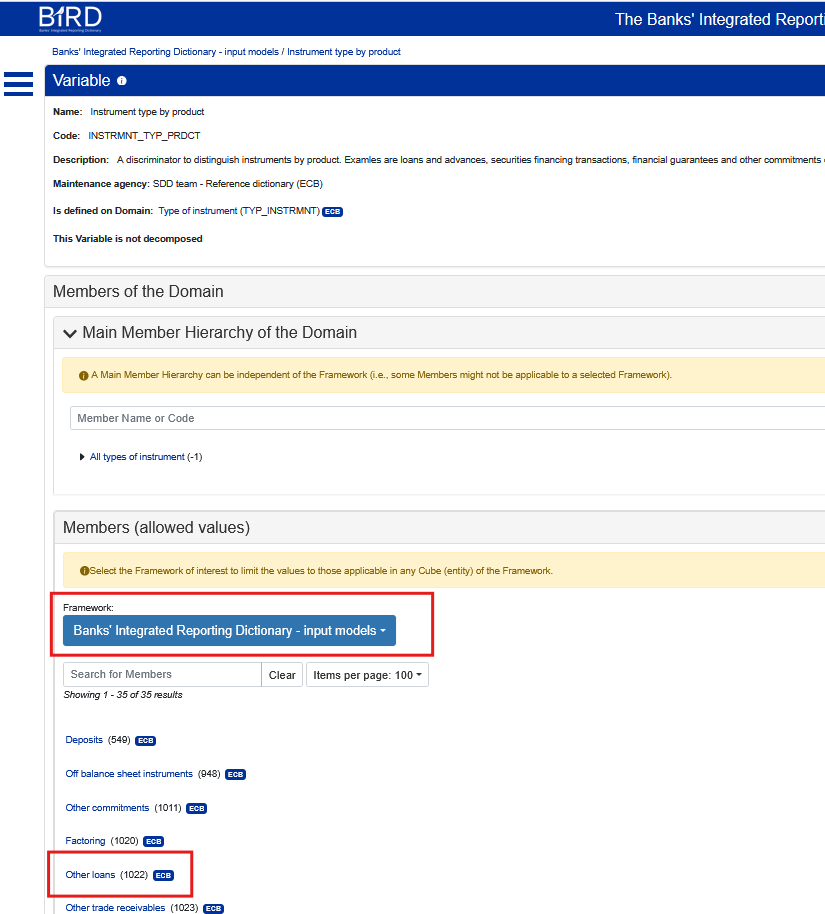
Figure: Allowed values for a cube/framework-specific subdomain.
Rendering package artefacts
The rendering package describes annotated templates and related rendering metadata. The package is influenced by the EBA Data Point Model (DPM) structure.
The diagram below shows the SMCubes rendering package concepts in dark blue and how they relate to concepts from other packages, such as Variable from the core package.
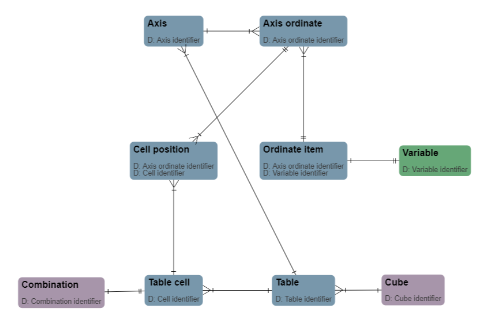
Figure: SMCubes rendering package concepts and their relationship to other packages.
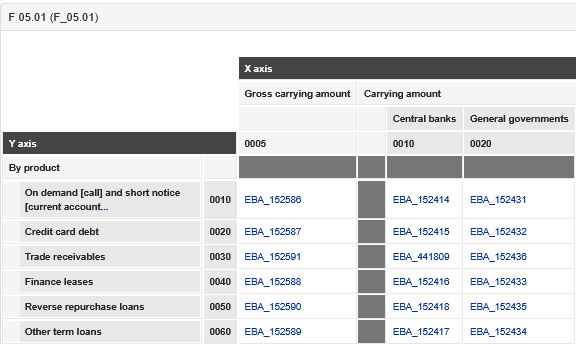
The rendering package can describe non-reference annotated templates from the EBA. The example below shows FINREP F 05.01.
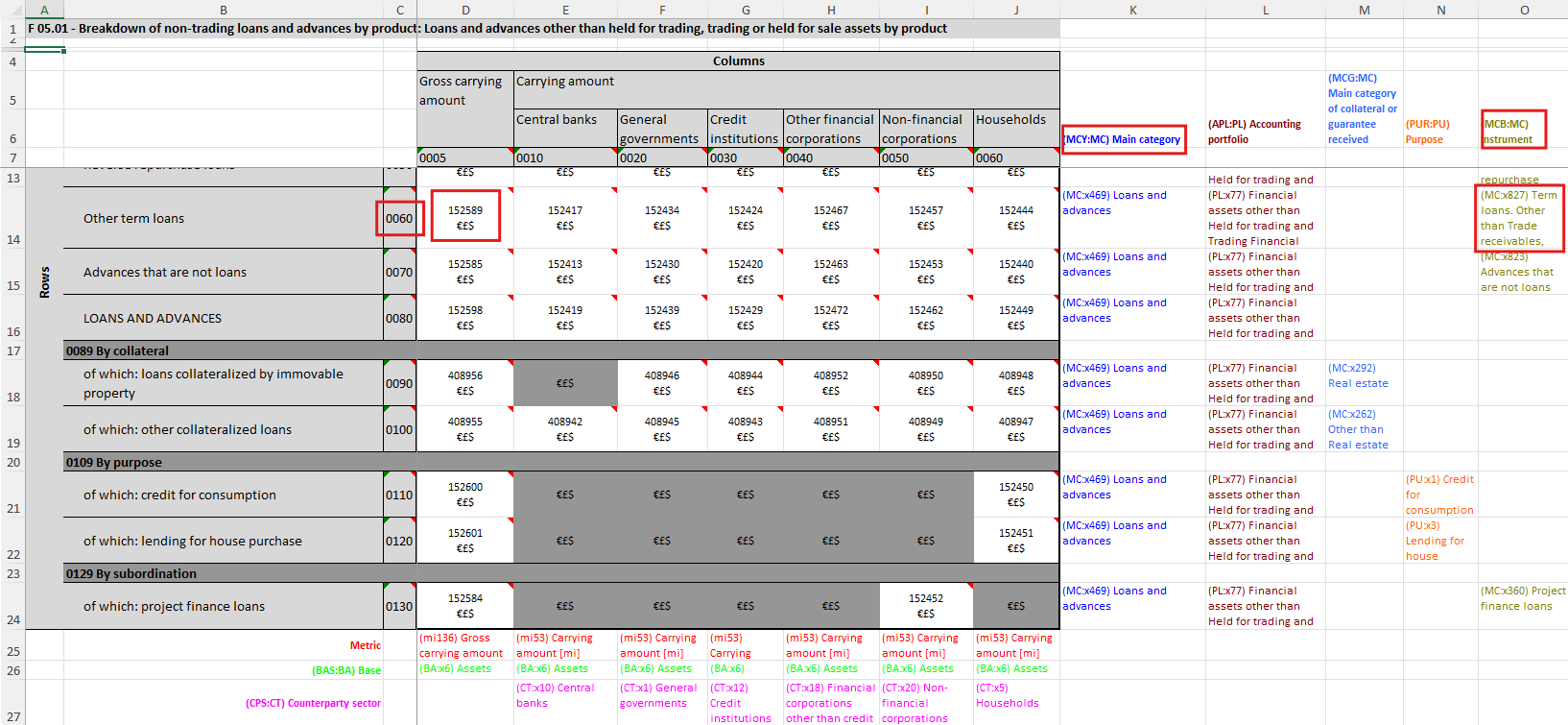
Figure: EBA FINREP F 05.01 annotated template.
The corresponding metadata can be navigated in the BIRD metadata viewer.
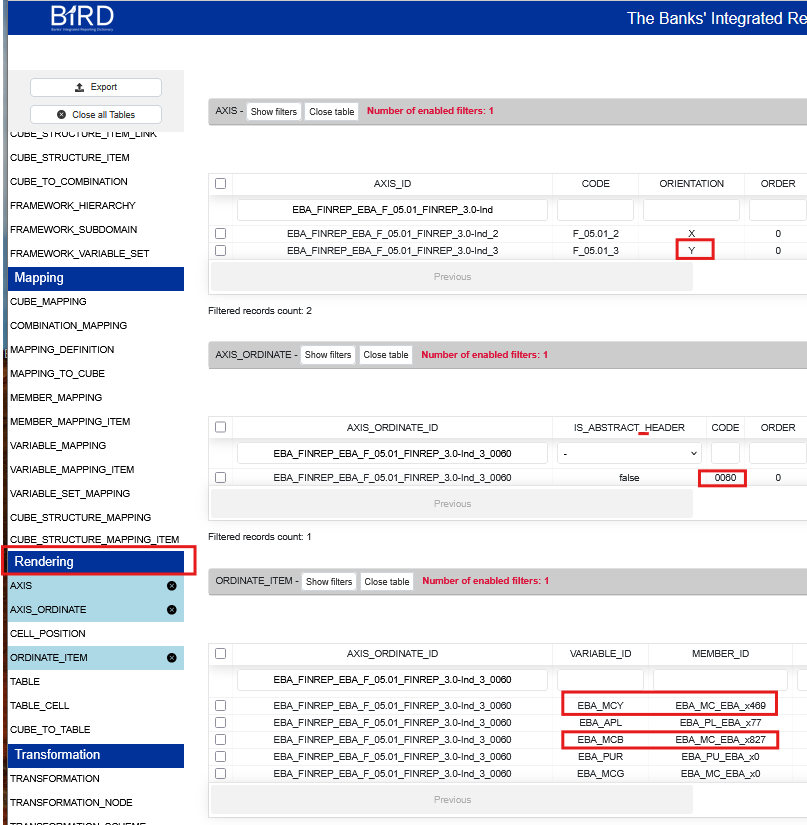
Figure: Rendering metadata shown in the BIRD metadata viewer.
Mapping package artefacts: semantic integration
Mappings provide semantic integration between non-reference dictionaries, such as the EBA dictionary, and the SDD reference dictionary.
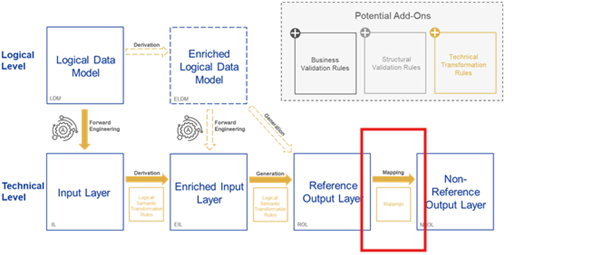
Note that the official bird diagrams can lead to a confusion of what the EBA<>SDD mappings are, as it links together the mappings in a diagram that is about data flow (IL->EIL->ROL) ,
Mappings really have nothing to do with data flow, their purpose is purely to create the structure of the ROL as shown below:
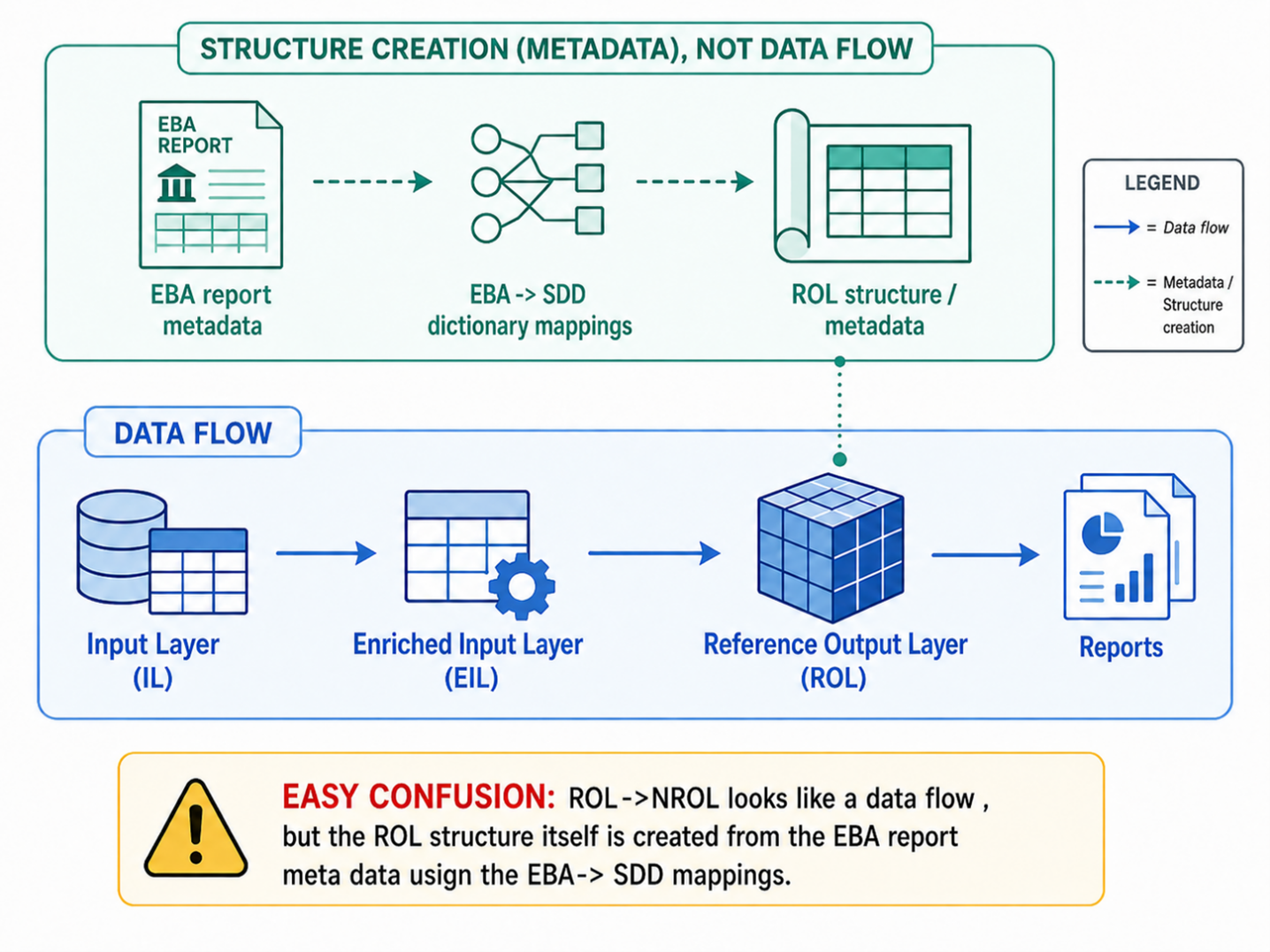
Those mappings can be applied to an EBA annotated template to produce an SDD annotated template. That SDD annotated template can then be used to create a Reference Output Layer as the target for BIRD transformations.
The example below shows a mapping used when creating the reference annotated template for FINREP F 05.01. The same mapping can be useful for multiple templates. It links these EBA members:
- Loans and advances (x469) in the Main Category (MCY) non-reference domain.
- Term loans. Other than Trade receivables, Credit card debt, Finance leases, Reverse repurchase loans (x827) in the Instrument (MCB) non-reference domain.
The mapping points to this SDD member:
- Term loans Other than Trade receivables, Credit card balance, Finance leases, Reverse repurchase agreements, on demand and short notice (114) in the
TYP_INSTRMNTreference domain.
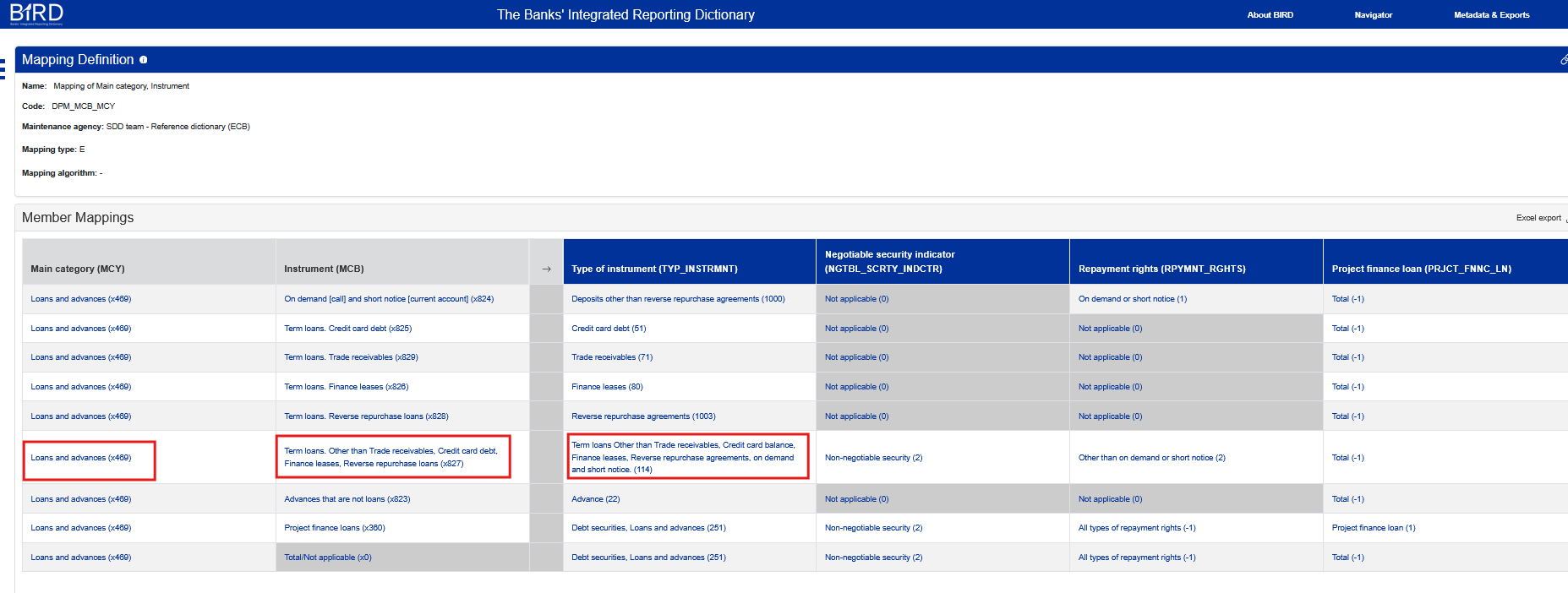
Figure: Semantic mapping from EBA dictionary members to an SDD member.
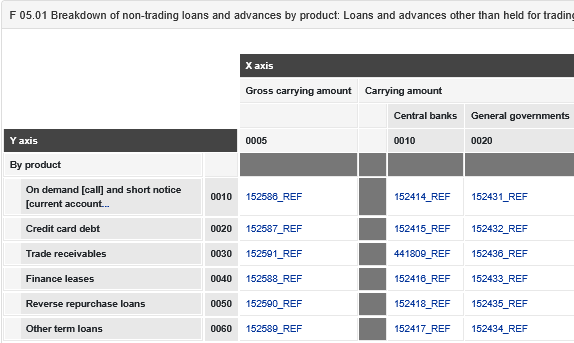
After applying the relevant mappings to an EBA annotated template, BIRD can produce a reference annotated template.
| EBA annotated template | Reference annotated template |
|---|---|
 |
 |
Data definition package artefacts: Reference Output Layer
The SMCubes data definition package describes cube structures and combinations and cube links
Combinations
A combination is a set of variable/member pairs. Combinations can store the metadata behind a specific report cell or datapoint. The example below highlights datapoint 152589 in the FINREP F 05.01 annotated template.
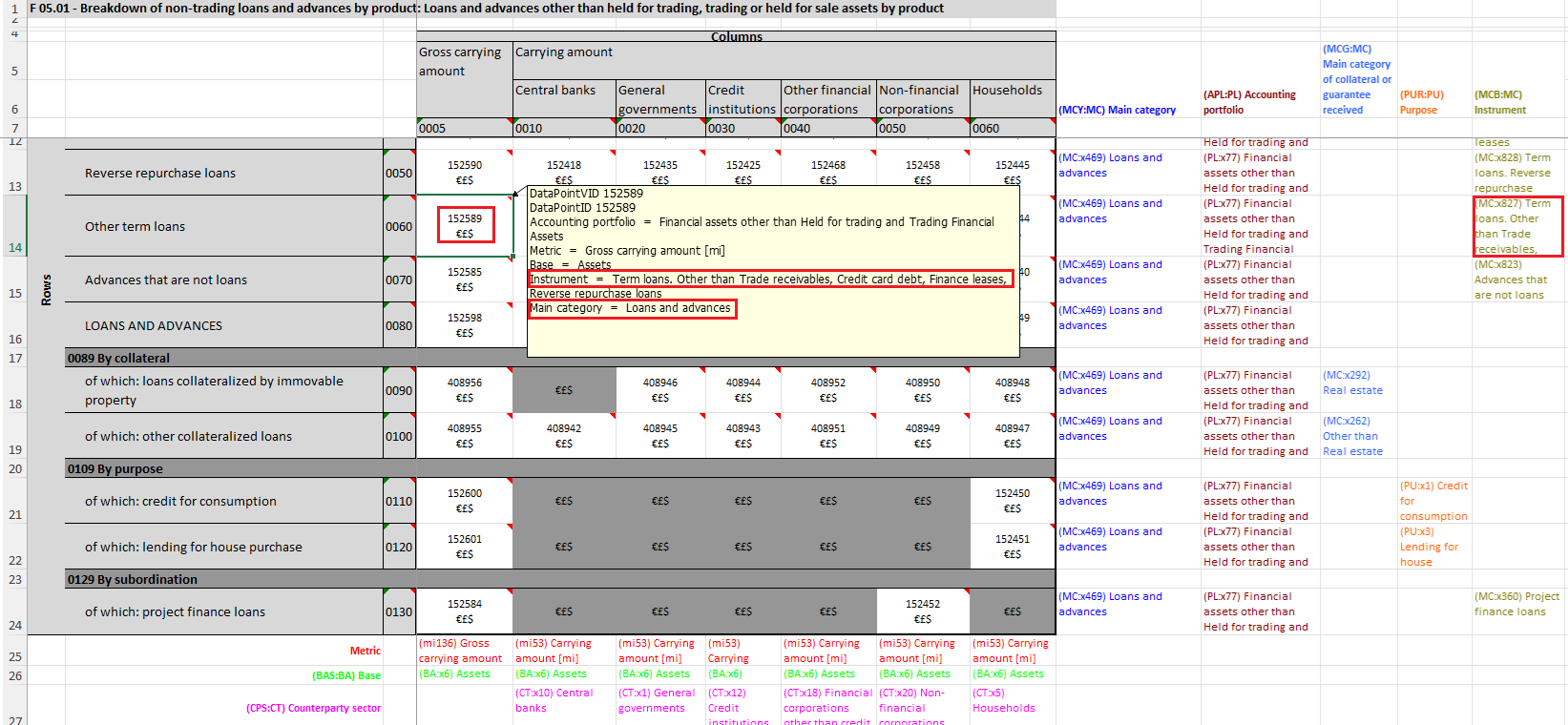
Figure: Datapoint 152589 in the annotated FINREP F 05.01 template.
The BIRD website visualises the corresponding non-reference combination metadata as shown below.
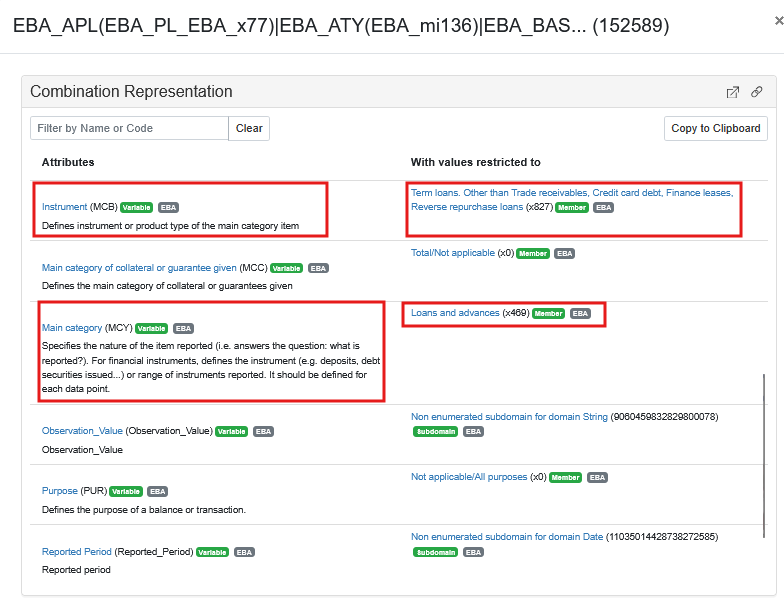
Figure: Non-reference combination metadata for the highlighted datapoint.
After applying the EBA-to-SDD mappings, BIRD can create the corresponding reference combination. In the comparison between the two combinations, the mapping described above is used to derive the correct TYP_INSTRMNT reference member.
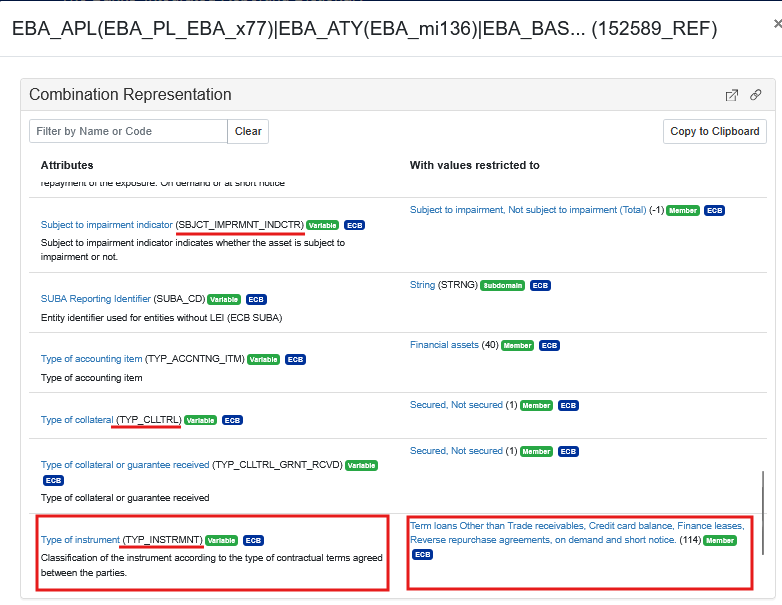
Figure: Reference combination metadata created by applying mappings.
Reference Output Layer cube structures
A cube structure is similar to a table definition: it defines a cube and its cube structure items, which are comparable to columns.
BIRD has a set of Reference Output Layer (ROL) cubes, with one ROL cube per report. To build the ROL cube for a report, BIRD looks at the variables used in the reference annotated template and lists them as cube structure items.
The row below shows a Reference Output Layer cube structure using some of the same variables shown in the reference combination.

Figure: Reference Output Layer cube structure items.
Some variables may appear in mappings but not in the official ROL if no cube links are created for them. In that case, the variables are redundant for constructing the ROL and can be removed from the mapping without changing the ROL result.
In an implemetation such as Eclipse Free BIRD Tool, Combinations can be converted into filters and aggregations that act upon the reference output layer structure. Member hierarchies are important in this step because non-leaf members, such as TYP_INSTRMNT_114 or SBJCT_IMPRMNT_-1, may need to be expanded into the leaf members that appear in the relevant input subdomain, such as TYP_INSTRMNT_1022, SBJCT_IMPRMNT_1, and SBJCT_IMPRMNT_2.
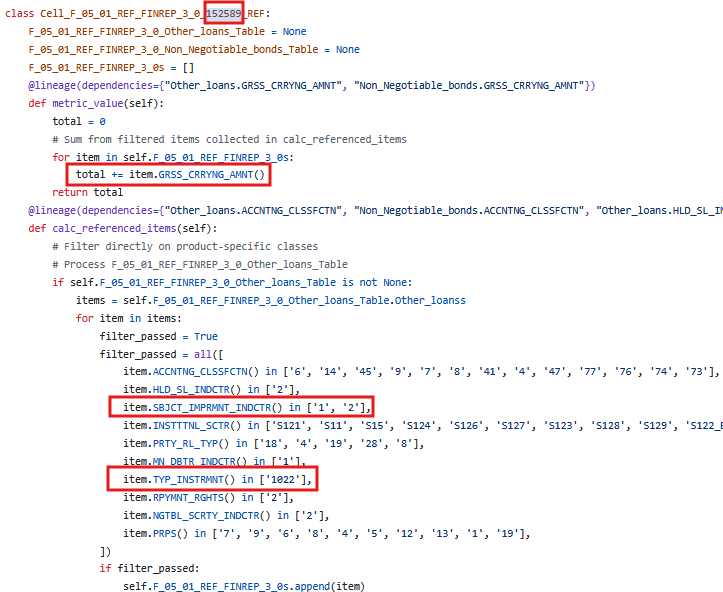
Figure: Example of deriving filters and aggregations from a combination.
Data definition package artefacts: input and enriched input layers
The Input Layer (IL) and Enriched Input Layer (EIL) are sets of cubes with cube structure items. They correspond to the tables and columns maintained in the SQL Developer tooling.
The example below shows metadata for the INSTRMNT cube in the Enriched Input Layer.
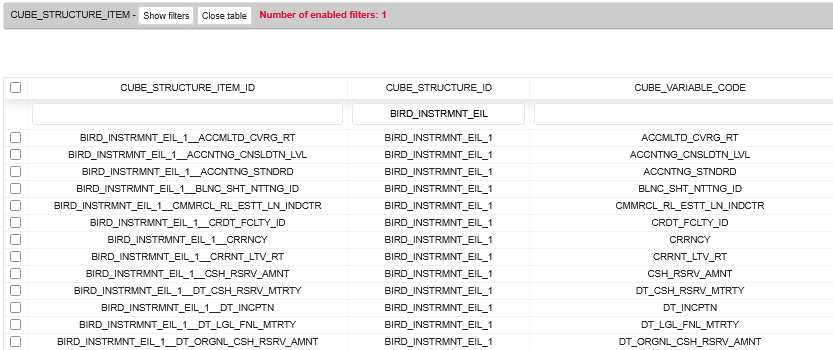
Figure: Example Enriched Input Layer cube structure.
Data definition package artefacts: cube links
Cube links connect cube structure items in the enriched input layers to cube structure items in the Reference Output Layer (EIL->ROL). Both sides use the SDD reference dictionary, so cube links can be generated automatically through the gap analysis.
In EFBT, cube links are normally interpreted in the context of a financial product. For example, the CRRYNG_AMNT item needed for Other loans in FINREP F 05.01 is linked to CRRYNG_AMNT in the INSTRMNT_RL enriched input cube. The same CRRYNG_AMNT item needed for non-negotiable bonds is linked to a different security-related enriched input cube.
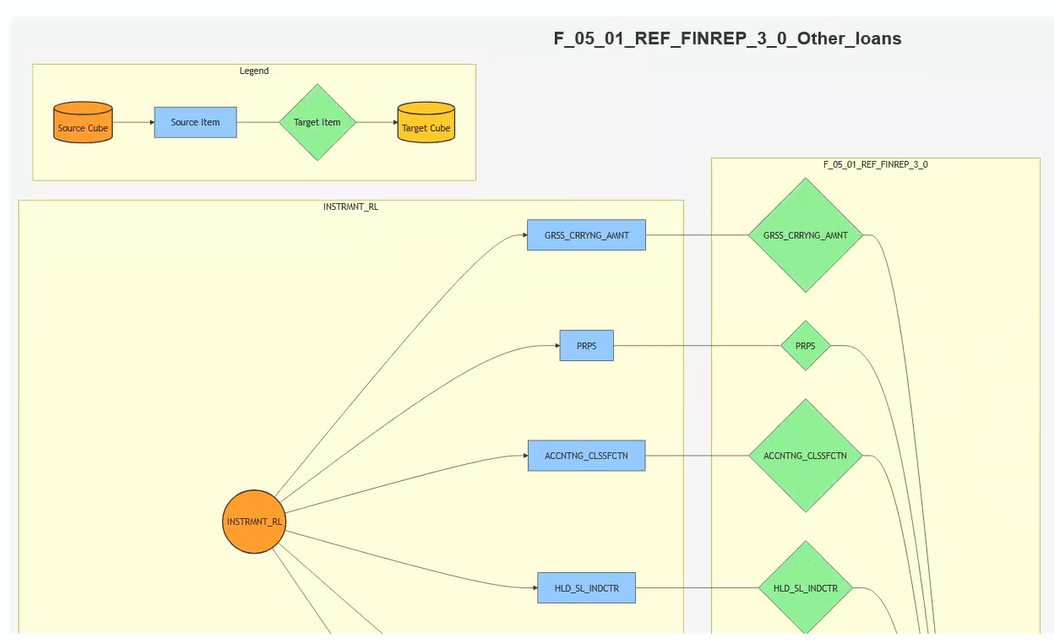
Figure: Cube links for the Other loans product context.
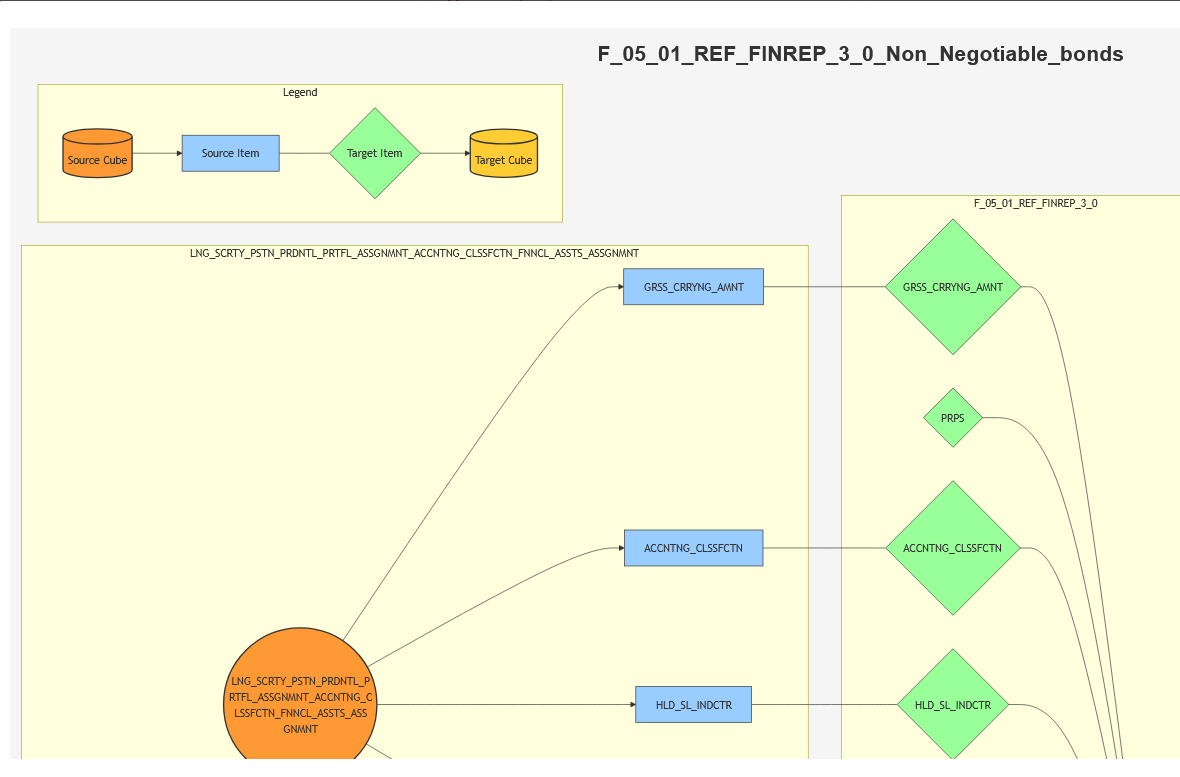
Figure: Cube links for the non-negotiable bonds product context.
The wider view below shows that a FINREP F 05.01 Reference Output Layer may need information from multiple cubes. A working BIRD implementation must join those cubes to build a flat structure for the report.
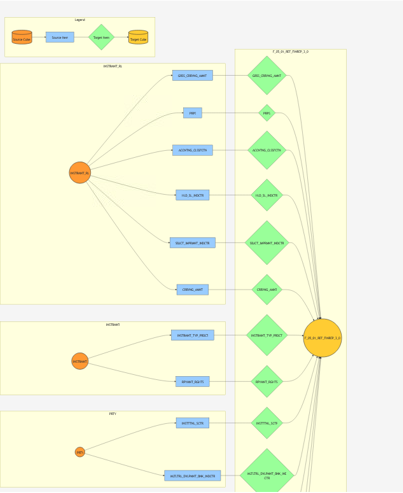
Figure: A report template may require data from multiple input/enriched input cubes.
EFBT performs those joins. In the example below, separate joins are created for Other loans and non-negotiable debt securities. The purple box represents report cell 152589 in FINREP F 05.01. The cyan boxes are product-specific Reference Output Layer instances for the report. The green tables are Input Layer or Enriched Input Layer cubes.
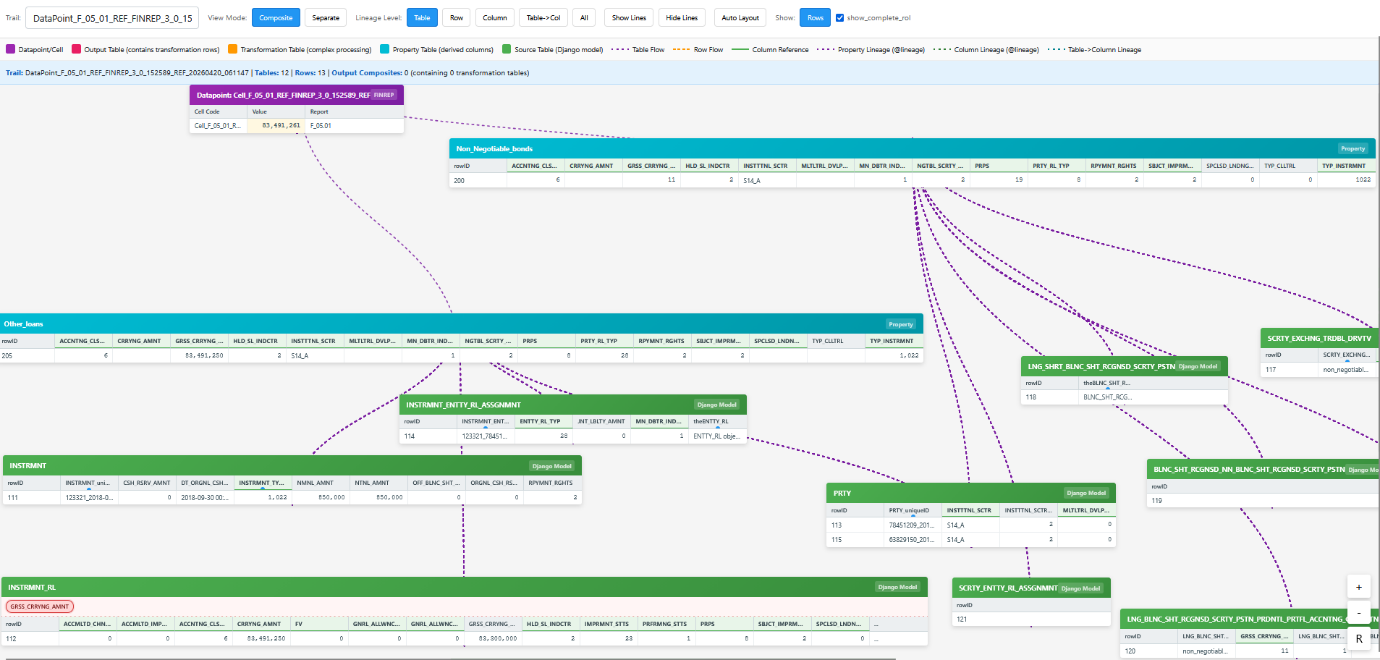
Figure: EFBT product-specific joins for FINREP F 05.01.
The column lineage below corresponds directly to the cube links.
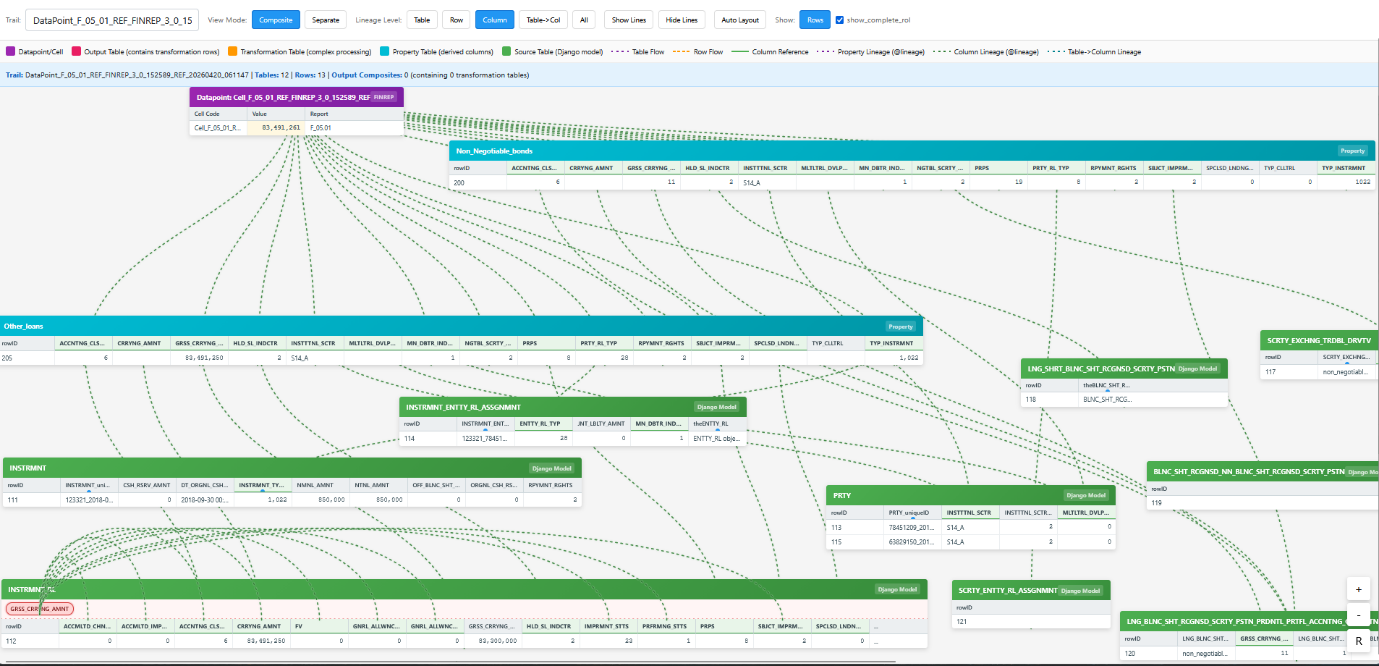
Figure: Column lineage corresponding to cube links.
The lines between the report datapoint and the Reference Output Layer represent the filters and aggregations derived from the combination for that datapoint.
Data definition package artefacts: Member links
Member links are also part of the data definition package. They are useful for dataset-style regulatory submissions such as AnaCredit, and potentially IReF, where output layers already use the SDD dictionary but allowed values may differ between output and input cube structure items.
For example, the AnaCredit counterparty cube ANCRDT_ACCNTNG_C uses ACCNTNG_CLASSFCTN. Member 13 is available in the subdomain associated with the output layer cube structure item, but not in the subdomain associated with the ACCNTNG_CLASSFCTN cube structure item in the INSTRMNT_RL input layer cube. The input layer instead contains the more specific members 76 and 77.
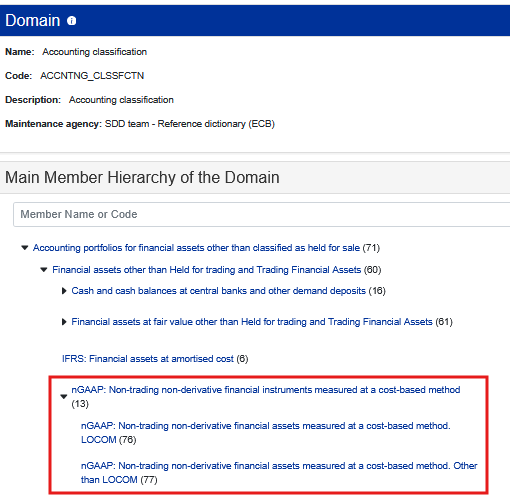
Figure: Accounting classification member hierarchy showing member 13 and its submembers.
BIRD addresses this mismatch by creating member links. Member links often mirror member hierarchies.

Figure: Member link metadata.
Transformation package artefacts: derivation rules
Derivation rules describe how to calculate extra fields in the Enriched Input Layer from fields in the Input Layer. In other words, they describe IL-to-EIL transformations.
BIRD stores these rules as pseudocode. The example below shows the derivation rule for GRSS_CRRYNG_AMNT.
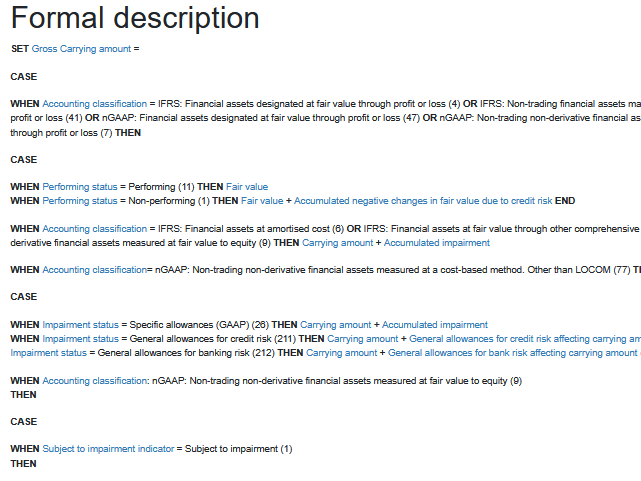
Figure: BIRD derivation rule pseudocode for GRSS_CRRYNG_AMNT.
EFBT can also visualise the data lineage for derivation rules.

Figure: EFBT lineage view for a derivation rule.