3. Adding Custom Skins - eckig/graph-editor GitHub Wiki
This tutorial covers how to add your own custom skin classes.
For each visual element there is an abstract skin class. A custom skin must extend one of these classes and must also have a one-parameter constructor that the model instance can be passed to. For example:
public class FooNodeSkin extends GNodeSkin {

    public FooNodeSkin(GNode node) {
        super(node);
        // Custom code here.
    }
}
The custom skin class is registered in the GraphEditor with a simple callback:
// Register GNodeSkin implementations(s):
graphEditor.setNodeSkinFactory(this::createMyNodeSkin);

// Register GConnectorSkin implementations(s):
graphEditor.setConnectorSkinFactory(this::createSkin);

// Register GConnectionSkin implementations(s):
graphEditor.setConnectionSkinFactory(this::createSkin);

// Register GJointSkin implementations(s), only used for GJointConnectionSkin connections:
graphEditor.setJointSkinFactory(this::createJointSkin);

// Register GTailSkin implementations(s):
graphEditor.setTailSkinFactory(this::createTailSkin);

private GNodeSkin createMyNodeSkin(final GNode node)
{
    return new FooNodeSkin(node);
}
Now every node will be rendered through the FooNodeSkin.
If you would like to support more different skins, you may extend the callback as you like. It is recommended to separate the different skins with the type attribute of every element in the GModel.
We'll use GConnectorSkin as an example because it's fairly simple. Connectors are the things that users click and drag on to create and remove connections. A connector skin must implement the following methods:
public abstract Node getRoot();
public abstract double getWidth();
public abstract double getHeight();
public abstract void applyStyle(GConnectorStyle style);
Let's create a custom skin to show a circular connector shape. The root node will be a JavaFX Pane with a Circle inside it.
private static final double RADIUS = 8;
private Pane root = new Pane();
private Circle circle = new Circle(RADIUS);

public FooConnectorSkin(final GConnector connector)
{
    super(connector);
    root.getChildren().add(circle);
    circle.getStyleClass().setAll("foo-connector");
}

@Override
public Node getRoot() { return root; }
The reason we use a pane for the root element, rather than returning a circle directly, is so that the (0,0) coordinate of the root element corresponds to the upper-left corner of the connector. For the width and height we simply write:
@Override
public double getWidth()  {  return 2 * RADIUS; }

@Override
public double getHeight() { return 2 * RADIUS; }
It is currently strongly recommended to return constants, rather than values that are zero until a layout-pass occurs such as root.getWidth().
We can implement the applyStyle method as follows:
@Override
public void applyStyle(final GConnectorStyle style)
{
    switch (style)
    {
    case DEFAULT:
        circle.pseudoClassStateChanged(forbidden, false);
        circle.pseudoClassStateChanged(allowed, false);
        break;

    case DRAG_OVER_ALLOWED:
        circle.pseudoClassStateChanged(forbidden, false);
        circle.pseudoClassStateChanged(allowed, true);
        break;

    case DRAG_OVER_FORBIDDEN:
        circle.pseudoClassStateChanged(forbidden, true);
        circle.pseudoClassStateChanged(allowed, false);
        break;
    }
}
The actual stying is then done in CSS. For example:
.foo-connector:hover,
.foo-connector:pressed   { -fx-stroke-width: 2; }

.foo-connector:allowed   { -fx-fill: green; }

.foo-connector:forbidden { -fx-fill: red; }
Connection skins come in three flavours. Extend the one that matches what your connection needs:
| Class | Use for |
|---|---|
GConnectionSkin |
connections without a visual representation: not drawn, not clickable, not shown in the minimap, but selectable |
GVisualConnectionSkin |
connections drawn as a line: adds getRoot() and drawRoute(...)
|
GJointConnectionSkin |
connections that display or constrain joints: adds setJointSkins(...). Joint skins are only created for these |
A visual connection skin only draws the route it is given. The route is computed by a ConnectionRouter (see 3.4):
public class FooConnectionSkin extends GVisualConnectionSkin {

    private final Polyline line = new Polyline();

    public FooConnectionSkin(final GConnection connection) {
        super(connection);
        line.getStyleClass().add("foo-connection");
    }

    @Override
    public Node getRoot() { return line; }

    @Override
    protected void drawRoute(final List<Point2D> route, final RouteContext context) {
        line.getPoints().clear();
        for (final Point2D point : route) {
            line.getPoints().addAll(point.getX(), point.getY());
        }
    }

    @Override
    protected void selectionChanged(final boolean selected) {
        line.pseudoClassStateChanged(PseudoClass.getPseudoClass("selected"), selected);
    }
}
The last drawn route is available via getRoutePoints(), e.g. for the minimap.
Routes are computed by a ConnectionRouter. The graph editor calls each router once per layout pass with all of its connections, so a router can route them together, e.g. to avoid obstacles. The built-in routers are:
| Router | Default for |
|---|---|
JointRouter |
GJointConnectionSkin: source, joints, target |
StraightRouter |
other visual skins: a straight line |
OrthogonalRouter |
preview while dragging: a simple rectangular route |
A custom router returns the route for each connection, using the geometry of the RoutingScene:
public class FooRouter implements ConnectionRouter {

    @Override
    public Map<GConnection, List<Point2D>> route(final RoutingScene scene, final List<GConnection> connections) {
        final Map<GConnection, List<Point2D>> routes = new HashMap<>();
        for (final GConnection connection : connections) {
            final ConnectionEndpoint source = scene.getEndpoint(connection.getSource());
            final ConnectionEndpoint target = scene.getEndpoint(connection.getTarget());
            if (source != null && target != null) {
                routes.put(connection, List.of(source.position(), target.position()));
            }
        }
        return routes;
    }
}
Register it on the DefaultGraphEditor. Return the same instance for connections that should be routed together:
final FooRouter router = new FooRouter();
graphEditor.setConnectionRouter(connection -> router);

// optional: the side of the node a connector is on (ConnectionEndpoint.side())
graphEditor.setConnectorSideFunction(connector -> Side.RIGHT);
Expensive routers should return false from isInteractive(). They then only run after a model change, and connections of nodes being dragged are drawn by the preview router (setPreviewRouter(...), default OrthogonalRouter). Stateful routers are notified about removed elements via nodeRemoved(...) and connectionRemoved(...).
A full set of custom skins & validators can be found in the demo module that enforce a 'tree-like' structure:
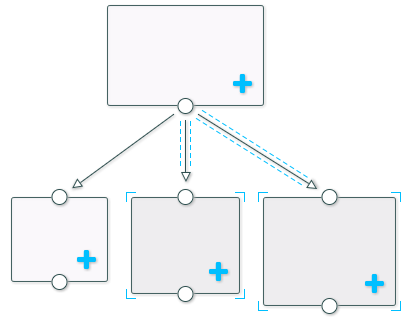
Source code can be found here.