Routing Lab - eamonstackpole/my-tech-journal GitHub Wiki
Summary
In this lab we learned how to configure a network on packet tracer, how to configure and analyze packets through a sniffer, and observed the difference between switches and hubs.
Had issues connecting my switch and sniffer, I used straight wire when I needed to use crossover wires. To prevent this in the future I should just use the automatic connection wire tool.
Questions
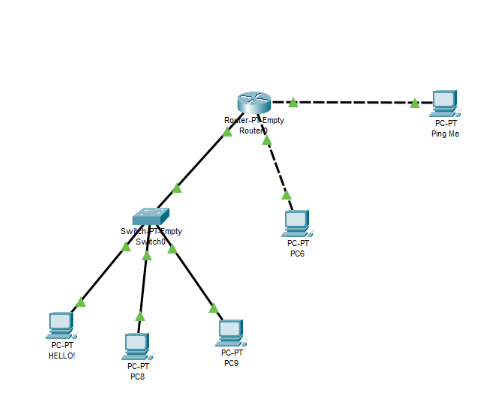
Deliverable 1: Build the below network in Packet Tracer. Screen Capture of networks (1 points)
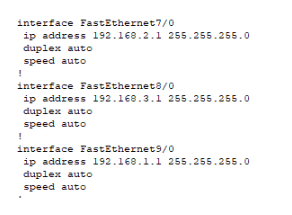
Configure the IPs on the router interfaces. You will need 3 different network/IPs Deliverable 2: Screen capture of router IP settings. 5 points
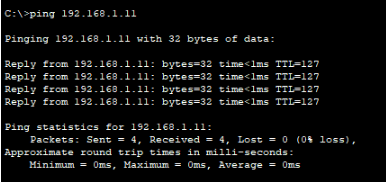
Once all of the interfaces are configured, try pinging from HELLO! laptop to Ping Me laptop. Deliverable 3: Screen capture of HELLO! pinging Ping Me. 1 points
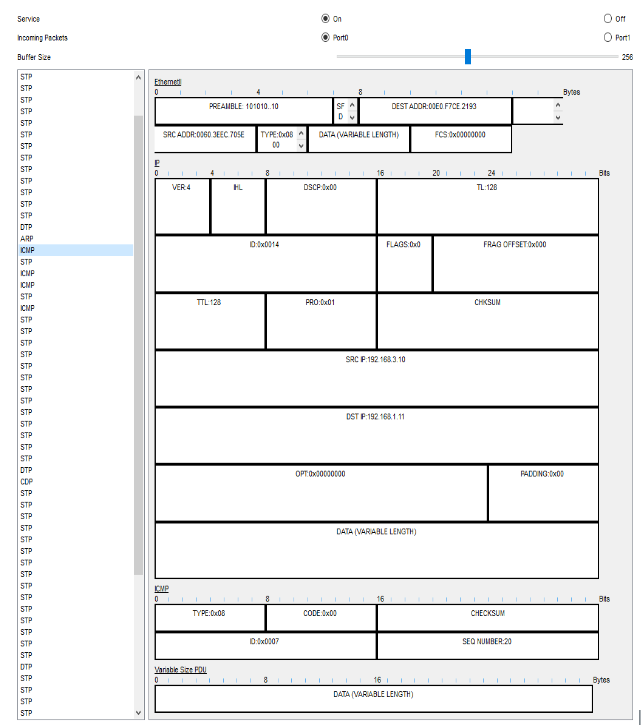
Install sniffer between switch and router. Try pinging from HELLO! laptop to Ping Me laptop and observe packet info. Deliverable 4: SCREEN CAPTURE of sniffer GUI info. 2 points
Replace switch with a hub and repeat above steps. Deliverable 5: What was different about the sniffer information when it was connected to a hub? 3 points
I do not see any difference in the packets, however when connected to a hub I only saw ARP and ICMP packets and on the switch I saw STP and DTP packets as well.