Classful Subnetting - eamonstackpole/my-tech-journal GitHub Wiki
Summary
In this lab we learned how to add and use serial links and use Routing Information Protocol (RIP) to let different routers communicate with each other.
Commands & Instructions
- To add serial links, go to the router > physical > drag the link into one of the two empty slots
- Set the clock rate to 64000
- Use the red lightning with a clock on it to connect routers to one another
- Put the main network address in the RIP table
Problems & Troubleshooting
- I had an issue where my IP address did not match the subnet mask, but I found out that was a range issue on my part.
Questions
- Show the successful transmission of a PDU from Joyce1 to Skiff1 and SkiffLast to JoyceLast. Make sure to Capture the PDU List showing these successes in a screenshot that captures your entire PT window to include the PDU list (make sure to label your diagram with your name)
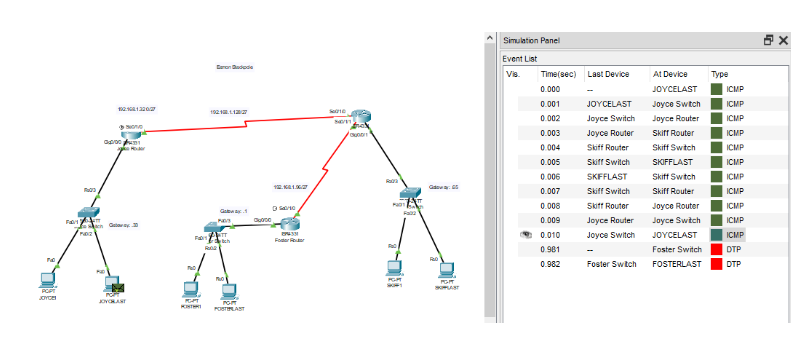
- Show the successful transmission of a PDU from Foster1 to Skiff1 and Foster Last to SkiffLast in a screenshot that captures your entire PT window to include the PDU list (make sure to label your diagram with your name)
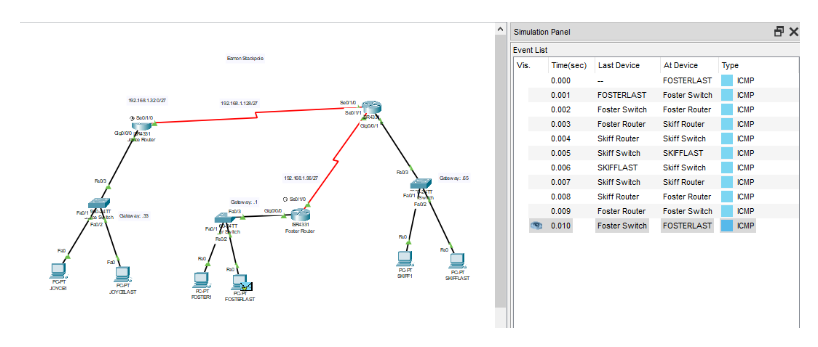
- Make sure to reflect on this lab, your difficulties with it and those new items covered to include configuration specifics of classful subnetting, RIP, Serial Connections and any IOS commands you experimented with.