Groups Features - dvirby20/BotIt GitHub Wiki
The groups features are used in the bot and we show parts of them here as an example for using the groups API. Before you read this file, you should understand the structure of a feature on ARP.
Create a new group
The "create a new group" feature is shown only to the bot admin, and it helps him/her create new groups easily through the bot without opening the database. In order to show the feature only to the bot admin, we need to add the following function to the feature:
from APIs.OtherAPIs.DatabaseRelated.User.user import User

def is_authorized(self, user: User) -> bool:
    return "bot_admin" in user.role
The function checks if the user has "bot_admin" attribute in his role. This attribute is added to his role if he registers as an admin when he registers or changes his profile.
To create a new group, we send a form to the user.
from BotFramework.create_group_form import CreateGroupForm
self.ui.create_form_view(session, CreateGroupForm(), "please insert the following details:", self.func1).draw()
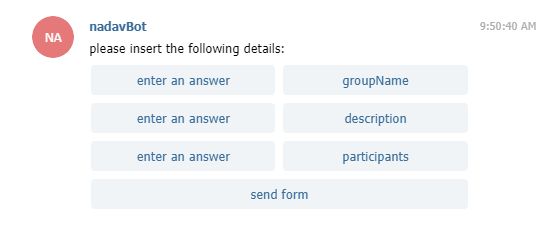
After the user presses the "send form" button we get all his answeres in the func1() function, and create a new group:
from APIs.OtherAPIs.DatabaseRelated.Group import groups
    def func1(self, session: Session, form_activity: FormActivity, form: CreateGroupForm):
        groups.create_new_group(str(form.groupName.value), str(form.description.value), form.participants.value, [])
Manage Groups
The "Manage Groups" feature is shown to group admins and to the bot admin. It helps them change an existing group details through the bot without opening the database. In order to show the feature only to the group's or bot admins, we need to add the following function to the feature:
from APIs.OtherAPIs.DatabaseRelated.User.user import User

def is_authorized(self, user: User) -> bool:
    return "group_admin" in user.role or "bot_admin" in user.role
The function checks if the user has "bot_admin" or "group_admin" attribute in his role. This attribute is added to his role if he registeres as bot admin or another group admin added him as admin.
In the feature, we first get all the groups that the user is their admin, then ask the user which group he wants to change with a View type button list:
from APIs.OtherAPIs.DatabaseRelated.Group import groups

buttons = []
for group in groups.get_user_groups(session.user):
    if session.user in group.admins:
        buttons.append(self.ui.create_button_view(group.name, lambda s: self.show_small_menu(group,session)))
self.ui.create_button_group_view(session, "What group do you want to change?", buttons).draw()
We use lambda to give the show_small_menu() function the group and the session.
On the show_small_menu() function we ask the user what detail he wants to change with a View type button list:
group2 = None

def show_small_menu(self, group: Group, session: Session):
    global group2
    group2 = group
    buttons = []
    buttons.append(self.ui.create_button_view("Change group name", lambda s: self.change_name(group, session)))
    buttons.append(self.ui.create_button_view("Change group description", lambda s: self.change_description(group, session)))
    buttons.append(self.ui.create_button_view("Add participants", lambda s: self.add_participants(group, session)))
    buttons.append(self.ui.create_button_view("Subtract participants", lambda s: self.subtract_participants(group, session)))
    buttons.append(self.ui.create_button_view("Add admins", lambda s: self.add_admins(group, session)))
    buttons.append(self.ui.create_button_view("Subtract admins", lambda s: self.subtract_admins(group, session)))
    self.ui.create_button_group_view(session, "What do you want to do?", buttons).draw()
We use a global variable (which is outside a function) name group2 to send the group to later functions. We use lambda again in for the same purpose as before.
Then, in each of the functions the buttons call, we ask the user for a specific input with get_text() function or with a form and change it in the groups attributes on the data base.
For example, lets look at the change_name function:
def change_name(self, group, session):
    self.ui.create_text_view(session, "What is the new group name?").draw()
    self.ui.get_text(session, self.newName)
It uses the get_text() function to get a new name to the group from the user and then calls the newName() function that saves the new name in the database.
def newName(self, session, text):
    global group2
    group2.name = text
    group2.save()
    self.ui.create_text_view(session, "Name successfully changed").draw()
Note: The add and remove admin functions are more complicated because we need to check that the admin isn't an admin of another group before we add/remove the "group_admin" from his role.