背景系统 - dasasdhba/Super-Mario-Vandal-Editor GitHub Wiki
本章介绍本项目的背景系统的使用。
使用 Room 原生 Background 系统
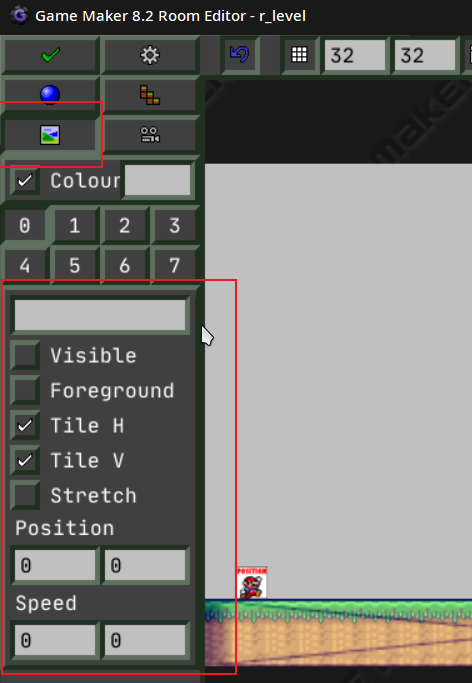 如图所示,作相应设置即可,但是这个方法有以下缺点:
- 可移植性差,不能快速地搬到其他 Room
- 不支持视差效果
如果要克服这些缺点,请使用下面的办法:
使用 script
使用 o_background 或者 o_background_default,并修改它们的参数bg即可。
参数bg应该被设为一个 script,你可以参考 Scripts/game/background/ 中的 script。
以 bg_day_meadow_cloud 为例:
//bg_day_meadow_cloud()
//视差背景的坐标参数,你也可以用 parallax_y(coefficient) 来获取 y 方向的视差坐标参数
var _p1,_p2,_p3;
_p1 = parallax_x(0.7)
_p2 = parallax_x(0.5)
_p3 = parallax_x(0.3)

//让背景横向运动起来,默认的变量有 global.back_vx[], global.back_vy[], global.back_va[]
//如果你觉得这些不够用,在 Scripts/game/background/tool/background_clear 中添加变量
global.back_vx[2] += 0.2
global.back_vx[3] += 0.4

//设置图层可视性
background_visible[0] = 1
background_visible[1] = 1
background_visible[2] = 1
background_visible[3] = 1

//图层 0:天空
background_index[0] = back_sky_day //指定背景资源
background_htiled[0] = 1 //使用水平平铺
background_vtiled[0] = 0 //不使用垂直平铺
background_xscale[0] = 1 //水平缩放
background_yscale[0] = room_height/480 //垂直缩放
background_blend[0] = c_white //混合模式,c_white 为正常,你还可以使用 bm_add, bm_subtract 等等
background_x[0] = 0 //坐标
background_y[0] = 0
background_alpha[0] = 1 //透明度

//图层 1:草地
background_index[1] = back_meadow
background_htiled[1] = 1
background_vtiled[1] = 0
background_xscale[1] = 1
background_yscale[1] = 1
background_blend[1] = c_white
background_x[1] = _p1 //将横坐标设为视差参数以获取视差
background_y[1] = room_height-140
background_alpha[1] = 1

//图层 2:云
background_index[2] = back_cloud_grand
background_htiled[2] = 1
background_vtiled[2] = 0
background_xscale[2] = 1
background_yscale[2] = 1
background_blend[2] = c_white
background_x[2] = _p2 + global.back_vx[2] //将横坐标加上变量使背景运动
background_y[2] = view_yview[0]+50
background_alpha[2] = 1

//图层 3:更快的云
background_index[3] = back_cloud_grand
background_htiled[3] = 1
background_vtiled[3] = 0
background_xscale[3] = 1
background_yscale[3] = 1
background_blend[3] = c_white
background_x[3] = _p3 + global.back_vx[3]
background_y[3] = view_yview[0]
background_alpha[3] = 1
然而,GM 的 background 最多只支持八个图层(0~7),如果需要使用更多图层,使用下面的方法:
//bg_day_meadow_cloud()
var _p1,_p2,_p3;
_p1 = parallax_x(0.7)
_p2 = parallax_x(0.5)
_p3 = parallax_x(0.3)

global.back_vx[2] += 0.2
global.back_vx[3] += 0.4

global.bg_num = 4 //向绘制系统声明需要绘制的图层总数

// tiled 绘制比较吃性能,这里采取等效写法
global.bg_index[0] = back_sky_day
global.bg_htiled[0] = 0
global.bg_vtiled[0] = 0
global.bg_xscale[0] = view_wview[0] //将水平拉伸至屏幕可见宽度
global.bg_yscale[0] = room_height/480
global.bg_blend[0] = c_white
global.bg_x[0] = view_xview[0] //将横坐标设为屏幕左侧坐标,也可以设为 parallax_x(0)
global.bg_y[0] = 0
global.bg_alpha[0] = 1

global.bg_index[1] = back_meadow
global.bg_htiled[1] = 1
global.bg_vtiled[1] = 0
global.bg_xscale[1] = 1
global.bg_yscale[1] = 1
global.bg_blend[1] = c_white
global.bg_x[1] = _p1
global.bg_y[1] = room_height-140
global.bg_alpha[1] = 1

global.bg_index[2] = back_cloud_grand
global.bg_htiled[2] = 1
global.bg_vtiled[2] = 0
global.bg_xscale[2] = 1
global.bg_yscale[2] = 1
global.bg_blend[2] = c_white
global.bg_x[2] = _p2 + global.back_vx[2]
global.bg_y[2] = view_yview[0]+50
global.bg_alpha[2] = 1

global.bg_index[3] = back_cloud_grand
global.bg_htiled[3] = 1
global.bg_vtiled[3] = 0
global.bg_xscale[3] = 1
global.bg_yscale[3] = 1
global.bg_blend[3] = c_white
global.bg_x[3] = _p3 + global.back_vx[3]
global.bg_y[3] = view_yview[0]
global.bg_alpha[3] = 1
特别地,如果你需要制作前景,按照上述格式,将全局变量 bg_... 改为 fg_... 即可。