Beaglebone Black NTP Support - cu-ecen-aeld/buildroot-assignments-base GitHub Wiki
AESD Beaglebone Black Buildroot NTP instructions
This page includes the notes about setting up NTP server packages for Beaglebone Black hardware.
Buildroot config changes
- modify the buildroot configuration with the command
make menuconfigfrom the buildroot directory of the local project repository. - Navigate to
Target Package>>Networking Applications. Search forntpand enable it. - Enable necessary sub-package under NTP like
ntpd: To demonize NTP server sync at the time of board boot up.ntpdate: Command used to set the local date and time by polling NTP servers specified.ntptime: Utility is used to read kernel time variablentpq: Utility used as an alternative tontpstatto check the NTP server status with respect to local time.
- Save the configuration by using
save-config.shscript present in the project root directory. - Check the
aesd_beaglebone_defconfigfile under../base_external/configs/directory to haveBR2_PACKAGE_NTP,BR2_PACKAGE_NTP_NTPDATE,BR2_PACKAGE_NTP_NTPQ,BR2_PACKAGE_NTP,BR2_PACKAGE_NTP_NTPTIMEpackages added and enabled. [ Reference commit 1and commit 2] - Use
build.shscript from the project root directory to build new image which would include the configured NTP packages.
NTP implementation check
- Call
datecommand from the Beaglebone Black's command line. The command to show the date and time which is in sync with the current UTC time. - Use
ntpqutility to query the NTP server.-
Call
ntpq -npcommand as shown in the image below. This command should list a query for the peers known to server.

-
In response to the command, the running NTP configuration should show a list of queries for the addresses of the remote peer. The peer with the
*sign indicates the peer is declared the system peer and lends its variables to the system variables.

-
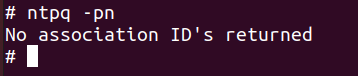
If the board is not connected to the NTP server; either because of the configuration issue or because Beaglebone is not connected to the internet; it would not show the query and display a message shown below.
-