Sprint 5 Review - cs-utulsa/Euler-Angles-Repo GitHub Wiki
Product Vision:
The vision behind our project is to create a user-friendly, interactive web app that educates on and makes correct conversions of Euler Angles to quaternions. The goal is to provide information to users who want to better understand Euler angles and the use of quaternions in 3D rotation, as well as information about the conversion methods, specifically when the conversion of a quaternion to Euler angles is unable to return the expected values.
Euler angles are three angles that describe the rotation of an object concerning a fixed coordinate system. Because the three angles can be applied in different orders, resulting in different rotations, Euler angles are represented by twelve rotation sequences. While Euler Angles are incredibly useful for understanding the orientation of an object, there are limitations to using them based on a phenomenon known as Gimbal Lock, which is where quaternions become very useful. The quaternion number system is a 4D extension of the complex number system, consisting of a scalar and a vector component. Though difficult to fully understand how it works, the quaternion number system has become a great tool when describing orientation in 3d space. Therefore it is useful for Euler Angles to be converted to quaternions using one of twelve methods based on the rotation sequence of the angles.
Unfortunately, there are some issues with the conversion methods from quaternions to Euler angles in addition to a lack of information on the internet regarding all twelve of the conversion methods. Since the methods use trigonometric functions, specifically arcsin, arctan, and arccos, there is a limited range of values that can be returned from these methods, meaning that when Euler angles are converted into a quaternion, it may not be possible to get these same angles back out from the conversion of quaternion to Euler angles. Therefore, this web application will seek not only to make the correct conversions for users but also to provide information regarding the range of values that each method is able to return and show how the methods work at a deeper level.
Some other goals for this project include giving information concerning the mathematics behind Euler angles, rotation matrices, and quaternions, providing an interactive graph showing various rotations of an object and the corresponding quaternions, and recommending additional resources to users for more information.
Hardware:
- Computer
Software:
- Code: Python, JavaScript, LaTeX, HTML, CSS
- Microframeworks: Flask (Python Web Framework), JupyterHub, Bootstrap
- Server Provider: AWS
- Team Communication: Discord, GroupMe
- Code Editor: Visual Studio Code
Product Backlog:
This is a list of our user stories and their corresponding acceptance criteria, with many divided between what we consider to be a novice or an expert user. We gave a rating for the estimated effort for each task on a scale from 1 to 10, with 10 taking the most effort. A novice user has just entered the world of 3D rotation and is looking for a deeper understanding, while an expert user is well versed in conversions, possibly in a corporate setting.
- As a general user, I want to be able to input an Euler angle and see the output of the corresponding quaternion, and vice versa.
- Given I need to perform a transformation and I input the appropriate values, I will receive the proper and accurate result.
- Estimated time: 30 hours
- Estimated effort: 10
- As a novice user, I want to receive an explanation of the various rotations of the Euler angles to gain understanding.
- Given I do not understand a type of rotation, I will be able to click a button and receive an explanation.
- Estimated time: 3 hours
- Estimated effort: 3
- As a novice user, I want the output to update as the various inputs change so I can see incremental differences.
- Given I want to change the coordinate or rotation of an angle, and I input a new value, I will receive a new result instantly.
- Estimated time: 5 hours
- Estimated effort: 4
- As a novice user, I want to see a graph that is aligned with my input to fully visualize the conversion.
- Given that I want to convert a set of Euler angles to a quaternion and that I input correct values, an image on a graph representing the converted angle will be available for me to view.
- Estimated time: 20 hours
- Estimated effort: 8
- As a novice user, I want to know when conversion back to Euler may produce a different result than expected so I will not be confused.
- Given I input an Euler angle whose domain causes an issue with the trigonometric functions, I will receive a warning indicating that the resulting Quaternion will possibly correspond to a different set of Euler angles upon conversion.
- Estimated time: 10 hours
- Estimated effort: 6
- As a novice user, I want guidance so I do not get stuck on issues in interpretation.
- Given I am confused, and I click on a link to help documentation, I will be directed to a page that describes the processes in an easy-to-understand way.
- Estimated time: 5 hours
- Estimated effort: 3
- As an expert user, I want a clean, modern interface for conversions that is not bloated with unnecessary, extra information.
- Given I want to convert an Euler or quaternion angle and visit this web application, I will be able to make these conversions quickly on a user-friendly, clean interface.
- Estimated time: 20 hours
- Estimated effort: 8
- As a novice user, I want to be able to interact with a graph and move it around to better understand the values I input.
- Given I want to interact with a graph, I will be able to input my values and then move the graph around using my cursor.
- Estimated time: 30 hours
- Estimated effort: 10
- As a general user, I want to learn more about quaternions and 3D rotations easily without spending hours researching them.
- Given I want to learn more about quaternions and 3D rotations easily, I will be able to click a button that directs me to a learning center with little write-ups about these topics.
- Estimated time: 12 hours
- Estimated effort: 6
- As a novice user, I want to access additional resources about quaternions and 3D rotations without having to search for them on the internet.
- Given I want to access additional resources, I will be able to click a button that directs me to a page where all additional resources are displayed, and a search bar allows me to narrow them down.
- Estimated time: 8 hours
- Estimated effort: 5
- As a novice user, I would like to learn more about linear algebra and the concepts that make these conversions possible at a more fundamental level so that when I read about 3D rotation, I can better understand it.
- Given, I would like to learn more about linear algebra and the fundamental concepts behind these conversions, I will be able to easily access lessons that dive into linear algebra topics.
- Estimated time: 15 hours
- Estimated effort: 7
- As a general user, I would like to know how Convert+ can be used in a practical way and why the converter is important with its various types of conversions.
- Given, I would like to know how Convert+ can be used in a practical way and why the converter is important, I will be able to read about its uses and practicality in specific industries and fields of study on the home page.
- Estimated time: 3 hours
- Estimated effort: 3
- As a general user, I would like to access a calculator to perform matrix operations and the operations talked about in the lessons.
- Given, I would like to access a calculator to perform additional operations linked to the lessons, I will be able to find a link in the lessons to a related calculator or access it through a calculator landing page.
- Estimates time: 25 hours
- Estimated effort: 9
Sprint 5 Goals:
- Finish up lessons and tutorials
- Complete the content
- Format into HTML
- Create landing page for lessons and links between pages
- Research practical uses of 3D rotation and add content to home page
- Scale website to fit different screens
- Additional converters
- Map out and begin creating additional converters
- Create a converters landing page
- Configure form boxes to accept the input and show the rotation
- Create a viewer friendly rotation model with sub-axes added to cube after each rotation
- Create "Contact Us" page
Sprint 5 Backlog:
- As a novice user, I want the output to update as the various inputs change so I can see incremental differences.
- Create viewer friendly rotation model with sub-axes added to cube after each rotation
- As a novice user, I want to see a graph that is aligned with my input to fully visualize the conversion.
- Configure form boxes and create a user friendly rotation model
- As a general user, I want to learn more about quaternions and 3D rotations easily without spending hours researching them.
- Finish up lessons on quaternions and rotations
- As a novice user, I would like to learn more about linear algebra and the concepts that make these conversions possible at a more fundamental level so that when I read about 3D rotation, I can better understand it.
- Finish up new lessons on linear algebra concepts
- As a general user, I would like to know how Convert+ can be used in a practical way and why the converter is important with its various types of conversions.
- Research practical uses of 3D rotation and add information to the home page
- As a general user, I would like to access a calculator to perform matrix operations and the operations talked about in the lessons.
- Add in additional converters for linear algebra concepts
General Assignments and Priorities: Our focus for this sprint was to continue working on the UI and to integrate the new code that was developed in JavaScript. Since our team found JavaScript to be to best solution to developing a great visualization of 3D rotations, we started last sprint with creating the new code using the library three.js. Specifically Garron and Sammy, who have been working heavily on some of the backend development of our website, spent time with Issa figuring out the integration of the 3D representation and conversions into our current HTML code.
For continuing to develop the UI, we tried to finish up the "Lessons" portion of our website, though a couple will have to wait to be completed. Keely worked on gathering more content for each of the lessons and Adam focused on formatting the lessons in HTML, while getting each of the lessons to link to the ones before and after it. Finally, Yao created a new page on our website labeled "Contact Us" so that we can receive feedback from our users about their experience on Convert+.
Test Cases:
Unit Test Cases
Keely:
Test 1:
Purpose - Test the links under the “References and Additional Resources” section of the Lessons Home page upon navigating there from the drop-down menu on the side.
Setup - Open the user interface from the HTML script and navigate first to the home landing page by clicking “Convert+” in the top left-hand corner.
Inputs - The chosen inputs are based on site navigation and the HTML code that is behind our user interface. For this test, I am specifically looking for broken links among the section titled “References and Additional Resources” that is on the Lessons home page. There are currently 4 resource links to be tested. This test is repeated 10 times to make sure that the results are consistent.

Coverage -
Ways to access “References and Additional Resources” links on Lessons Home Page:
- Collapsible menu on the right side.
- Coverage = 1/1 = 100%
Test 2:
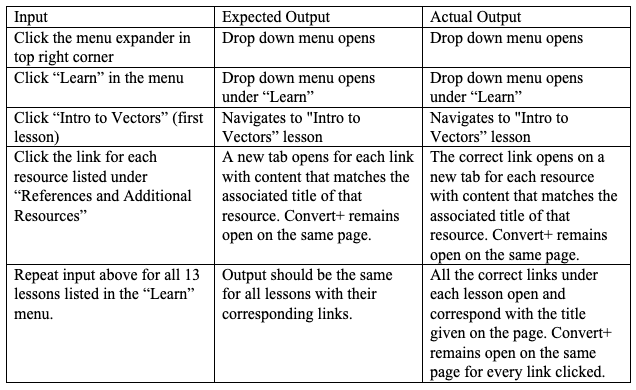
Purpose - Test the links under the “References and Additional Resources” section of each lesson upon navigating there from the drop-down menu on the side.
Setup - Open the user interface from the HTML script.
Inputs - The chosen inputs are based on site navigation and the HTML code that is behind our user interface. For this test, I am specifically looking for broken links among the section titled “References and Additional Resources” in each of the 13 lessons when they are accessed from the drop-down menu. Some lessons have more links than others. This test is repeated 5 times for each lesson to make sure that the results are consistent.
Test 3:
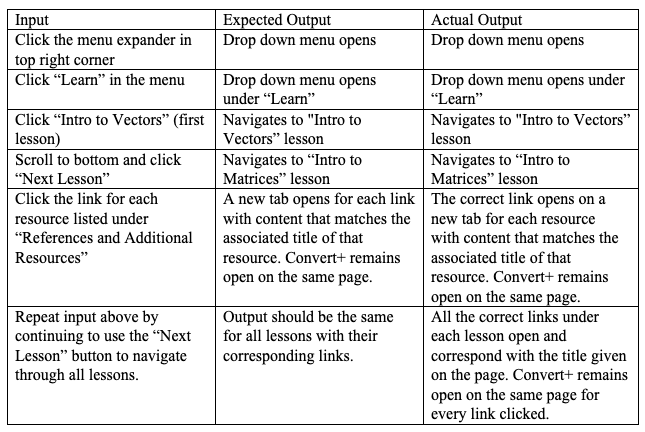
Purpose - Test the links under the “References and Additional Resources” section of each lesson upon navigating there from the next lesson button.
Setup - Open the user interface from the HTML script.
Inputs - The chosen inputs are based on site navigation and the HTML code that is behind our user interface. For this test, I am specifically looking for inconsistencies in accessing the links among the section titled “References and Additional Resources” in each of the 12 lessons that are accessed by the “Next Lesson” button in the previous lesson. I want to test that this button doesn’t cause errors with accessing the correct links for a lesson’s references. This test is repeated 5 times for each lesson to make sure that the results are consistent.
Coverage for Tests 2 and 3 -
Ways to access “References and Additional Resources” links associated to each lesson:
- Collapsible menu on the right side.
- “Next Lesson” button at the bottom of the previous lesson’s page
- “Previous Lesson” button at the bottom of the next lesson’s page
- Coverage = 2/3 = 66.6%
Garron:
All of my unit test cases were concerned with the functionality of the Quaternion Converter itself.
Test 1:
Purpose: Test input data requirements and ensure the integrity of inputted user data.

Setup: open the js file containing the variable and output the values via an alert.
Inputs: Selected inputs for the test were as follows: a non-numeric character, a negative integer, a negative float, 0, 0.0, a positive float, and a positive integer. For this, I was mostly looking for the website's ability to handle a reasonably large subset of total possible inputs, while still maintaining the input requirements for the backend script.
Coverage for test 1:
- Non-numeric characters (other than . or -) were allowed to be accepted
- Data arrived in the variables as intended
- Various forms of float formatting (such as a number of leading 0's) were also accepted Coverage: 3/3 (100%)
Test 2:
Ensure that the renderer correctly displays Euler angles with negative components.

Setup: The HTML script with the renderer loaded, and recorded results for the tested negative inputs' positive components.
Inputs: Inputs tested were just negative integers and floats, as non-numeric characters were filtered out in the first test. I was mostly testing to make sure that the renderer was rotating in the proper direction, not just mirroring the same result as the positive results.
Coverage for test 2:
- Negative floats rotate correctly
- Negative integers rotate correctly Coverage 2/2 (100%)
Test 3:
Rendering loads default rendering unrotated on page reload

Setup: The HTML page and the script responsible for creating the rendering.
Inputs: In this test, I was mostly concerned with rendering the script's independence on the starting condition of the page, and that it would load the default non-rotated cube every time.
Coverage for test 3:
- Reload page with no inputs
- Reload the page with non-zero inputs (the renderer pre-rotates the image)
- Reload page with zero inputs Coverage (2/3) 66%
Sammy:
Test 1:
Purpose – Test Euler Angle components and checkboxes objects are instantiated correctly.
Setup – Open HTML script and input values into X, Y, and Z boxes. Select rotation order and click calculate.
Inputs – There are 4 inputs that need to be checked. The X, Y and Z components of the Euler Angle as well as the rotation order.
| Input | Expected Output | Actual Output |
|---|---|---|
| X-component | document.write("Hello World!") called | document.write("Hello World!") called |
| Y-component | document.write("Hello World!") called | Blank white screen.Euler angles components not working properly. |
| Z-component | document.write("Hello World!") called | document.write("Hello World!") called |
| Rotation Order | document.write("Hello World!") called | "Undefined"Wrong method used for accessing rotation value. |
Coverage –
- 2/4 tests passed = 50%
Test 2:
Purpose – Checking the functionality of the calculate button used for conversion.
Setup – Open HTML script and input values into X, Y, and Z boxes. Select rotation order and click calculate.
Inputs – There is one input from the user clicking Calculate.
| Input | Expected Output | Actual Output |
|---|---|---|
| User clicking calculate | Quaternion and rotation matrix values update. Rotation animation starts. | Quaternion and rotation matrix values update. Rotation animation starts. |
Coverage-
- 1/1 tests passed = 100%
Test 3:
Purpose – Test the Quaternion components fill correctly when different numbers are used for Euler Angles and different rotation orders.
Setup – Open HTML script and input values into X, Y, and Z boxes. Select rotation order and click calculate.
Inputs – 4 number sets were chosen along with 4 different rotation orders.
| Input | Expected Output | Actual Output |
|---|---|---|
| X=1, Y=2, Z=3, Order=XYZ | X=0.7549 Y=-0.2061 Z=0.5051 W=-0.3689 | X=0 Y=0 Z=0 W=0 Euler angles components not working properly |
| X=2, Y=3, Z=4, Order=YZX | X=0.4653 Y=-0.1702 Z=0.3841 W=-0.7791 | X=0 Y=0 Z=0 W=0 Euler angles components not working properly |
| X=3, Y=4, Z=5, Order=ZXY | X=0.2941 Y=-0.3000 Z=-0.7443 W=-0.5192 | X=0.2941 Y=-0.3000 Z=-0.7443 W=-0.5192 |
| X=4, Y=5, Z=6, Order=XZY | X=0.7563 Y=0.3494 Z=-0.4917 W=-0.2533 | X=0.7563 Y=0.3494 Z=-0.4917 W=-0.2533 |
Coverage – 2/4 tests passed = 50%
Yao:
My test is focused on the Contact Us page.
Test 1:
Purpose: Test all the boxes that can accept the input string. On each page of the website can go to the contact us page, also on then contact us page is can also go to other pages.
Setup: In the testing browser input value to each box. And click each button on the page.
Inputs: For the name input any strings, in the phone number box input number, in the email box input the email in the correct format, and input some sentences in the comment box.
| Input | Expected Output | Actual Output |
|---|---|---|
| input strings at First Name form | allow input strings in the box | box allowed input |
| input strings at Last name form | allow input strings in the box | box allowed input |
| input strings at E-mail form | allow input strings in the box | box allowed input, also can check the string have "@" and ".com" as a correct email address |
| input strings at Phone number form | allow input strings in the box | box allowed input |
| input strings at Comments form | allow input strings in the box | box allowed input |
| click the submit button | go to the success submit page, And send a message to our email address | Due to the website is not on the server, it can not go to the success page and send to our email address. This feature works on the local machine. |
| click the "contact us" button on each page | go to the contact us page | each page is linked with the contact us page |
| click dropdown menu | go to other pages from contact as page | On the contact us page is can go to other pages |
Coverage : 8/9 tests passed = 88%
Issa: I worked on creating the front-end of the converstion pages including the input and the output.
Test 1:
Purpose: Before even integrating the front end with the back end, the HTML code should be able to accept only the correct input in the input boxes of the conversation pages.

Setup: For testing, the input was stored in the browser and was shown as output in a testing box.
Inputs: the goal is to block unwanted input so I tried strings and symbols in any way that may lead to crashing the back-end code or lead to injection. I checked if the wanted input works correctly including integer float and mathematical symbols including (-) (+) (e).
Coverage -
-
(4/4) Tests passed = 100%
Test 2:
Purpose: Ensure that the required input boxes have the initial value of zero and that the order of the rotation axis must be selected.

Setup: For testing, Store input values in the browser for checking. Checking if the rotation selector allows selecting more than one option at a time.
Inputs: Entering no values in input boxes or entering in some and leaving some empty to see if the value will equal zero. Checking if the rotation selector allows selecting more than one option at a time or the value without selecting.
Coverage -
- The initial values in the input box work correctly.
- The rotation selector does not start with the XYZ plane as an initial value and works only when selecting.
- Since not knowing the right plane will lead to different results not having an initial value would be a good choice.
-
(2/2) Tests passed = 100%
Test 3:
Purpose: Ensure that the required input boxes have a placeholder to help clarify the input.

setup: On the conversion page, deleting initial values should reveal the placeholder on an input box.
Inputs: deleting initial values from all the boxes, entering and deleting input to insure that the functionality works.
Coverage -
- Placeholders can be seen in a lighter color when deleting input data.
- Placeholders can be seen in a lighter color when deleting initial data.
-
(2/2) Tests passed = 100%
Adam:
My tests were focused on user navigation.
Test 1:
Purpose - Test the links in the sidebar's lesson dropdown menu that direct to each of the lessons.
Setup - Navigate to the home page and open the sidebar by clicking the hamburger button in the top right hand corner.
Inputs - This test was concerned with the HTML links and their destinations as the inputs. I am testing each link to see if it consistently leads to the correct lesson page. I am testing this on each page with the updated sidebar to ensure there is cohesion among the pages.
| Input | Expected Output | Actual Output |
|---|---|---|
| Click the learn dropdown in the sidebar | Drop down menu containing lessons expands | Drop down menu expands |
| Click "1. Intro to Vectors" in the dropdown | Page redirects to the intro to vectors lesson | Page redirects to expected lesson |
| Click the following 12 links in the dropdown | Each link goes to the lesson specified in the link's title | Each link goes to the specified lesson |
| Repeat the process for each of the HTML pages | Each page's lesson links work correctly | Every page has working sidebar lesson links except for the converter pages, which do not have the updated sidebar layout |
Coverage - 3/4 tests passed = 75%
Test 2:
Purpose - Testing the "Previous Lesson" and "Next Lesson" links within each lesson page.
Setup - Navigate to the first lesson, "Intro to Vectors," through the lessons sidebar dropdown menu.
Inputs - This test was also concerned with the HTML links and their destinations as the inputs. I am testing each button to see if it consistently leads to the next or previous lesson page, as designated. I will test this on all lesson pages.
| Input | Expected Output | Actual Output |
|---|---|---|
| Click "1. Intro to Vectors" in the lessons dropdown in the sidebar | Page redirects to the Intro to Vectors lesson | Page redirects to expected lesson |
| Click the "Next Lesson" button at the bottom of the page | Page redirects to the second lesson, Intro to Matrices | Page redirects to the second lesson |
| Continue clicking the "Next Lesson" button on each subsequent lesson | Lessons go in order by the counting numbers | Lessons are displayed in order and can be navigated sequentially through the next lesson button |
| Click the "Previous Lesson" button on the last lesson page | Lesson page changes from the "Euler Angles and Gimbal Lock" page to the "Quaternions to Euler Angles" page | Lesson page changes as expected |
| Continue clicking the "Previous Lesson" button on each subsequent lesson | Lessons go in reverse order up to the first lesson, Intro to Vectors | Lessons go in reverse order as expected |
Coverage - 5/5 tests passed = 100%
Test 3:
Purpose - Testing a basic user site navigation scenario
Setup - Navigate to the Home Page of Convert+
Inputs - This test is concerned with HTML links and their destinations as inputs. They will be tested in an order much like how a user may access the website.
| Input | Expected Output | Actual Output |
|---|---|---|
| Click the "Lessons" box on the main page | Page changes to the lessons landing page | Page changes as expected |
| Click the "Beginner Lessons" dropdown | Menu expands showing a collection of starter lessons listed in chronological order | Beginner lessons menu expands as expected |
| Click "Lesson 3" | Page changes to Lesson 3, Basic Matrix Operations | Page changes to Lesson 3 as expected |
| Open the sidebar menu and click "Home" | Page returns to main home page of Convert+ | Page is returned to home page |
| Click the "Converters" box on the main page | Page is redirected to the converters landing page | Page is redirected as expected |
| Click "Euler to Quaternion Converter" | Page opens with the ability to convert an Euler angle to a Quaternion | Conversion page opens as expected |
| Click the Convert+ logo in the upper left hand corner of the page | Page returns to the home page | Nothing happens; must press back in the browser to return to previous page |
Coverage - 6/7 tests passed = 85.7%
Integration Test:
Purpose – Test Javascript code and Three.js packages work when connected to html.
Setup – Open HTML script and input values into X, Y, and Z boxes. Select rotation order and click calculate.
Inputs – User input of numbers, rotation selection, and Calculate button that results in multiple outputs.
| Input | Expected Output | Actual Output |
|---|---|---|
| User input of number and rotation selection | Quaternion boxes is filled with numbers through Javascript integration | Quaternion boxes was filled with numbers through Javascript integration |
| User input of number and rotation selection | Quaternion numbers are correct and three.js packages calculate properly | Quaternion numbers were incorrect since Quaternion components were incorrectly copied. |
| User input of number and rotation selection | Rotation matrix is filled with numbers through Javascript integeration | Rotation matrix was filled with numbers through Javascript integration |
| Clicking Calculate | Javascript file runs properly allowing for conversion | Javascript file runs properly allowing for conversion |
Coverage – 3/4 tests passed = 75%
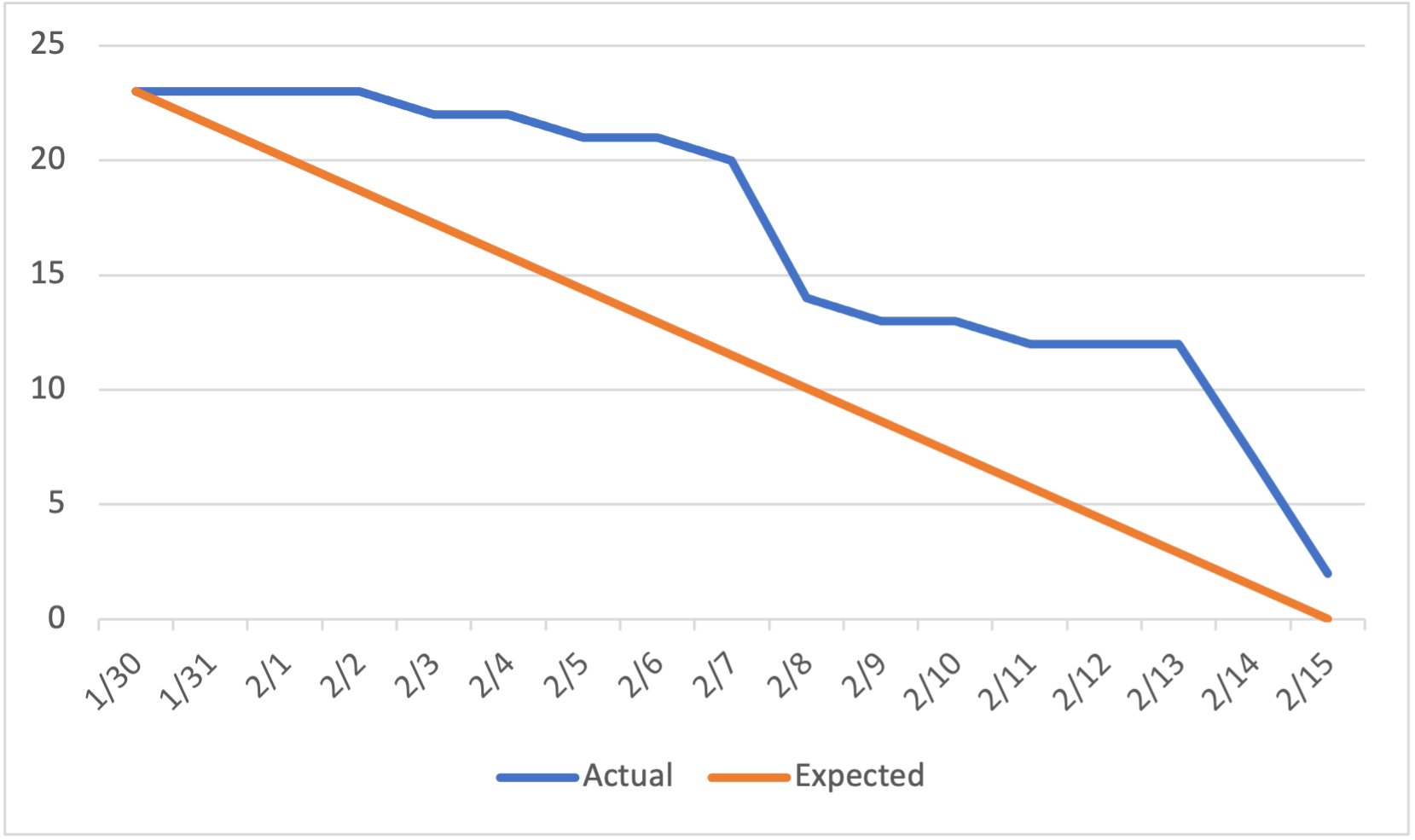
Burndown Chart