Agents and the Terminal - cruisinme30/spelunk GitHub Wiki
Claude Code, Copilot and the Terminal app can use the same search as Spelunk's box: the same query language, the same index, the same history. Nothing outside VS Code builds or changes an index; it asks the one VS Code keeps.
| Run | What happens |
|---|---|
| Spelunk: Install 'spelunk' Command in PATH | Copies the spelunk command to ~/.local/bin (Windows: %LOCALAPPDATA%\Programs\Spelunk), and keeps it current after Spelunk updates. If that folder isn't on your PATH, the message says to add it |
| Spelunk: Add to Claude Code | Asks first, installs the command, runs Claude Code's own claude mcp add --scope user spelunk -- ~/.local/bin/spelunk mcp, then offers to add a short note to the folder's CLAUDE.md
|
| Nothing, for Copilot | VS Code 1.101 or later lists Spelunk's tools for Copilot and other agents in VS Code by itself (spelunk.agent.offerToCopilot) |
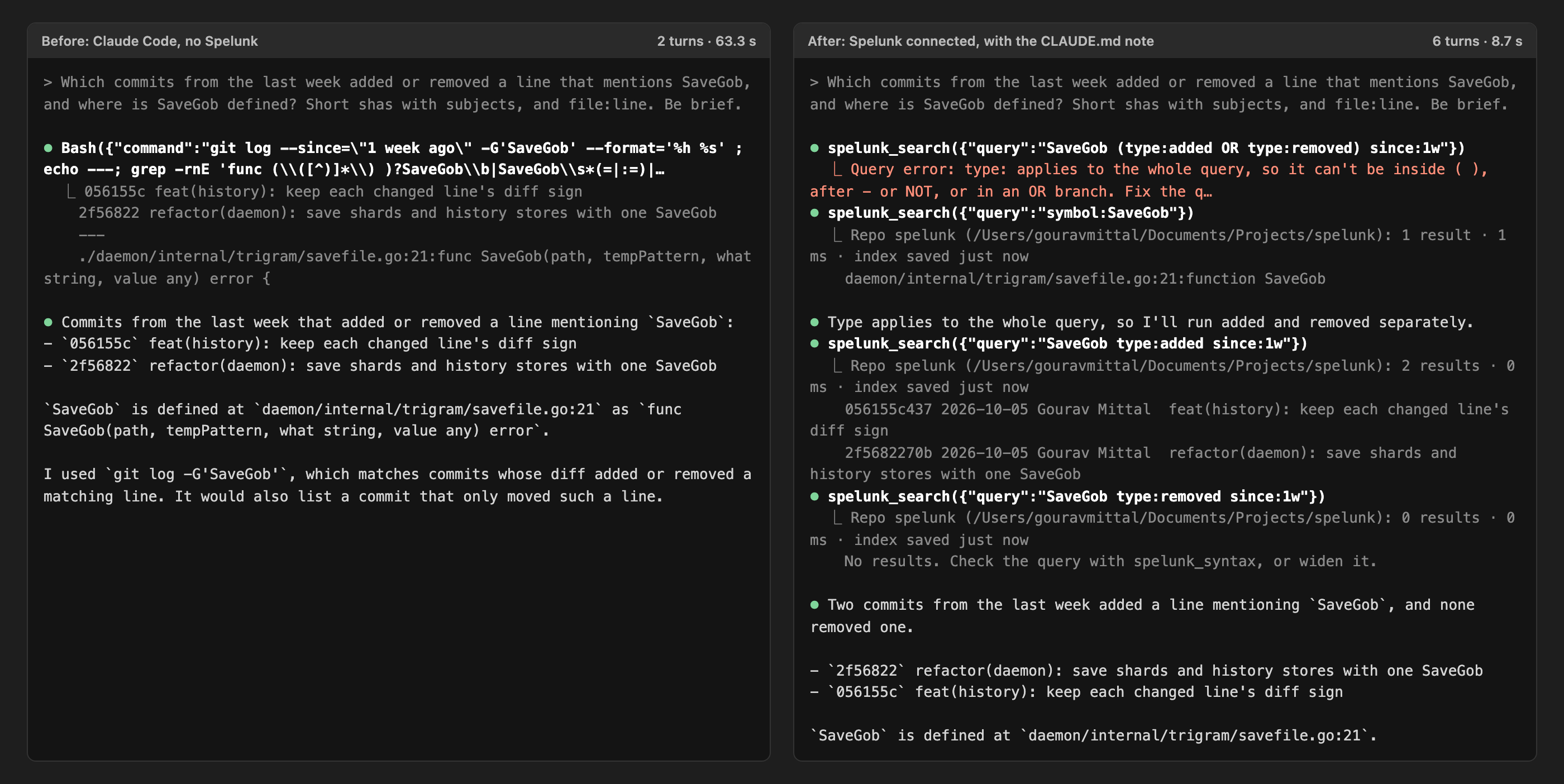
Say yes to the CLAUDE.md note. Without it, agents reach for grep and git log even when Spelunk is connected: in our
tests Claude chose Spelunk on its own in none of three tries, and used it at once when the note was there.
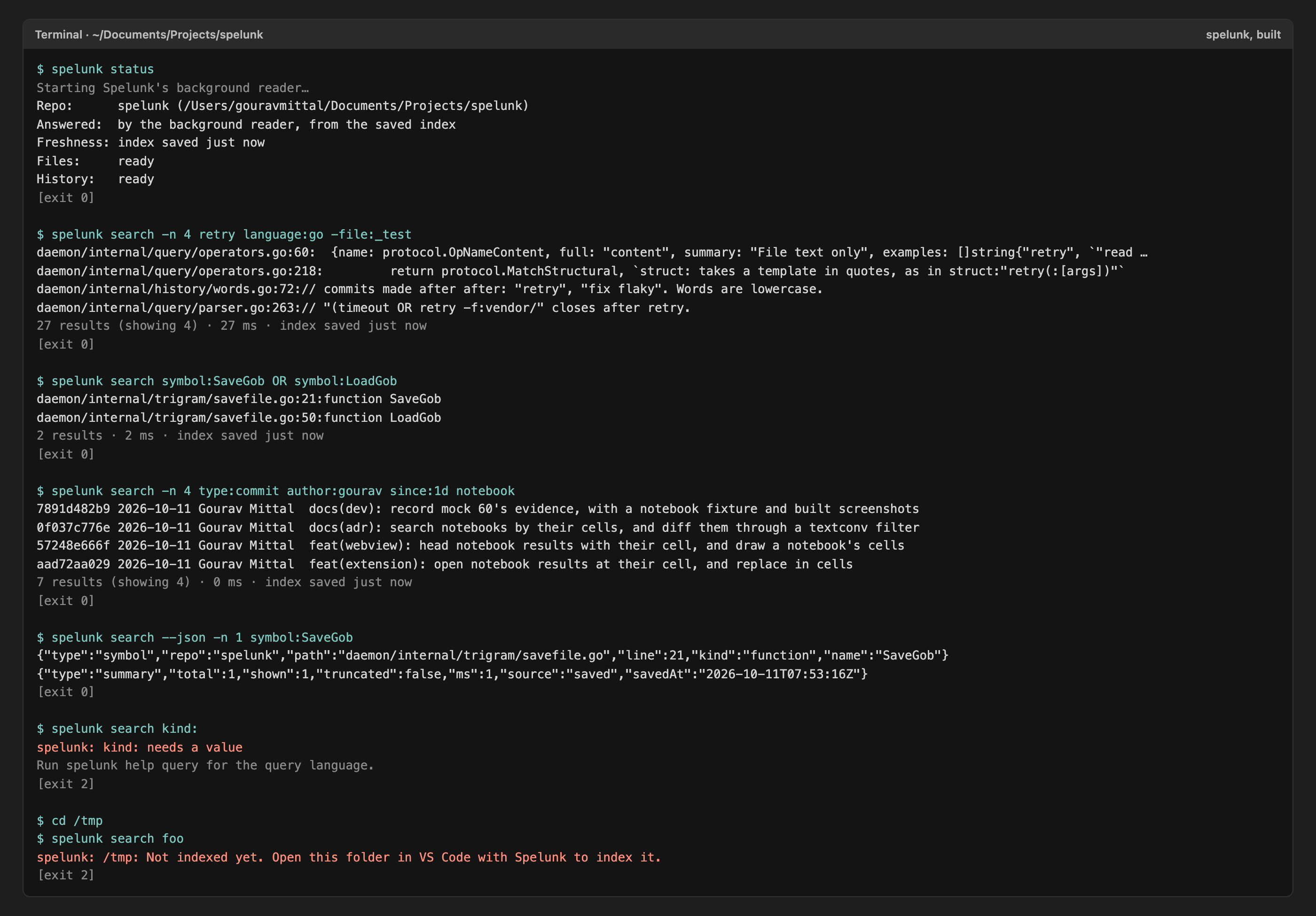
$ spelunk search 'symbol:SaveGob OR symbol:LoadGob'
daemon/internal/trigram/savefile.go:21:function SaveGob
daemon/internal/trigram/savefile.go:50:function LoadGob
2 results · 2 ms · index saved just now
| Command | Does |
|---|---|
spelunk search [options] QUERY |
Search the repo that holds the current folder. Lines read path:line:text, paths relative to where you are, as ripgrep prints them; commits read sha date author subject. A summary goes to standard error |
spelunk status |
Which repo answers here, whether VS Code answers live or the saved index does, and how fresh it is |
spelunk help query |
The query language, with examples, as the parser knows it |
spelunk mcp |
Serve AI agents over the Model Context Protocol on standard input and output |
spelunk mcp add claude |
Run Claude Code's claude mcp add for you |
| Option | Does |
|---|---|
-n N, --count N
|
Show up to N results (default 50) |
--json |
One JSON object per result (type, repo, path, line, column, text; kind and name for a definition; within (the kind, name and first line of the definition it is in) for a line found inside the definitions kind: or symbol: asked for; sha, date, author and subject for a commit), then one summary object |
--vimgrep |
path:line:column:text, for editors' quickfix lists |
--in DIR |
Search the repo that holds DIR instead |
--timeout SECS |
Stop after SECS seconds and print what was found |
-- |
Everything after it is the query, even words that start with -
|
A query word that starts with -, like -test or -file:vendor/, is part of the query, not an option. The command
ends with 0 when something matched, 1 when nothing did and 2 for a mistake in the query, a folder with no index, or any
other error, as grep and ripgrep do.
Agents get four tools, all of which only read:
| Tool | Gives |
|---|---|
spelunk_search |
Results for a query, each with a ref for spelunk_preview, and a line that says how many there were, whether the search stopped at the time limit, and how fresh the index is |
spelunk_syntax |
The query language |
spelunk_preview |
The code around a result, or a commit's message and files |
spelunk_status |
Which repo answers, and how fresh its index is |
A query with a mistake comes back as an error with the parser's message, which agents use to fix the query and try
again. A search from the Terminal or an agent may run for 30 seconds (spelunk.agent.timeLimitMs), where the panel's
searches stop after 2, since an agent can't tell an answer that stopped early to try again.
| Situation | Who answers |
|---|---|
A VS Code window has the folder open (spelunk.agent.shareWindow on) |
That window, at once, with what you saved a moment ago |
| No window has it | A background reader loads the saved index the first time (about 30 seconds for a repo the size of Linux), then answers at once. Before each search it re-reads files changed since the index was saved, and every answer says how old the index is. It quits after 10 minutes with no questions |
| The folder was never opened in VS Code with Spelunk | Nothing: "Not indexed yet. Open this folder in VS Code with Spelunk to index it." |
| The saved index is from another version of Spelunk | Nothing, until VS Code opens the folder and indexes it again |
Windows talk to the command through a socket in ~/.spelunk/run, which only your user account can open, and only to
search, preview and read status: nothing that arrives there can rebuild an index, replace text, change settings or
stop VS Code's search.
Two VS Code windows on the same repo build its index once: the first writes it, and the second uses what the first saves, and takes over when the first closes (Indexing).
Screen 56: Agents and the terminal: the spelunk command and Claude Code or Copilot search the same index, live from VS Code or from the saved index · Screen id agent-access · milestone 2.1

Built: the command and Claude Code
Next: Settings and Commands: every command and setting.