Universal Links - codepath/ios_guides GitHub Wiki
In the past, most iOS apps used custom URL scheme (i.e fb://auth). The problem is that two apps can claim the same URL scheme and there is no way to protect against which app should launch. Second, if the app was not installed, the URL doesn't open and there needs to be custom code to handle it. Universal links try to solve both of these problems, first by requiring verifiable ownership and also providing graceful fallback mechanism.
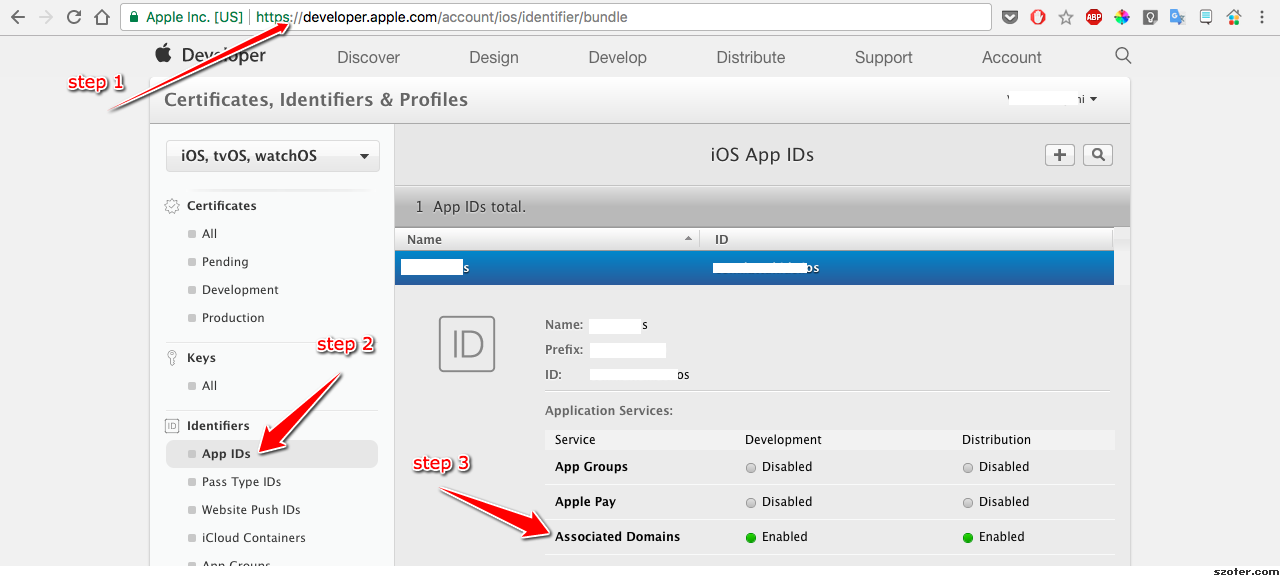
First, register your app at developer.apple.com and make sure the Associated Domains is enabled for the app.
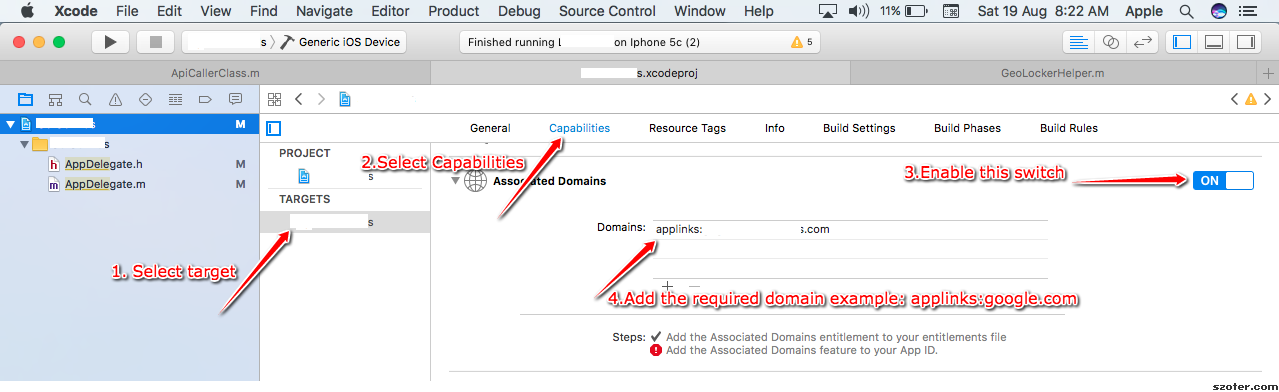
Inside your Xcode project, add the associated link in the format applinks:my.example.com:
The final step requires hosting an apple-app-site-association file over HTTPS (no redirects) at either https://<your-domain>/.well-known/apple-app-site-association (preferred — iOS checks this location first) or at the site root https://<your-domain>/apple-app-site-association. The file must be served with Content-Type: application/json and must not have a .json extension. The apps key under applinks must be present and an empty array — the actual app configuration goes in details. Each entry in details lists the apps it applies to and the URL components those apps should handle. Each app identifier is <Team ID>.<Bundle Identifier> — visit https://developer.apple.com/account/ → Membership to find your Team ID. In the example below, 9JA89QQLNQ is the Team ID and com.apple.wwdc is the Bundle ID.
{
    "applinks": {
        "apps": [],
        "details": [
            {
                "appIDs": [ "9JA89QQLNQ.com.apple.wwdc" ],
                "components": [
                    { "/": "/wwdc/news/" },
                    { "/": "/videos/wwdc/2015/*/highlights/" }
                ]
            }
        ]
    }
}
The modern syntax shown above — appIDs (plural) with a components array — was introduced in iOS 13 and is what Apple now recommends. Each components entry can match against the path (/), query (?), or fragment (#) and can carry an exclude: true flag to subtract patterns. The older syntax with a singular appID and a flat paths array is still supported if you need to serve devices running iOS 12 or earlier, but new files should prefer components. components patterns don't support regular expressions, but support * and ? wildcards. See Apple's Supporting associated domains for the full grammar.
In your AppDelegate.swift, the application method that has the restorationHandler parameter will get called when the link is triggered. Note that the restorationHandler closure takes [UIUserActivityRestoring]? (the legacy [Any]? form was updated in Swift 4.2):
func application(_ application: UIApplication, continue userActivity: NSUserActivity, restorationHandler: @escaping ([UIUserActivityRestoring]?) -> Void) -> Bool {

    // /videos/wwdc/2015/*/highlights/
    if let url = userActivity.webpageURL,
       let regex = try? NSRegularExpression(pattern: "/videos/wwdc/(?<yearId>\\d+)/(.*?)/highlights/?", options: .caseInsensitive) {
        let matches = regex.matches(in: url.absoluteString, options: [], range: NSRange(url.absoluteString.startIndex..., in: url.absoluteString))
        if !matches.isEmpty {
            return true
        }
    }

    return false
}To use wildcard app links, you must make sure that the subdomain and sub subdomains can serve the apple-app-site-association file. For instance:
- app.domain.com (must serve the apple-app-site-association file)
- server1.app.domain.com (must serve the apple-app-site-association)
- server2.app.domain.com (must serve the apple-app-site-association)
Use the Console app, click on the Devices, and look for applinks in the system messages.
Click on the Home button and make sure the app is currently not in the foreground. To launch the simulator, you can type this command at the Terminal prompt:
xcrun simctl openurl booted "https://www.example.com/content?id=2"Keep in mind that Safari will not attempt to launch the app if it is already on the same domain according to Apple's documentation:
When a user browses your website in Safari and taps a universal link in the same domain, the system opens that link in Safari, respecting the user’s most likely intent to continue within the browser. If the user taps a universal link in a different domain, the system opens the link in your app.
You will need to either expose a URL with a different domain (e.g. deeplink.example.com) or use a third-party service like branch.io, which supports custom domains.
- https://objectivetidbits.com/working-with-universal-links-on-ios-simulator-adffb7767801
- https://developer.apple.com/documentation/xcode/allowing-apps-and-websites-to-link-to-your-content/
- https://medium.com/@abhimuralidharan/universal-links-in-ios-79c4ee038272/
- https://developer.apple.com/videos/play/wwdc2015/509/