Installation ᴾᴴᴾ - chung-leong/zigar GitHub Wiki
JavaScript | PHP
The recommended way of installing the Zig compiler is with Zig Version Manager. ZVM helps you easily keep up to date with the language's rapid development. Installation of the version manager is a simple one-step process. Simply follow the instructions at the project's GitHub page.
After you have installed ZVM, run the following command in a terminal window to install the stable version of Zig:
zvm install --zls 0.17.0Zigar 0.15.3 is designed to work with version 0.17.0 of the Zig compiler. It will not work with master, due to the pace of breaking changes being introduced.
You may also choose to download Zig manually.
When you're finished, run the following to verify that the compiler is available:
zig version0.17.0
The extension is distributed as source code only. The build process is extremely easy. The only thing you need is the Zig compiler. After install it, follow these steps:
- Download php-zigar's install package from this project's release page. You DO NOT need the "Source code" tarball.
- Extract the contents of the Zip file into a directory
- In a terminal window, cd to this directory
- Type
php build.phpand press [ENTER]
The build script will
download the development package for the version of PHP running on your computer and proceed
to build the extension. The process will take a few minutes. Afterward, you will find the
extension's .so or .dll file in the sub-directory extensions.
If you're using MacOS or Linux, you can activate the build script's menu screen using the following command:
php build.php menu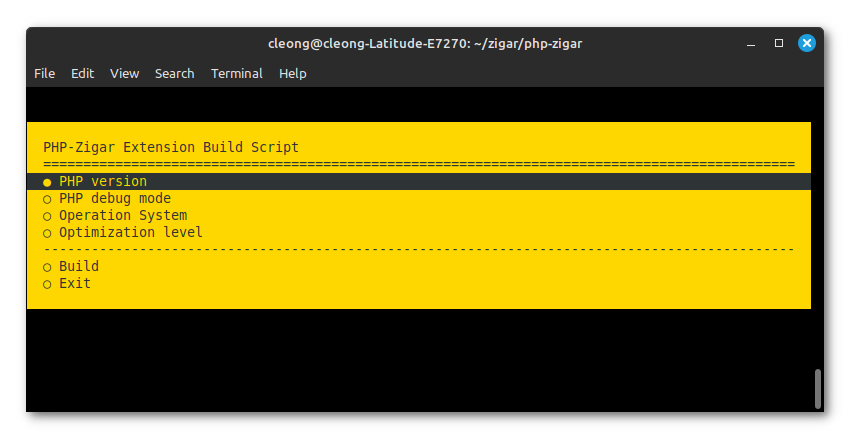
The menu screen allows you to select additional targets to build the extension for. On Windows,
you can achieve the same by manually editing build.ini:
; versions[] = 8.1
; versions[] = 8.2
; versions[] = 8.3
; versions[] = 8.4
versions[] = 8.5

; debug = on
debug = off

; targets[] = x86_64-linux-gnu
; targets[] = aarch64-linux-gnu
; targets[] = x86_64-macos
; targets[] = aarch64-macos
targets[] = x86_64-windows
; targets[] = x86_64-windows-ts

; optimize = Debug
; optimize = ReleaseSafe
optimize = ReleaseSmall
; optimize = ReleaseFast
Building php-zigar manually is also not particularly difficult. First, you need to download the PHP development package from PHP's download page. You'll see the download link only if you select Windows as the operation system.
If you wish to compile for PHP 8.4 or lower, you'll need to fix two Windows-specific header
files. Open include/win32/ioutil.h and include/win32/codepage.h in a text editor, replace
all instances of __forceinline (a MSVC-specific keyword) with zend_always_inline.
Once you have prepared the development package, change to the directory containing php-zigar's
source code. Enter zig build --help to see a list of command-line options. You will need to
scroll up to see the project-specific options:
Project-Specific Options:
  -Doptimize=[enum]            Prioritize performance, safety, or binary size
                                 Supported Values:
                                   Debug
                                   ReleaseSafe
                                   ReleaseFast
                                   ReleaseSmall
  -Dtarget=[string]            The CPU architecture, OS, and ABI to build for
  -Dcpu=[string]               Target CPU features to add or subtract
  -Dofmt=[string]              Target object format
  -Ddynamic-linker=[string]    Path to interpreter on the target system
  -Dphp-include=[string]       Directory containing PHP header files
  -Dphp-extension=[string]     Directory where the extension will be saved
  -Dphp-debug=[bool]           Whether PHP executable has debug enabled
  -Dphp-ts=[bool]              Whether PHP executable was compiled with thread-safety enabled
For example, the following command builds the extension for Linux running on 64-bit x86 CPUs:
zig build -Dtarget=x86_64-linux-gnu -Doptimize=ReleaseSmall -Dphp-include=/home/rwiggum/Downloads/php-devel-pack-8.5.7-Win32-vs17-x86/include -Dphp-extension=extensionsNote: Zig interprets linux as "Linux with the MUSL C library". You need to use the -gnu suffix
to get it to compile for glibc.
Note: On MacOS, you might need to set the enviroment variable DEVELOPER_DIR to /dev/null to
work around an incompatibility between the Zig compilter and Xcode 26.4.
By default, Apache 2 on Windows gives each thread 1MB of stack memory. This is woefully inadequate. Running with such a small stack means the extension will crash from a stack overflow (status code 3221225725) as soon as you try to do anything.
Add the following to httpd.conf to increase the stack size to 8MB:
<IfModule mpm_winnt_module>
   ThreadStackSize 8388608
</IfModule>
This is only applicable when PHP is running as an Apache 2 handler. The use of this configuration
as a development environment is not recommended, since it means any global variable in your Zig
code would need to be threadlocal.