tools tiled - cheaterbob/CR-Guide GitHub Wiki
Tiled maps
Install and open the starter map
-
Download the desktop build for your operating system from the official Tiled download page, install it, and launch it once. Captivity does not require a Tiled plugin or scripted extension.
-
Copy the complete
ModSDK/MapTemplates/TiledStagedirectory into your mod workspace. Keep itslevels,templates,tilesets,assets, andreferencedirectories together so relative paths continue to resolve. -
In Tiled, select File > Open File or Project and open
levels/starter-map.jsonfrom the copied directory. If Tiled asks for a format, choose JSON map files. -
Keep the map Orthogonal and Finite. Save it as JSON with raw tile-layer arrays; do not convert it to TMX/XML, an infinite map, base64 data, or compressed layer data.
-
Before packaging, run the template's verification script from PowerShell:
.\ModSDK\MapTemplates\verify-tiled-pack.ps1 -PackPath ".\path\to\your-mod"
If you also need Unity's packager and previews, complete Install the authoring tools. Tiled itself can edit a stage without Unity running.
Export a finite orthogonal map as Tiled JSON. The experimental pipeline renders PNG-backed tile and image layers and constructs reviewed gameplay objects, including platforms, spawners, doors, vendors, registered pickups, pack-local stage-item key items, lights, moving platforms, navigation links, and interaction graphs. Exactly one player-spawn point defines the player start.
For a stage-item that should remain on a shelf or cabinet until collected, set initiallyKinematic: true. Its world pickup still works normally; items without this property retain dynamic physics.
The same initiallyKinematic property works on registered pickup points, such as a weapon displayed on a pedestal. A proximity-light can set lightRotationZ to preserve its source light shape's local rotation.
Tiled pixels are converted from a top-left, downward-positive coordinate system to Unity units using the stage definition's pixelsPerUnit.
Start with ModSDK/MapTemplates/TiledStage. It contains an editable map, a ready-to-copy stage definition, reusable .tx object templates, and a machine-readable summary of the supported gameplay objects.

Keep gameplay objects, decoration, platform art, repeated art, and backgrounds on their named layers. Select an object to inspect its template and supported per-instance Custom Properties.
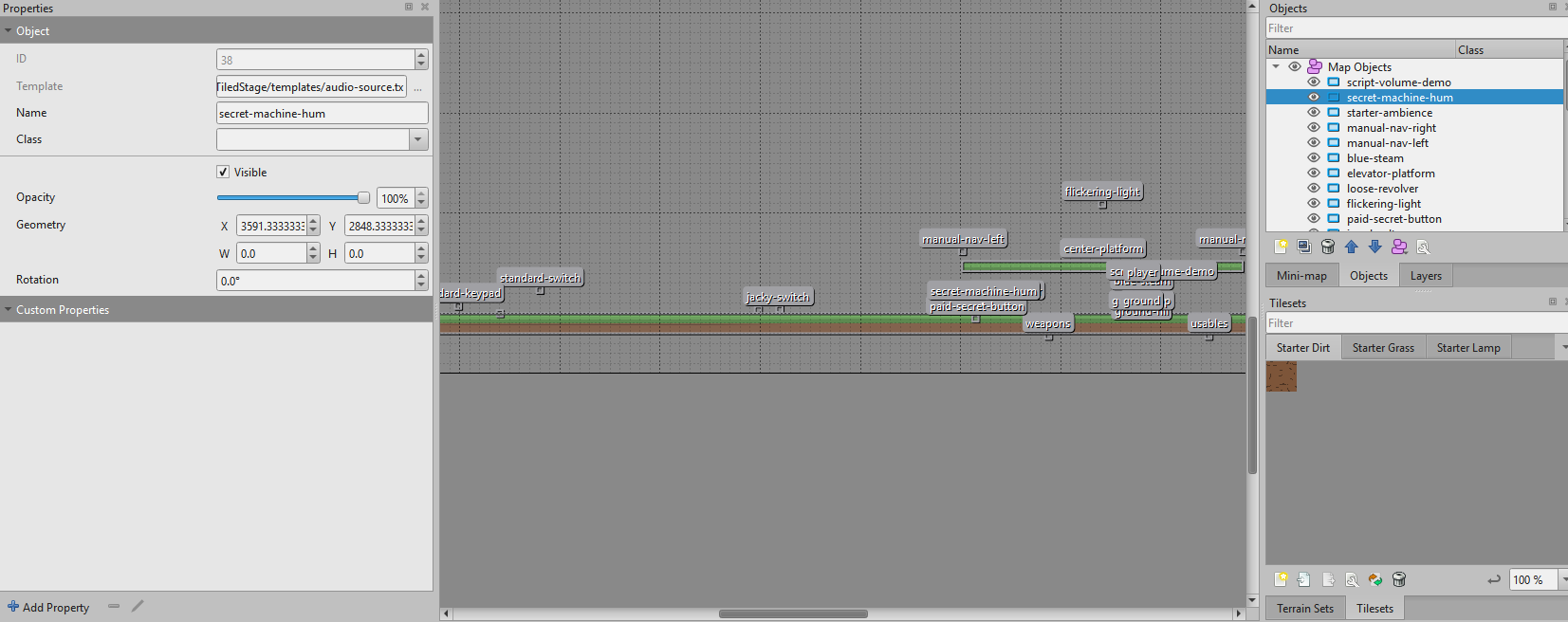
Use "extends": "core:stage/mod-template" when the map should be stage-independent. This reserved base supplies only the runtime stage shell and shared object templates; it does not borrow layout, collision, actors, or scripted state from a playable Core location. Existing inherited ports can keep their current core:stage/... base while they migrate one object group at a time.
Object instances may use native Tiled .tx templates. Paths are resolved relative to the map or parent template, must remain inside the mod pack, and may override the template's fields and property array.
Spawner point names must match the corresponding spawners[].id values in the stage JSON exactly. Encounter configuration remains in the stage definition; Tiled owns positions and collision rectangles.
Tile layers use raw numeric arrays and embedded or external JSON/TSJ tilesets. PNG spritesheets, larger-than-grid tiles, margin/spacing, opacity, group offsets, and horizontal/vertical flips are supported. Tile objects with the decoration class render as scalable and rotatable visual props; their tileset's standard Tiled objectalignment value is honored, with an omitted or unspecified value using the orthogonal-map bottomleft default. repeat: true tiles a sprite across large rectangles. tileMode may be continuous or adaptive, with an adaptiveModeThreshold from 0 through 1. Exported legacy art can preserve four pixel-based spriteBorder* properties on its tileset so capped and sliced walls do not repeat the entire source image. Decorations may also set sortingLayer (Sky, Background, Decoration, or Platform), sortingOrder (-10000 through 10000), opacity (0 through 1), and an HTML-style tintColor. Object-layer opacity is multiplied by the decoration's own opacity. Point objects named weapon-vendor and usable-vendor instantiate shared vending-machine templates with the existing UI and catalogs. A weapon-case point creates a purchasable case using its weapon content-ID property and a caseSize from 1 through 3.
The door point class supports standard, jacky, and roller values in its doorType property. Give every door a unique object name. A door-switch point toggles the comma-separated door names in targetDoors. Standard and Jacky doors retain their Core behavior; roller doors retain their animation and use proximity activation unless linked to a switch.
The note class opens the existing reading HUD with authored text and font size. The keypad class accepts a numeric code and opens one or more named doors after successful entry. General interaction graphs provide additional conditions, actions, and cross-object links.
The interaction class supplies reusable logic for buttons, secrets, trigger zones, and shootable targets. The aliases machine, logic-switch, and easter-egg-step use the same validated graph. Set trigger to use, touch, or shoot; use objects are points while touch/shoot objects are rectangles. The starter kit includes preview-backed .tx templates for common machines, so they remain visible while editing in Tiled and become their proper runtime objects in game.
Interactions can require a wave range, living-enemy range, completed challenges, several activations, a registered inventory item, a minimum unspent money balance, or completion of other named interactions. Actions can delay, consume or grant items, add/remove money, heal the actor, apply knockback/ragdoll, control doors and lights, queue enemies, and activate other nodes. All content IDs and named links are checked while the pack loads, action-chain cycles are rejected, and an unavailable use interaction is checked before its price is charged.
light-bulb points can use the Core light presentation or paired pack-local visualFile/activatedVisualFile PNGs. Portable lights also accept initial/activated HTML colors, sprite PPU/pivot/sorting settings, and point-light inner radius, outer radius, and falloff. An interaction using lightAction: activate applies the activated sprite and color without first switching off an already-lit indicator.
proximity-light points are fully portable fixtures: a pack-local PNG and a 2D point or freeform light fade in while any actor is within detectionRadius, then fade out. Set initiallyActive: false for a fixture enabled later by a stage script's set-object-active action. file, fadeSeconds, intensity, lightType, color, falloffIntensity, lightOffsetY, sortingLayer, and sortingOrder define presentation. Point lights use innerRadius and outerRadius; freeform lights use shapePath (semicolon-separated x,y vertices in Unity units) and shapeFalloffSize.
freeform-light points create static 2D lighting without a Core prefab. Set shapePath to 3–64 semicolon-separated x,y vertices in Unity units, and sortingLayers to a comma-separated list of affected layers. intensity, color, falloffIntensity, shapeFalloffSize, and initiallyActive reproduce the authored light. Stage scripts can enable or disable a named light with set-object-active.
For a visible fixture, optional file supplies a pack-local PNG rendered at pixelsPerUnit on sortingLayer/sortingOrder. lightOffsetY and lightRotationZ place and orient the light relative to that sprite; this preserves FER's dormant laboratory panel light.
When a mod extends a Core stage and replaces one of its embedded lights, optional suppressInheritedPath names that original light's relative hierarchy path so it does not render a second time. This is only a suppression hint; the new light's geometry and appearance still come entirely from JSON.
A stage may define one global-light point with intensity, color, falloffIntensity, and affected sortingLayers. It replaces the inherited global light and becomes the target of the stage's global-light API and set-global-light stage-script actions.
point-light points create a standalone 2D cone light. Set its radii, inner/outer angles, rotation, color, intensity, falloff, affected sorting layers, and additive or alpha-blend overlap. Optional pulseFrom, pulseTo, and pulseSeconds reproduce a repeating two-phase alarm intensity cycle. initiallyActive: false and suppressInheritedPath support scripted replacement of dormant Core fixtures.
Interactions may additionally require a minimum/maximum number of living enemies or a comma-separated list of completed challenge content IDs. visualArt selects a published Core map-art ID so an interaction can appear as a machine instead of an invisible point. For fully portable stateful artwork, set both visualFile and activatedVisualFile to pack-local PNGs; visualPixelsPerUnit, visualPivotX, visualPivotY, visualSortingLayer, visualSortingOrder, and visualScale control how the two states render. The activated image replaces the normal image after a successful activation.
ambient-audio and audio-source points load bounded pack-local WAV/OGG files when the stage opens. Ambient audio is non-positional; positional audio uses configurable linear falloff. The optional mixerGroup property selects Ambience or SFX (their respective defaults). Native Tiled tileset animations are supported for painted tiles and tile-object decorations.
To replace inherited stage audio, add an optional audio object beside layout and waves in the stage definition. The ambience, entryMusic, waveMusic, and waveComplete fields each accept a pack-local WAV or OGG. Any omitted field continues using the inherited Core clip.
A light-bulb point clones a working Core fixture. initiallyOn controls its starting state and flicker accepts 0 through 1. Players can toggle it with Use or permanently break it by shooting it.
A pickup point instantiates a registered weapon, usable, or consumable from its full item content ID. amount may exceed one only for stackable items. A moving-platform rectangle travels by its moveX/moveY pixel offset and uses approved Core art. A particle-emitter point creates bounded looping particles without requiring a Unity prefab.
Named nav-node points supplement the automatically generated platform nodes. Place ground nodes on the top surface of their platform; the loader normalizes them to the Core walking-network height. Their comma-separated links are directed, connectionType is move or climb, and fly: true marks aerial routing. Set bidirectional: true to create the reverse edge automatically. For a ground climb link, upward traversal climbs while reverse/downward traversal walks off the ledge and falls. Missing and self-referencing links invalidate the map.
For multi-room maps, use the supplied room.tx, room-entry.tx, and room-transition.tx templates. Room rectangles control camera bounds. Transitions target named entries and may wait for active enemies to be cleared or become unavailable after one use. They do not save progression or replace the stage's normal player spawn.
An altar point clones the full Jungle altar sequence and rebinds it to the authored stage's wave and lighting systems.
Use a core-art rectangle to reuse a curated background or prop from the base game. Its art property selects a stable public ID listed in the starter kit's reference/core-map-art.json; the rectangle controls position and size. These visuals accept Background, Decoration, or Platform sorting and optional horizontal or vertical flips, but never create collision.
Tiled Image Layers support pack-local PNG files, visibility, opacity, offsets, nested groups, and horizontal or vertical repetition. They render on the background layer and are the preferred choice when the background should be visible in Tiled itself.
External JSON/TSJ tilesets are covered by Docs/Modding/schemas/tiled-tileset.schema.json. The validator checks their grid dimensions, relative PNG path, and bounded animation frames. A tileset may use ../ to reach another directory within its pack; the runtime resolves the final path and rejects it if it escapes the pack. Cross-field rules—such as whether the declared grid fits the image and whether animation tile IDs exist—are also enforced by the runtime loader.
XML TSX, compressed/base64 layers, diagonal transforms, and automatic tile-object collision remain unsupported.
Use layout.hideInheritedVisuals: true to replace the selected Core stage artwork. Collision remains explicit in the Gameplay object layer rather than being inferred from painted tiles.