content enemies - cheaterbob/CR-Guide GitHub Wiki
Enemies
spawn.inheritTemplateSpawners: true adds a variant anywhere its Core template already spawns. The optional experimental spawn.selectionWeight controls its relative frequency and defaults to 1. Existing Core choices each have weight 1; one variant with weight 0.25 therefore has a 0.25 / (1 + 0.25), or 20%, share when competing with one matching Core enemy. Multiple variants add their weights to the denominator.
Inherited enemies extend a stable Core enemy ID. They can currently override bounded statistics, inherited attacks, selected behavior modules, drop rules, animation speed, spawning behavior, and published rig sprites.
Only use properties listed for their exact object in the enemy API reference. Enemy JSON is closed to unknown fields. In particular:
spawncurrently containsinheritTemplateSpawnersand optionalselectionWeight; there is nojoinCoreSpawnerslist.- Original enemies cannot join selected Core spawners through
spawn; place their content ID in authored stage spawners. - Enemy attacks do not currently have
ragdollSeconds. The property with that name belongs to supported Tiled interactions. animationdoes not currently haveblendSeconds.- A
downedFinisheruses the documented top-level or per-phaseplayerAnimation/playerAnimationRef; it does not havepairingorplayerStruggleAnimationReffields.
These names may be reasonable future feature requests, but adding them to a document before the schema and runtime implement them invalidates the pack.
The Zombie I LibreSprite kit in ModSDK/EnemyTemplates/Zombie1 builds a named-layer 128×128 atlas from the exact Core sprites. It inherits core:enemy/zombie-1, including the original rig, animation clips, colliders, and specialized prefab behavior.
Fully original enemies (experimental)
Omit extends and use visual.type: originalSkeletonAtlas to make an enemy without cloning a Core NPC. The runtime constructs the actor rigidbody and body collider, sprite bones, projectile hit zones, ragdoll joints, attacks, procedural animation set, and reviewed AI from data. A complete example is ExampleMods/prey-green-zombie/content/original-green-stalker.json.
The Unity shortcut is Captivity Reloaded > Modding > Create Original Enemy.... It can scaffold the enemy, test stage, animation documents, and optional DragonBones project while keeping each result schema-valid.
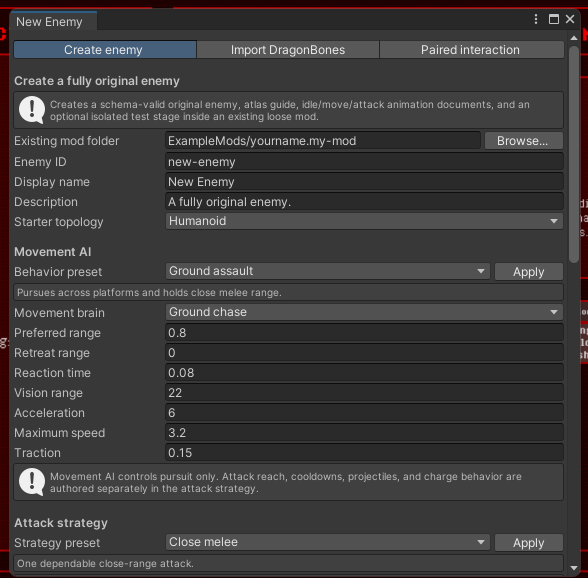
An original visual requires:
regions: rectangles within one pack-local PNG atlas.bones: up to 64 named bones. Every bone selects a region and may name a parent. Ahipsbone is required. Makehipsthe single top-level bone: do not retain editor-only wrapper bones such asroot, an armature name, orskeleton-*above it. Every declared bone receives a physics body during ragdoll, so empty wrapper bones can destabilize the chain or pull it away from the floor. Localx,y,rotation, pivot, and sorting order are explicit, so descendants are not limited to the humanoid Core rig.hitZones: box or circle projectile zones attached to named bones. One zone per bone may uselow,normal,critical, orblockdamage. Add practical zones tohips, the torso, and major limbs; these trigger hitboxes become solid colliders while the enemy is ragdolled and keep it on platforms.bodyWidth,bodyHeight, and optional body offsets: the solid capsule used for floors and walls while the enemy is standing. It remains separate from the per-bone ragdoll colliders.
After importing from DragonBones, inspect the hierarchy before packaging. hips should have no parent, all other physical bones should descend from it, and the lower body must have non-zero hit zones. Test at least one temporary knockdown and one death on both a Core stage and any bundled Tiled stage; a rig that stands correctly can still have an invalid ragdoll hierarchy.
animation.clips contains named procedural clips. Each clip has an ordered list of frames; a frame supplies an atlas region, absolute local position, rotation, or scale values for any subset of bones. Sprite regions switch at the authored frame while transforms interpolate between frames. idle and move are required. Attack definitions reference another clip by name and specify the exact hit time, total duration, ranges, damage, knockback, chance, and cooldown.
Clips may instead live in separate normalized enemyAnimation documents. Map a semantic clip name to its content ID with animationRefs, for example "move": "your.pack:enemy-animation/stalker-move". The document's enemy must identify the owning enemy. Bone targets are checked against that enemy's declared skeleton. Numeric tracks support position, rotation, scale, sprite color, and sorting order. Object tracks switch atlas regions by name, or load a pack-local PNG directly when the sprite key supplies asset. Inline clips and references can be mixed but cannot define the same semantic name.
Standalone attack delivery types are:
melee: applies an impact insidehitRange.hitscan: verifies range and line of sight and displays the Core tracer.projectile: launches an atlas-backed Rigidbody2D projectile toward the player's position at the firing moment. It requiresprojectileRegion,projectileSpeed,projectileLifetimeSeconds, andprojectileRadius;projectileGravityScaledefaults to zero. A non-zero gravity scale produces an aim-compensated ballistic arc. Projectiles are destroyed when they hit the player, a platform, or their lifetime expires.area: applies an impact withinareaRadiusaround a facing-relativeoffsetXand localoffsetYfrom the enemy.grab: starts that enemy'sdownedFinisherQTE on a target insidehitRange. Consequently, an enemy containing a grab must also define the finisher module.multiStage: consumes 2–16 orderedstages, with exactly one orderedattackHitanimation event per stage. Every stage selectsmelee,hitscan,projectile,area, orgraband may override damage, knockback, range, offsets, or projectile settings; omitted stage values inherit the containing attack.
Enemy animation events
Non-looping clips referenced by an attack or finisher may contain an ordered events track. attackHit performs the current attack delivery at that exact point in the animation. Multiple markers repeat a normal delivery; for multiStage, they consume the declared stages in order. When at least one attackHit marker exists, it replaces the attack's legacy hitTimeSeconds; otherwise hitTimeSeconds remains the fallback and one of the two timing methods is required. A cue is an inert semantic timeline marker with an optional bounded index and amount; it is available to authoring tools but never invokes a Unity method or gameplay code. Unlike gameplay events, inert cues may also appear on looping clips.
impulse applies a bounded physics impulse to the enemy. Its x value points forward by default and is mirrored when the enemy faces left; set relativeToFacing to false to use world-space X.
Presentation events use the same timing track:
soundplays a pack-local WAV or OGG through a positional SFX source.volumedefaults to1.cameraShaketakes a boundedamountfrom0through1.spriteEffectbriefly displays an existing atlasregion, optionally attached to a namedbone. It supports localx/y,durationSeconds, uniformscale, andsortingOrder.
Enemy-side gameplay events are restricted to attack and finisher clips and cannot be placed on looping clips in this first version. Inert semantic cues are allowed on loops. Player-side finisher events may loop with their player animation. Event audio is loaded safely from the defining pack, capped at 32 MiB per file, and never resolves outside the pack directory.
"swipe": {
  "durationSeconds": 0.55,
  "loop": false,
  "frames": [
    { "time": 0, "bones": { "chest": { "rotation": -12 } } },
    { "time": 0.22, "bones": { "chest": { "rotation": 20 } } }
  ],
  "events": [
    { "time": 0.16, "type": "impulse", "x": 0.35 },
    { "time": 0.22, "type": "attackHit" },
    { "time": 0.22, "type": "cameraShake", "amount": 0.15 },
    { "time": 0.22, "type": "spriteEffect", "region": "hit-flash", "bone": "hand-right", "durationSeconds": 0.08 }
  ]
}
The shared scheduler keeps gameplay timing in data without importing arbitrary Unity animation events. spriteEffect remains the simple bounded atlas-sprite option; normalized animation documents may additionally define bounded particle, light, trail, and decal effects with timed effect triggers. A presentation effect may reference a safe pack-local PNG in texture, divide it with textureSheetTilesX and textureSheetTilesY, and choose textureSheetFrame using top-left row order. Decals require a texture. Light intensity/radius, trail width/persistence, and decal pixels-per-unit have explicit bounded fields. These presentation effects do not add arbitrary damage or script callbacks.
Reviewed standalone AI types are groundChase, flyingChase, and holdPosition. Chasers face and approach the player, maintain preferredRange, and select configured attacks; optional retreatRange makes them back away when the player gets too close. Flying chase uses gravity-free two-axis movement. A stationary enemy can still select attacks inside its initiate range. reactionSeconds bounds how often each AI makes a new decision. Ground enemies use the stage navigation graph to reach higher platforms through directed climb links. When pursuing a player below, they leave the platform and fall naturally instead of climbing downward. Authors should provide links in every direction that an enemy is expected to travel.
Original enemies cannot set spawn.inheritTemplateSpawners, because there is no template whose spawn list can be inherited. Reference their full content ID from a data-driven stage spawner instead. The format remains experimental while custom rigs receive gameplay testing.
Published behavior modules currently include regeneration, low-health berserk, lifesteal, reflected thorns damage, onHitRagdoll, onHitEquipClothing, content-ID-based spawnOnDeath, and periodic speedPulse movement bursts. Modules are bounded and composable; inherited attack entries can separately override damage, chance, ranges, timing, knockback, and whether the enemy moves during the attack.
onHitEquipClothing gives every successful attack by that enemy a bounded chance to attach a registered Core or mod garment. cooldownSeconds prevents repeated attachment attempts. The referenced clothing must be loaded and registered or the enemy definition is rejected.
{
  "type": "onHitEquipClothing",
  "clothing": "your.pack:clothing/hex-band",
  "chance": 0.25,
  "cooldownSeconds": 8
}
Downed-player finisher QTE
Fully original enemies may add one experimental downedFinisher behavior module. When the enemy is within triggerRange of a ragdolled player, or a player voluntarily exposing themself with the normal Expose binding (S by default), it starts Captivity's struggle meter. Keyboard, controller, and mobile use the same bounded QTE implementation.
{
  "type": "downedFinisher",
  "triggerRange": 1.6,
  "startDelaySeconds": 0.25,
  "durationSeconds": 8,
  "meterMax": 100,
  "inputPower": 14,
  "inputPattern": "adaptive",
  "decayPerSecond": 2,
  "failureDamage": 20,
  "successRecoveryHealth": 8,
  "successStunSeconds": 2.5,
  "cooldownSeconds": 4,
  "animation": "finisher",
  "playerAnimation": {
    "durationSeconds": 0.8,
    "loop": true,
    "frames": [
      { "time": 0, "bones": { "chest": { "rotation": -12 }, "head": { "rotation": 8 } } },
      { "time": 0.4, "bones": { "chest": { "rotation": 12 }, "head": { "rotation": -8 } } },
      { "time": 0.8, "bones": { "chest": { "rotation": -12 }, "head": { "rotation": 8 } } }
    ],
    "events": [
      { "time": 0.4, "type": "libido", "amount": 1 },
      { "time": 0.4, "type": "scaledPleasure", "amount": 0.2 },
      { "time": 0.4, "type": "strengthDamage", "amount": 1 },
      { "time": 0.4, "type": "struggleDamage", "amount": 10 }
    ]
  }
}
Reaching meterMax releases the player, optionally restores health, and can ragdoll the enemy for successStunSeconds. Running out of time releases the player, applies failureDamage, and briefly knocks the player down. animation references an enemy procedural clip. Optional playerAnimation uses the same bounded, interpolated frame format for the published player bones and restores the player's previous pose afterward. Normalized player-animation references also support sprite, color, sorting, and particle presentation tracks.
inputPattern selects the struggle interaction and defaults to adaptive for compatibility:
adaptivepreserves the original behavior: alternating directions on keyboard, right-stick rotation on controller, and aim-stick rotation or Jump taps on mobile. Keyboard players may hold Jump for slower automatic progress.alternaterequires discrete left/right inputs. Controller and mobile sticks must return to neutral between directions.rotaterequires aim-stick rotation on controller/mobile and uses alternating directions as its keyboard fallback.taprequires repeated presses of the normal Jump action and displays that device's Jump glyph.
A controller or touch-stick rotation completes after roughly three quarters of a circle and grants four times the phase's inputPower, matching four successful alternating inputs. Brief crossings through the stick dead zone are tolerated, but releasing the stick for about 0.3 seconds starts a new gesture. Set decayPerSecond with that cadence in mind; requiring several complete circles per second is not practical on either device.
On Android, a connected gamepad takes priority after the player uses it, even while the on-screen mobile controls remain visible. The prompt changes to Circle right stick; touching the mobile controls switches the active input back to the touch-stick path.
For a reusable curve-based animation, put a playerAnimation document in a content root and replace the inline object with "playerAnimationRef": "your.pack:player-animation/example". Normalized position, rotation, and scale tracks are sampled through their authored linear or Hermite curves and converted into the same safe finisher player. A reference may be used on the top-level finisher or an individual phase. Missing IDs invalidate the pack, and an entry cannot define both playerAnimation and playerAnimationRef. Runtime v1 accepts the core:player-rig/alex rig. See ExampleMods/prey-green-zombie/content/stalker-restraint.player-animation.json.
For an ordered finisher, replace the single presentation with 2–8 phases. Each phase requires a unique id, its own durationSeconds, and an enemy animation; it may also provide a separate playerAnimation, inputPattern, inputPower, and decayPerSecond. The struggle meter persists between phases, while the prompt and input gesture may change. Phase animations restart at each transition, and enemy/player events use time relative to that phase. Reaching meterMax succeeds immediately; reaching the end of the last phase fails. Combined phase duration is capped at 300 seconds.
Independent NPC participants
A phased downedFinisher may reserve up to three real secondary original-enemy instances. Each entry in participants defines a stable slot ID, the required enemy content ID, its join policy, ranges, pair offset, facing, and optional fallback animation. Phase-specific animations are selected through participantAnimations on each phase.
"participants": [
  {
    "id": "assistant",
    "enemy": "your.pack:enemy/assistant",
    "joinPolicy": "phaseBoundary",
    "joinRange": 3,
    "approachRange": 9,
    "offsetX": 1.25,
    "offsetY": 0,
    "facing": "left",
    "animation": "assist-idle"
  }
]
startOnly slots are checked when the interaction begins and may be marked required. phaseBoundary slots are optional: matching unreserved enemies inside approachRange approach the active interaction, and enemies inside joinRange enter at the next phase boundary. They never jump into the middle of a phase. Runtime v1 limits participants to originalSkeletonAtlas enemies because each participant needs the modular animation controller.
While participating, each NPC has its AI, attacks, physics, collisions, animation, facing, position, and sorting state controlled by the QTE session. That state is restored on success, failure, cancellation, component disable, or participant removal. The owner and every secondary NPC are reserved so two active interactions cannot claim the same instance.
Optional successOutcome and failureOutcome objects replace the legacy fixed outcome fields. They may independently combine healthDamage, strengthDamage, pleasure, libido, healthRecovery, enemyStunSeconds, playerRagdollSeconds, and up to eight equipClothing content IDs. A common cursed-clothing setup puts equipClothing on failureOutcome, so the enemy attaches the garment only when the player loses the QTE. When an outcome object is omitted, the existing successRecoveryHealth, successStunSeconds, or failureDamage behavior remains in effect. The Green Stalker example demonstrates two phases with distinct animation/event rates and different success/failure effects.
"failureOutcome": {
  "healthDamage": 10,
  "equipClothing": ["your.pack:clothing/hex-band"]
}
playerAnimation.events is a separate player-side event track. Each entry controls exactly one effect, and multiple entries may share a timestamp:
pleasureadds its amount directly to the pleasure bar.scaledPleasureuses the Core libido-scaled pleasure formula.libidoadds its amount to libido.strengthDamageremoves its amount from the yellow strength bar.struggleDamageremoves its amount in points from current QTE progress and cannot lower it below zero.healthDamagedeals its amount as normal player health damage, including active difficulty, rule-profile, and clothing modifiers.
This list is exhaustive. Do not use animation labels such as hitReaction as gameplay events. Author the reaction through bone/sprite tracks or a supported presentation effect instead.
Events repeat on every cycle when loop is true. The example reproduces the main effects of a normal Zombie thrust at 0.4 seconds in each 0.8-second cycle; its struggleDamage is 10 points out of the configured 100-point meter. At most 64 events are allowed and every event time must fall within the clip duration. Positive amounts are required. pleasure and scaledPleasure are capped at 100 per event, libido and struggleDamage at 10,000, and damage events at 100,000.
Normalized player documents use the same event names in name and place the amount in floatValue. The runtime importer now also applies sprite-name tracks when their sprites are available, RGBA color tracks, sorting-order tracks, and bounded particle-effect triggers. Particle targets may name a published player bone or a bone on the paired enemy. The Green Stalker's drain phase uses a Squoid-derived two-trigger particle definition as the initial runtime presentation test.
The optional experimental statuses object customizes the existing status cards associated with a finisher. Supported keys are active, mating, infusion, succumbed, orgasm, fertilized, pregnant, implanting, labor, birth, and mindBroken. Each entry may override title, description, or both. Omitted entries use Captivity's normal wording. Text supports {enemy}, {fetus}, and {child} placeholders. Cards are connected to their real player events: for example, active lasts for the QTE, orgasm appears only on orgasm, and pregnancy-related cards appear only if a fetus is actually inserted.
"statuses": {
  "active": { "title": "Pinned", "description": "{enemy} has you pinned!" },
  "succumbed": { "description": "You could not escape {enemy}..." },
  "fertilized": { "description": "{enemy} implanted a {fetus}." }
}
Published player bone names are hips, butt, spine, chest, neck, head, arm-right-upper, arm-right-lower, hand-right, arm-left-upper, arm-left-lower, hand-left, leg-right-upper, leg-right-lower, foot-right, leg-left-upper, leg-left-lower, foot-left, ear, and face.
This module deliberately defines a gameplay finisher rather than pregnancy, clothing, dialogue, or explicit scene behavior; those require separate reviewed modules and assets.