ICharacter - carenalgas/popochiu GitHub Wiki
Description
Inherits PopochiuClickable.
Use it to make characters do actions. Is the shortcut for ICharacter.gd, and can be used (from any script) with C (i.e. C.walk_to_clicked() or C.Glottis.walk_to_prop('CoffeeMachine')).
Some things you can do with it:
- Access the player character (PC) directly.
- Get any character.
- Make characters move or say something.
Examples
C.face_clicked() # Makes the PC look at the clicked node (of type Clickable)
C.character_say('Glottis', 'Hi Manny!') # Makes character Glottis greet
C.connect('character_spoke', self, '_do_something_after_spoke') #
C.player.face_left() # Makes the PC look left
⬇️ Since version 1.9.0 ⬇️
C.Glottis.say('Hi Manny!')
C.Manny.face_right()
C.Meche.walk_to_hotspot('Window')
Properties
Signals
-
character_move_ended( PopochiuCharacter
character). Emitted when acharacterfinishes moving through a room. This happens in the_clear_navigation_path()method of PopochiuRoom. -
character_spoke( PopochiuCharacter
character, Stringmessage). Emitted when acharactersaysmessage. This is what makes the graphic interface display the text of what the character is saying. Emitted by thesay()method in PopochiuCharacter.
Public
- player PopochiuCharacter. The PopochiuCharacter that is the current player-controlled character.
- characters Array. An array of PopochiuCharacter with the instances of all the available characters in the game.
- camera_owner PopochiuCharacter. The PopochiuCharacter the camera is following.
Methods
Public
-
change_camera_owner( PopochiuCharacter
c, boolis_in_queue = true) voidDefines which PopochiuCharacter
cwill the camera follow. If you want to use it outside a E.run(), sendis_in_queueasfalse. Can be yield. -
character_say( String
chr_name, Stringdialog) void🍑 Intended to be used inside an E.run() (a.k.a. queue of instructions) 🍑
Makes the PopochiuCharacter with
chr_name(script_name) say a line ofdialog. Can be yield.func on_room_transition_finished() -> void: # Glottis greets Manny and the code pauses until the player clicks anywhere yield(E.run([ C.character_say('Glottis', 'Hi Manny'), C.character_say('Glottis', 'What are you doing here?') ]), 'completed') -
character_say_no_block( String
chr_name, Stringdialog) voidMakes the PopochiuCharacter with
chr_name(script_name) say a line ofdialogimmediately. Can be yield.func on_room_transition_finished() -> void: # Glottis greets Manny C.character_say_no_block('Glottis', 'Hi Manny') -
character_walk_to( String
chr_name, [Vector2](https://docs.godotengine.org/en/stable/classes/class_vector2.html)position, [bool](https://docs.godotengine.org/en/stable/classes/class_bool.html)is_in_queue = true` ) voidMakes the PopochiuCharacter with
chr_name(script_name) move topositionin the current room. If you want to use it outside a E.run(), sendis_in_queueasfalse. Can be yield.# This is the CharacterGlottis.gd script file func on_item_used(item: PopochiuInventoryItem) -> void: if item.script_name == 'Mice': # Make this character walk to the point with name Exit. yield( C.character_walk_to(self.script_name, room.get_point('Exit'), false), 'completed' ) C.character_say(self.script_name, 'What are you doing!!!???', false) -
face_clicked( bool
is_in_queue = true) voidMakes the PC (player character) look at the last clicked PopochiuClickable. If you want to use it outside a E.run(), send
is_in_queueasfalse. Can be yield. -
get_character( String
script_name) PopochiuCharacterLooks for a PopochiuCharacter whith
script_nameand returns it, otherwise returnsnull.It looks for the PopochiuCharacter in the array of
charactersin Popochiu. -
get_character_ignore_walkable_areas( String
chr_name) boolGets the
ignore_walkable_areasproperty value for the specified character. When this property is true, the character can move ignoring walkable areas boundaries. Useful in rooms with multiple walkable areas, when only certain actions may allow to walk from one to the other. -
get_runtime_character( String
script_name) PopochiuCharacterReturns the instance of the PopochiuCharacter identified with
script_name. Otherwise returnsnull. This method is used to assign the instace of characters in the A singleton, in order to make work calls likeC.Glottis.face_left(). -
is_valid_character( String
script_name) boolChecks if the character with
script_nameexists in the array of PopochiuCharacter instances in this class. -
player_say( String
dialog) void🍑 Intended to be used inside an E.run() (a.k.a. queue of instructions) 🍑
Makes the PC (Player-controlled Character) say
dialog. Can be yield.func on_room_transition_finished() -> void: E.run([ C.player_say("I'm in a run") ]) -
player_say_no_block( String
dialog) voidMakes the PC (Player-controlled Character) say
dialogimmediately. Can be yield.func on_room_transition_finished() -> void: yield(C.player_say_no_block("I'm not in a run", false), 'completed') # Do something once players click anywhere to finish the dialogue line -
player_walk_to( Vector2
position, boolis_in_queue = true) voidMakes the PC (player character) walk to a
positionin the current room. If you want to use it outside a E.run(), sendis_in_queueasfalse. Can be yield.func on_room_transition_finished() -> void: yield( C.player_walk_to(room.get_hotspot('Stairs').walk_to_point, false), 'completed' ) E.run([ 'Player: What!?', 'Player: I have to climb all those steps?' ]) -
set_character_emotion( String
chr_name, Stringemotion, boolis_in_queue = true) return_typeSets the PopochiuCharacter with
chr_nameto have its emotion identifier asemotion. If you want to use it outside a E.run(), sendis_in_queueasfalse. -
set_character_ignore_walkable_areas( String
chr_name, boolvalue) voidSets the
ignore_walkable_areasproperty for the specified character. When this property is true, the character can move ignoring walkable areas boundaries. Useful in rooms with multiple walkable areas, when only certain actions may allow to walk from one to the other. -
walk_to_clicked( bool
is_in_queue = true) voidMakes the PC (player character) walk to the
walk_to_pointposition of the last clicked PopochiuClickable (e.g. a PopochiuProp, a PopochiuHotspot, another PopochiuCharacter) in the current room. If you want to use it outside a E.run(), sendis_in_queueasfalse.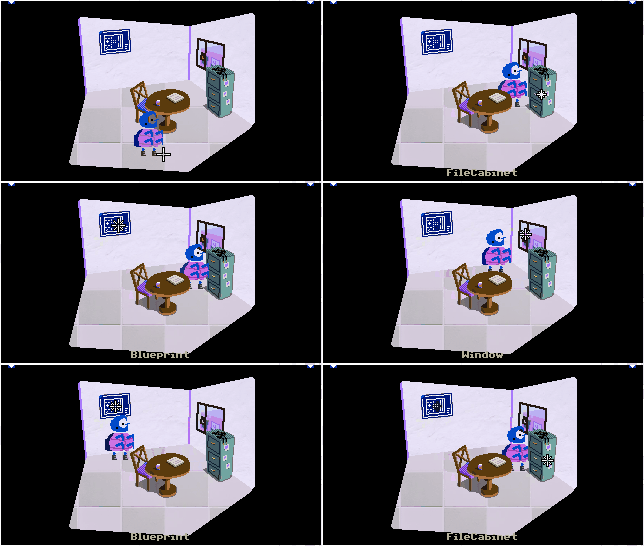
☝️ The clicked prop (the file cabinet) and hotspots (the blueprint and the window) in this room have this: ☝️
func on_interact() -> void:
  C.walk_to_clicked(false)
Set and get
-
set_player( PopochiuCharacter
value) voidSets
valueas the currentplayer(Player-controlled character). It also assignsvaluetocamera_owner.
Private
-
_character_say( String
chr_name, Stringdialog) voidInternally used to make the PopochiuCharacter with
chr_namesay a line ofdialog. This method is called bycharacter_say()andcharacter_say_no_block().