03. Process Flows - cafe24github/cafe24_app_pg_sample GitHub Wiki
- Overview
-
A. Checkout (Synchronous)
Checkout ➡ Callback ➡ End -
B. Checkout (Asynchronous)
Checkout ➡ Callback ➡ Webhook ➡ End -
C. External Checkout
Initialize Button ➡ Checkout ➡ Callback ➡ End -
D. Cancellation (Synchronous)
Cancellation ➡ End -
E. Cancellation (Asynchronous)
Cancellation ➡ Webhook ➡ End
Normal Checkout/Cancellation Process
The PG app acts as the middleman between Cafe24 and the Payment Company.
Cafe24 calls the PG app to create checkout/cancellation requests to the Payment Company. In return, the Payment Company will send updates to the PG app which will then forward the details to Cafe24.

External Checkout Process
In this process, the role of the PG app remains the same. However, the checkout request comes from the Cafe24 Mall Front but the payment updates from the Payment Company are still sent to Cafe24.

📝 For the verification of request data from either Cafe24 or the PG Company, see the Request Data Verification page for suggestions.
📝 The flowcharts in this wiki shows the app-level flow for each module. To get an overview of the flow of each module, check the referenced documents from Cafe24 with the 📚 legend
📝 Refer to the PG Company's documents on how to provide your callback endpoint to their system.
-
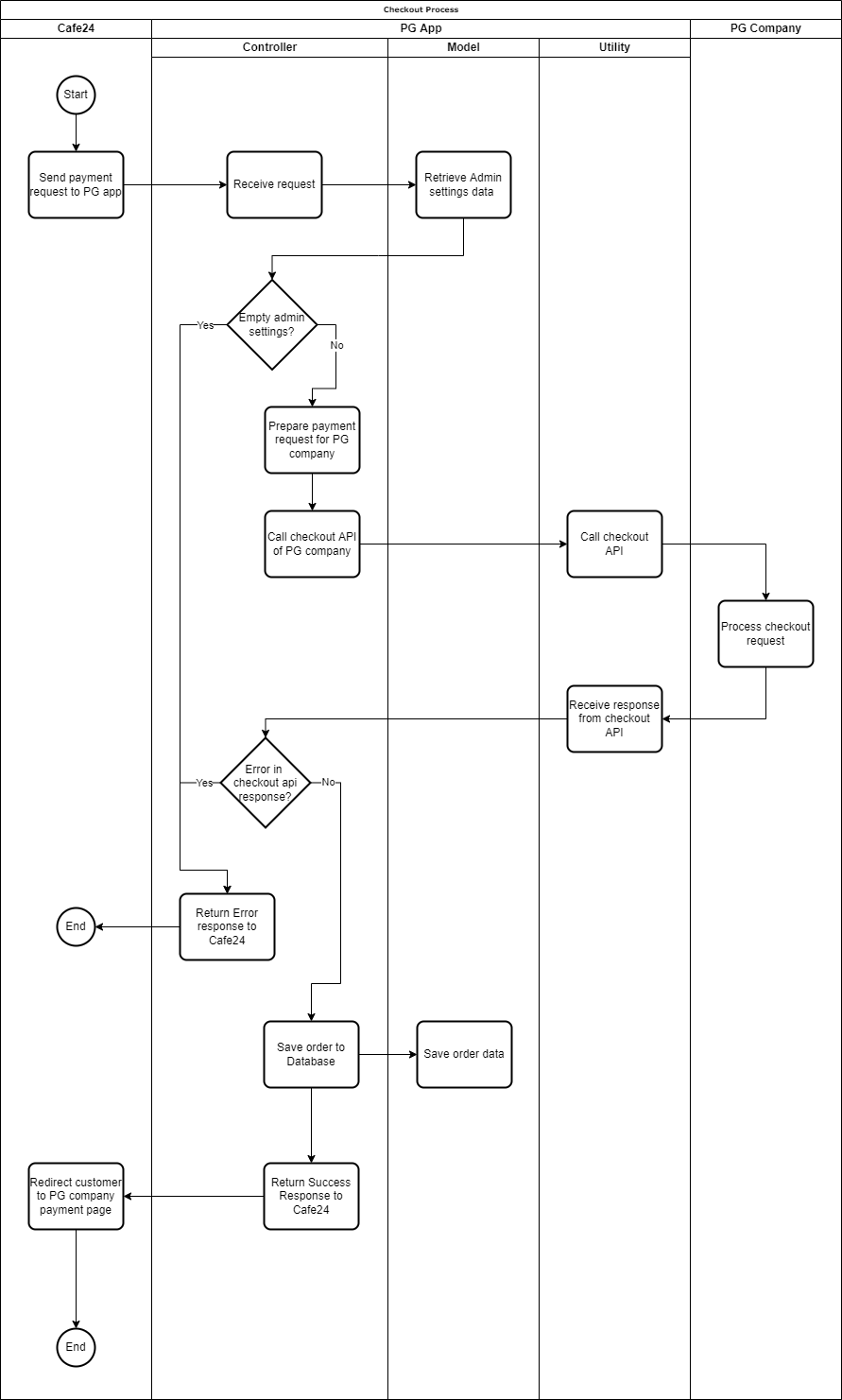
Cafe24 will call the payment request API endpoint you set in the Apps setting.

-
The PG app verifies and processes the order data and sends a checkout request to the PG company.
-
Depending on the PG Company, they will either provide a payment URL or data for the requested checkout:
- Payment URL: displays the webpage that is hosted by the PG Company that will ask the buyer to confirm the payment.
- Requested checkout data: the data returned will contain parameters that can be used by the PG app to process the payment confirmation. The PG app will then host a payment page from its own payment URL that will load the payment process SDK or platform of the PG Company.
-
The PG app will give the payment URL to Cafe24, which will redirect the user to the payment URL. After the user confirms or denies the payment, the PG Company will redirect them to the callback endpoint.
Click to see the checkout flow chart
-
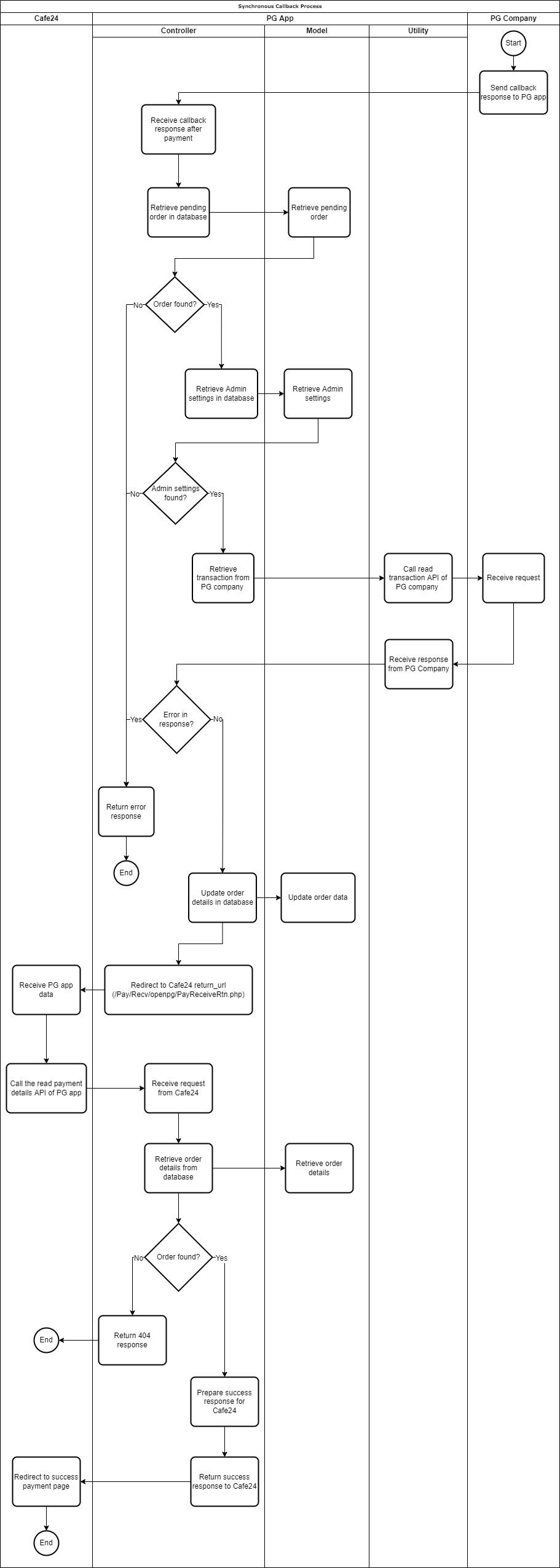
The PG Company will call the PG app's callback URL you provided.
-
The PG app will then verify and process the callback data and will send the payment updates to Cafe24 by redirecting to the return URL (
return_url) provided by Cafe24 in the payment request earlier.
-
Cafe24 verifies and processes the payment by calling the PG app's read payment details API endpoint you provided in the Apps setting.

-
Cafe24 will then redirect the user to the EC mall's payment result page.
📚 Cafe24 Payment Process (Synchronous), Cafe24 Payment Results (Synchronous)
Click to see the synchronous callback flow chart
Sample Code: https://github.com/cafe24github/cafe24_app_pg_sample/tree/master/app/Http/Controllers/SynchronousCheckout
📝 Refer to the PG Company's documents on how to provide your callback and webhook endpoint to their system.
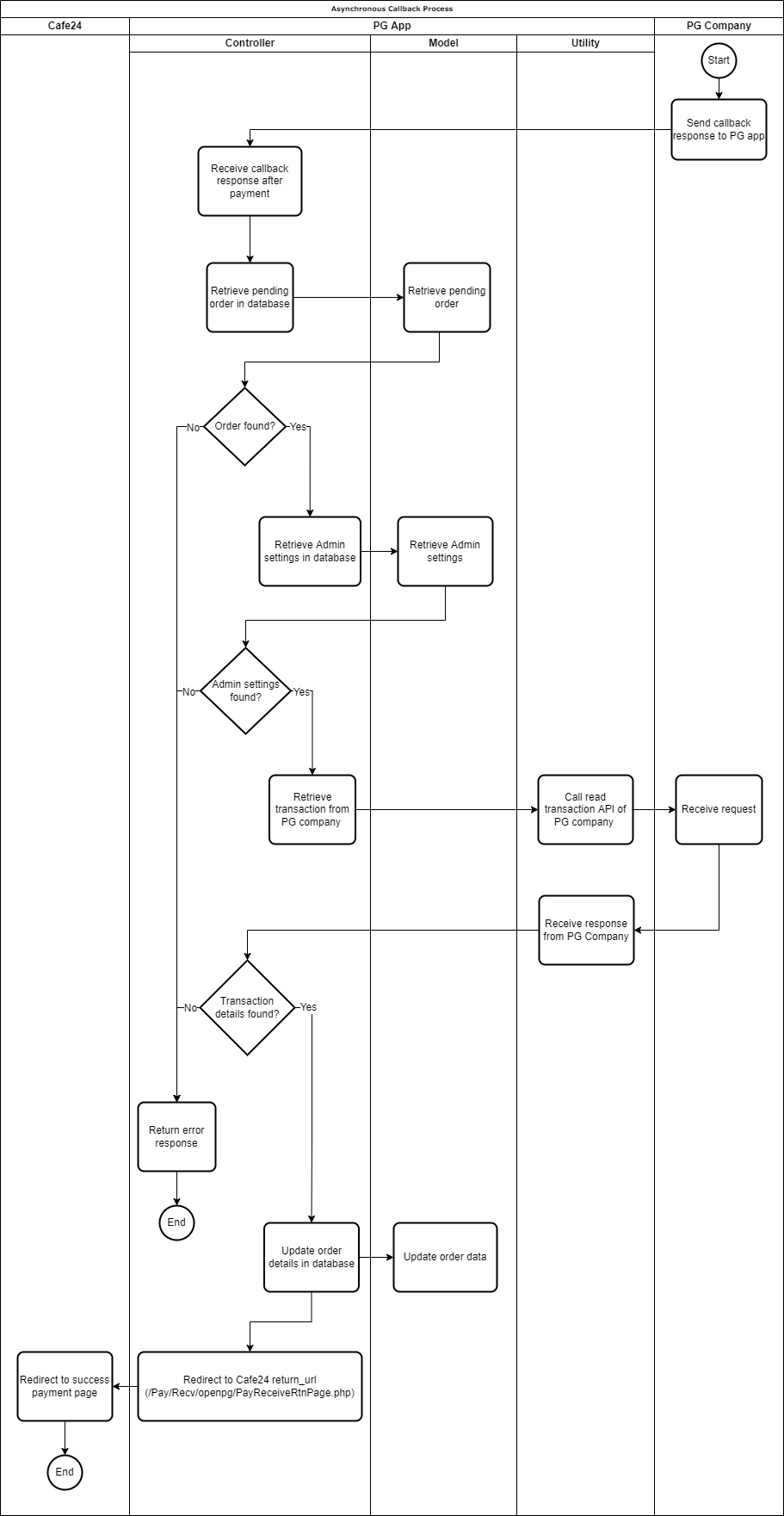
The process for the asynchronous checkout request is the same as the synchronous checkout. The difference is with the process in the callback after the payment confirmation. Refer to the A.1. Checkout Request flow.
- The PG Company will call the PG app's callback URL you provided.
- After verifying the callback data, the PG app will redirect to the return URL (
return_url) provided by Cafe24 in the payment request earlier.
📚 Cafe24 Payment Process (Asynchronous), Cafe24 Payment Results (Asynchronous)
Click to see the asynchronous callback flow chart
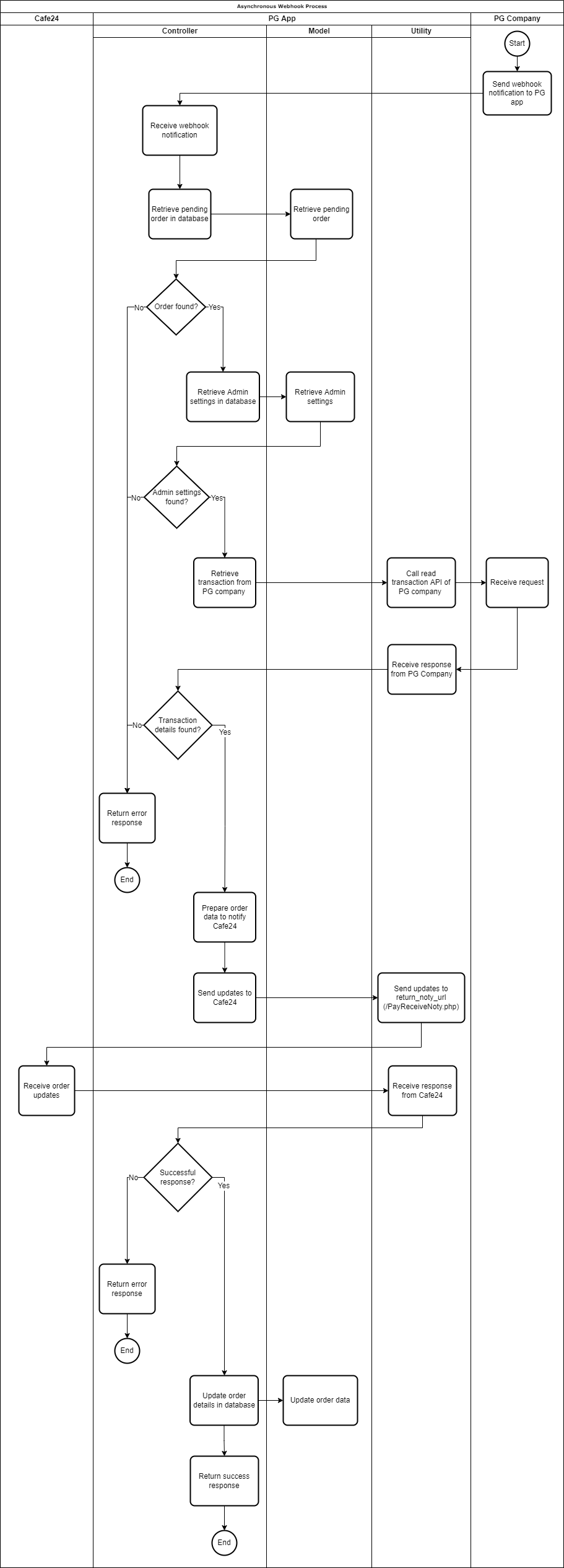
- The PG Company will send a payment notification to the PG app using the webhook endpoint you provided.
- After verifying and processing the webhook data, the PG app will send the payment updates to Cafe24 using the
return_noty_urlendpoint.
If your webhook handler did not respond with a successful status, the PG Company might attempt to send a request to the PG app's webhook.
Click to see the asynchronous webhook flow chart
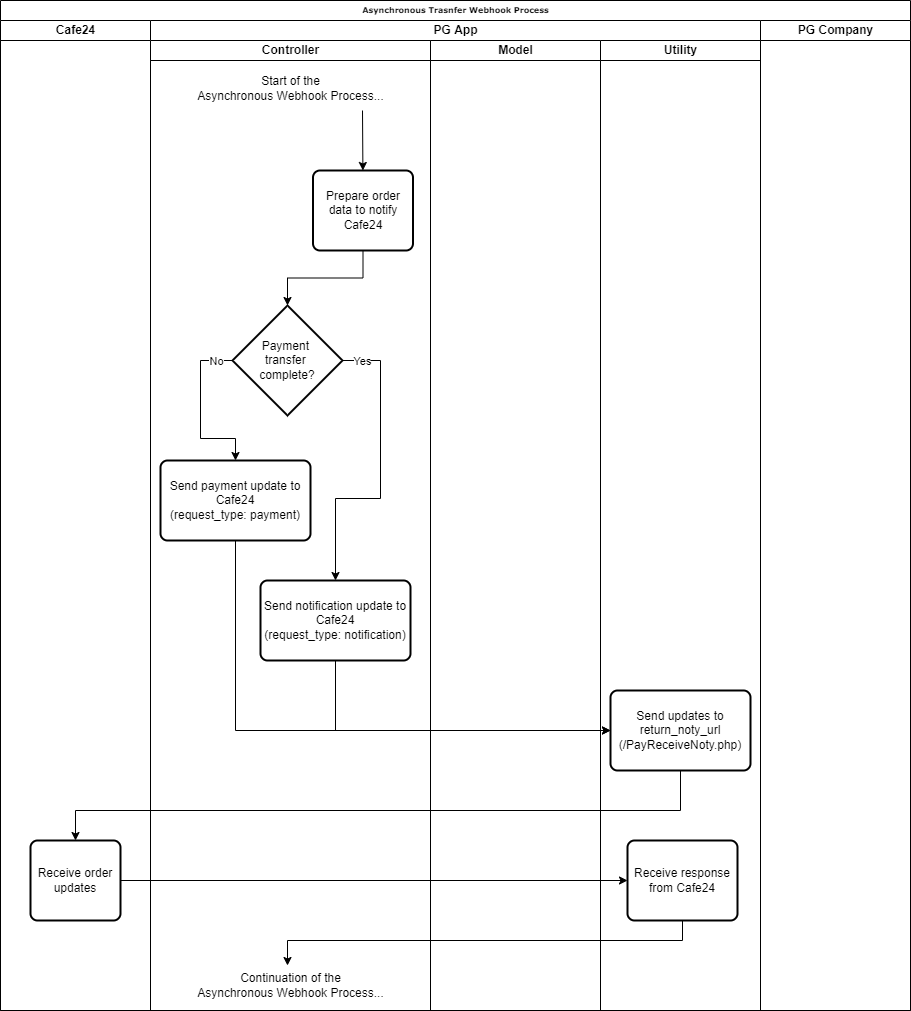
If the PG Company uses a non-instant payment and requires an additional webhook notification to the PG app for the payment transfer, you will also send those updates to the return_noty_url. The webhook process flow is almost the same as the process above, the difference is an additional condition to check what values request_type and payed_tf will contain.
| Condition | request_type | payed_tf |
|---|---|---|
| For the initial webhook where the payment is still pending or the payment is not yet transferred from the user into the PG company | payment | F |
| For the succeeding webhook where the payment is complete or the payment has been transferred into the PG company | notification | T |
📚 Cafe24 Payment Transfer Result Notification (Payment Transfer Webhook)
Click to see the asynchronous webhook transfer flow chart
Sample Code: https://github.com/cafe24github/cafe24_app_pg_sample/tree/master/app/Http/Controllers/AsynchronousCheckout
📝 Refer to the PG Company's documents on how to provide your callback endpoint to their system.
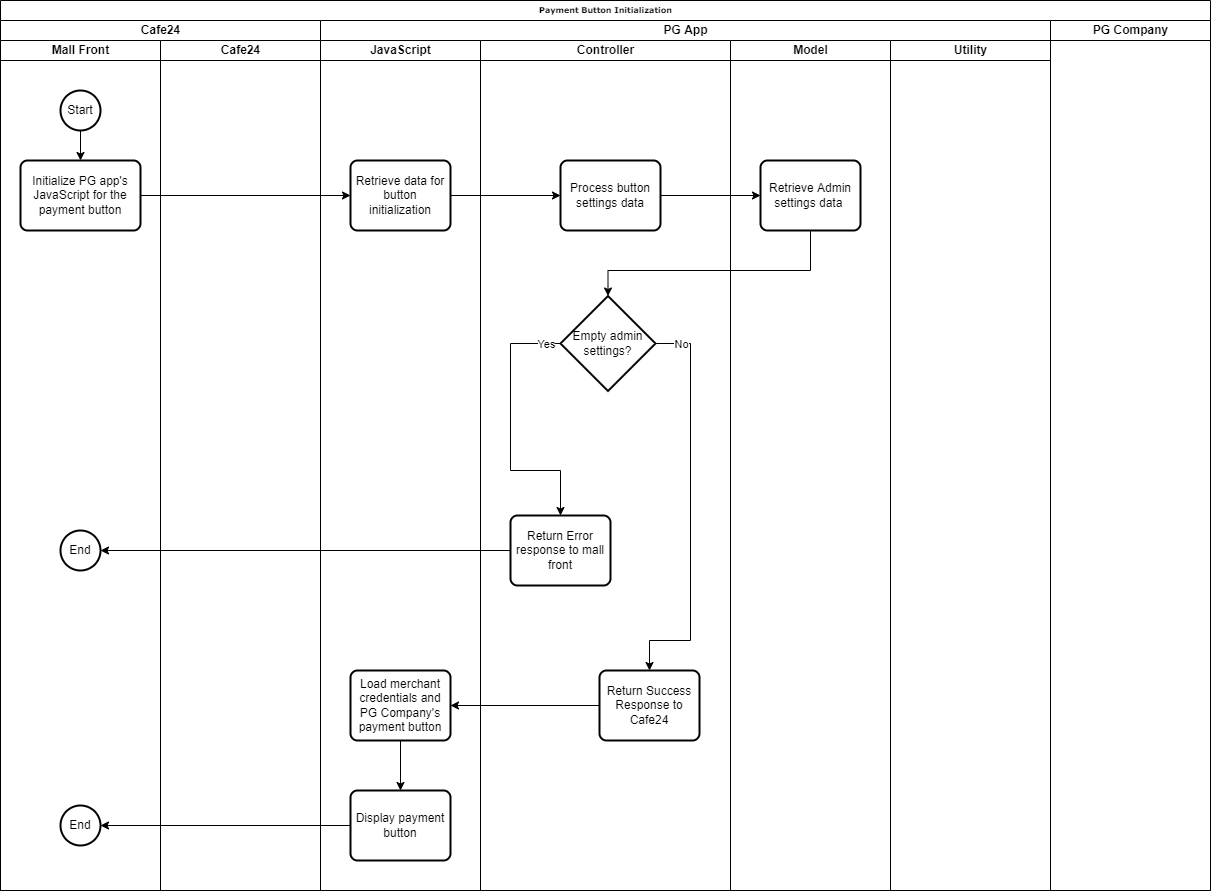
- The Cafe24 Mall Front will load the JavaScript file that was installed to the mall using the Cafe24 Scripttag API.
- The PG app will prepare the necessary data and display the payment button on the Cafe24 Mall Front.
Click to see the payment button initialization flow chart
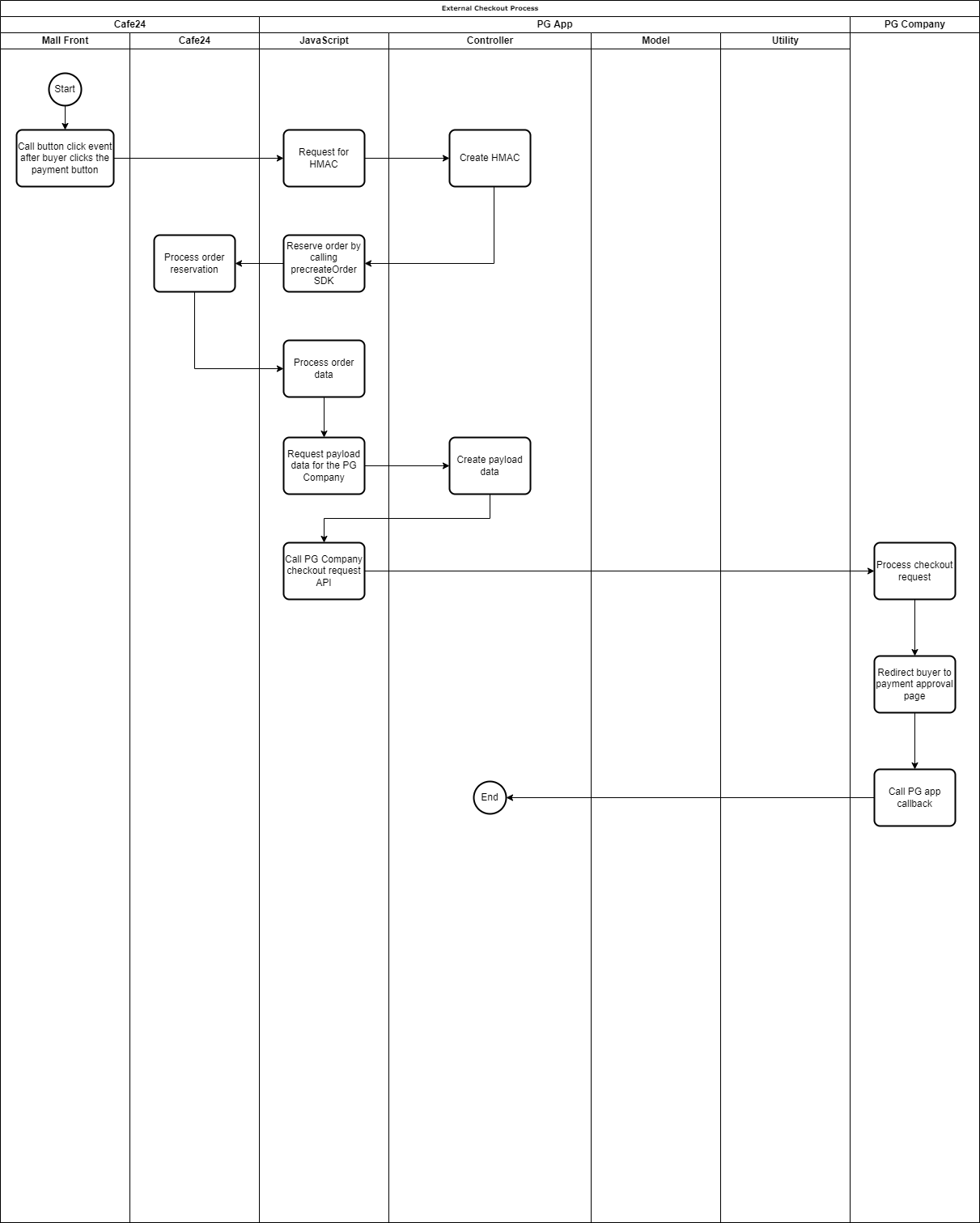
- The Cafe24 Mall Front will call the payment button's function.
- The PG app's JavaScript will reserve the order using the precreateOrder API of Cafe24.
- The reserved order will then be passed to the PG Company's payment API depending on their specifications.
- Depending on the PG Company, they will either redirect the user to their payment page or return additional data to the PG app to process the payment confirmation. For the latter part, the PG app will need to host its own payment page.
- After the user confirms or denies the payment, the PG Company will redirect them to the external checkout callback endpoint.
📚 Cafe24 JavaScript SDK, Cafe24 Payment Process (External) , Cafe24 Order Reservation (External Payment)
Click to see the external checkout request flow chart
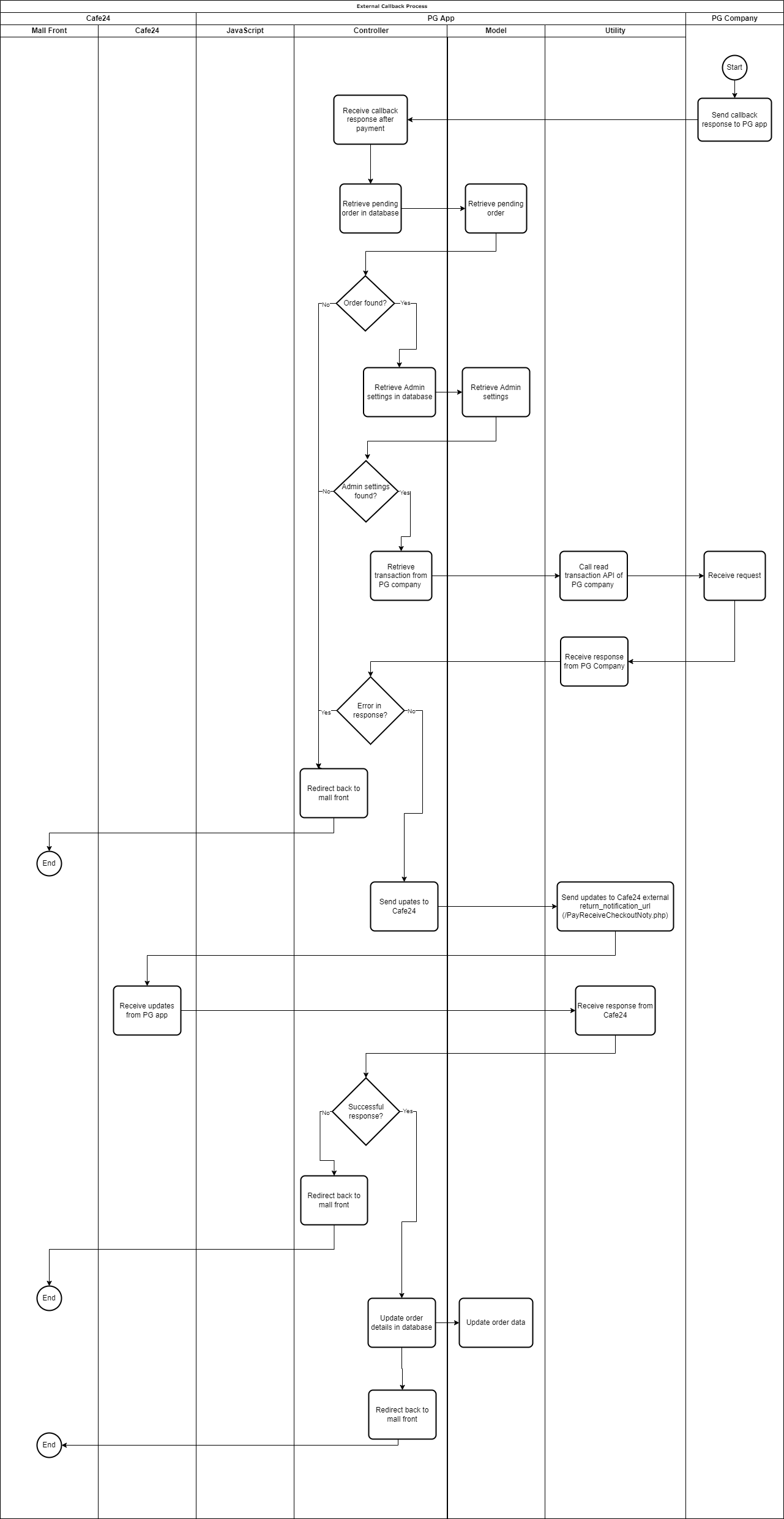
- Whether the process is synchronous or asynchronous, the PG Company will call the PG app's external callback endpoint to send the payment status.
- The PG app will pass the results back to Cafe24 through the return notification URL (return_notification_url) and redirect the buyer back to the EC mall.

Click to see the external checkout callback process flow
Sample Code: https://github.com/cafe24github/cafe24_app_pg_sample/tree/master/app/Http/Controllers/ExternalCheckout
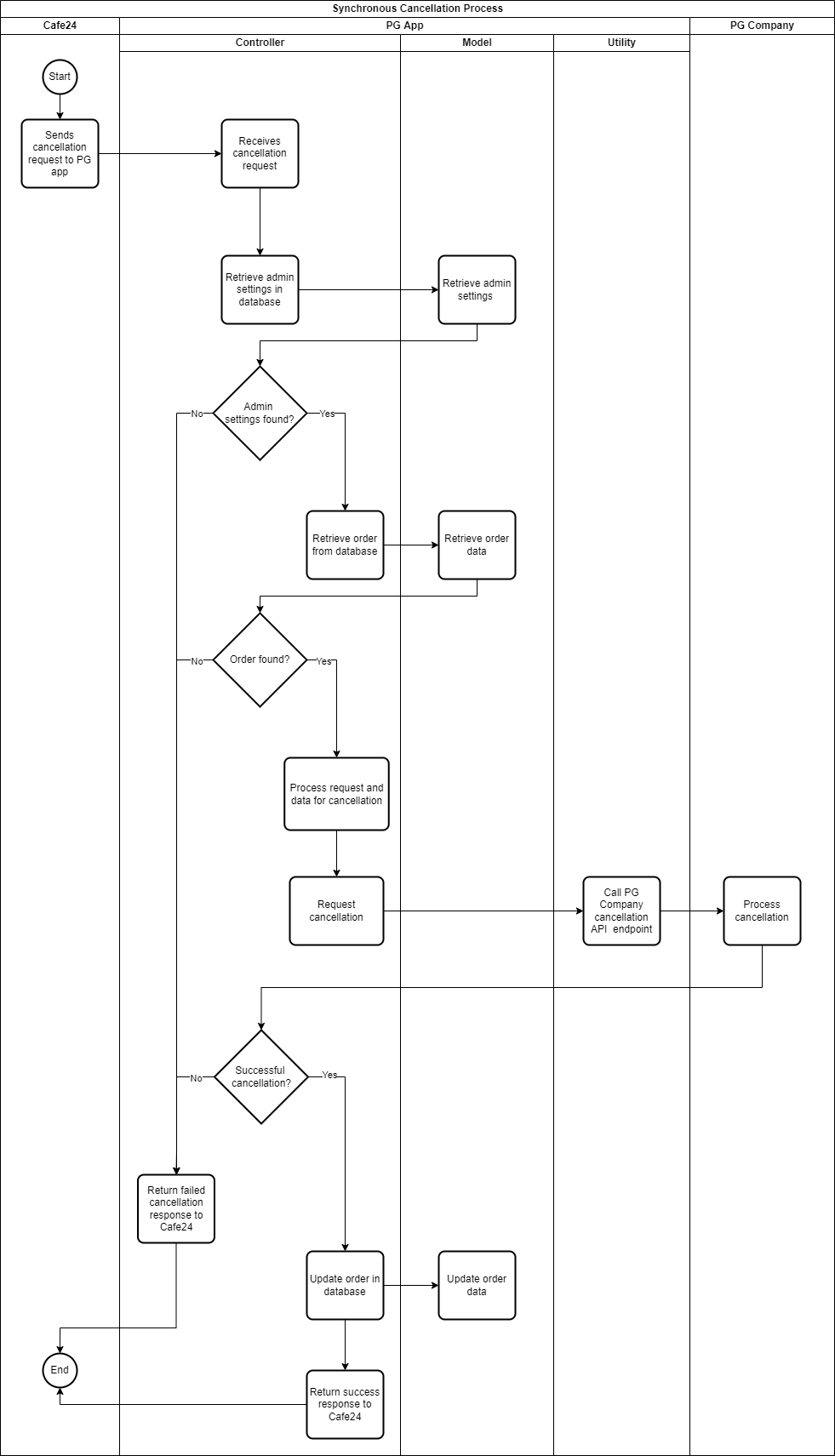
- Cafe24 will call the cancellation request API endpoint you set in the Apps setting.
- The PG app verifies and processes the order data and sends the cancellation request to the PG Company.
- After they process the request, the PG app will send the results back to Cafe24.
📚 Cafe24 Payment Cancellation Process (Synchronous), Cafe24 Cancellation Request
Click to see the synchronous cancellation flow chart
Sample Code: https://github.com/cafe24github/cafe24_app_pg_sample/tree/master/app/Http/Controllers/SynchronousRefund
📝 Refer to the PG Company's documents on how to provide your cancellation webhook endpoint to their system.
-
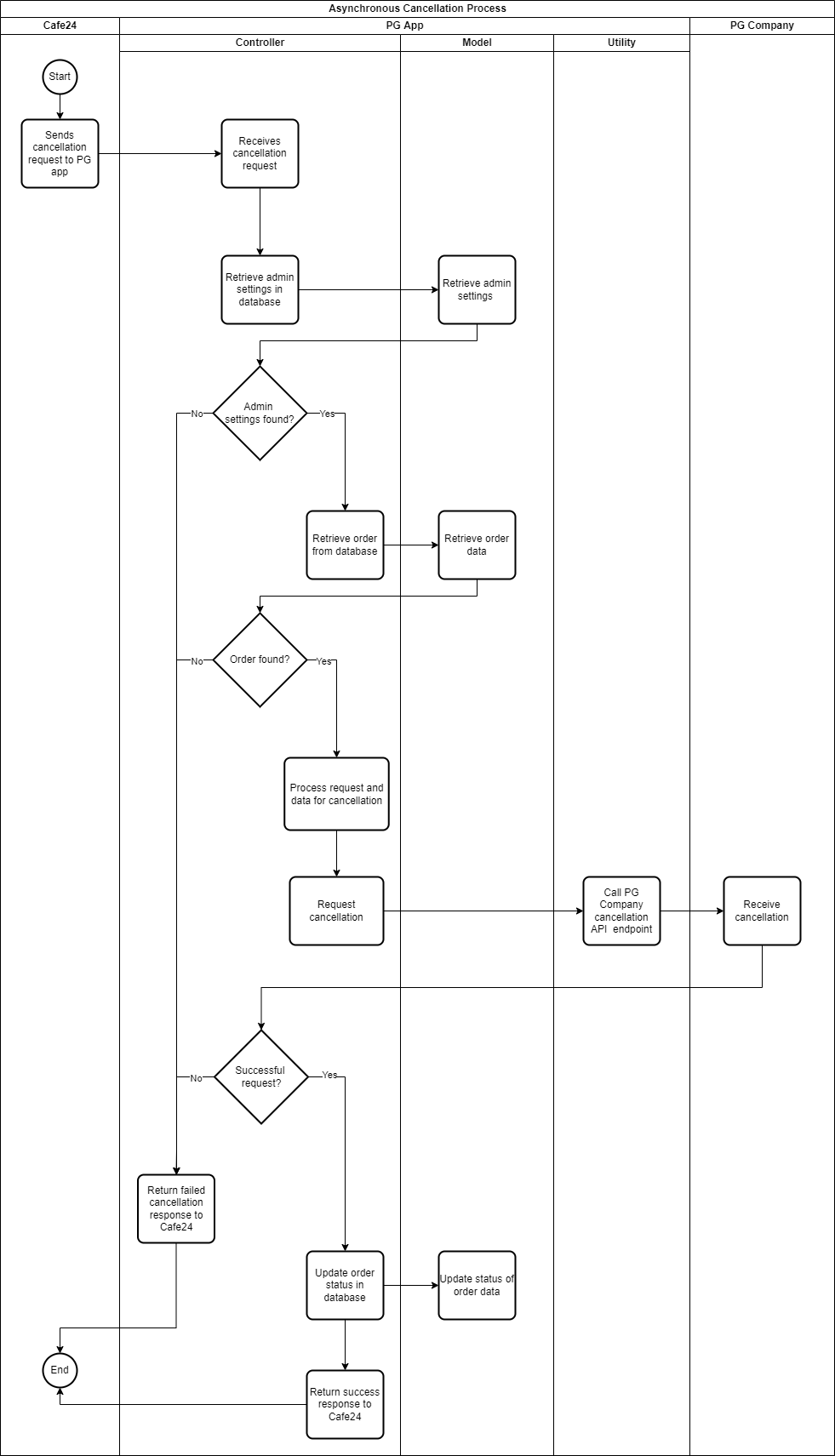
Cafe24 will call the cancellation request API endpoint you set in the Apps setting.

-
The PG app verifies and processes the order data and sends the cancellation request to the PG Company.
-
The PG app will then send the request results back to Cafe24. The PG app will then wait for the cancellation notification of the PG Company through the app's webhook endpoint.
📚 Cafe24 Payment Cancellation Process (Asynchronous), Cafe24 Cancellation Request
Click to see the asynchronous cancellation request flowchart
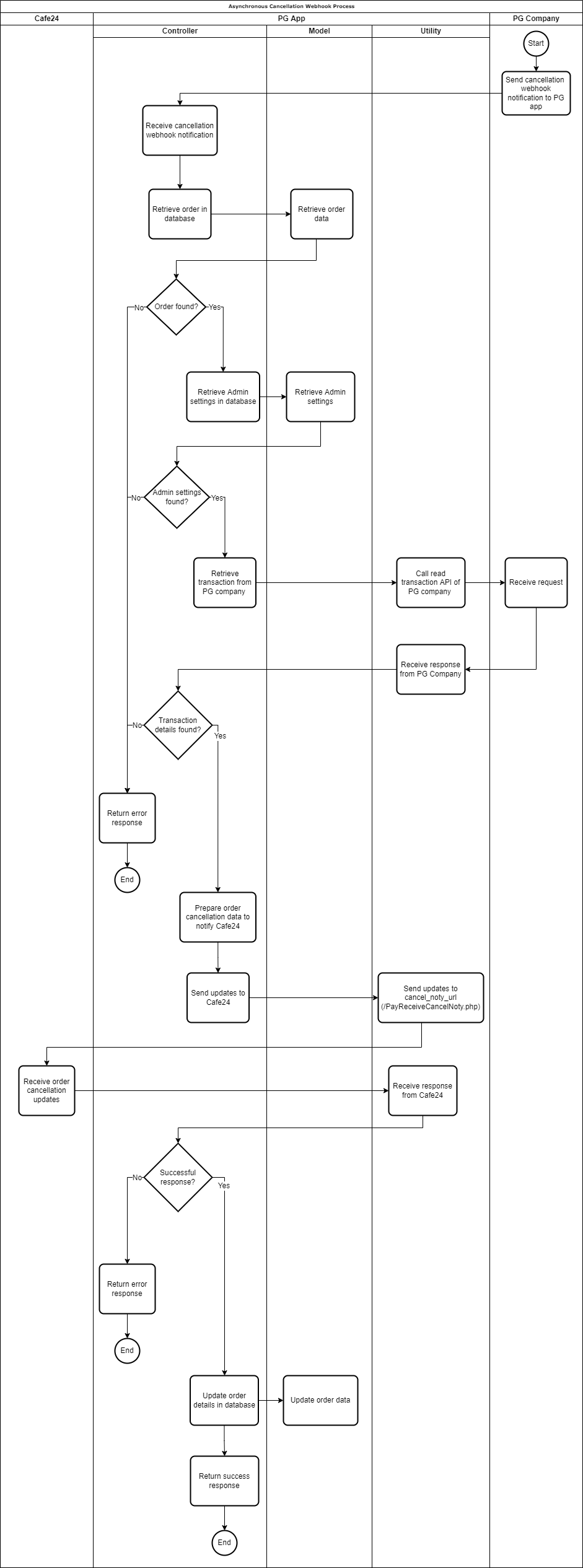
- The PG Company will send a cancellation notification into the PG app using the webhook endpoint you provided.
- After verifying and processing the webhook data, the app will send the payment updates to Cafe24 using the
cancel_noty_urlendpoint.
If your webhook handler did not respond with a successful status, the PG Company might attempt to send a request to the PG app's webhook.
📚 Cafe24 Payment Cancellation Completion Notice (Asynchronous Webhook)
Click to see the asynchronous cancellation webhook flowchart
Sample Code: https://github.com/cafe24github/cafe24_app_pg_sample/tree/master/app/Http/Controllers/AsynchronousRefund