How to host a server - buu342/ACS-DoomWare GitHub Wiki
Wow buu, there's a lot of text here that I don't feel like reading. Can I just get the TSPG settings or something?
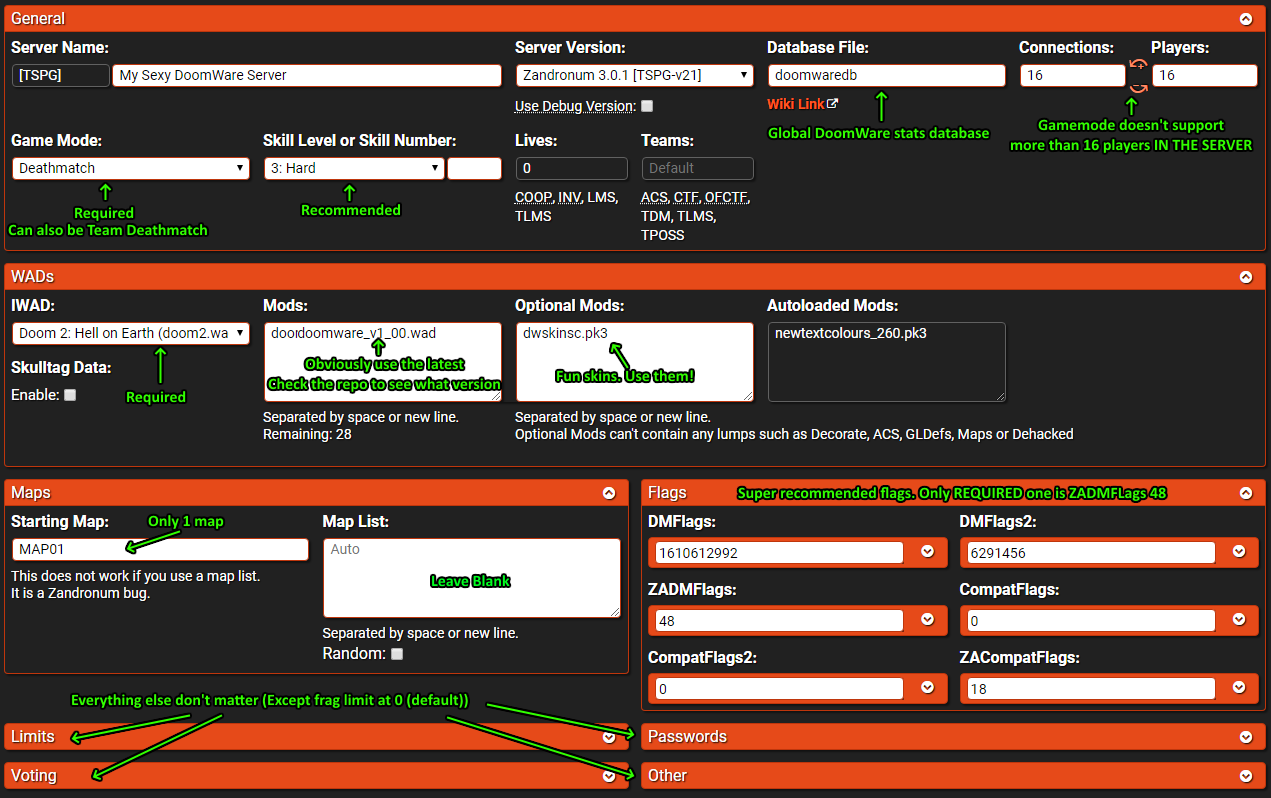
DoomWare runs on Zandronum. This page will not show you how to actually make a Zandronum server, but rather just tell you what you need to get DoomWare running.
DoomWare is self contained. The latest public release of DoomWare is available here in the repository and in the releases page, where you can also find older versions. An optional PK3 with a collection of curated player skins to use in servers is also provided.
While DoomWare is a custom game mode, it relies on the server running Deathmatch or Team Deathmatch to function properly. It is recommended that the skill level be set to Ultra Violence (usually skill number 3). The game runs entirely in MAP01, with a special event happening in MAP30.
Other important server settings:
- Player collisions disabled (
SV_UnblockPlayers true) to prevent telefragging. - Jumping enabled (
SV_NoJump false) due to minigame requirements. - Shared keys disabled (
SV_ShareKeys false) due to minigame requirements. - Rocket jumping enabled (
SV_NoRocketJumping false) due to minigame requirements. - Degeneration disabled (
SV_Degeneration false) due to minigame requirements. - Monsters enabled (
SV_NoMonsters false) due to minigame requirements. - Force respawn enabled (
SV_ForceRespawn true) to prevent issues with some minigames. - Force respawn after 1 second (
sv_forcerespawntime 1) ifSV_ForceRespawnisn't working for some reason. - Same spot respawning disabled (
SV_SameSpawnSpot false) to prevent issues with some minigames. - Crouching disabled (
SV_NoCrouch true) to prevent exploits. - Disable same level (
SV_SameLevel false) to allow for the special MAP30 event to happen. - Send full button info (
Compat_ClientsSendFullButtonInfo 1) to fix visuals on some minigames - Optinally, I'd recommend enabling chasecam (
sv_chasecam true), as it can be helpful for some minigames.
My preferred settings are:
dmflags 1610612992dmflags2 6291456zadmflags 48-
zacompatflags 2
DoomWare supports databases for player stats and achievement tracking. If manually configuring a server, simply add authhostname auth.zandronum.com:16666 and databasefile DATABASEFILENAMEHERE to your config to enable databases (where DATABASEFILENAMEHERE is whatever you want, it'll create the file automatically if it doesn't exist). If using an automatic server host, they might just have a database input box, and all you probably need to do is fill that in with a name (please consult with your host). As for the file name, I typically use the name doomwaredb for my database file. More information on DoomWare's stat tracking available here.
DoomWare comes with a bunch of server customization settings. Check the Serverside CVars page for more info.