how to import and use custom engines - boogiehasfun/engine-sim GitHub Wiki
If you prefer video tutorials than watch this video (I recommend this to people with next to no knowledge of Github or computers)
Step one: Set-up
If you want the latest release click here
-
Download engine-sim 0.1.3a (up-to-date)
-
Join the discord server.
Optional: Visual Studio Code (Mainly for devs)
warning: using newer engine-sim releases may result in this wiki page being outdated
Step 1.1: Get the software ready
Un-zip the "build_1_3a.zip" file to a known location on your computer like the downloads folder or your desktop.
Step two: Downloading an engine
On the discord server you'll find a channel named "engine-sharing", go through the list of engines and find one you like.
For example I'll be using "Audi 2.2 liter inline 5 turbo" by Jckf.
Engine files look like this: engine.mr
Once you have downloaded the file its best to find the node name, though most of the time people name the node name after the file name. To find the the node name you first open the file in the text editor or with Visual Studio Code, then scroll down until you see something similar to this:
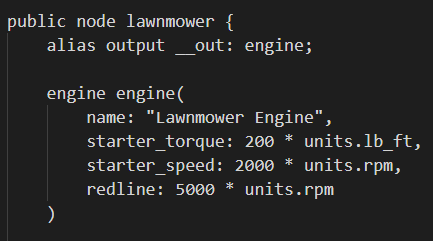
The text after public node is the node name, keep this in mind because we will use this later on.
Exit out of the engine file and head over to your game directory / folder (aka. the folder location of engine-sim) and follow the path build_1_3a\build_1_3a\assets\part-library\engines
Drag n' drop the engine file into the engines folder
Step 3: Importing engine and loading engine in-game
Now we import, go to build_1_3a\build_1_3a\assets\part-library\engines again and you'll see this

Open the file engines.mr in your text editor or Visual Studio Code and you'll see one of these two pictures:
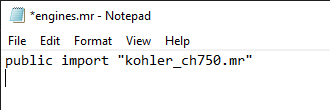
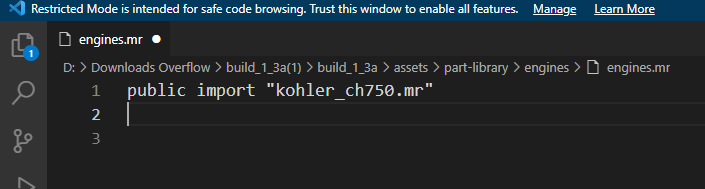
In a new line add public import "engine.mr" but change 'engine' to the file name of your engine, so for example the engine I'm importing, the "Audi 2.2 liter inline 5 turbo", but the file name is "vems.mr" so I'd replace "engine.mr" to "vems.mr". So now your engines.mr file should look similar to mine
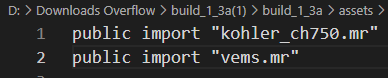
Step 4: Almost done! Just one more step to-go.
Remember the node name of you engine? If you don't remember go back and check, but if you do your going to use that now. From file explorer go back to the assets folder and scroll down until you see test.mr or click on a random file (don't open the random file) and on your keyboard press T until it selects test.mr, then open test.mr, if you see
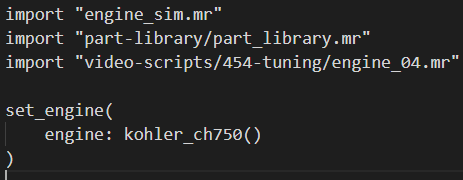
then you clicked on the right one, now you use the node name, I'm gonna use vems as my node name. Select kohler_ch750 and delete it, then type in the same area as kohler_ch750 put your engines node name there, it should now look similar to this
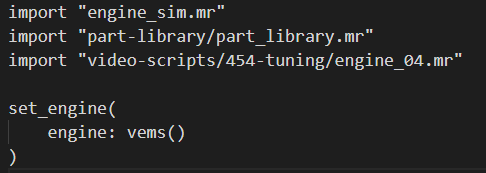 Now save either by going to the top left and clicking File then clicking Save.
Test
Now we test to see if it works, if it worked you should enter the game with a different engine other than the default kohler_ch750 (build 0.1.3a only, once new builds are released the default engine will be Audi 2.2 liter inline 5 turbo aka. vems) If it doesn't work and crashes under the engine-sim-app.exe there is a error_log.log file, open that file and copy the contents in the error log and go to the discord server and go to #engine-sim-support and ask for help, make sure to include the contents of the log file in the message.
If you find an error with this wiki please submit an issue or pull-request addressing the issue and how to fix it.
Credits
- Ange for making engine-sim
- The engine-sim community
- And you for reading this.