ThingWorx - auto-mate/CheatSheetWiki GitHub Wiki
Intro
API
Considerations and Issues
Mashups
Service Creation
SQL Server
An IOT System that uses:
Similar Services are grouped to make a Thing Shape ( TS )
Multiple Thing Shapes are used to make a Thing Template ( TT ).
A Thing Template is used to make an instance or "Thing" ( T )
User Interfaces are created in mashups ( MU ). NB Data from a service in a MU my not be visible unless the data is described in a Datashape ( DS )
A Thing inherits services from the Thing Template TT and its TS's Connection info and other constants etc can be held down the chain in a config table.
Things can offer services as an API.
Coding is done in javascript.
Menu Browse/Subsystem/PlatformSubsystem then goto Configuration.
- Ensure Filter Content Type is unchecked and Add Visibility Permission to Everyone
- With + button create a new APIKey and specify Twx user and expiry date.
- In the Thing Add Visibility Permission to Everyone and RunTime Permission to the user in the APIKey
Sample Powershell script to get data from service API (note header).
$postData = @{PostName1="Data1";PostName2="Data2"}
$header   = @{appKey="<KEY>"}

$x = Invoke-WebRequest -Uri "https://....../Thingworx/Things/<ThingName>/Services/<ServiceName>" `
    -Body $postData   `
    -Headers $header `
    -Method Post
NB Use a datashape else fields wont be accessible in any Mashups.
JDBC Driver Class Name     = com.microsoft.sqlserver.jdbc.SQLServerDriver
JDBC Connection String     = jdbc:sqlserver://<IP>:1433;databaseName=<dbname>;applicationName=Thingworx;
connectionValidationString = SELECT CURRENT_TIMESTAMP
Use + to add a TS if not already created.
In the TS select services / Add / Local (javascript) -- Add a service Name
Add Any Input Parameters and the Parameter Type in the "Inputs" Section
Select The Output Data type
In the editor create the function as:
(function() {
    <Your Code Here>
    result = <whatever you want the function to return>;
})();
wrap your code with
try {

} catch(err) {

}
Hello World. Input named p1 type string, Output Type string, p1 input as "Hello". Returns Hello World string.
NB In "inputs" the little arrow to the right can be clicked to add the parameter to the code at the current cursor position.
(function() { result = p1 + " World"; })();
Snippets
Over 500 snippets are available for use in the snippets area. Expand to use. Includes
- if
- try catch
- logging
- infotable
- dates
- encryption
- contentloader functions
e.g.
getJSON - read from Json Webpage
PostJSON - send to Webpage
Me/Entities
This allows use of services etc from the current TS/TT we are in ( me ) and other "Entities"
e.g. Selecting a service called myService that returns JSON in the current TS/TT that requires a parameter P1 as Text will add the code as below.
// result: JSON
let result = me.myService({
	P1: undefined /* TEXT */
});
For "Entities" select entity from list e.g. a database entry that returns an infotable.
NB as here our final "result" is an infotable set output type to match.
(function() {
    ///// below added
    ///// NB let removed to get it to work!
    // result: INFOTABLE dataShape: ""
	result = Things["<SomeDatabaseThing>"].<SomeService>();
    ///// above added
})();
Use + to add an MU if not already created.
Name and Save.
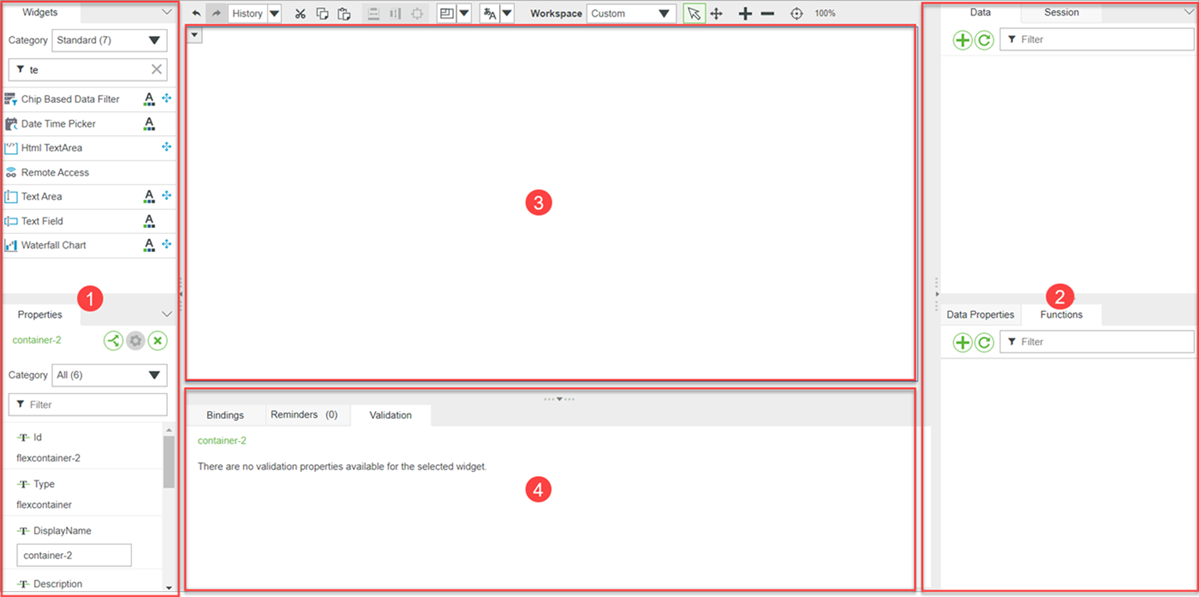
- Layout Tab, Split the window into different sections e.g. header/footer/main data section/leftpanel/rightpanel etc. and sets size/alignment with the section.
- Widget Tab, Drag/Drop widgets to designer
- Explorer, Tree of objects in the mashup
- Mashups, List of mashups that can be used
-
Properties, change name, drag bindings for actions etc. e.g. grid row select event, date picker formats etc.
Clicking on the bindings icon allows many binding options.
If displayed clicking on the gear icon may allow additional settings e.g. renaming columns in a grid ( NB they must be described in a DS) - Style, Apply Css styles to selected object. NB you can save a theme and use this in this section.
- Displays and allows changes to bindings to see data flow and event linkages.
-
Data
Use + to add a service from a thing.
A service may have when expanded some parameters and a returned data section that can be bound to objects in the MU.
e.g. Text Box For Input Param and grid for output. It can be fired by say a button click event or on load or many other events.
NB an infotable will only show its fields in the "returned data" section if described by a DS.
Additional Services can be added by + for a different Thing or the </> icon to add a service from the existing thing. - Session, contains information that can be dragged to a widget.
- User, contains information that can be dragged to a widget.
- Data Properties
- Functions
Don't wrap code in (function(){})();
Ensure to connect int to int string to string etc.
Ensure to include an event to fire your required Expression/Decision.
- Decision - Use Validator, fires true event or false event, add any params as required. Output always one of the 2 events.
- Expression - operation performed on any parameters. Ensure "result="
let can be problematic - some snippets only seem to work when is deleted.
nulls may be caught in try catch so use try catch!