Raven Colonial How ‐ To - aussig/BGS-Tally GitHub Wiki
Raven Colonial and BGS-Tally How-To
Introduction
The BGS-Tally plugin supports bi-directional synchronisation of both system and project data with Raven Colonial ("RC"). This how to guide explains the features and process of synchronisation.
The two systems were developed independently and so use slightly different terminology.
| Raven Colonial | BGS-Tally |
|---|---|
| System | Plan |
| Site | Build |
| Project | Progress |
Linking
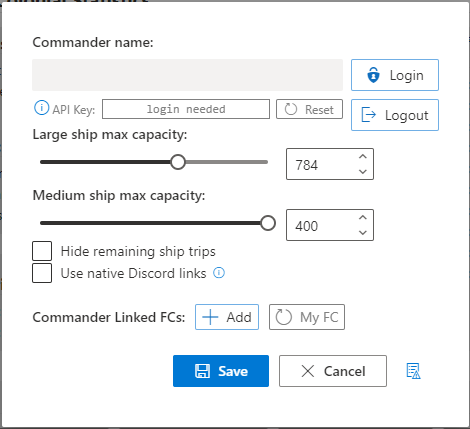
The first step is to connect BGS-Tally to Raven Colonial. BGS-Tally supports RC's API Key authentication. To set this up:
- Go to RC, login, and connect your Frontier account.
- Copy the API Key
- Go to BGS-Tally configuration and paste the API Key into the Raven Colonial API Key field.

Plans
Creation
When creating a plan in BGS-Tally you can choose whether or not to synchronise it with RC. If you choose to sync and the system already exists in RC it will be imported into BGS-Tally. If it doesn't exist it will be created in RC.
You can choose to enable or disable synchronisation at any time with the "Edit system plan" button however it's not recommended to keep switching it on and off as this may lead to the two systems getting confused.
Notes
- Though plans in BGS-Tally can be hypothetical and have no system name, in order for the system plan to successfully synchronise with RC you must give it a valid system name.
- RC doesn't have a plan name so this is not synced.
- RC has an owner for every system. If you are not the owner of a system in RC BGS-Tally will make it readonly. The plan can be edited locally by turning off synchronisation.
Modification
You may make changes to the plan in BGS-Tally or RC however it's not recommended to make changes simultaneously in both due to the differences in how the two systems update. See Synchronisation
When you make a change in BGS-Tally it is passed to RC immediately but to see it you may need to use "Load" to refresh the system display in RC. When you make a change in RC it isn't saved until you press "Save" and won't subsequently be retrieved by BGS-Tally until you use "Refresh".
Note:: RC requires a site to have a layout, name, and body. Therefore new builds will not be sent to RC until those fields have been filled in.
Deletion
Deleting a base in BGS-Tally will remove it in RC and vice versa. Systems cannot be deleted in RC so deleting a plan in BGS-Tally will not remove it from there.
Projects
Initiation
Though you can mark a build as in progress at anytime it really only becomes active when you visit the colonisation site and make a delivery of goods. At this time BGS-Tally will create a project in RC, send the commodity requirements, and start recording your contributions as you make them.
Progress
Every contribution is sent to RC and you can see your progress there in (close to) real time. Changes made to your fleetcarrier's cargo are sent to RC.
Completion
When you make the final contribution or when you visit the site after completion the build will be marked as completed. BGS-Tally will not mark the project as completed in RC as this is irreversible.
This process can be somewhat challenging as a site's internal market identifier may change upon completion. This makes it hard to definitively determine that a site in the game is the result of completing a project (see Challenges/Limitations. Hopefully in future the CAPI market endpoint will make this easier.
If a duplicate is created the best solution is to use the RC delete duplicates option. Visiting the build, either by docking or just dropping out of supercruise if it doesn't have landing pads, can also help.
Synchronisation
The BGS-Tally and RC have slightly different approaches to recording and displaying changes.
- RC only updates the plan when you press load or save though the build page refreshes automatically.
- BGS-Tally updates both the plan and progress as changes are made.
Since BGS-Tally is a client-side application all synchronisation is initiated by BGS-Tally and all data is passed between the two systems by BGS-Tally either pulling or pushing it.
The following actions initiate synchronisation events
-
Startup – BGS-Tally reads all the active, synced systems and projects from RC upon startup.
-
Build creation – once a build has a layout, name, and body it will be created in RC
-
Build change – any changes to a build are immediately sent to RC.
-
Build deletion – upon deletion a build will be deleted from RC.
-
Starting the game –
-
Delivery to colonisation site – if a project doesn't exist one will be created, and contributions will be sent to RC
-
Carrier cargo changes – market and transfer activity with your carrier will send that data to RC.
-
Refresh – pressing the refresh button will read the system from RC. There is a cooldown on this, currently 30 seconds.
Tips and Tricks
Due to limitations of the details Frontier records in the journal log it can sometimes be a challenge to match up a site (colonisation ship, colonisation site, or completed build) in the journal with the one in the plan. This can result in duplication of entries.
The problem can be minimized by changing the name of a build in BGS-Tally if it changes in the system as this helps BGS-Tally to match the journal data with the right build.
When landing at a construction site for the first time BGS-Tally will not create a project in RC until you make your initial commodity contribution.