SocialCalc - audreyt/socialcalc GitHub Wiki
This is a screenshot of SocialCalc in action:

And here is its class diagram:
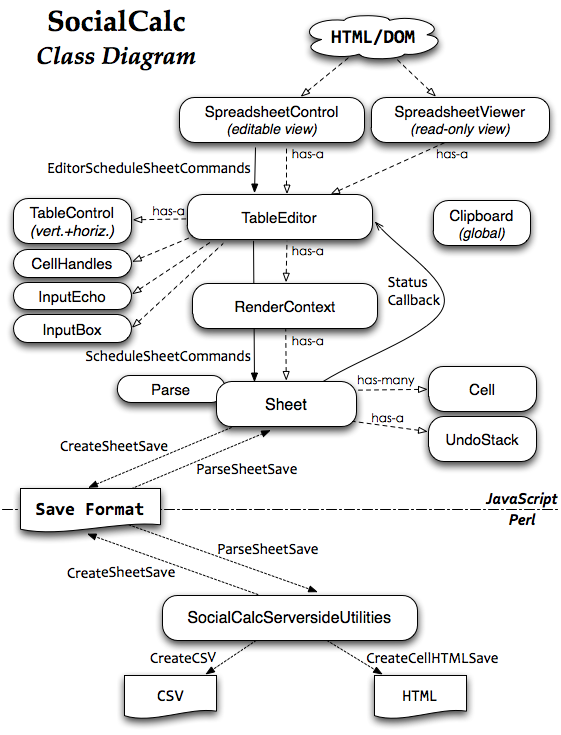
Compared to WikiCalc, the server's role has been greatly reduced. Its only responsibility is responding to HTTP GETs by serving entire spreadsheets serialized in the save format; once the browser receives the data, all calculations, change tracking and user interaction are now implemented in JavaScript.
The JavaScript components were designed with a layered MVC (Model/View/Controller) style, with each class focusing on a single aspect:
-
Sheet is the data model, representing an in-memory structure of a spreadsheet.
It contains a dictionary from coordinates to Cell objects, each representing a single cell. Empty cells need no entries, and hence consume no memory at all.
-
Cell represents a cell's content and formats.
Here are some common properties of a Cell object:
datatype t datavalue 1Q84 color black bgcolor white font italic bold 12pt Ubuntu comment Ichi-Kyu-Hachi-Yon -
RenderContext implements the view; it's responsible for rendering a sheet into corresponding DOM objects.
-
TableControl is the main controller, accepting mouse and keyboard events.
As it receives view events such as scrolling and resizing, it updates its associated RenderContext object.
As it receives update events that affects the sheet's content, it schedules new commands to the sheet's command queue.
-
SpreadSheetControl draws the top-level UI, including toolbars, status bars, dialog boxes and color pickers.
-
SpreadSheetViewer is an alternate top-level UI that provides a read-only interactive view.
We adopted a minimal class-based object system with simple composition/delegation, and make no use of inheritance or object prototypes. All symbols are placed under the SocialCalc.* namespace to avoid naming conflicts.
All updates on the sheet go through the ScheduleSheetCommands method, which takes a command string representing the edit. Here are some common commands:
set     sheet defaultcolor blue
set     A width 100
set     A1 value n 42
set     A2 text t Hello
set     A3 formula A1*2
set     A4 empty
set     A5 bgcolor green
merge   A1:B2
unmerge A1
erase   A2
cut     A3
paste   A4
copy    A5
sort    A1:B9 A up B down
name    define Foo A1:A5
name    desc   Foo Used in formulas like SUM(Foo)
name    delete Foo
startcmdextension UserDefined args
The application embedding SocialCalc may define extra commands on their own, by adding named callbacks into the SocialCalc.SheetCommandInfo.CmdExtensionCallbacks object, and use the startcmdextension command to invoke them.
To improve responsiveness, SocialCalc performs all recalculation and DOM updates in the background, so the user can keep making changes to several cells, while the engine catches up on earlier changes in the command queue.
When a command is running, the TableEditor object sets its busy flag to true; subsequent commands are then pushed into the deferredCommands queue, ensuring a sequential order of execution. The event loop looks like this:

As the diagram above shows, the Sheet object keeps sending StatusCallback events to notify the user of the current state of command execution, through each of the four steps:
-
Execute Command
Sends
cmdstartupon start, andcmdendwhen the command finishes execution.If the command changed a cell's value indirectly, enter the Recalc step.
Otherwise, if the command changed the visual appearance of one or more on-screen cells, enter the Render step.
If neither of the above applies (for example with the
copycommand), skip to the PositionCalculations step. -
Recalc (as needed)
Sends
calcstartupon start,calcorderevery 100ms when checking the dependency chain of cells,calccheckdonewhen the check finishes, andcalcfinishedwhen all affected cells received their re-calculated values.This steps is always followed by the Render step.
-
Render (as needed)
Sends
schedrenderupon start, andrenderdonewhen the<table>DOM object is updated with formatted cells.This steps is always followed by the PositionCalculations step.
-
Position Calculations
Sends
schedposcalcupon start, anddoneposcalcafter updating the scrollbars, the current editable cell cursor, and other visual components of the TableEditor.
Because all commands are saved as they are executed, we naturally gets an audit log of all operations. The Sheet.CreateAuditString method provides a newline-delimited string as the audit trail, with each command in a single line.
ExecuteSheetCommand also creates an undo command for each command it executes. For example, if the cell A1 contains Foo and the user executes set A1 text Bar, then an undo-command set A1 text Foo is pushed to the UndoStack. If the user clicks Undo, then the undo-command is executed to restore A1 to its original value.
Now let's look at the TableEditor layer. It calculates the on-screen coordinates of its RenderContext, and manages horizontal/vertical scroll bars through two TableControl instances.

The view layer, handled by the RenderContext class, also differs from WikiCalc's design. Instead of mapping each cell to a <td> element, we now simply create a fixed-size <table> that fits the browser's visible area, and pre-populate it with <td> elements.
As the user scrolls the spreadsheet through our custom-drawn scroll bars, we dynamically update the innerHTML of the pre-drawn <td> elements. This means we don't need create/destroy any <tr> or <td> elements in many common cases, which greatly sped up response time.
Because RenderContext only renders the visible region, the size of Sheet object can be arbitrarily large without affecting its performance.
TableEditor also contains a CellHandles object, which implements the radial fill/move/slide menu attached to the bottom-right corner to the current editable cell, known as the ECell:

The input box is managed by two classes: InputBox and InputEcho. The former manages the above-the-grid edit row, while the latter shows an updated-as-you-type preview layer, overlaying the ECell's content.

Usually, the SocialCalc engine only needs to communicate to the server when opening a spreadsheet for edit, and when saving it back to server. For this purpose, the Sheet.ParseSheetSave method parses a save format string into a Sheet object, and the Sheet.CreateSheetSave method serializes a Sheet object back into the save format.
Formulas may refer to values from any remote spreadsheet with a URL. The recalc command re-fetchs the externally referenced spreadsheets, parses them again with Sheet.ParseSheetSave, and stores them in a cache so the user can refer to other cells in the same remote spreadsheets without re-fetching its content.
The save format is in standard MIME multipart/mixed format, consisting of four text/plain; charset=UTF-8 parts, each part containing newline-delimited text with colon-delimited data fields. The parts are:
-
The
metapart lists the types of other parts. -
The
sheetpart lists each cell's format and content, each column's width (if not default), the sheet's default format, followed by a list of fonts, colors and borders used in the sheet. -
The optional
editpart saves the TableEditor's edit state, including ECell's last position, as well as fixed size of row/column panes. -
The optional
auditpart contains the history of commands executed in the previous editing session.
For example, here is a spreadsheet with three cells, with 1874 in A1 as the ECell, the formula 2^2*43 in A2, and the formula SUM(Foo) in A3 rendered in bold, referring to the named range Foo over A1:A2:

The serialized save format for the spreadsheet looks like this:
socialcalc:version:1.0
MIME-Version: 1.0
Content-Type: multipart/mixed; boundary=SocialCalcSpreadsheetControlSave
--SocialCalcSpreadsheetControlSave
Content-type: text/plain; charset=UTF-8

# SocialCalc Spreadsheet Control Save
version:1.0
part:sheet
part:edit
part:audit
--SocialCalcSpreadsheetControlSave
Content-type: text/plain; charset=UTF-8

version:1.5
cell:A1:v:1874
cell:A2:vtf:n:172:2^2*43
cell:A3:vtf:n:2046:SUM(Foo):f:1
sheet:c:1:r:3
font:1:normal bold * *
name:FOO::A1\cA2
--SocialCalcSpreadsheetControlSave
Content-type: text/plain; charset=UTF-8

version:1.0
rowpane:0:1:14
colpane:0:1:16
ecell:A1
--SocialCalcSpreadsheetControlSave
Content-type: text/plain; charset=UTF-8

set A1 value n 1874
set A2 formula 2^2*43
name define Foo A1:A2
set A3 formula SUM(Foo)
--SocialCalcSpreadsheetControlSave--
This format is designed to be human-readable, as well as being relatively easy to generate programatically. This makes it possible for the Drupal project's Sheetnode plugin to use PHP to convert between this format and other popular spreadsheet formats, such as Excel (.xls) and OpenDocument (.ods).
Now that we have a good idea about how the pieces in SocialCalc fit together, let's look at two real-world examples of extending SocialCalc.