How to set up multiple instances of StreamSets - anodot/daria GitHub Wiki
If you want to run pipelines on multiple instances of StreamSets you must have a separate machine or a container for each instance. Each machine must have:
- docker;
- docker-compose;
- access to
https://app.anodot.comor a specific subdomain where your account is created; - access to the agent container by a URL;
- a URL for the StreamSets container that is accessible to the agent on port 18630 (you can forward any port to the StreamSets in the container).
When the requirements above are satisfied, follow these steps:
- Login the machine that will run a StreamSets instance.
- Create a docker-compose.yaml file wherever is convenient for you with such contents:
version: '3.1'

services:
  dc:
    image: anodot/streamsets:latest
    restart: on-failure
    container_name: anodot-sdc
    ports:
      - 18630:18630
    environment:
      SDC_JAVA_OPTS: "${SDC_JAVA_OPTS} -Xmx10240m -Xms10240m -server"
      SDC_CONF_RUNNER_THREAD_POOL_SIZE: "2000"
    volumes:
      - sdc-data:/data

volumes:
  sdc-data:
- Run
docker-compose up -dfrom the directory where that file is located. - Add StreamSets instance to the agent:
- in the agent docker container run
agent streamsets add: - enter the URL of the StreamSets container you created
- keep user and pass default values if you didn't change it in StreamSets
- enter the agent URL via which StreamSets can access the agent
Example:
agent streamsets add
Enter streamsets url: http://streamsets-2:18630
Username [admin]:
Password [admin]:
Agent external URL [http://anodot-agent]: http://anodot-agent:8080
StreamSets instance added to the agent
Here's the diagram of how StreamSets, agent and Anodot communicate
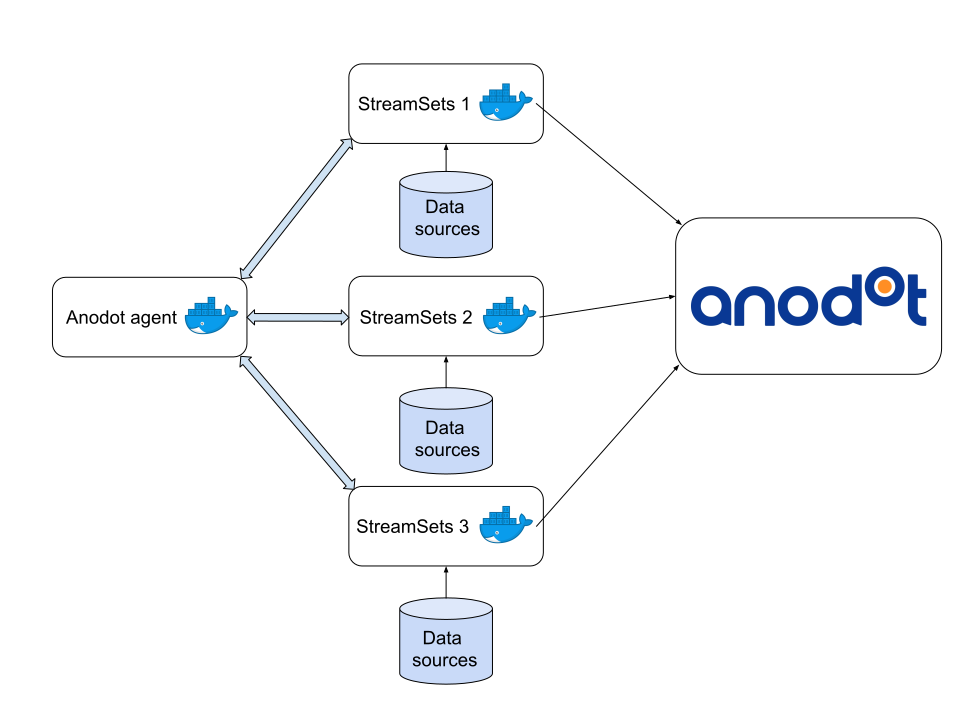
You have to do these steps for every new StreamSets instance.
If you have more than one StreamSets added to the agent, the agent will automatically create new pipelines in different instances so that the load is balanced between them.