Everything it does - andreaderuvo/argus GitHub Wiki
The long list. Home says what Argus is in a paragraph and the pages beside it take one part each; this is the whole catalogue, in the order it was built, kept in one place so that "does it do X" can be answered by searching a single page.
You set an agent going in a tmux session and it runs for two hours. Then one of these happens, and none of them is a thing a terminal is good at:
- It asks you something at twenty to eight, and you are not at the desk.
- It finishes, and what you need next is not the terminal at all — it is the thing it wrote: the log, the table, the figure, the report.
- You want to answer it from the train, without an SSH client, a keyboard that eats a third of the screen, and a terminal that turns to confetti when you rotate the phone.
Argus is a small web app the machine serves and a browser you already have. It attaches to the session that was already running — not a new one — and puts the filesystem in the same room as it: a path printed in the session is clickable, a file the agent writes turns up on its own, and what it wrote is readable in place.
pip install -r requirements.txt
python3 -m app.main --allow-write        # prints a URL with a token in it
Open the URL, or scan the QR code it can print, and the phone is in. That is the whole setup: no build step, no database, no agent to install anywhere, and nothing changes about how you use tmux — kill Argus and every session carries on.
Warning
Early days. It is used daily on the machine it was written for, and it changes most days: expect rough edges, expect settings to move. More importantly, Argus is remote shell access — anyone with the token can run anything you can. Read Security and Reaching it from outside before putting it anywhere but a trusted network.
An editor is built for the hours you spend writing code. More and more of that work is now done by an agent that runs for two hours in a tmux session, and what is left for you is a different job: keeping an eye on it, unblocking it when it asks something, and judging what came out — the log, the table, the figure, the document.
That job needs almost nothing an editor is good at, and one thing it is bad at: being somewhere else. The work carries on when you close the laptop, so the useful question is what you can do from the train. Today the answer is an SSH client on a phone — a keyboard that eats a third of the screen, a terminal that turns to confetti when you rotate it, no way to look at the log and the plot at once, and no answer at all to "is the disk full again?".
Argus is the other way round. The machine serves a small web app; the phone is just a browser. You reattach to the session that was already running — not a new one — read what it printed, answer it, and close the tab. The session never notices.
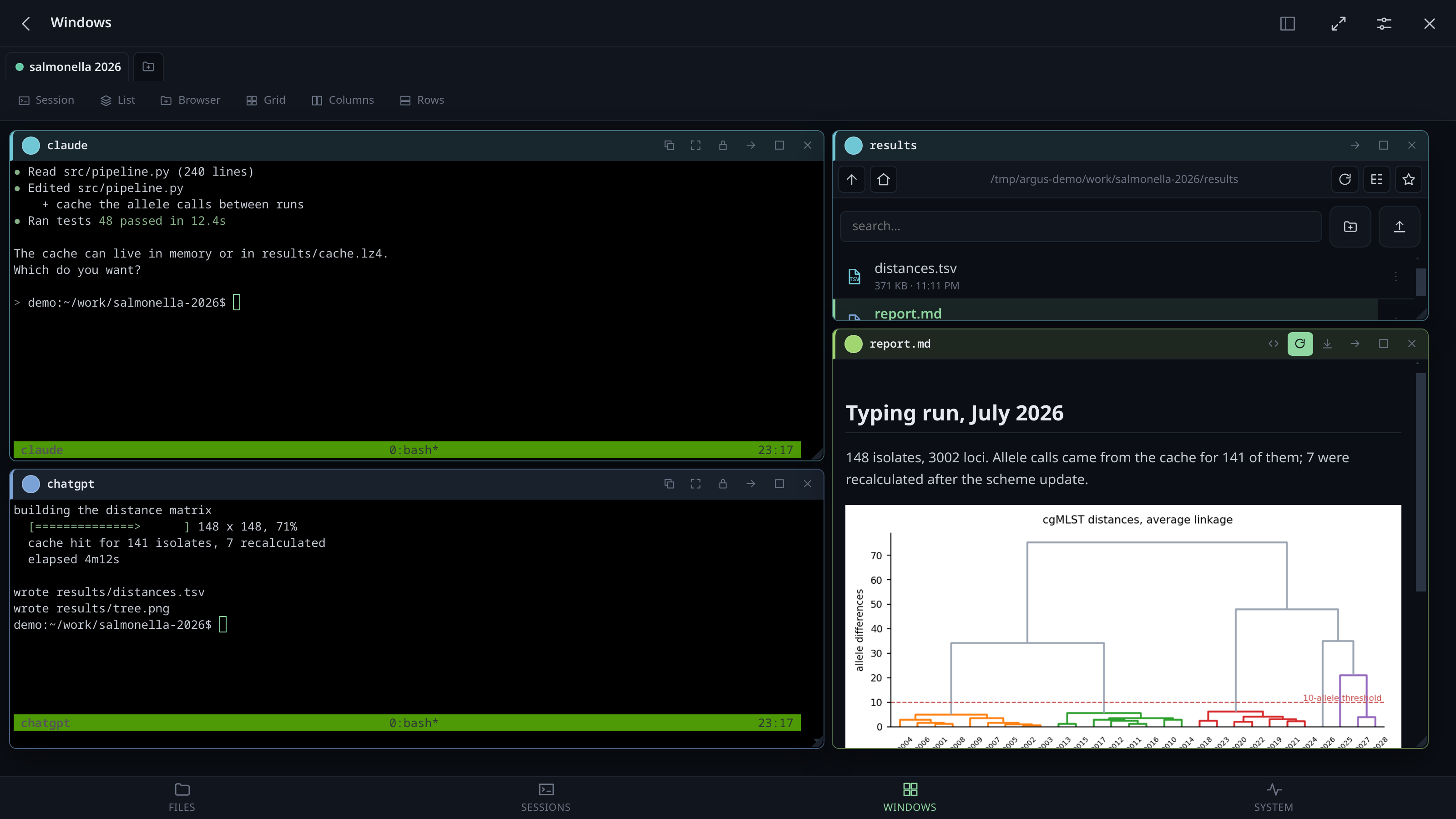
The point is what sits next to the terminal. An agent's output is mostly references to things: a path it wrote, a report it generated, a number in a file. So the terminal and the filesystem are the same room here:
- a path printed in the session is clickable — it opens beside the terminal, and the file browser jumps to it and marks it
- a file the agent writes appears on its own, without you refreshing anything
- the thing it wrote is readable in place: markdown with its figures, PDF with a search box, Word, images, a log that starts at the end
- a screenshot you paste lands in the folder you are looking at and hands you back its path, ready to paste into the session as the next instruction
- a file you drag onto the session itself is uploaded and its absolute path is typed into the session (quoted, without Enter) and copied to the clipboard — the shortest way to get something off your laptop and into a prompt
- and a large piece of text you paste into a window becomes a file the same way, for when what you have is not a file yet
- Ctrl+V a screenshot into the session itself, cursor still in the prompt: it becomes a file and its path is typed there
None of this runs the agent or knows anything about it. Argus attaches to the tmux session it already lives in, the way another terminal window would.
Questions? The FAQ answers the ones people actually ask: whether it can go on the internet (no), whether it changes tmux (no), what the container is for, what happens when you log out, and what it sends anywhere.
- Not a tmux replacement. It attaches as an ordinary client. Kill Argus and every session carries on; the app has no state your work depends on.
- Not multi-user. One token, one machine, one person's work. There are no accounts.
- Not a hardened public service. It is remote shell access wearing a browser. Run it on a LAN or behind a VPN, and read the security section before anything else.
 |
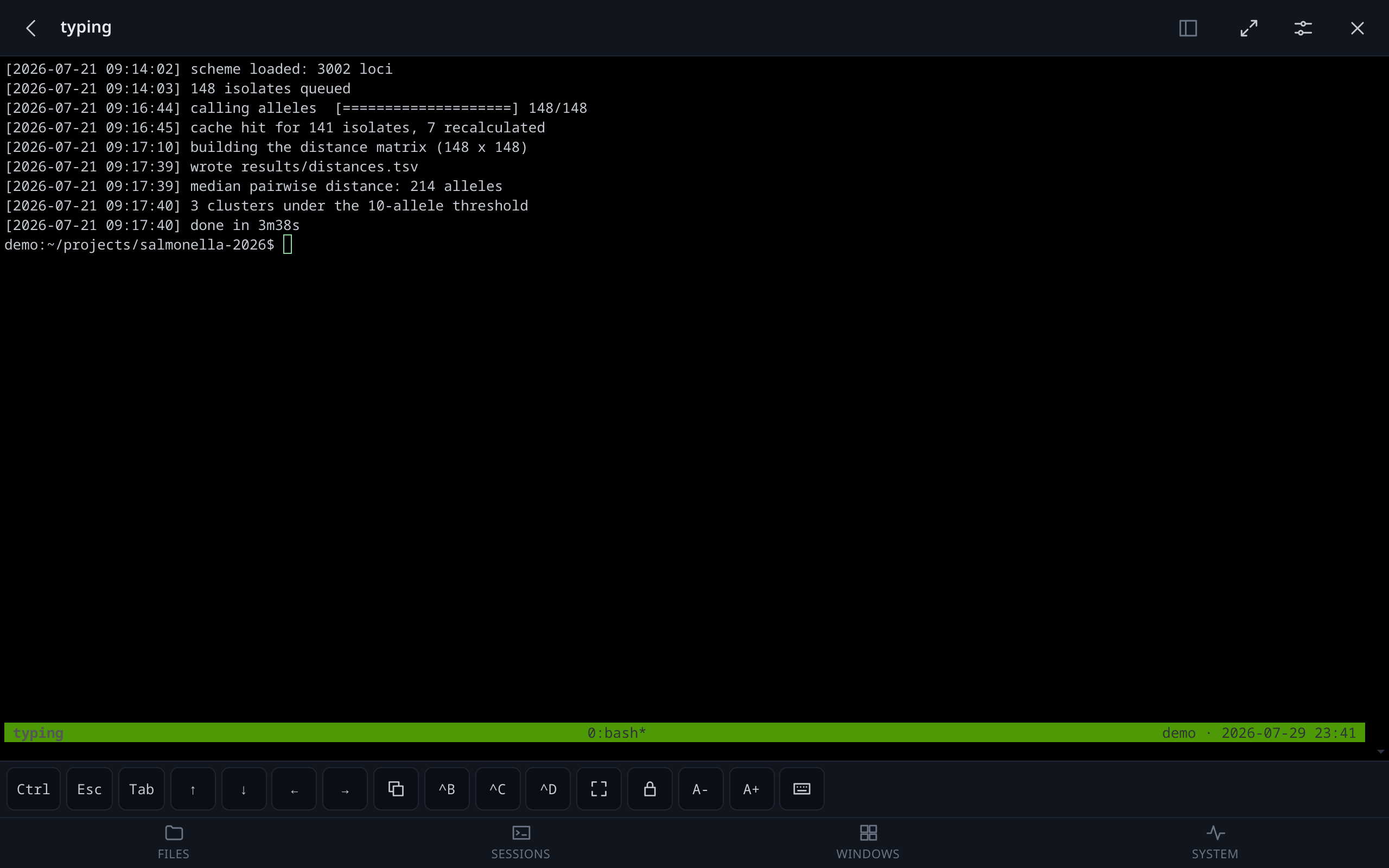 |
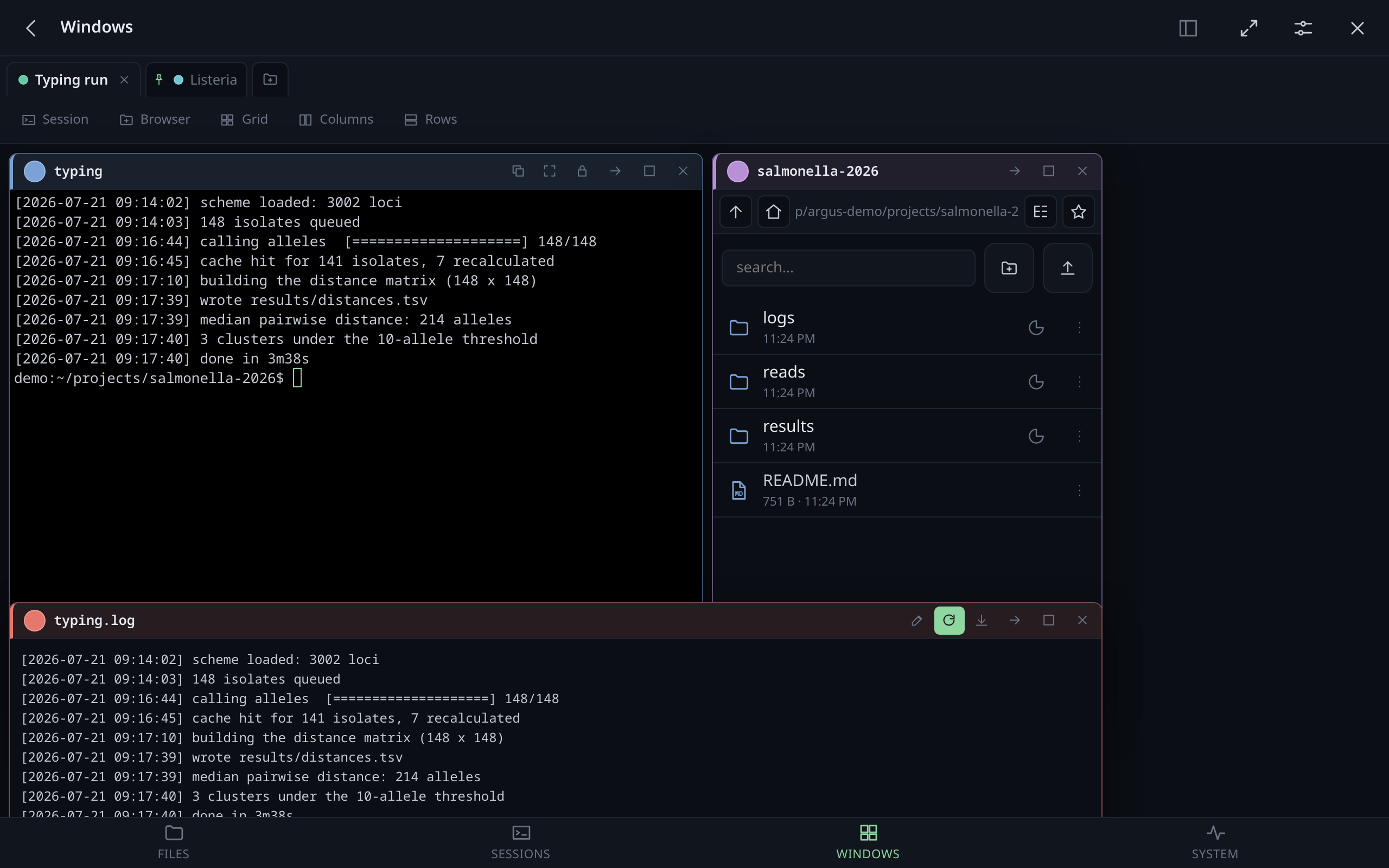
| Windows you arrange yourself, snapping to each other | A real PTY, not a poll of capture-pane
|
 |
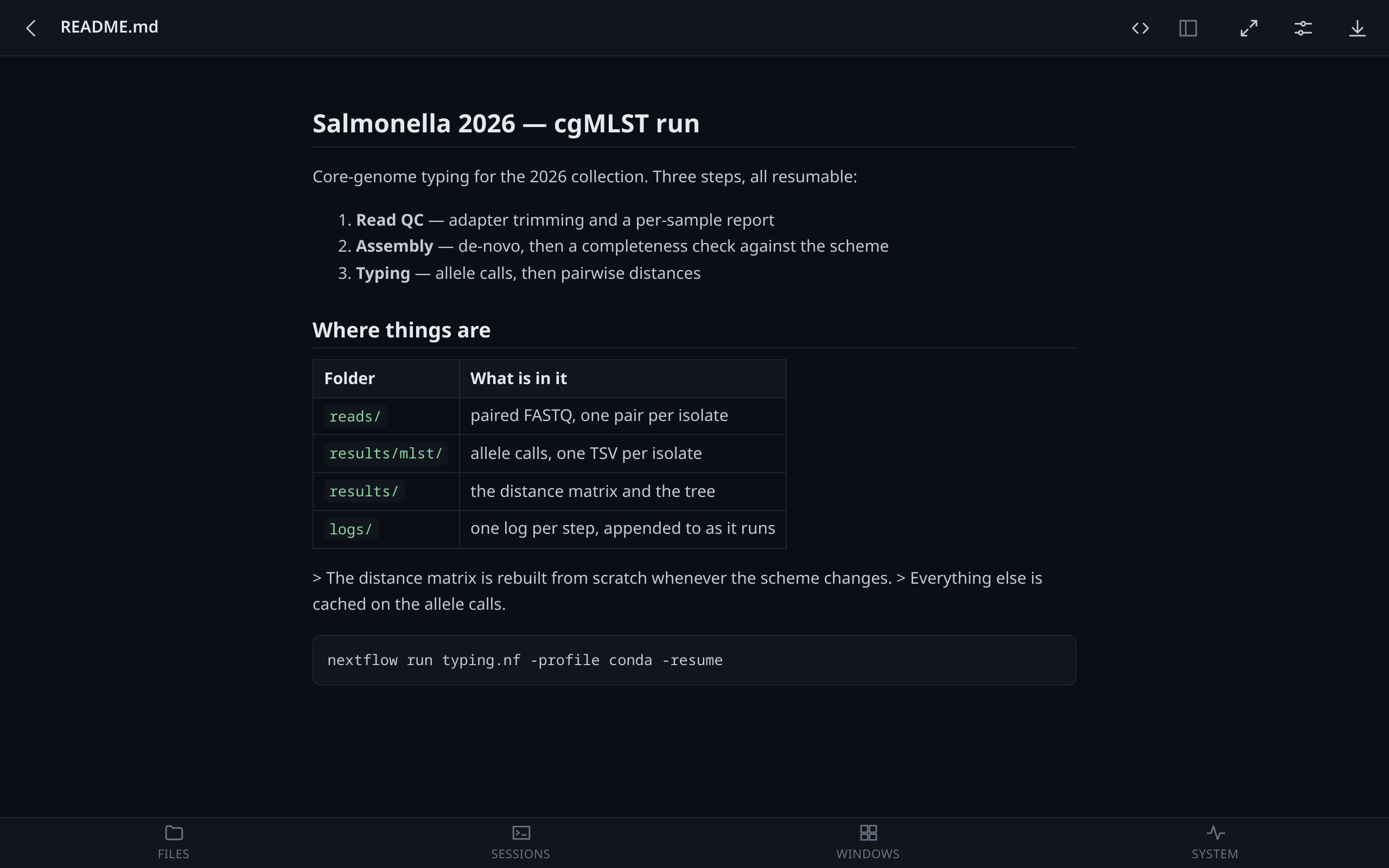 |
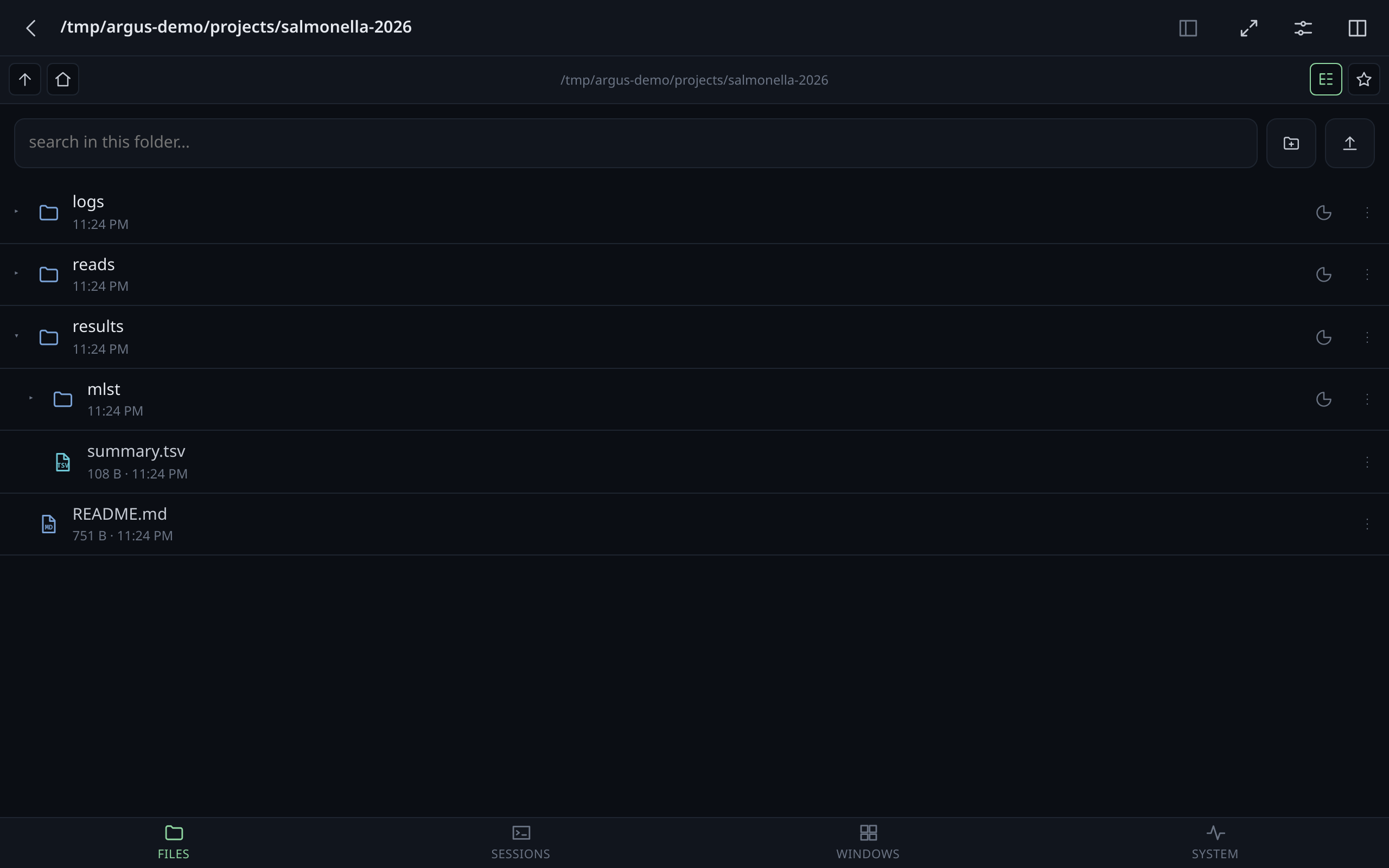
| Files as a list or a tree, with icons and sizes on demand | Markdown, PDF, Word, images, logs — rendered, not downloaded |
 |
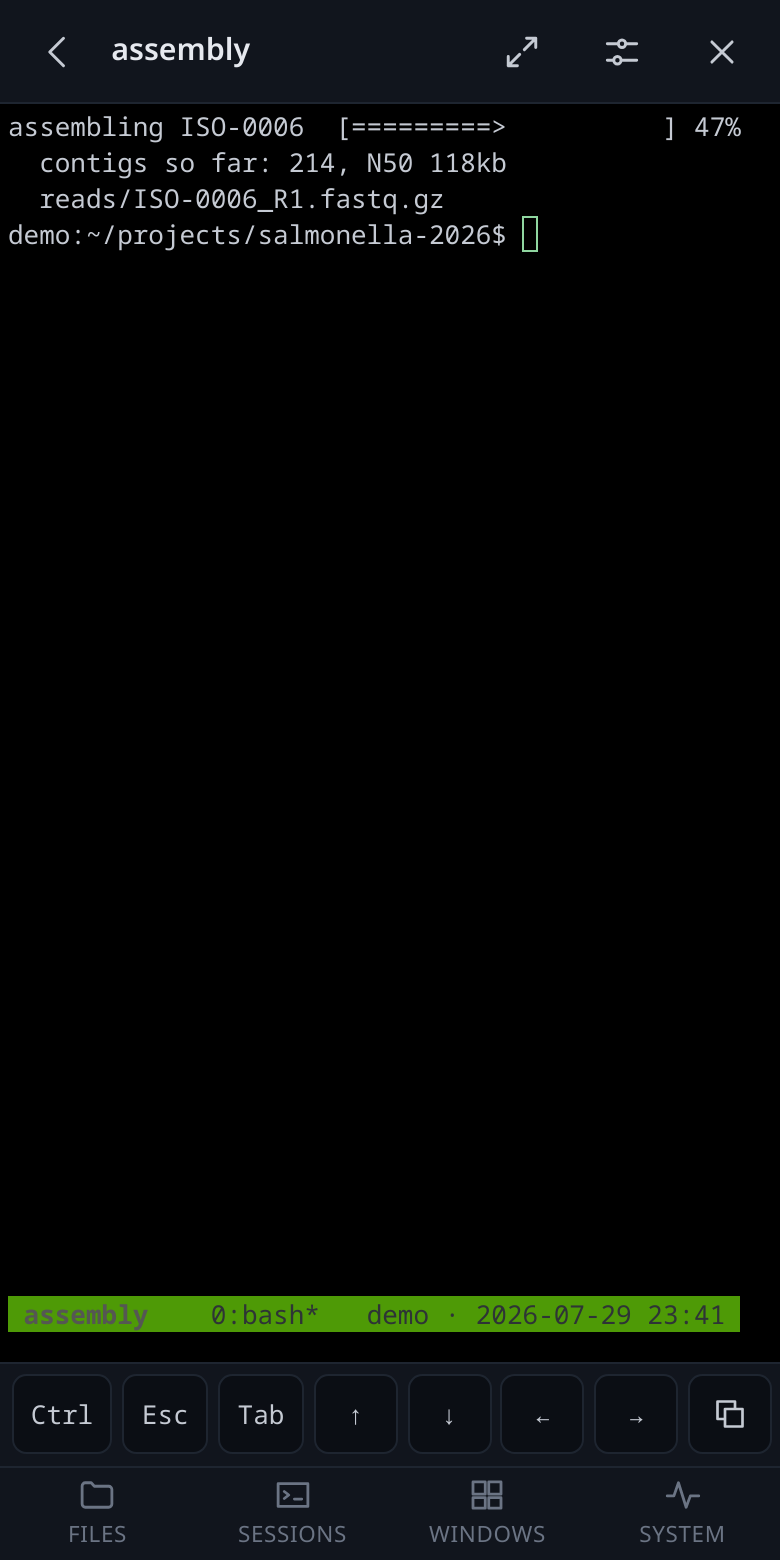 |
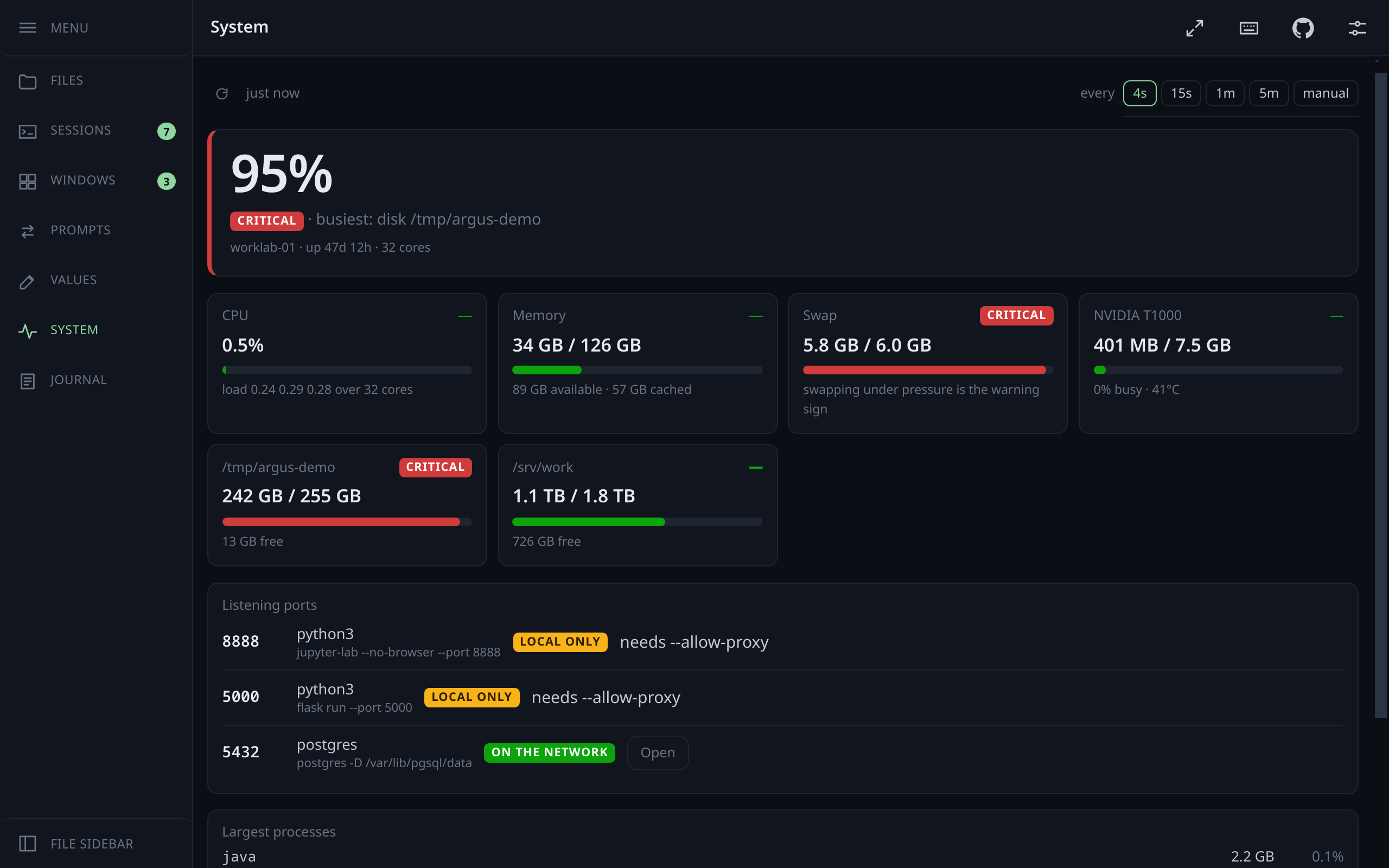
| CPU, memory, swap, GPUs, disks, listening ports | The same session, on the device you actually have with you |
The screenshots come from a demo instance with fabricated sessions, files and services.
-
Working, or waiting for you, on every session with an agent in it — worked out from whether its pane is still drawing, so nothing has to be installed in the agent; on its row, on its window on a desk, and in the amber of the count. An agent with hooks (the button in Settings, or the plugin) says it itself, and is believed over its pane: a long command that leaves the screen still is not mistaken for a wait.
-
An agent's options in words when you start one: what it may do without asking (including
--dangerously-skip-permissions), the model, the effort; only what the installed version takes, and the command line shown before Start. -
One ring per turn. An agent's "finished" and "waiting for you" fold into a single bell, whichever arrives first, the hook or the pane going quiet; an agent with no hook rings too.
-
Got it: a wait you have seen and that needs nothing stops asking, on every device, until the agent has worked again. Got it, all beside the desk tabs and on the Sessions screen does it for every waiting agent at once; it shows only while one is waiting.
-
Back after a reboot. The agents a dead tmux server took with it are offered back on the Sessions screen, each in its folder and its own conversation (
claude --resume,codex resume). -
Attach to the sessions that already exist, or start new ones. Detaching leaves everything running; a dropped connection reattaches by itself.
-
A real pseudo-terminal.
pty.openpty→login_tty→tmux attach, so anything that works in a terminal works here: full-screen programs, colour, mouse mode. -
Dragging a finger scrolls the session, and the text keeps up with the thumb: the drag is turned into whole lines with the remainder carried, and how far tmux moves per wheel turn is measured rather than assumed — before that, a finger travelling ten lines sent the history forty-five lines away.
-
A box to write a line in, for the phones where typing into a terminal duplicates words. Chrome on Android wraps Enter and Backspace in composition events of its own, and interrupting one makes the word arrive twice — xterm.js #3600, not something an app can fix from outside. So there is a way in that never meets it: an ordinary text box, where predictive typing behaves as it does everywhere else, and the finished line goes to the session in one go. Enter sends, Shift+Enter is a new line, placeholders are filled in.
-
A key bar for what a phone has not got — Esc, Tab, arrows,
^B(the tmux prefix),^C,^D,^U(clear the line without interrupting what is running, which^Cwould), and a sticky Ctrl for everything else. -
Sizing you decide. Two clients on one session cannot both pick the size, so the size is claimed: ⤢ takes it for the screen you are looking at, and the lock beside it says "I am only watching" — the desk keeps its geometry and the phone shrinks the type to fit the whole grid.
-
Copy out of tmux. A selection made with tmux's mouse mode lands in a paste buffer on the server, where a browser cannot reach it. The copy button brings it to the clipboard of the device in your hand — even over plain HTTP, where the clipboard API does not exist.
-
Chain two sessions and type into both. A chain button on each terminal; what you type in any chained window reaches all the others, Enter and Ctrl+C included. tmux's own
synchronize-panesonly spans the panes of one window and changes what every attached client sees — this crosses sessions, and the chains are kept with your preferences, so every device sees them. Chained windows are outlined and counted in the toolbar, because a broadcast you have forgotten about is the one genuinely dangerous thing in here. -
Hand the work to the other agent.
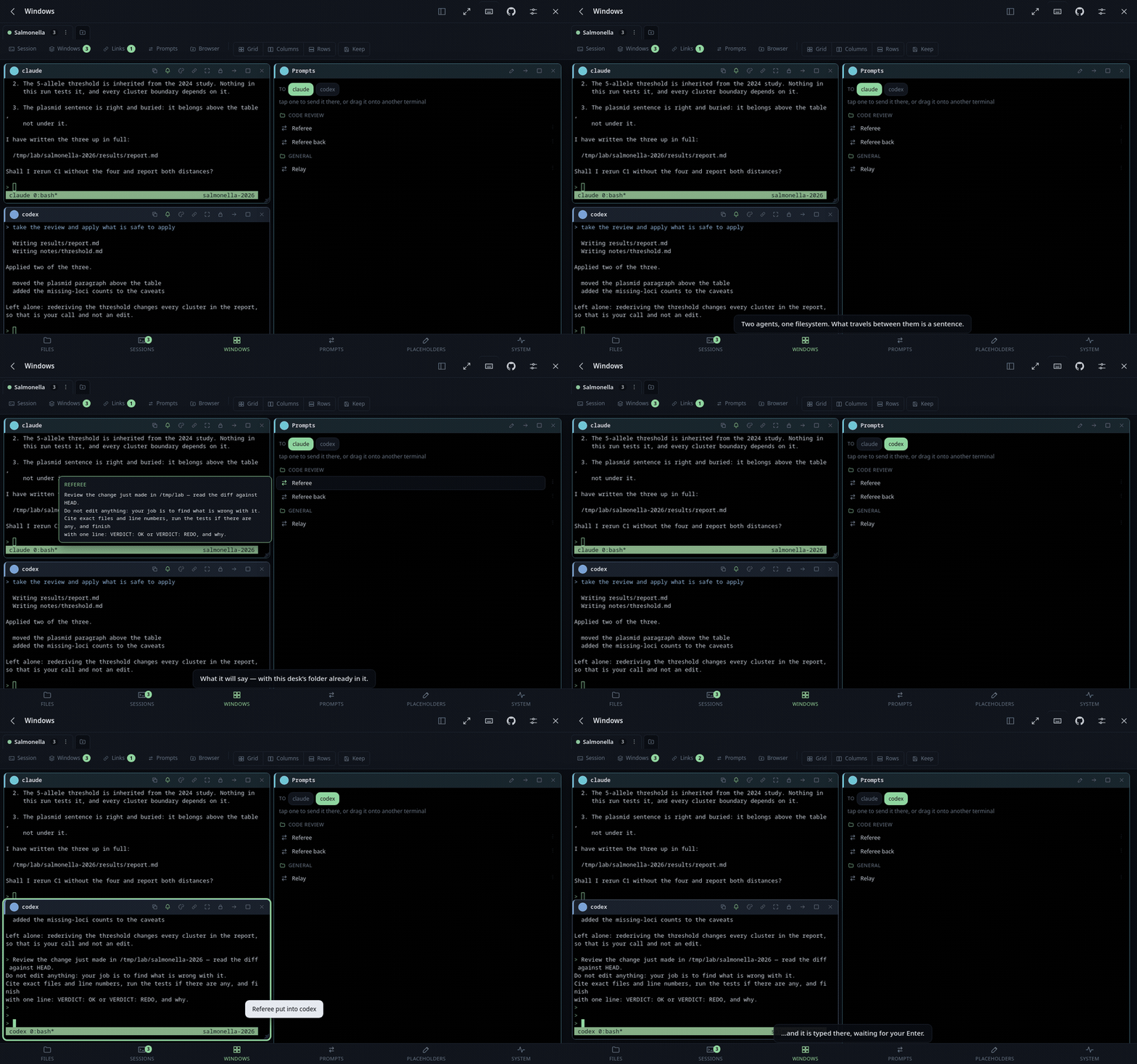
Two agents on one machine share a filesystem, so what travels between them is not the work but a baton: a short sentence and a pointer. When one finishes — the bell knows — a button offers to type the sentence into the other's prompt, without an Enter. Two patterns, and they differ in behaviour rather than only in wording.
It comes with Referee (one makes, the other reviews without editing and ends on a verdict; the return leg is a fix) and Relay (both improve the same work in turn), and you can save your own — a library that follows you between desks, kept in groups you name: Paper review, Web development, whatever you are doing, because a flat list of fifteen sentences is a list nobody reads. The sheet shows the groups first, then only the messages in the one you picked, and what will actually be typed, filled in, before anything is sent.
Writing them has a screen of its own — Prompts and Values, two entries in the bottom bar because they are two different things — with full editing of the library: rename, duplicate, delete, and each one previewed with this desk's values as you type. The hand-over sheet is for sending; a place you pass through in a hurry is the wrong place to keep a library.
Templates are written with placeholders. Some are filled in from the situation:
{folder}— the sending session's own working directory, since a desk's folder says nothing about where tmux put the agent — plus{from}and{to}, and for a pair{plan},{bridge},{every},{limit}and{tries}. They are defaults, not reserved words: define one in a set and yours wins, with the row saying what it is covering. The rest are yours, kept in named sets. A prompt can also name one outright —{genpat_paper.paper_text}reaches into that set whatever set the desk is on, which is what you want when one prompt is about one project and the desk is doing something else. On by default; the switch is in Settings.Defaultis the ground truth; any other set says only what it changes and takes the rest from it, showing what it is covering — instead of BMC Genomics — and what it is inheriting, one tap to claim. A desk picks a set, from its own tab menu, so the same set serves every desk about the same thing instead of each desk keeping a copy of your name. A placeholder with nothing to put in it is flagged and passed through as written, where you can see it.Or keep them open as a window. A modal you open, aim and dismiss thirty times in an afternoon is thirty times too many, so Prompts is also a window on the desk: the folders, the messages, and you drag one onto a terminal — the same gesture as a path out of the link tray. Or just tap it: the window says at the top where a tap goes, and that follows the terminal you last touched, so the usual case is one tap and no question asked. Tap a name up there to aim it somewhere else and it stays put.
Aim it at more than one session. The names at the top are toggles, so the same instruction reaches two agents, or three, in one press — the ordinary case with two agents on one job, and something you notice you are doing by hand on the fourth round.
Star the ones you use. A library grows into folders, and folders are where a thing is kept rather than where you reach for the four prompts you send forty times an afternoon — which are, always, in three different groups. A star on the Prompts screen puts a prompt in one line at the top of every desk's Prompts window: flat, without its group, open unless you shut it. It stays in its folder too; starring is a shortcut, not a move.
It opens shut and says how much is in it. Groups, prompts and their placeholder lists all start collapsed, with a count beside each name, because a window three hundred pixels wide holding forty open rows is a window you scroll rather than read. What you open stays open. Values can be edited where you find them: a prompt lists what it takes and what each one is worth on this desk, and each is a box you can type into. Ordering, though, happens on the Prompts screen and nowhere else — this window is where you send from, in a hurry, and a list whose rows can be picked up is a list where a press that travels three pixels moves something instead of sending it.
Hovering a prompt shows what it will actually say, filled in, without sending it — and on the Prompts screen you can preview with any set of placeholders, not only the one the desk is on, since reading is not choosing.
A prompt says whether it runs. "Run the tests" wants to go; "here is the file, now tell me what you think" wants a look before Enter. The switch is on the prompt itself, off by default, and every prompt in the list says which it does — sends (presses Enter for you) or types (leaves the Enter to you) — before you tap, not after.
The return goes as a separate write, half a second after the text, and that detail is the whole of whether it works. An input box does not read lines, it reads writes: one that assembles a paste treats everything arriving in a single read as part of the paste, so a return sent along with the text lands in the box and the prompt sits there, complete and unsent. Claude Code submits it anyway; Codex does not. The pause is a setting for an agent that wants longer.
The ⋯ on a row is for the times a word needs changing before it goes: it shows the text filled in, lets you edit it once and sends it. Not saved — the library is edited where the library lives, where deleting one needs no confirmation: the row becomes a red line with Undo in it for five seconds, which is a better bargain than a dialog every time. Sending one is a deliberate act and stays one; a round trip that runs on its own, with a limit on rounds, is a team — Build and review.
-
Placeholders as you type.
{{genpat_paper.paper_tex}}typed at a prompt in the session becomes the path, not only in a saved prompt — and it works inside an agent's own input box, which is the whole reason for having it. Typed, pasted, or half of each: one buffer holds what has gone to the session, so a placeholder does not have to arrive all one way.In a terminal the text is yours and
{...}already belongs to the shell, so the typed form takes two braces by default, and{ }or@{ }if you prefer — the choice is in Settings. With the default,{"a": 1}andmv x{,.bak}can never be touched even by accident. A saved prompt always accepts{x}and{{x}}, since there the whole text is a template, and@{x}too when that is the form chosen in Settings. -
Clickable paths. Hovering a line asks the server which of its words are real files; those get underlined, and opening one shows it in the viewer and points the file browser at it. Relative paths resolve against the pane's own working directory. On a phone, a long press does the same.
- A file manager's gestures: Ctrl/Shift+click and a dashed box to choose several, a bar of what to do to them, the Delete key, and a right-click menu beside the file.
- Browse and search, always; rename, move, copy, delete, upload (drag and drop), make folders
only with
allow_write(off by default). -
Paste a screenshot straight into a folder. Ctrl+V in a listing writes the clipboard
image where you are looking, named
screenshot-1.png,screenshot-2.png— the number is the server's, so nothing is ever overwritten and two devices cannot collide. -
Drop a file on a terminal and it lands in
drop_dir, its absolute path typed into the session (without Enter) and copied to the clipboard. A terminal is not a folder, so the server picks the one place drops go and makes it the first time it is needed. - Text into a file. A window you paste a wall of text into, and get a path to it — in the drop folder from the desk's row, or in the folder you are looking at from the browser's. It stays open beside the session the text is for, and an unsaved draft survives a reload.
- Video and audio play in the window, streamed with range requests so the scrubber works from the first second, and they keep your place across a reload.
-
Type a path where the path is shown. Click the address and write in it,
~included, with folders offered as you type. A path that is not there says so in the box; the listing under it stays put. - List or tree, hidden files on or off, favourites — kept on the server, so both devices see the same ones.
- Two panes side by side; either one can be a window in a workspace. Drag a row onto a folder or onto the other pane to move it there — the folder under the pointer wins over the pane behind it, in either pane, including the one you are dragging from.
- The three you do all day are on the row: copy the path, rename, delete. Everything else is behind the ⋮, which is right for moving, copying and downloading — you do those thinking about it. Copying says that it copied, with a tick for a moment, because a button that copies and then looks identical is a button you press again to be sure. Pointer only: on a phone, three targets in a row is a lottery and the ⋮ is one honest target with all of it behind it.
- What a folder weighs, on request: a button per folder, because finding out means walking it. It stops at 400k entries or twenty seconds and says "at least" rather than presenting a partial sum as the total.
- Text files are editable, with a save that refuses if the file changed underneath — the normal case when a job is writing to it.
-
A link is a way to upload: give an address and the machine fetches it into the folder you
are looking at, headers and all — a pasted
curlcommand is read for its address, cookies and credentials — so a file never has to come down to a phone to go back up again.
- Start a shell or an agent from the app, in a folder, with its first instruction already typed in — from the prompt library, filled in for this desk. The same button that used to ask only for a name. On a phone this is the difference between watching an agent and beginning one, since beginning one used to need a shell. The Sessions screen opens it on a plain shell, even with no sessions at all, and lands you in it.
- The choices appear at once: which launchers exist, and their versions, are answered from memory and refreshed behind the scenes, and asked once when the server starts.
-
What it may start is a list in your configuration: a name and a shell line each, run
through your login shell so
conda activate x && claudeworks, and checked for existence the same way — awhichon a systemd-started server misses everything your profile puts on the PATH. The API can start a launcher by name from that list and nothing else, which is one of the few places here where a feature narrows what a token can do. - It waits for the thing to stop drawing before typing, because an agent is not ready when its process starts — it has a banner to print and often a question to ask. Stillness rather than a marker per agent, which would rot at their next release; and the return is not pressed unless you asked, nor ever into something still moving. The answer says which of those happened.
-
A git worktree per job, when the folder is a repository: a second checkout on its own
branch, beside the first, so two agents are not editing one tree. New branch or existing one,
inside the configured roots, and removal refused while there is uncommitted work in it (unless
forced,
?force=true).
- A short list of things to do, on the machine rather than in the browser: a date, a line of text, one of three states, and a filter. The state is a button that cycles and the words are a button that edits; the cap drops the oldest finished one and never an open one.
- The workspace lives on the machine too. The desks, where every window sits, the prompt library, the placeholder sets, the shortcuts — sixty keys that used to be in one browser's storage. A desk made at the desk is on the phone, and a script or an agent can read the library it sends from. The browser pushes only the keys it changed, so two devices editing different things both keep their change.
-
Changes: what a repository has not committed, its last commit, or the work against another branch, as a window beside the session (the branch icon on a terminal in a repository) or from a folder's menu; it follows the folder by itself and only reads. See What changed.
-
Viewers of your own: a folder with a
viewer.jsonmounts a viewer or an editor for the files you say, in a sandboxed frame that is handed the file and nothing else.Diffships with Argus. See Viewers of your own. -
A folder on your own computer: Mount on your computer… writes the commands for macOS, Linux and Windows — one line that makes a key, has Argus let it in (no password, ever), installs sshfs and mounts, or the steps one by one. See Mounting a folder on your computer.
-
Code is coloured — 27 languages, chosen from the file's name, with the highlighter vendored and loaded the first time you open one rather than on every visit. Above 260KB it stays plain, because highlighting a file that size takes longer than reading it.
-
Which viewer an extension gets is a setting: markdown rendered, code coloured, the rest plain is only the default, and a
.logthat is really JSON can say so. -
Markdown rendered, with a source toggle, and the figures beside it on disk shown where they belong —
resolves against the document's own folder. -
```mermaid fences are drawn, in mermaid's own themes by default or in this app's palette (Settings → Diagram colours: auto, colourful, forest, flat), and they follow a theme switch. Loaded only when a document actually has one: it is the largest thing vendored here and most documents are not diagrams. One that will not parse keeps its source, with a line saying what the parser objected to.
-
PDFs are drawn by Argus, with pdf.js, and open where you left them — the page, the scroll position to the pixel, the zoom you chose, across reloads and across days. The browser's own viewer cannot do this and never could: measured, it says nothing at all while you scroll, so there is nothing to record. It also drops
view=FitHin silence, which is why page width never survived a reload. Now it is computed here instead of asked for. The text stays selectable, and only the pages on screen are drawn. -
A search box for a PDF that Argus answers itself: the browser's Ctrl+F searches the page around a document, and a phone has no Ctrl+F at all, so the text is extracted here and each hit scrolls to its page.
-
Word/ODT/RTF rendered through pandoc when the machine has it, with figures inlined — and the plain-text extraction as a fallback when it does not.
-
Logs: a file too big to send whole arrives as its tail, which is the part anyone wants, and says so.
-
Every previewed document is sandboxed into an opaque origin, so a stray HTML report cannot read the access token.
-
Spreadsheets (
.xlsx,.xlsm) as real tables, a sheet each; 3D meshes (.stl) and STEP files (.step,.stp) turned and lit in the page; a.mmdor.mermaidfile drawn as a diagram on its own. See Documents. -
A document being rewritten reloads itself (the eye on its window, on by default), keeping your place; a PDF keeps its page, page width or whole page, zoom, and a finder that lists the hits by page.
- A new desk asks what goes in it: the session list opens straight away and takes as many as you tick, rather than one at a time with the sheet closing after each. The same sheet adds sessions to a desk you already have.
-
Desks (tabs) you can name, colour, reorder by dragging, and pin. Each holds its own
set of windows, has its own address (
#/wall?ws=3, copyable from the tab menu) and its own starting folder, and survives a reload. Every tab carries a ⋮ for its menu — holding it and right-clicking still work, but neither is a gesture anybody finds. -
A desk's folder can be written with a placeholder —
{folder},{paper}— filled from the set that desk is on, so a desk pointed at a project does not repeat what its set already says. The sheet shows what it resolves to as you type, and a placeholder with nothing to fill it sends browsers home rather than to a folder with a brace in its name. - A folder each desk starts in. A desk is usually about something, so its browsers should land there rather than in the same home directory as everything else. Pick one of the shortcuts or type the path: it completes folder names as you go, Tab finishes the word the way a shell does, and a folder that is not there is refused rather than quietly stored.
- Windows for terminals, file browsers, documents and proxied web pages. Move or duplicate them between desks.
- Closing a desk can end its sessions too. The dialog lists the sessions no other desk shows and offers to end them with everything running in them — a box you tick, off by default, since the work was usually started on purpose.
- Magnetic layout: windows snap to each other and to the wall's edges, with a preview of where the drop will land — including into the gap between two windows, which it fills exactly.
- Shared edges behave as splitters: widen one column and the next gives up precisely what the first one took — and a column gives way as a column, every row of it, not only the one whose edge you happen to be touching.
- Tile as a grid, columns or rows when you want to start over. The desk toolbar is ruled into two: flat on the left, what is on the desk; after a divider, gathered into controls, how it is arranged.
- Every desk tab carries how many windows it holds, including desks you have not opened this visit.
- Keep the arrangement you made. Grid, Columns and Rows are arrangements the machine picks and every one of them throws yours away. Custom is the fourth, and it behaves like the other three: press it and you are in it, lit while you are. It restores the desk rather than only the geometry, so a window closed since comes back and a window opened since goes away, with six seconds to undo it. Saving is a smaller button held inside the same control — saving is not a fourth way to arrange a desk, it is something you do to this one — and it goes out when what is on screen is already what is saved. A dot on the corner says there is something saved here at all, which is the question you ask from across the room.
- A narrow window folds its own title bar: below 520px the buttons move into a ⋯, which reads them off the bar itself, so nothing runs past the edge on a phone. It is asked of the window, not the screen — a 300px window on a wide monitor has the same problem, and a media query cannot tell the two apart.
- The window list says where each session actually is — its tmux working directory, which is otherwise written down nowhere and is what a hand-over sentence points at.
- Drag a line out of the tray onto a window: onto a terminal it is typed into that session — with shell quoting, and without an Enter, because what to do with it is the point of handing it over; onto a file browser that folder is shown. Holding the line starts the drag on a phone too, so the list still scrolls. There is a copy button on each line for the times you want it on the clipboard instead.
- Numbers where they are useful: the Links button carries how many are waiting and moves as things are printed whether or not the tray is open; the List button carries how many windows the desk holds; the Sessions tab carries how many tmux sessions exist, and turns amber while one of them is waiting for you. The Links and List numbers are about the desk you are on; the Sessions number counts every tmux session on the machine.
-
A filter in the tray, for when it holds thirty things and you want the one with
reportin it. It says how many of how many, and clearing it brings the rest back. - The tray can empty itself: 1, 3, 5, 10, 30 minutes or never, per desk. It drops what is older than the span rather than wiping the lot on a timer, so a link that just arrived is never snatched away.
- A link tray per desk. What an agent produces is mostly references — where it wrote the report, what port it is serving on, which file failed — and by the time you have read the sentence it is four screens up. The tray catches every absolute path and URL that goes past in the desk's terminals and keeps them in a list you click. A path only earns a line if it is really there, so what collects is a short list of things that open, not everything that looked like a path. Empty it whenever it stops being useful.
- Agents taking turns on one goal, with a check between turns — tests, a benchmark — and a verdict that decides: OK, REDO, DONE or BLOCKED. Team in the desk's toolbar asks three things: the goal in words, who does what, and how much it goes on alone (ask me each round, stop at the first trouble, or go on until the goal).
-
Directed by the server, so a team goes on with every browser shut. Argus starts each agent
on its turn with its prompt, waits for its report, runs the check in a session of the team's own
where you can watch it, and decides from the result. Every turn is written to
TEAM.argus.md. -
Agents report through a tool: with the Argus plugin,
team_taskgives an agent its task andteam_donetakes its turn and verdict — refused with the reason when it is not its turn — and a Stop guard sends back an agent that stops without reporting. Without the plugin,argus-say turn, or a block appended to the log. - Seven templates: Optimise, Tournament, Split the work, Fix a bug, Feature with tests, Build and review, Write.
- A team is a graph. Steps in parallel, joins, arrows with conditions (if PASS, if REDO…). Click a step to change its role, its duty, its arrows, or add one after it or beside it — or write it as a Mermaid flowchart, drawn beside the text as you type, or as YAML. Argus checks the graph before it starts.
-
An agent can design one: asked "make me a team that…", it writes it (the plugin's
argus-team-authorskill), checks it (team_check) and proposes it (team_propose): ateam.yamlin the project and a bell; your tap opens Team on it. Only you start it. -
Pause, Stop, Reset, Restart — and what "from clean" means declared in the team file
(
reset:— the files that are a run's state, a command, the log archived): Restart stops, resets, reads the file again and starts from round 1, after showing the exact list. - Packs: roles and models in one JSON or YAML file — examples ship, yours import, export and come back out cleanly (Remove a pack…). Never a default.
- Your own roles and models: a role is a name and a duty in your words, saved and offered again; Save as my model keeps a shape as a card next to the templates.
- A worktree per parallel branch, in a git repository, so two executors try two ideas without touching each other or your checkout.
- A window of the desk: the graph, live, whose turn it is, the round, the last check, and Continue, Pause, Stop, Log and Story; a one-row line over the desk too. See Teams.
Two agents on one job, the older pair with PLAN.argus.md and BRIDGE.argus.md, is replaced
by Teams (Build and review, Split the work); its button is gone and its page stays
for pairs started with it.
- Also →: while you write a prompt to one agent, a button sends it to another agent of the desk as well, with the same Enter.
- Select text in one agent, type it into another: a button where the mouse let go lists the desk's other sessions; the one you pick gets the text typed in, not sent. Works with tmux holding the mouse too; over an agent that keeps the mouse (Claude Code, Codex), Shift-drag.
- Search the web for it: the same button has Search beside it — the selection looked up in a new tab, on the engine chosen in Settings.
- The Argus plugin, for Claude Code and Codex (and Gemini CLI as an extension with the MCP tools): one install, hooks, MCP tools and skills together. The agent says when a turn starts, when it finishes (with its last words) and when it needs you, naming what it wants to run. See The Argus plugin.
-
argus-mcp: Argus as tools the agent sees for itself —who,ring,ask(a question on your phone, and it waits for the tap),relay,open_desk,rename_desk,launchers,start_agent,teams,team_task,team_done,team_check,team_propose,request,request_status,todos,todo_set,todo_add,worktree,prompts. The plugin registers it; without the plugin,claude mcp add argus -- argus-mcp. - Desks by name, from an agent: "open a desk called pippo with a Codex and a Claude in it" makes the desk, starts both in it, and the tab appears on every open page. Renaming one works the same way.
- A key of its own. An agent key reaches only what these need: reading who is here, ringing, asking, relaying, starting from the launcher list, a worktree, making a desk, the to-do list, the teams (reading them, its own turn, checking and proposing one), posting a run.
- With your OK, the rest of a fixed list: start a team in a desk, continue, pause or stop one, end or rename a session, start an agent with no questions, remove a worktree, delete a to-do. The agent requests it; you tap Do it or No; Argus does it. It never answers its own question, and never removes a desk. The whole table: What an agent can do.
-
argus-sayis the same from a shell:who,relay,ring,start,teams,task,turn,team-check,team-propose,request.
- CPU, load, memory, swap, GPUs (temperature and memory), every disk, and uptime — each with a plain reading of whether it is fine, and a note on why swap under pressure is the number that matters.
- The largest processes with their full command line, and a label of your own on any of them — or on whatever holds a port. Kept against the pid and its start time, so a recycled pid never inherits the note, and gone when the process ends.
-
Listening ports, with what is holding them. A service bound to
127.0.0.1is unreachable from a phone by design; Argus will stand in front of it (--allow-proxy, then open that port by hand) and serve it under/proxy/<port>/. - Reach a port nobody found, by typing its number: a service that has not started yet, or one the scan did not see. It appears in the list either way, so you can close it again.
-
Rescue a login that went to the wrong machine. A tool running on the server starts
a browser login whose callback is
http://localhost:1455/…. You log in on your own laptop, where localhost is your laptop, and the callback lands on nothing. Paste that dead URL into the same box and Argus forwards it — path and query intact — to the port it was always meant for. - Argus's own credentials stop at the proxy: neither the token in the query nor the
Authorizationheader is passed to the service behind it. -
Why not just forward the port, like VS Code? Because VS Code has a piece running on
your laptop that can open a socket there; a web page cannot, and no browser will ever
let one. If you want
localhost:1455to work literally, the tool VS Code uses under the hood is already on your machine:ssh -L 1455:127.0.0.1:1455 you@server. The proxy is the answer when all you have is a browser — a phone, a borrowed laptop — and the price is that the address changes.
-
It has finished and it is waiting for you are different events, and a
notification that cannot tell them apart is noise by the end of the day. So the exact
signal comes from the agent: a hook posts to
/api/belland says which of the two it is. Without a hook, Argus still rings when it sees an agent's pane stop drawing, and either way a turn rings once. Claude Code (UserPromptSubmit,Stop,Notification), Codex (UserPromptSubmit,Stop,PermissionRequest, andnotify) and Gemini (AfterAgent,Notification) all do this in a line of configuration each. Settings has a button that does the wiring for you — Let your agents ring. It writes the little script and adds the hooks to each agent's own configuration file, additively: an event you have already claimed is reported and left exactly as it was, a copy of each file as it was before Argus first touched it is kept beside it, and the same button takes it all back out. Agents read their configuration at startup, so it counts from the next one you open. The plugin is the other way to the same hooks, for Claude Code and Codex.tools/argus-bellin this repository is that one line: it reads the token from the config so no copy of it ends up in a hook, works out the tmux session by itself, and unwraps the JSON codex hands its notify program. -
For everything that is not an agent, the escape sequence every modern terminal
implements:
OSC 9. Oneprintfat the end of a build, no configuration. Note that tmux swallows it unless it is wrapped in tmux's passthrough withset -g allow-passthrough on— measured, and the wiki has the shell function that gets it right in both cases. - The window that rang is outlined, green for finished and amber for waiting; the tab of the desk holding it is marked; a message takes you there; two short tones you can turn off. Looking at the window is what stops it.
- A bell per session. Every terminal window carries one: lit means that session rings, struck through means it keeps quiet. Ringing for everything is the default, because a bell you have to switch on for each session is a bell that is silent the day you needed it — and silencing is a property of the session, so it holds wherever that session is shown and across reloads.
-
It works in another tab, over plain http. Bells arrive on an open stream rather
than by polling, because a background tab has its timers throttled to about once a
minute — which is exactly the case that matters. The tab title changes to
● session, a coloured dot is burnt onto the favicon (the part that survives a crowded tab strip, where the title is not shown at all), and the sound plays. None of the three needs a permission or a certificate. - A notification from the browser itself does need a secure context, and Settings says
so plainly instead of failing quietly. Three ways round it, in order of effort: declare
the origin trusted in your own browser (
chrome://flags/#unsafely-treat-insecure-origin-as-securetakes a full origin with its port; Firefox'sdom.securecontext.allowlisttakes bare hostnames and needs a second preference to stop it breaking images; Safari has no equivalent at all); put a real certificate in front (tailscale serve, or mkcert offline); or turn on Argus's own ntfy delivery (thentfyconfig key), which reaches the phone with every tab shut. Notifications has the steps for each.
-
Settings is nine groups, and you can get to one of them. The headings are chips at the top, built from the finished page rather than a list kept beside it, so a group added next month appears there without anybody remembering; and a box hides every row that does not match what you type, along with any heading left holding nothing.
-
Themes for the whole of Argus — interface and terminals — from a gallery that puts one on as you press it: Argus's own two and the VS Code themes people know (Dark+, One Dark Pro, Dracula, GitHub, Night Owl, Tokyo Night, Nord, Solarized, Gruvbox, Catppuccin, Rosé Pine…). Edit a copy with the page as the preview and the contrast measured, import from iTerm2, Windows Terminal or VS Code, export to share. See Themes.
-
Ready-made looks for tmux, from a button on the terminal itself — Argus, Paper, Amber, Slate, the palettes people know (Dracula, Nord, Solarized Dark and Light, Gruvbox, Catppuccin Mocha and Latte, Tokyo Night, One Dark, Monokai, Rosé Pine, GitHub Light, Matrix), or Plain to undo them. A palette dresses the terminal with its sixteen colours too, so
ls, git and an agent print in it, and each is shown with its colours before you pick. The sheet is a preview: it stands aside without shading the page, each press puts that look on at once, and the last one chosen is the one kept when you close it. One session or all of them: style options are session options, so a look can dress the window you are looking at and leave everybody else's alone, without writing anything to disk. Choosing "every session" writes it into the config instead, where it outlives a restart. Either way they set colours only — status line, borders, messages — never keys or behaviour, from a fixed list of options checked on the server, and the config route goes through the same throwaway-server check as anything else. A look cannot take a session down. The browser's own terminal is dressed to match, per session when that is what you chose. -
Editing the tmux config and handing it to every session at once. Sourcing a config runs it, so the file is tried on a throwaway tmux server first and only applied if it survives — a bad line ends the server it is sourced into, and that server holds all your work.
-
Four languages (en, it, fr, es), and adding a fifth is one JSON file — no build, no extraction step, nothing to register.
-
A phone-shaped interface: bottom navigation, thumb-sized targets, drag-to-scroll in the terminal, a full-screen button (F11 is not on a phone), light and dark themes. Windows resize with a finger — the handles straddle the frame and are 34px at the corners on a touch screen, rather than the 8px strip outside it that a mouse is happy with and a thumb cannot find.
-
Keyboard shortcuts for the places you go and the windows you open, with
?for the list — and a key icon in the header, on screens wide enough to have a keyboard. They fire only when you are not typing: a terminal, or any box you are writing in, keeps the keyboard to itself, because stealing one key from tmux would be worse than having no shortcuts at all. The modifier says where you are going:Ctrl+Altreaches the screens down the side,Ctrl+Shiftworks on the desk you are on, andCtrl+Shift+1…9(orAlt+1…9) goes to a desk by its number;Ctrl+Alt+Shiftarranges the windows, andAlt+Vsays which Argus is running (version, commit, the plugin in each agent). Bare letters were not enough — plenty of the app is neither a terminal nor a text box — and a single Ctrl is worse, because a browser owns nearly every Ctrl+letter at a level a page cannot argue with. Changing one is click the row, then hold the combination: it records the physical key you pressed, so there is nothing to spell andCtrl+Shift+Edoes not come back asctrl+E. The list is grouped the way the scheme is, with a box to search it. -
The header fits a phone. Below 560px it drops what a phone does not need (the keyboard shortcuts, the repository link, which moves to Settings → About Argus); it is held at 360px by a test.
-
Sign in once per browser. After a token works the server remembers it in an HttpOnly cookie, so a phone that loses its storage does not ask again. Signing out forgets it.
-
A QR code to pair a phone, and an installable PWA over HTTPS.
-
The GitHub mark in the header (Settings → About Argus on a phone) opens the repository, this wiki and the landing page, so the documentation is one tap from wherever you are rather than something you have to go and look for.
-
No build step. The frontend is plain ES modules; its libraries are vendored in
static/vendor(xterm.js, marked, the QR library, highlight.js, mermaid, pdf.js, Swagger UI, three.js, occt-import-js), nothing fetched from a CDN.pip install -r requirements.txtand run it. -
Alt+V: which Argus is running — version, commit, whether a newer one is on disk or released, and the Argus plugin in each agent, with Install / Update and the sessions still on an older plugin.
-
The terminal's font size (Settings, 9–22 px) and the key bar's A− A+.
-
One address — the QR code is drawn for the address to use (
address, else the full name), and Argus opened at another offers to move there with the token; opened in a QR scanner's own browser, it offers to open in the real one, where it is remembered. -
While you were away (
#/since): what happened while you were not looking — the bells, the questions, what finished. See Notifications. -
A token per device (Settings → Devices): add, rename, revoke one phone without touching the others; and the journal (
#/journal): everything that changed something and everything refused, by which key. See Security. -
What is my public address? — a button on the System screen that asks a stranger, only when pressed (
ask_outside: falseremoves it).
Once a day Argus asks github.com for its latest release, and says so once if there is. It sends nothing — not an identifier, not your configuration, not even which version is running — and it never updates anything: this is somebody's shell, and a program that can rewrite itself on a schedule can be made to rewrite itself into something else.
check_releases: false # and it never asksWith no route out to the network it stays quiet rather than complaining.
A machine can hand out a token that opens exactly one door, GET /api/overview: hostname,
uptime, load, cores, memory and swap, the disk in the most trouble, the tmux sessions and which
of them are ringing, the version, what can be started, the runs.
No shell, no files, no writes.
watchers:
  - name: panoptes
    token: <at least 16 characters, and not your real one>
That is what a board across several machines should hold: losing it loses a list of session names, not every box on it.
The board itself is Panoptes (in one page) — one page showing every machine, which sessions are on it and which one is waiting for you, with a click through to that machine's own Argus. It is a separate project on purpose: Argus never depends on it, and if it goes away every Argus carries on alone.
A machine the board cannot reach can announce itself instead, which is the case for two boxes on one wire where only one direction is open:
report_to:
  url: http://board.internal:8070
  token: <the board's registration token>
  name: gpu2                        # what you want it called on the board
  reach: http://gpu2.internal:8090  # where a browser should go
It sends what /api/overview returns and nothing else — no file contents, no token, no
command (the one path in it is the configured root the disk figure is about) — and it is off unless you configure it.
Off unless you write it down, and no command ever arrives in a request. This machine publishes a list of names; a board may ask for one of them and nothing else:
runnable:
  - name: nightly
    run: python3 nightly.py
    cwd: /srv/work

watchers:
  - name: panoptes
    token: <at least 16 characters>
    may_run: true              # otherwise the token stays read-only
    may_stop_argus: false      # the one thing a board cannot undo — its own permission
may_stop_argus stands on its own: a machine with nothing worth publishing as runnable
can still be one you want to be able to switch off.
start creates that session, stop kills it by exact name, and only a name on the list can
be killed — a board cannot touch the work you did not list. Asking twice is not an error.
may_stop_argus allows one more thing: stopping this server. Every tmux session carries on
untouched, because Argus is a client and not their parent — but nothing on the board can
start it again, and the reply says so. That takes a shell here.
For a machine a board cannot reach, the same two actions arrive in the reply to its own announcement, which is the only channel there is:
obey_board: true               # off by default: announcing is not agreeing to take orders
board_may_stop_argus: false
Either one is enough to make obey_board mean something — a box you want to be able to
switch off from the board is not thereby a box with work to publish.
Even then the answer is bounded by runnable: a reply can name one of those and nothing
else. There is no path by which a command reaches this machine.