Desks and windows - andreaderuvo/argus GitHub Wiki
Desks and windows
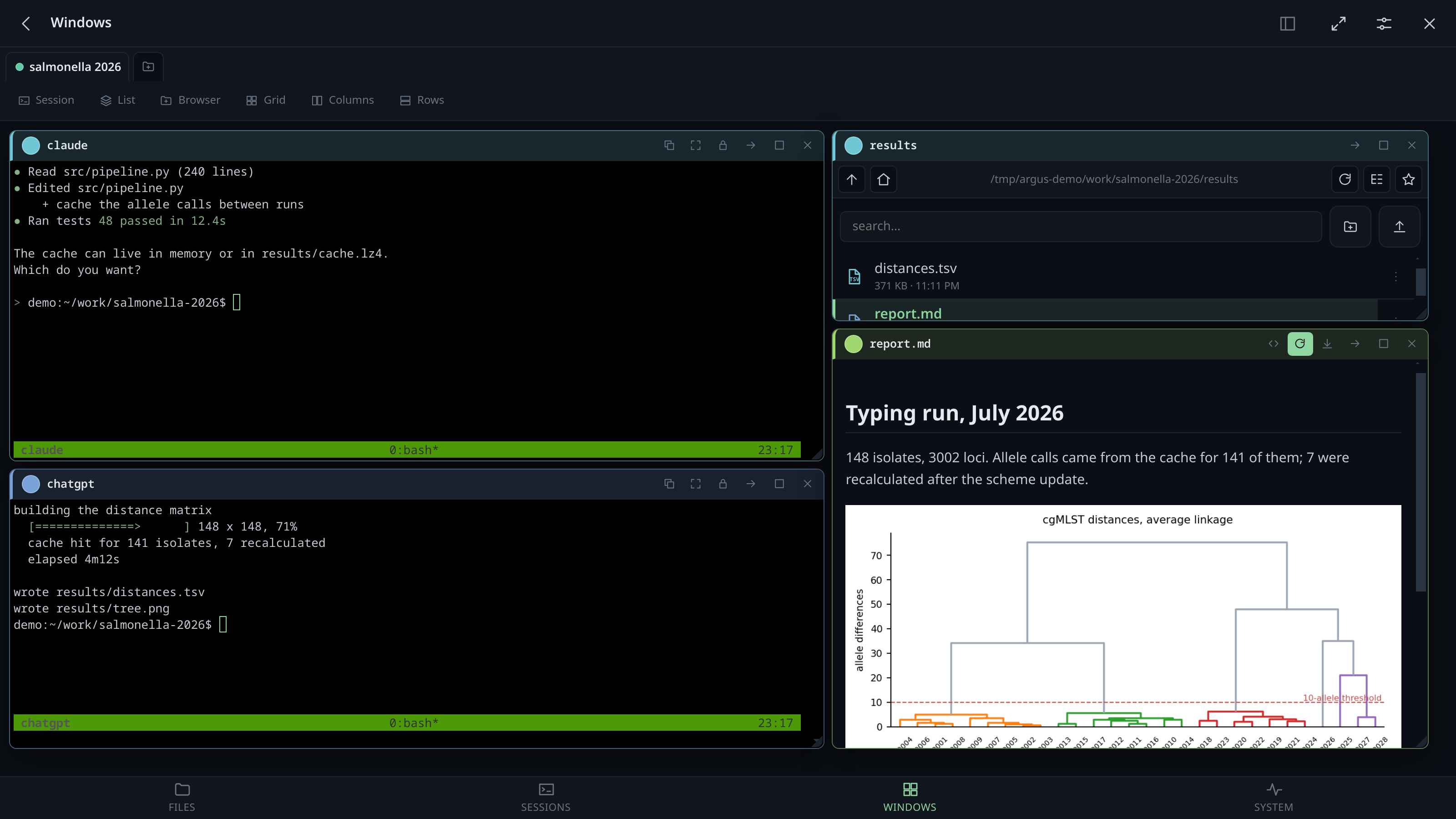
A desk is a set of windows that survives reloads. Terminals, file browsers, documents and proxied web pages, side by side.
Desks
A desk made on the machine — by an agent ("open a desk called pippo"), or from another device — is kept on the machine and adopted by every page: one that was open, one that opens later, and one that missed the news (Argus restarted under it) — its next save keeps the desk instead of overwriting it.
Making one opens the list of tmux sessions straight away and takes as many as you tick — a desk is usually two or three sessions, and closing the sheet after each one meant opening it three times. The same sheet, from Sessions in the toolbar, adds more to a desk you already have.
An agent can make one for you. With the Argus plugin installed, asking your agent to "open a desk called pippo" or "rename Desk 11 to Pippo" does it: the tab appears, or changes its name, on the machine and on every open page.
-
Every tab says how many windows it holds — a quiet pill beside the name, not the accent one the link tray wears: that means something is waiting for you, and an inventory shouting the same way would cheapen it. It counts desks you have not opened this visit too, from the stored list, and it changes the moment a window opens or closes in any desk rather than only the one on screen.
-
The dot on a tab says what its agents are doing: a steady amber ring while one of them is waiting for you (and the desk's name turns amber, when it is not the desk you are on), a slow pulse while one is working, plain otherwise. It is worked out by the server from the agents' panes, the same as on the Sessions screen, and read from the desk's stored list, so a desk you have not opened this visit, or one put away in the rail, says it too. It used to pulse whenever any of its terminals had printed in the last two seconds, which lit for an idle agent's redraw, tmux's clock and your own typing, and could not say "waiting" at all.
-
Got it, all: at the end of the tab strip, and at the top of the Sessions screen, while any agent is waiting for you. One press sets every wait aside on every desk, for when you have been away for days and half the desks are asking; each asks again once it has worked.
-
Hovering the tab opens a card: each agent in the desk, its session, and for how long it has been waiting or working, the ones waiting first. Got it on one of them means "seen, nothing to do": the desk stops asking for it until it has worked and stopped again, on every device. All seen does the same for every agent in the card.
-
Making one: the New workspace button (a folder with a +) at the end of the tab strip. The app says workspace where this wiki says desk — the same thing.
-
The tab's menu (hold it, or right-click): Rename… (or double-click the tab), Change colour…, the folder it opens in, Placeholders: {set}, its own link, Close every window (N), Pin to the front / Unpin, Put it away, Close this workspace. Reorder by dragging the tab; a pinned one is held at the front however a drag ends.
-
Its own link:
#/wall?ws=3, copied from the tab menu. Opening it lands on that desk whatever was open last, on any device. -
The tab menu is on the tab: the ⋮ beside the name. Holding the tab and right-clicking it still open the same menu, but neither is a gesture anybody finds.
-
Starred folders in the sidebar show their name and, under it, where they are — the whole path, in a smaller type, wrapped over up to three lines. Hovering a row brings its actions over the end of it: for a file, open the folder it is in (Files on that folder, the file flashed); copy the full path, new desk here for a folder, remove the star; right-click has them too. The wide sidebar can be dragged wider from its right edge (double-click the edge for the default), and the paths show more of themselves.
-
A new desk from a folder: New desk here in a folder's menu in Files, or on a starred folder in the sidebar (the grid button on hover, or right-click → New desk here). The desk is named after the folder — numbered when that name is taken — starts in it, and the page moves onto it.
-
Its own folder: the tab menu's Choose the folder it opens in… decides where a file browser lands in that desk, and where a session started from it begins. Without one, the home directory.
It can be written with a placeholder —
{folder},{paper}, anything the desk's set defines — and what is stored keeps the placeholder, so changing the set moves the desk with it. The sheet shows what it resolves to while you type; if nothing fills it, browsers go home rather than to a folder with a brace in its name.The sheet offers the roots and the folders this desk's browsers are already showing — and above them a field for the one nobody can guess, which is usually the real answer: a desk is about one project, several levels down. Type it and folder names complete as you go; Tab finishes the word, or as far as the candidates agree, the way a shell does. The pencil beside a shortcut loads it into the field to carry on from. A folder that is not there says so (not there yet) and offers Create it?, making the missing folders — a desk starting nowhere would send every browser home with no explanation.
An agent can set it too (
open_deskwithfolder, for a desk that exists as well), and a team started in a desk with no folder gives it the team's: its browsers land where the team works. A start can saydesk_folder: trueto replace a folder the desk already has, orfalseto leave the desk alone. -
The ✕ on a session's window asks which you mean: Close the window (first, and Enter — the session keeps running, as detaching always did) or End the session too, which asks once more, as ending a session always does, and says when the session is also shown on another desk. A session that has already ended, and every other kind of window, closes at once.
-
Windows can be moved or duplicated to another desk: Move or duplicate to another workspace in the title bar, or by dragging the window onto another tab (hold Ctrl or Alt to duplicate). A title bar also has Full screen (the window alone) and, for a session, Change colour.
-
Closing a desk is the ✕ on the tab you are on, or Close this workspace in its menu. A desk with windows asks first, and the last desk always stays. Its windows go; the tmux sessions behind them carry on. The dialog also offers to end the desk's sessions and everything running in them, as a checkbox that starts unticked, because the work in them was usually started on purpose. Only sessions no other desk has a window on are offered. A pinned desk has no ✕: unpin it first.
The toolbar
It answers two questions, and it is ruled into two to say so. On the left, flat, what is
on the desk: New session, Sessions, Team, Windows (the list of this desk's windows — not the Windows
screen, which is the desks themselves, #/wall, Ctrl+Alt+W), Links, Prompts, Browser, and Text
when the server can write and has a drop_dir — the ones that open a window or count what is already there. Then a divider, and on the right the ones that say how it is
arranged, gathered into controls rather than left loose: Grid │ Columns │ Rows and
Custom │ 🖫.
Nine items of equal weight in a flat row read as an undifferentiated list, and on a phone whichever ones happened not to fit scrolled away. Now what scrolls off is a whole group.
The arrangement that is yours
Custom is a fourth arrangement beside the three the machine picks, and it behaves like them: press it and you are in it, and it stays lit while you are. It restores the desk rather than only the geometry — a window closed since comes back, a window opened since goes away, the one you were working in comes back on top — with six seconds to undo it.
Saving is the smaller button held inside the same control, because saving is not a fourth way to arrange a desk; it is something you do to this one. It writes down what is on screen, over whatever was there before, and goes out when there is nothing to write — when what you are looking at is already what is saved.
A dot on the corner means there is something saved here, which is the question you ask from across the room. Nothing saved: Custom is dimmed and the save button is the only live thing in the control. Saved but you have moved on: outlined, with the dot. Saved and you are in it: lit, and the tiling button goes out, because two claims of "this is the arrangement you are in" would be one too many.
It was two buttons of equal weight, Keep and Mine, and equals raise a question the toolbar could not then answer: press Grid, then Keep, and Grid is still lit while the thing you just saved sits behind a button that looks exactly as it did a moment ago. Below 560px wide the tiling buttons drop their words — their icons are the drawing of a grid, of columns, of rows — which buys back more than the outlines cost: measured, 750px of toolbar on a 390px phone against 802px before any of it.
Windows
-
Pin a window where you put it. The pin in its title bar: a pinned window is left alone by Grid, Columns and Rows, which lay the others out in the room it leaves — put a log along the bottom, pin it, press Columns, and the terminals share the space above it. Its title bar is underlined while pinned; press the pin again to let it go. Kept with the desk.
-
Close the windows of ended sessions at once. A window whose session has ended says gone; while there are any, the toolbar shows Close N gone, which closes them all (only windows — the sessions are already gone). An agent can do the same:
close_gone_windows, orargus-say close-gone [--desk NAME]. -
Also →: the prompt you are writing, to another agent as well. While you type into an agent with other agents on the desk, a small button at the foot of its window offers the next one (▾ for another). Press it and the line goes there at once, typed and with its Enter; the Enter in the window you are writing in stays yours. Missed it: for eight seconds after the Enter it offers to send what you just sent. The line is rebuilt from what you typed, never read off the screen, so nothing is offered once an arrow, a history recall or a Ctrl key means it is no longer known exactly. Sessions chained to the one you type in are not offered — what you type already reaches them.
-
Select, and hand it to another session. Select text in one terminal of a desk and a button appears where the mouse let go. It lists the desk's other sessions, agents first with what they are doing (the one waiting for you on top), and types the text into the one you pick: typed in, not sent, so the Enter is yours. With only one other session the button names it and does it in one click. It works however the text was selected: with tmux holding the mouse (
mouse on, the usual setup) the browser never sees a selection, so the text is taken from tmux's own copy (set-clipboard on), which arrives a moment after you let go. Beside it, always — in a desk with one terminal too — Search looks the selection up on the web, in a new tab: an error message, a package, a flag. Its first line when it is long, at most 400 characters. The engine is chosen in Settings → Sessions → Search the web with (Google, DuckDuckGo, Bing, Startpage, Ecosia, Perplexity): a page cannot ask the browser which engine is its default, so Argus asks you once. Over Claude Code or Codex, hold Shift while you drag. Both keep the mouse for themselves, so a plain drag goes to them and selects nothing; Shift makes the terminal select anyway. A plain drag that selected nothing over such a program says so, once. -
Magnetic: windows snap to each other and to the edges of the desk, with a preview of where the drop will land — including into the gap between two windows, which it fills exactly.
-
Shared edges are splitters: widen one column and the next gives up precisely what the first took, clamped so neither is squeezed below its minimum.
-
And a column gives way as a column. Push one tall window against two rows stacked beside it and both rows give way, even when only one of them is actually touching the edge you are dragging — different widths, or a window not quite tall enough to reach the second row, used to leave the other one exactly where it was. What makes them a column is the outer edge they share and the fact that they are stacked, so the run is followed out as far as it goes. Each keeps whatever inset it had: the column gives way, it is not tidied up. Windows that share neither the edge nor the column are left alone.
-
Double-click the title bar to maximise, again to go back to the exact size it had before — remembered across reloads, not just for the session.
-
Grid, Columns, Rows arrange everything at once. They are things you do, not modes the desk stays in: closing a window afterwards does not re-tile anything.
-
Custom puts back the arrangement you saved: see The arrangement that is yours. The desk's ⋮ menu can save it too (Remember this arrangement, Save this arrangement again) and has Forget the saved arrangement.
-
A window's buttons are in its ⋮. The title bar keeps the colour, the name, the
i, ⋮ and ✕ at every width — what a phone always had — and everything else (copy, rename, kill, bell, colours, chain, size, pin, move, behind, full screen, a document's own buttons) is in the menu ⋮ opens: beside it with a mouse, a sheet with a finger, each with its icon, a switch that is on ticked, Kill in red. So a window made narrow is not a row of icons eating its name. Settings → Sessions → Window buttons in the ⋮ menu off puts them back on the bar while the window is wide enough (under 520px they fold into ⋮ anyway). See On a phone. -
A desk can be put away. The
_(Put it away) on the tab of the desk you are on — beside the cross, because those are the two ways a desk leaves the strip and only one of them is final — or Put it away in its menu. It leaves the strip for the rail — between the places the app can go and the windows you have open, with its colour, its name and how many windows it holds. Clicking it brings it back and takes you there: parking is somewhere to leave a desk, not a state it lives in, and a desk you use but cannot find in the strip is worse than a crowded strip.Three things make it a park rather than a hiding place. It stays visible wherever you are — the windows below vanish when you leave the wall, rightly, but the reason to glance at a parked desk is that something in it might want you. It wears the same halo a tab does when a session in it is asking, worked out from the desk's own list rather than from windows on screen, because a desk parked since the page loaded has no windows on screen at all. And you cannot put away the last desk left — the desk you are standing on parks like any other, stepping you onto whichever one is left in the strip first.
-
Or put every other one away at once. The square icon beside
_, or Put the others away in the same menu: everything open except the desk you are looking at goes to the rail in one press, for the moment six open desks is five too many and only this one is the point. Same guard as parking one by hand — nothing to offer with only one desk already open — and the same rail, the same one click back. -
A window can go behind the others. Everything in a desk raises — clicking it, typing in it, opening something in it — and nothing lowered, so getting one out of the way meant clicking every other one in turn. The button on the title bar renumbers the stack with this one at the bottom and everything else in the order it was.
-
Opening something that is already open raises it. Click a path whose file is already in a window and that window comes to the front and flashes, instead of nothing at all happening because it was behind three others. Nothing is duplicated.
-
Windows lists every window in the desk, says which are hidden corner-to-corner behind another or have drifted off the edge, and brings the one you pick to the front. It carries the count of them on the button. For a terminal it also says where that session actually is — its tmux working directory, which is written down nowhere else and is what a hand-over sentence points at.
The Sessions entry in the rail (or the drawer, on a phone) carries one too: how many tmux sessions exist, wherever you are in the app. It turns amber while one of them is waiting for you, which is the difference between "there are five" and "one of them has stopped and wants something".
The link tray
What an agent produces is mostly references: where it wrote the report, what port it is serving on, which file failed. They are the useful part of the output and the part that scrolls away — by the time you have read the sentence it is four screens up, and finding it again means scrolling back through the reasoning to get at the one line that pointed somewhere.
Links in the desk's toolbar opens the tray, and carries a count of what is waiting in it. The count moves as things are printed whether or not the tray window is open, which is the point of having it on the button — and it belongs to the desk you are on, so switching tabs shows that desk's own number rather than the last one's. Every absolute path and every URL that goes past in that desk's terminals lands in it, and clicking a line opens it the same way clicking it in the terminal would: a file in the viewer, a folder in a browser, a URL in a tab — a loopback URL through the proxy, like anywhere else. Ctrl (⌘ on a Mac) + click on a line does what it does on the terminal link it is a record of: the raw file or the raw URL, in a new tab, none of Argus's own chrome around it.
- Only what will still mean something later. An absolute path or a URL. A relative path means nothing once the pane that printed it has moved on, so it is left alone.
- Only what is really there. Each path is checked against the filesystem before it earns a line, so what collects is a short list of things that open rather than everything that looked like a path. A terminal prints a lot of the latter.
- One line each, most-mentioned first. A path an agent prints in every message is
worth seeing without scrolling more than whichever happened to come up last, so a repeat
counts against the line it already has — shown as
×3on the row — rather than earning a second one; a tie (everything mentioned once, the ordinary case) falls back to newest first. The session it came from is named beside it when more than one is feeding the tray. - Kept with the desk, across reloads, up to 200 lines. Drop one with the ✕ on its row, or empty the whole tray from the button in the title bar.
- A star keeps it. The ☆ on a file or folder link puts it among your favourites: in the sidebar's starred section (called Starred once a file is among them) and in every file browser's strip, long after the tray has emptied. A relative path is resolved first, against the session that printed it. Pressed again, it is unstarred everywhere. URLs have no star: a favourite is a place on this machine.
- How often, and from where. A link printed more than once wears its count — 3×, most printed first — and the session it came from, with that session's colour; hovering says each in words.
- The actions on hover. A link's star, copy and ✕ come over the end of its row when the pointer is on it, so at rest the name and its place have the whole width; a lit star stays in view. On a touch screen they are always there.
- The name first. Each link is two lines: the file's name, bold, with its type's icon —
and under it, small, where it is, clipped from the left so the folder next to the name is the
part that stays. A URL is split the same way: the file it points at (decoded, so
My%20Report.pdfreads My Report.pdf; taken from?file=…when the path does not end in one; the host when there is no path), and the host and the rest under it. - A filter at the top, because a tray with thirty things in it is a list you read
rather than a thing you click. It says 3 of 5 while it is narrowing, and clearing the
box brings everything back. Plain text is plain (
a.bfinds a dot);*and?make it a file pattern —*.pdf,report*,run?/*, against the name or any tail of the path, a URL by its file — with the switch on too, where*.pdfis not a regular expression;.*beside it makes it a regular expression, kept for the desk, and/…/is one even with that off —/\.(pdf|png)$/,/^https?:\/\/localhost/. Any case unless the flags say otherwise. One that does not compile turns the box red and says why, and leaves the list whole. - Or let it empty itself. Empties after at the top of the tray takes 1, 3, 5, 10 or 30 minutes, or never. What it does is drop anything older than that span rather than wiping the lot on a timer — the same tidiness, without a link you were reaching for disappearing a second after it arrived. The choice belongs to the desk.
A full-screen program that paints over itself rather than scrolling is read as it stands on screen, so what it shows is caught too, without repeating.
Taking a line somewhere
Opening it is only one of the two things you want. The other is to hand the path to something already open, and for that you drag the line onto a window:
- onto a terminal it is typed into that session, quoted the way a shell wants it and with a trailing space. No Enter: deciding what to do with it is the whole reason you handed it over. This is the gesture for telling an agent which file to look at.
- onto a file browser that folder is shown; a file shows the folder holding it, with the file marked.
While you drag, the window under the pointer lights up and the label says what dropping would do, so nothing happens by surprise. On a phone the drag begins by holding the line rather than by moving it, so the list still scrolls with a finger.
Each line also has a copy button, for when the clipboard is where you wanted it.
What it cannot see
Only what arrives while you are attached. The history from before lives in tmux's own scrollback, not in the browser's terminal, so a path printed yesterday is not there. Scrolling back through it in copy mode repaints the pane, and what is repainted is read.
Which desk you are on stays in this browser. The desks themselves and everything on them live on the machine and follow you to any device — that is the whole point of keeping the workspace there. Which one you are looking at right now does not: two devices are never on the same desk, the phone watching a build while the laptop reads a paper, so sharing it would mean whichever moved last dragged the other one with it. Found the hard way, by a second browser quietly moving the first one mid-sentence.